
Slack Logger is a custom message logger to Slack for Python 3
Verified details
These details have been verified by PyPIProject links
GitHub Statistics
Maintainers

Project description
Python Slack Logger
This is a fork of chinnichaitanya/python-slack-logger.
Install
Install via pip: pip install py-slack-logger
Basic Usage
from slack_logger import SlackLogger

token = "your slack app token"
options = {
    "service_name": "Backend API",
    "service_environment": "Production",
    "display_hostname": True,
    "default_level": "info",
}

logger = SlackLogger(token=token, **options)

channel = "#my_channel"
response = logger.send(
    channel=channel,
    title="Health Check",
    description="All services are running normally!",
)
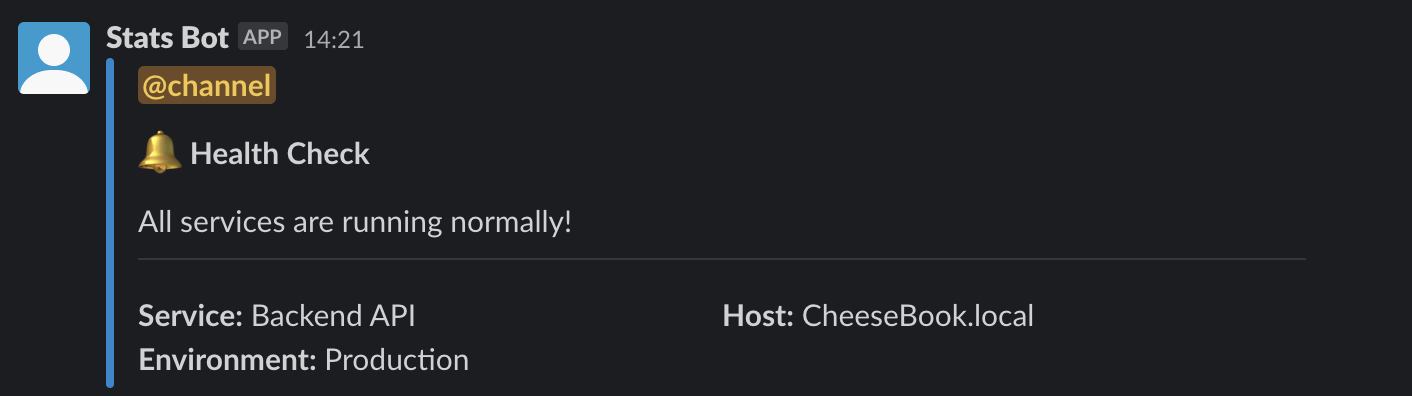
Configure various options
There are numerous configurations available to customise the message.
options = {
    # Service name would be the name of the service sending the message to your Slack channel
    # This would usually be the name of the application sending the notification
    # If unset, the default value would be "Service"
    "service_name": "Backend API",

    # Usually services would run in staging and production environments
    # This field is to specify the environment from which the application is reponding for easy identification
    # If unset, this block would not appear in the message
    "service_environment": "Production",

    # An option to specify whether or not to display the hostname in the messages
    # The hostname is set by default, but it could be disabled by specifically setting this to `False`
    "display_hostname": True,

    # The default importance level of the message
    # The left bar color of the message would change depending on this
    # Available options are
    # - default: #1F2225
    # - error: #DB2828
    # - warn: #FBBD08
    # - info: #2185D0
    # - verbose: #6417C9
    # - debug: #2185D0
    # - success: #21BA45
    # If the `error` field is set during the construction of the message, the `level` is automatically set to `error`
    # If nothing is specified, `default` color would be used
    "default_level": "info",
}
Emojis inbuilt! 😃
An appropriate emoji is automatically added before the title depending on the level.
Following is the map between level and the emoji added.
- default =
:mega:📣 - error =
:x:❌ - warn =
:warning:⚠️ - info =
:bell:🔔 - verbose =
:loud_sound:🔊 - debug =
:microscope:🔬 - success =
:rocket:🚀
Examples
Set Service Name and Environment for easy identification
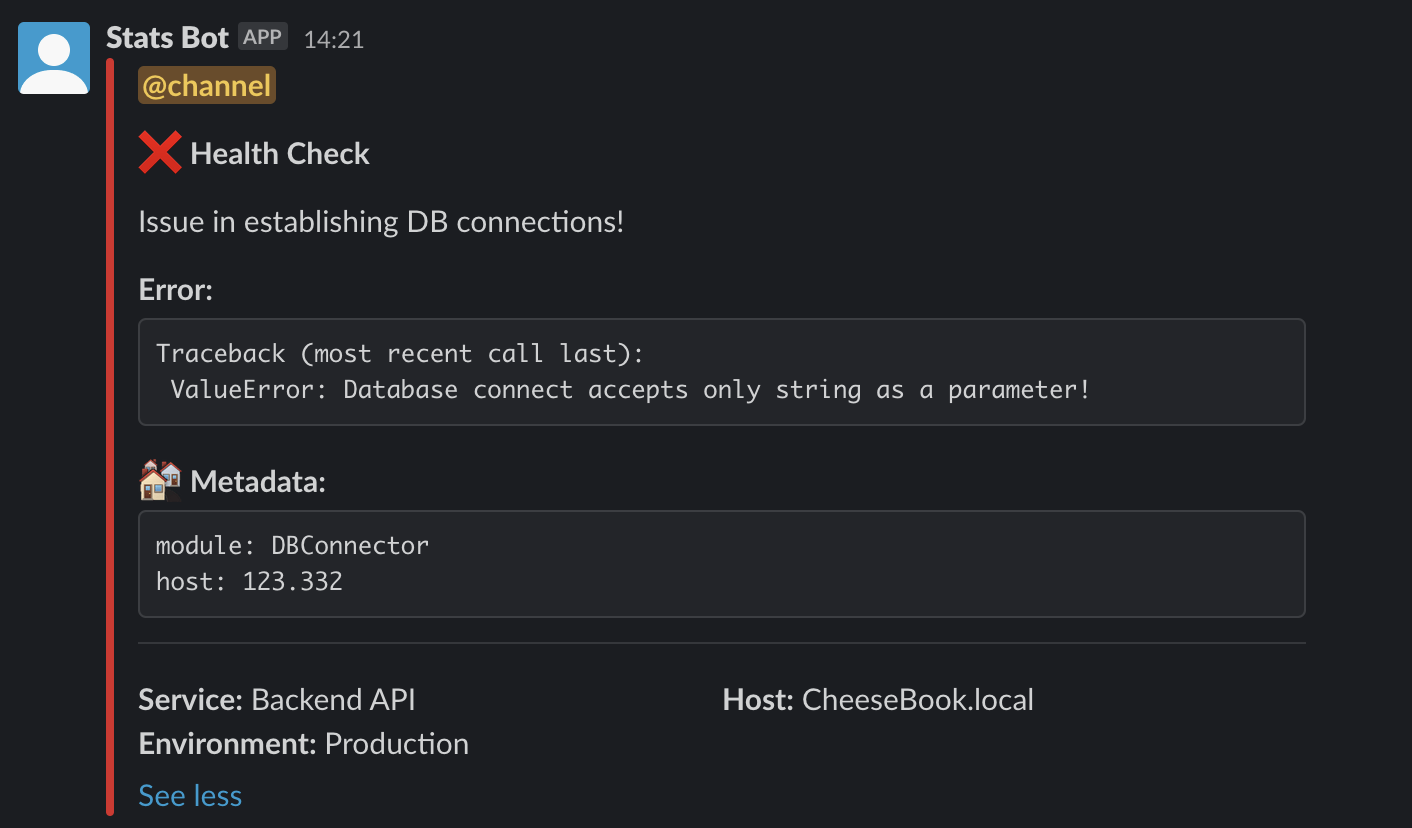
You can configure the log message with service name and environment for easy identification.
The Host field which is the hostname of the server is automatically added for every message.
You can even send any meta information like the data in the variables, module names, metrics etc with the metadata field while constructing the message.
These data should be passed as a dictionary.
from slack_logger import SlackLogger

token = "your slack app token"
options = {
    "service_name": "Backend API",
    "service_environment": "Production",
    "default_level": "info",
}

logger = SlackLogger(token=token, **options)

channel = "#my_channel"
response = logger.send(
    channel=channel,
    title="Health Check",
    description="Issue in establishing DB connections!",
    error="Traceback (most recent call last):\n ValueError: Database connect accepts only string as a parameter!",
    metadata={"module": "DBConnector", "host": 123.332},
)
Send messages without Hostname
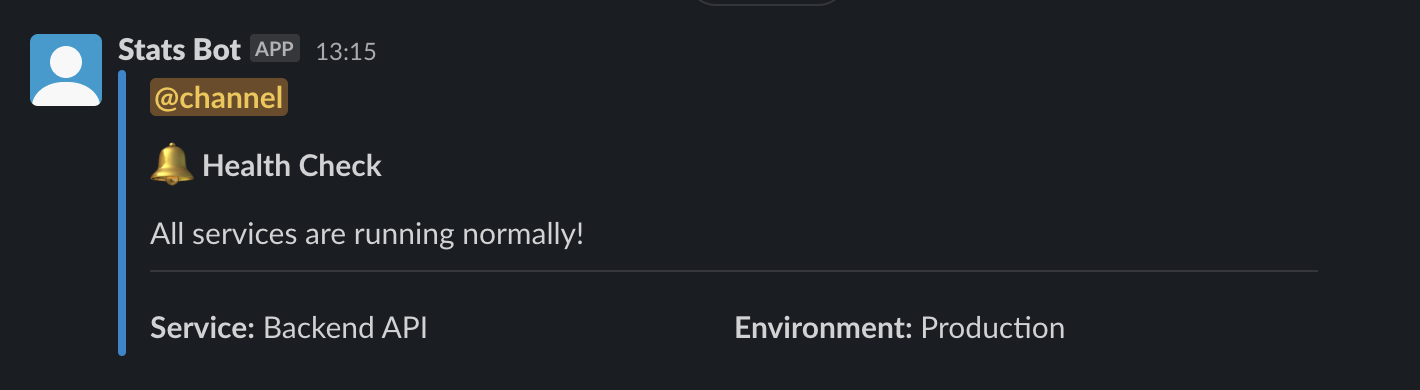
In case you do not want the hostname to be displayed in the message, disable it by setting "display_hostname": False in the options as follows.
from slack_logger import SlackLogger

token = "your slack app token"
options = {
    "service_name": "Backend API",
    "service_environment": "Production",
    "display_hostname": False,
    "default_level": "info",
}

logger = SlackLogger(token=token, **options)

channel = "#my_channel"
response = logger.send(
    channel=channel,
    title="Health Check",
    description="All services are running normally!",
)
Send messages with different log-levels
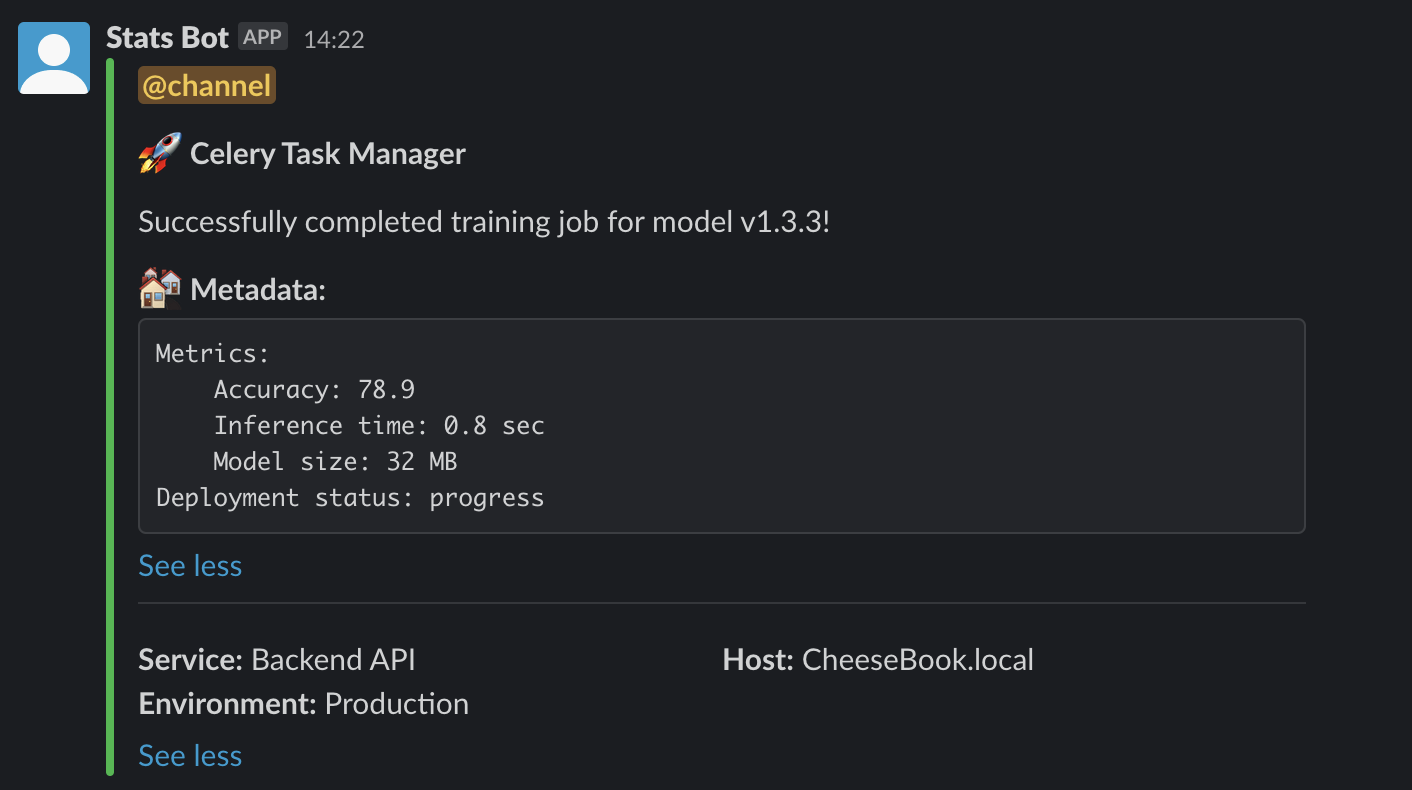
The log-level indicates the importance of the message. It changes the color of the Slack message in particular. Currently supported levels are,
errorwarninfoverbosedebugsuccess
The log-level can be set during construction of the message like through the parameter level.
If the parameter isn't provided, it'll be set to the one given in default_level.
Any invalid input would be ignored and the log-level would be automatically be set to default.
Any complicated nested dictionary can be passed to the metadata field and the message gets forrmatted accordingly for easy reading.
from slack_logger import SlackLogger

token = "your slack app token"
options = {
    "service_name": "Backend API",
    "service_environment": "Production",
    "default_level": "info",
}

logger = SlackLogger(token=token, **options)

channel = "#my_channel"
response = logger.send(
    channel=channel,
    title="Celery Task Manager",
    description="Successfully completed training job for model v1.3.3!",
    level="success",
    metadata={
        "Metrics": {
            "Accuracy": 78.9,
            "Inference time": "0.8 sec",
            "Model size": "32 MB",
        },
        "Deployment status": "progress",
    },
)
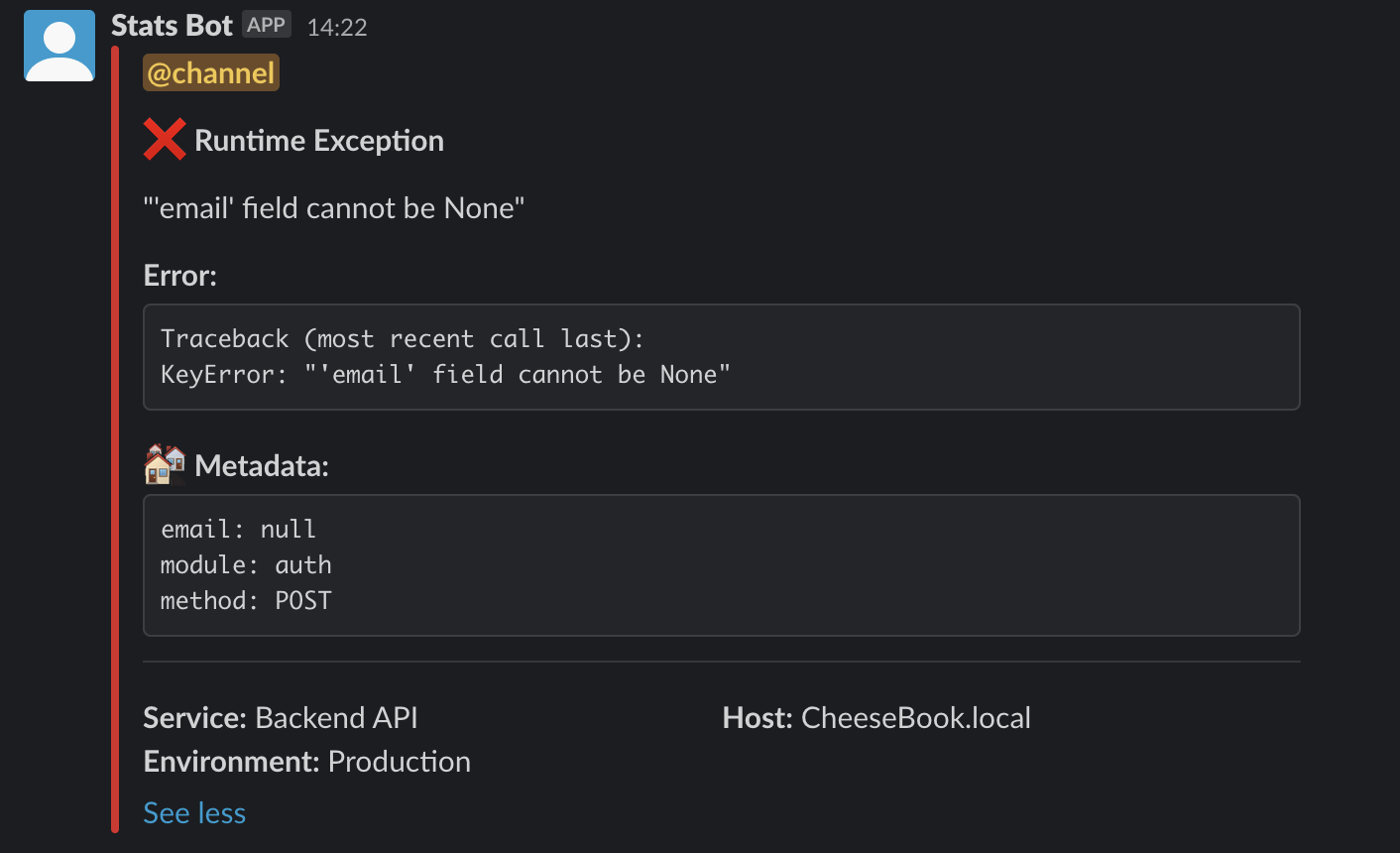
Send complete error traceback
The error field can contain any error message.
It will be automatically be formatted in the final message.
For example, you can send a complete traceback of an error message to debug faster!
import traceback

from slack_logger import SlackLogger


def get_traceback(e):
    tb = (
        "Traceback (most recent call last):\n"
        + "".join(traceback.format_list(traceback.extract_tb(e.__traceback__)))
        + type(e).__name__
        + ": "
        + str(e)
    )
    return tb


token = "your slack app token"
options = {
    "service_name": "Backend API",
    "service_environment": "Production",
    "default_level": "info",
}

err = KeyError("'email' field cannot be None")

logger = SlackLogger(token=token, **options)

channel = "#my_channel"
response = logger.send(
    channel=channel,
    title="Runtime Exception",
    description=err.__str__(),
    error=get_traceback(err),
    metadata={"email": None, "module": "auth", "method": "POST"},
)
Project details
Verified details
These details have been verified by PyPIProject links
GitHub Statistics
Maintainers


Download files
Download the file for your platform. If you're not sure which to choose, learn more about installing packages.
Source Distribution
Built Distribution
Filter files by name, interpreter, ABI, and platform.
If you're not sure about the file name format, learn more about wheel file names.
Copy a direct link to the current filters
File details
Details for the file py_slack_logger-1.0.3.tar.gz.
File metadata
- Download URL: py_slack_logger-1.0.3.tar.gz
- Upload date:
- Size: 5.4 kB
- Tags: Source
- Uploaded using Trusted Publishing? Yes
- Uploaded via: twine/6.1.0 CPython/3.13.12
File hashes
| Algorithm | Hash digest | |
|---|---|---|
| SHA256 |
17c978d866ad7e25e7810fdce7b1308e9dd02100ba29ada46050bf529b8500ea
|
|
| MD5 |
1b498e4597ee978f0be2bdb3eea95159
|
|
| BLAKE2b-256 |
28e367a10a652a34d7211fed5f22708a2a1b38d32902e23bcd4985cccc6f108c
|
Provenance
The following attestation bundles were made for py_slack_logger-1.0.3.tar.gz:
Publisher:
release.yml on Kayenta/py-slack-logger
-
Statement:
-
Statement type:
https://in-toto.io/Statement/v1 -
Predicate type:
https://docs.pypi.org/attestations/publish/v1 -
Subject name:
py_slack_logger-1.0.3.tar.gz -
Subject digest:
17c978d866ad7e25e7810fdce7b1308e9dd02100ba29ada46050bf529b8500ea - Sigstore transparency entry: 1449625813
- Sigstore integration time:
-
Permalink:
Kayenta/py-slack-logger@b386a36a331453e2bd241e417f42e2b59e9cb1cc -
Branch / Tag:
refs/tags/v1.0.3 - Owner: https://github.com/Kayenta
-
Access:
public
-
Token Issuer:
https://token.actions.githubusercontent.com -
Runner Environment:
github-hosted -
Publication workflow:
release.yml@b386a36a331453e2bd241e417f42e2b59e9cb1cc -
Trigger Event:
push
-
Statement type:
File details
Details for the file py_slack_logger-1.0.3-py3-none-any.whl.
File metadata
- Download URL: py_slack_logger-1.0.3-py3-none-any.whl
- Upload date:
- Size: 6.7 kB
- Tags: Python 3
- Uploaded using Trusted Publishing? Yes
- Uploaded via: twine/6.1.0 CPython/3.13.12
File hashes
| Algorithm | Hash digest | |
|---|---|---|
| SHA256 |
c582667858c3f0ba9a5d076c88833730102a7444bf637523b9ef17ba4083d6d1
|
|
| MD5 |
8e462c21efe723d681257dfa6d4f97f8
|
|
| BLAKE2b-256 |
bf4f0365372bfac10be5ecaad8a4df9980b6717aa6dd61e1d63057006449e2bc
|
Provenance
The following attestation bundles were made for py_slack_logger-1.0.3-py3-none-any.whl:
Publisher:
release.yml on Kayenta/py-slack-logger
-
Statement:
-
Statement type:
https://in-toto.io/Statement/v1 -
Predicate type:
https://docs.pypi.org/attestations/publish/v1 -
Subject name:
py_slack_logger-1.0.3-py3-none-any.whl -
Subject digest:
c582667858c3f0ba9a5d076c88833730102a7444bf637523b9ef17ba4083d6d1 - Sigstore transparency entry: 1449625824
- Sigstore integration time:
-
Permalink:
Kayenta/py-slack-logger@b386a36a331453e2bd241e417f42e2b59e9cb1cc -
Branch / Tag:
refs/tags/v1.0.3 - Owner: https://github.com/Kayenta
-
Access:
public
-
Token Issuer:
https://token.actions.githubusercontent.com -
Runner Environment:
github-hosted -
Publication workflow:
release.yml@b386a36a331453e2bd241e417f42e2b59e9cb1cc -
Trigger Event:
push
-
Statement type:






