
Styled CLI output and interactive input widgets, dependency-free

Project description
sparcli




Styled CLI output and interactive input widgets for Python, built directly on ANSI escape codes with no third-party dependencies.
sparcli is a native Python port of the Rust library of the same name. It renders styled text, tables, panels, trees and progress bars, and drives single-input prompts (text, password, number, confirm, select, fuzzy, date and more) – all from the standard library alone. It is meant for small, lightweight CLI tools: a single accent color, muted defaults, rounded borders, and graceful behavior under NO_COLOR or when output is piped. Heavy, full-screen retained TUIs are out of scope.
Highlights
- Output: styled text, inline markup, tables (colspan, rowspan, striping, wrapping, titles), panels, alerts, rules, lists, trees, key-value lists, badges, progress bars, spinners, multi-progress, diffs, columns, live in-place display, pager, and the composition helpers
align,padandvstack. - Input: confirm, text (validation, character filters, history, ghost autocomplete, dropdown), password, number (with a calculator), textarea, single and multi select, an inline fuzzy select, and a calendar date picker.
- A unified
Themefor input and output, set once and overridable per call. - Robust by design: prompts never raise on input, a RAII terminal guard restores the terminal, and results come back as values rather than exceptions.
- Zero dependencies: pure Python, standard library only, typed under strict basedpyright.
Installation
pip install py-sparcli
The distribution is named py-sparcli, but the import package is sparcli:
import sparcli
from sparcli import Panel, Table, TextInput
sparcli requires Python 3.12 or newer.
Feature overview
| Category | Components |
|---|---|
| Text and style | Style, Color, Attribute, Span, Line, Text, markup |
| Framing and layout | Panel, Rule, Columns, align, pad, vstack, BorderType, Align, Edges, Title |
| Data widgets | Table (Column, Cell), List (Marker), Tree (TreeNode), KeyValue, Diff, Badge, Alert (AlertKind) |
| Progress and live | Spinner (SpinnerStyle), ProgressBar (ProgressStyle, Thresholds), MultiProgress, Live, Pager |
| Input prompts | TextInput, PasswordInput, NumberInput, Confirm, Select, FuzzySelect, DatePicker, Textarea |
| Prompt support | Outcome, History, Shortcut, validate, event |
| Theming and terminal | Theme, theme, set_theme, color_support, is_input_tty, is_output_tty, term_width |
Output example
Every output widget exposes print() to write to stdout, print_to(writer) to capture the result, and render(max_width) to lay it out as a composable block. When stdout is not a terminal (a pipe, a file, or with NO_COLOR set), no escape codes are emitted.
from sparcli import Alert, Table

Alert.success("Build finished.").print()

Table().columns(["Name", "Status"]).row(["web-1", "online"]).row(
    ["db-1", "online"]
).striped(True).print()
╭───────────────────╮
│ ✔ Build finished. │
╰───────────────────╯
╭───────┬────────╮
│ Name  │ Status │
├───────┼────────┤
│ web-1 │ online │
│ db-1  │ online │
╰───────┴────────╯
A Panel frames content with a rounded border and an optional title. A left-aligned title reads as part of the frame: one connecting border glyph sits before it, never a flush corner - unless the title is too wide for the frame, in which case it is truncated into the border rather than widening the panel.
from sparcli import Panel

Panel("All systems nominal.").title("Status").print()
╭─ Status ─────────────╮
│ All systems nominal. │
╰──────────────────────╯
Input example
Prompts return an Outcome – a submitted value, a cancellation, or a fired shortcut – and never raise on input. They require an interactive terminal; without one, run() raises NoTerminalError. Each prompt also has a frame() method that renders its static opening frame without a TTY, which is how the previews below are produced.
from sparcli import Select

outcome = Select(
    "Environment", options=["staging", "production", "local"]
).run()
if outcome.is_submitted:
    print(f"selected option #{outcome.value}")
Its opening frame, with the cursor on the second row:
Environment
  staging
‣ production
  local
Text prompts chain validators and filters fluently:
from sparcli import Confirm, TextInput
from sparcli import validate

name = TextInput("Your name?").validate(validate.non_empty()).run()
if name.is_submitted:
    if Confirm("Continue?").run().submitted_or(False):
        print(f"Hello, {name.value}!")
Theming
A single process-wide theme drives both output widgets and input prompts. Set it once; per-call widget options still override individual values.
from sparcli import Color, Theme, set_theme, theme

set_theme(
    Theme(
        accent=Color.rgb(180, 142, 173),
        unicode=True,  # set False for ASCII-only glyphs
    )
)

# Read the active theme anywhere:
active = theme()
Output components
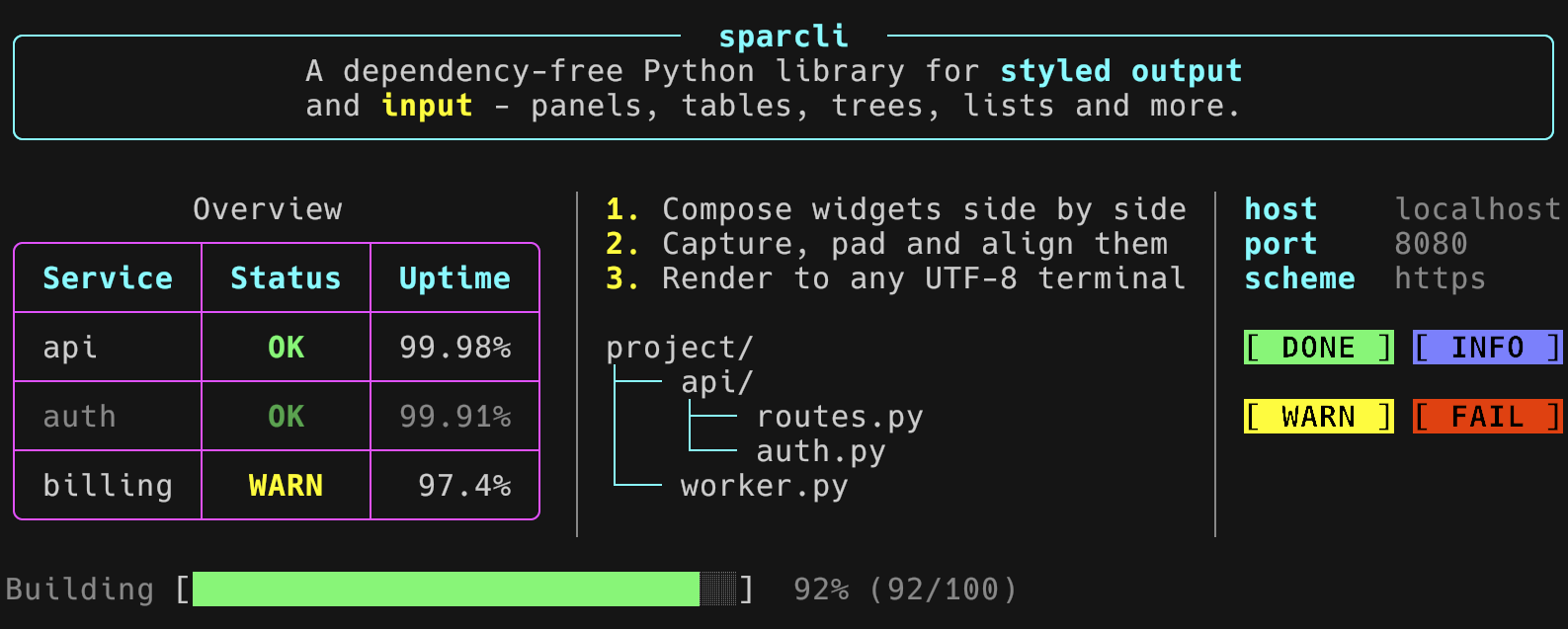
The output_readme.py example composes a hero panel, a three-column dashboard and a progress bar:
Captured with NO_COLOR=1 the same collage renders as plain text:
╭─────────────────────────────────  sparcli  ──────────────────────────────────╮
│              A dependency-free Python library for styled output              │
│              and input - panels, tables, trees, lists and more.              │
╰──────────────────────────────────────────────────────────────────────────────╯

          Overview            │ 1. Compose widgets side by side │ host    localhost
╭─────────┬────────┬────────╮ │ 2. Capture, pad and align them  │ port    8080
│ Service │ Status │ Uptime │ │ 3. Render to any UTF-8 terminal │ scheme  https
├─────────┼────────┼────────┤ │                                 │
│ api     │   OK   │ 99.98% │ │ project/                        │ [ DONE ] [ INFO ]
├─────────┼────────┼────────┤ │ ├── api/                        │
│ auth    │   OK   │ 99.91% │ │ │   ├── routes.py               │ [ WARN ] [ FAIL ]
├─────────┼────────┼────────┤ │ │   └── auth.py                 │
│ billing │  WARN  │  97.4% │ │ └── worker.py                   │
╰─────────┴────────┴────────╯ │                                 │

Building [███████████████████████████░░]  92% (92/100)
Input widgets
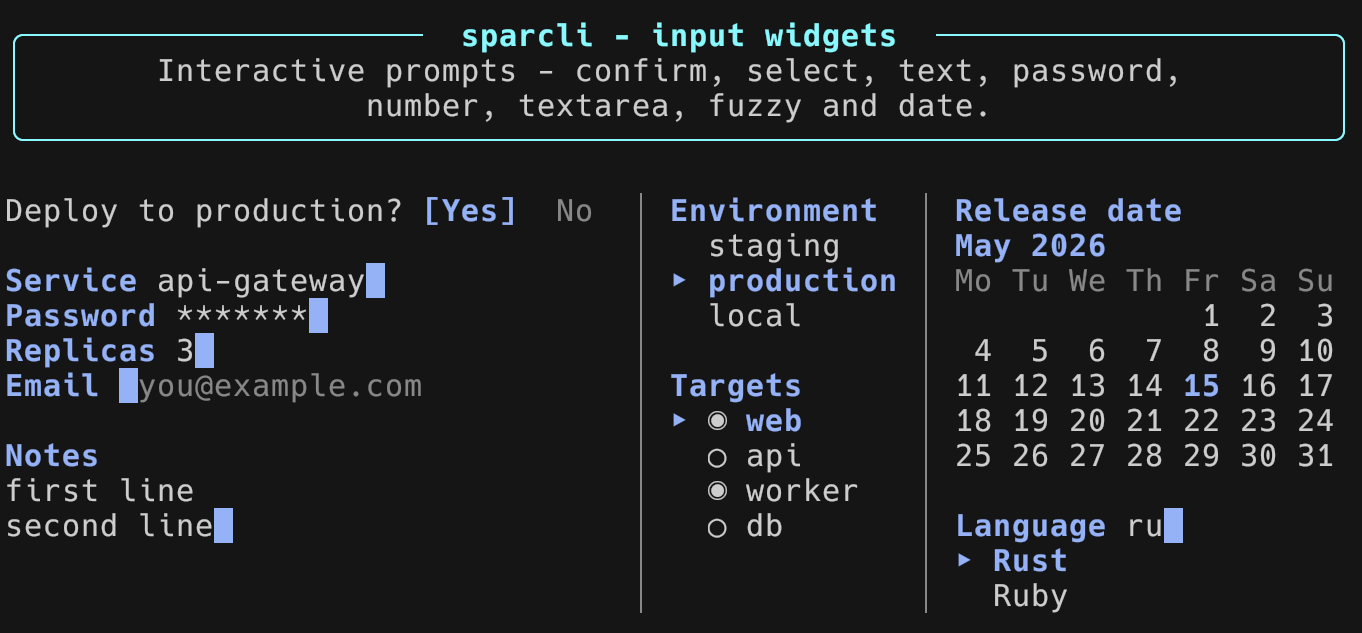
The prompt_readme.py example stacks the static opening frame of every prompt into a single dashboard, produced entirely through frame() with no TTY:
The same dashboard as plain text:
╭─────────────────────  sparcli - input widgets  ─────────────────────╮
│       Interactive prompts - confirm, select, text, password,        │
│                  number, textarea, fuzzy and date.                  │
╰─────────────────────────────────────────────────────────────────────╯

Deploy to production? [Yes]  No  │ Environment  │ Release date
                                 │   staging    │ May 2026
Service api-gateway              │ ‣ production │ Mo Tu We Th Fr Sa Su
Password *******                 │   local      │              1  2  3
Replicas 3                       │              │  4  5  6  7  8  9 10
Email  you@example.com           │ Targets      │ 11 12 13 14 15 16 17
                                 │ ‣ ◉ web      │ 18 19 20 21 22 23 24
Notes                            │   ◯ api      │ 25 26 27 28 29 30 31
first line                       │   ◉ worker   │
second line                      │   ◯ db       │ Language ru
                                 │              │ ‣ Rust
                                 │              │   Ruby
Running the examples
The examples/ directory holds five runnable programs. The static ones are deterministic and pipe-friendly:
python examples/output_gallery.py   # every static output widget
python examples/output_dynamic.py   # spinner, progress, multi-progress, live, pager
python examples/prompts.py          # every interactive prompt (needs a real TTY)
python examples/output_readme.py    # the output showcase collage
python examples/prompt_readme.py    # the input showcase, via frame()
The prompts.py example needs an interactive terminal; run without one it prints a notice and exits. The output_dynamic.py animations collapse to a single final frame off a terminal, so it stays clean when piped or redirected.
NO_COLOR and non-terminal behavior
sparcli honors the common terminal environment variables:
NO_COLORdisables all color: styled spans are written as plain text with no escape codes.CLICOLOR_FORCEforces color even when output is not a terminal.SPARCLI_NO_TTYforces "no terminal" behavior, used for deterministic captures and tests.
When stdout is not a TTY (a pipe or a file), color is disabled automatically unless CLICOLOR_FORCE is set, and the in-place engines print only their final frame. Every text showcase in this README is real captured output, produced with NO_COLOR=1 SPARCLI_NO_TTY=1; the two screenshots are the same collages captured in color.
Documentation
docs/DEVELOPMENT.mdcovers building, testing, linting and contributing.CHANGELOG.mdrecords release notes.- Every public class and function carries a docstring; browse the source under
sparcli/for the complete reference.
License
MIT – see LICENSE.
Release history Release notifications | RSS feed

Download files
Download the file for your platform. If you're not sure which to choose, learn more about installing packages.
Source Distribution
Built Distribution
Filter files by name, interpreter, ABI, and platform.
If you're not sure about the file name format, learn more about wheel file names.
Copy a direct link to the current filters
File details
Details for the file py_sparcli-0.3.0.tar.gz.
File metadata
- Download URL: py_sparcli-0.3.0.tar.gz
- Upload date:
- Size: 358.6 kB
- Tags: Source
- Uploaded using Trusted Publishing? No
- Uploaded via: uv/0.10.8 {"installer":{"name":"uv","version":"0.10.8","subcommand":["publish"]},"python":null,"implementation":{"name":null,"version":null},"distro":{"name":"macOS","version":null,"id":null,"libc":null},"system":{"name":null,"release":null},"cpu":null,"openssl_version":null,"setuptools_version":null,"rustc_version":null,"ci":null}
File hashes
| Algorithm | Hash digest | |
|---|---|---|
| SHA256 |
50bfc510c1e8efc65be00769fa99fb856e91c1d6c9065224fe089da0a7184b73
|
|
| MD5 |
1204db8a8590aa85a3101475c50b5093
|
|
| BLAKE2b-256 |
e670d003f0992a6bdf92c13b1b76e7336cb4ef14d467173aa1bafb62457303a4
|
File details
Details for the file py_sparcli-0.3.0-py3-none-any.whl.
File metadata
- Download URL: py_sparcli-0.3.0-py3-none-any.whl
- Upload date:
- Size: 114.7 kB
- Tags: Python 3
- Uploaded using Trusted Publishing? No
- Uploaded via: uv/0.10.8 {"installer":{"name":"uv","version":"0.10.8","subcommand":["publish"]},"python":null,"implementation":{"name":null,"version":null},"distro":{"name":"macOS","version":null,"id":null,"libc":null},"system":{"name":null,"release":null},"cpu":null,"openssl_version":null,"setuptools_version":null,"rustc_version":null,"ci":null}
File hashes
| Algorithm | Hash digest | |
|---|---|---|
| SHA256 |
d7b6fec8b996a661a4f0bed7bb4b1f81191a1737555612b30e45a906bb2c226e
|
|
| MD5 |
a598094dae6d5d93a4ba0682bc863988
|
|
| BLAKE2b-256 |
153e72f574f82a41a943adcc52e4b5de67b8f8b3f52e9b7013c5692464636f02
|






