
A terminal-based tasks and personal information manager.

Project description
Tuido – Efficient Day Planning in your Terminal
Tuido is a simple productivity application that provides a text user interface (TUI) for managing tasks, topics and notes. The Kanban columns of the task view and the fields of the topics can be defined by the user. All data are saved locally – no cloud requirement.
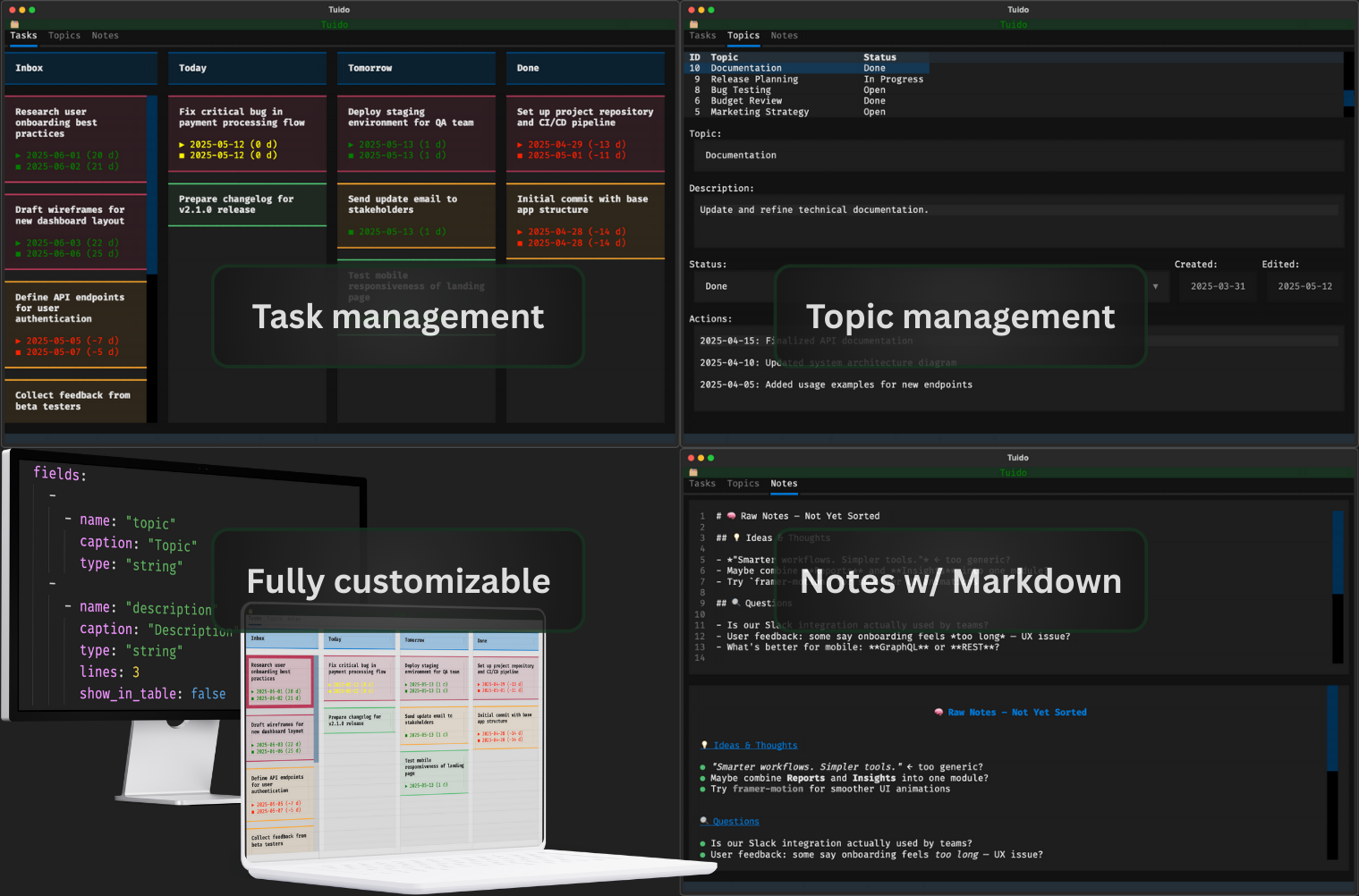
Many productivity apps offer an overwhelming number of features that you often don't actually need. Their complexity might slow you down. Tuido takes a different approach: minimalism. It gives you a clean, reliable space to plan your day as efficiently as possible.
The components are built using the Textual and Rich library, offering a modern terminal UI experience focused on clarity and interactivity.
The purpose of this application is to provide a space for planning and organizing the current day. With its keyboard-driven, minimalist interface, it aims to support an efficient workflow. It is not intended for long-term planning and is meant to complement apps like Notion or OneNote, not replace them.
Use Tuido for everything that is relevant today but can be deleted in the next few days. Tuido aims to help you separate temporary stuff from your personal knowledge management.
[!important] This application is under development. It's not yet suitable for a productive environment.
See the Roadmap to gain an insight into the current project status.
Core Features
- Minimalistic text user interface – no overhead
- Full keyboard navigation (but mouse interaction is also supported)
- Manage tasks in a Kanban system with user-defined columns
- Manage topics in a simplified database view with customizable fields
- Quick notes (displayed as text, as rendered Markdown or both)
See Feature Details for a more in-depth overview of the features and use cases.
Installation
Requirements
See pyproject.toml.
Installation via pip
pip install py-tuido
Installation from Source
git clone https://github.com/cgroening/py-tuido.git
cd py-tuido
pip install -e .
Alternatively, tuido can be run without installation, see Section Without Installation.
Usage
tuido
On the first run, Tuido creates the config and data directories and copies the default files into them.
Options:
| Flag | Description |
|---|---|
-C, --config DIR |
Use a custom folder for config.yaml and bindings.yaml |
-D, --data-folder DIR |
Use a custom folder for tasks.json, topics.json and notes.md |
Default paths:
| Platform | Config | Data |
|---|---|---|
| macOS / Linux | ~/.config/tuido/ |
~/.local/share/tuido/ |
| Windows | %APPDATA%\tuido\ |
%LOCALAPPDATA%\tuido\ |
Without Installation
The package can also be run without installation from the project root:
python -m tuido
Feature Details
Tuido is divided into three tabs: Tasks, Topics and Notes.
Task management
The Tasks module helps you organize your day by managing current tasks in a Kanban system. It is designed to mainly focus on what matters today – simple, fast and effective.
Key features:
- Create, edit and delete tasks
- Move tasks between columns
- Change number of columns an their titles
- Tasks are automatically sorted in the following order: priority, start date, end date, title
- Each tasks supports the following fields:
- Title
- Priority
- Start Date
- Due Date
- All changes are saved automatically
Use cases:
- Plan your day with a few concrete, actionable tasks
- Stay focused by seeing only what’s relevant now
- Clear out finished tasks at the end of the day to keep your board clean
Topic management
The Topics tab provides a structured way to organize information belonging to different topics that is relevant beyond just today – for example ongoing ideas.
While the task view is designed for immediate, short-lived actions, topics offer a more stable, form-based overview that supports medium-term planning and documentation.
Key features:
- Display all topics in a table view for quick navigation
- Show and edit topic details in a dynamic form
- Changes can be saved or discarded
Each topic is made up of fields defined by the user. The layout of the form and table adapts to these custom fields, allowing Tuido to be tailored to your workflow.
Supported field types:
string– for free text like titles or commentsdate– for scheduling and deadlinesselect– for statuses, categories or priorities
You can define the structure of topics in the config.yaml file. This allows you to model exactly the information you need – and nothing more.
Use cases:
- Keep track of your ongoing projects or areas of responsibility
- Save notes on meetings
- Define and follow up on goals, decisions or documentation
The topic management module helps you maintain clarity and focus by separating ongoing, structured data from the more dynamic daily task view.
Notes
The Notes tab is your space for unstructured, short-lived information – things that don't yet belong in a task or topic, but still matter right now.
Whether it's meeting notes, rough ideas, phone numbers or spontaneous thoughts – this module offers a lightweight way to capture temporary information quickly and without distraction.
Key features:
- A simple text editor built directly into the terminal UI
- Supports both plain text and rendered Markdown
- Toggle between raw, rendered or split view
- All changes are saved automatically – no need to press save
Use cases:
- Jot down ideas or thoughts throughout the day
- Take notes during meetings or calls
- Use Markdown to structure ad-hoc content (e.g. TODO lists, outlines)
- Store temporary content that doesn't need to be kept long-term
Notes are intended to be transient – they're not part of a long-term knowledge base. If something becomes important or structured, move it to a Topic or Task.
Configuration
All configuration lives in two files inside the config directory.
config.yaml
Defines the structure of topics and the Kanban columns for tasks.
fields – each entry is a row in the topic form; a row can contain one or more fields side by side:
fields:
  -
    - name: "topic"          # internal identifier
      caption: "Topic"       # displayed label
      type: "string"         # string | date | select
      table_column_width: 20 # column width in table view; omit to hide
  -
    - name: "status"
      caption: "Status"
      type: "select"
      options: ["Open", "In Progress", "Done"]
      table_column_width: 11
    - name: "created"
      caption: "Created"
      type: "date"
      table_column_width: 10
      input_width: 16        # width of the input widget
      read_only: true
      computed: "created_date"  # auto-filled on create: created_date | edit_date
  -
    - name: "notes"
      caption: "Notes"
      type: "string"
      lines: -1              # number of lines (-1 = fill available space)
task_columns – defines the Kanban columns in display order:
task_columns:
  - name: "inbox"
    caption: "Inbox"
  - name: "today"
    caption: "Today"
  - name: "done"
    caption: "Done"
bindings.yaml
Defines keyboard shortcuts. Bindings are grouped by context: _global, tasks, topics, notes.
_global:
  - key: q
    action: previous_tab
    description: Tab ←       # shown in the footer
    tooltip: Select the previous tab
    show: false              # hide from footer (optional, default: true)

tasks:
  - key: n
    action: new
    description: New
    tooltip: Create a new task
Available actions:
| Context | Action | Description |
|---|---|---|
_global |
previous_tab, next_tab |
Switch between tabs |
_global |
toggle_dark |
Toggle dark/light mode |
_global |
quit |
Quit the app |
_global |
prev_theme, next_theme |
Cycle color themes |
tasks |
new, edit, delete |
Manage tasks |
tasks |
move_left, move_right |
Move task between columns |
tasks |
select_left_column, select_right_column |
Navigate columns |
tasks |
select_upper_task, select_lower_task |
Navigate tasks |
topics |
new, delete |
Manage topics |
topics |
save, discard |
Save or discard edits |
topics |
focus_table |
Focus the topic list |
notes |
show_textarea |
Show text editor only |
notes |
show_md |
Show rendered Markdown only |
notes |
show_textarea_and_md |
Show editor and preview side by side |
Roadmap
Version 0.1 – Foundation
- Basis topic management (CRUD)
- Basic task management (CRUD)
- Basic note taking
Version 0.2 – Usability Enhancements
- Custom sort order for topics
- Filtering and searching topics
Version 0.3 – Interoperability
- Import and export tasks as CSV
- Import and export topics as CSV
Version 0.4 – Extended Customization
- More field types for topics:
bool,multiselect,number - Custom keyboard shortcuts via config
Version 0.5 – Advanced Workflow
- Task history/changelog
- Duplicate task/topic
Version 0.6 - Smart Fields
- Validations for topic fields
- More field functions for topics
Version 0.7 - Polished UI
- Compact mode which removes the inner spacing of input widgets
Possible Future Features
- Multilingual support
- Time tracking per task
- Task recurrence (e.g. daily, weekly tasks)
Release history Release notifications | RSS feed

Download files
Download the file for your platform. If you're not sure which to choose, learn more about installing packages.
Source Distribution
Built Distribution
Filter files by name, interpreter, ABI, and platform.
If you're not sure about the file name format, learn more about wheel file names.
Copy a direct link to the current filters
File details
Details for the file py_tuido-0.1.0.tar.gz.
File metadata
- Download URL: py_tuido-0.1.0.tar.gz
- Upload date:
- Size: 950.2 kB
- Tags: Source
- Uploaded using Trusted Publishing? No
- Uploaded via: uv/0.10.8 {"installer":{"name":"uv","version":"0.10.8","subcommand":["publish"]},"python":null,"implementation":{"name":null,"version":null},"distro":{"name":"macOS","version":null,"id":null,"libc":null},"system":{"name":null,"release":null},"cpu":null,"openssl_version":null,"setuptools_version":null,"rustc_version":null,"ci":null}
File hashes
| Algorithm | Hash digest | |
|---|---|---|
| SHA256 |
19612754df80d45251a0c76c0a2e05811517137f87da2fe9ebff9908d3de1aab
|
|
| MD5 |
792318534029b40d61f5ceb6cb322ac4
|
|
| BLAKE2b-256 |
58d82886f56a95e9b52dd6e9bb413862bd7da8e870b5beb9a97ce9c2b8e63d09
|
File details
Details for the file py_tuido-0.1.0-py3-none-any.whl.
File metadata
- Download URL: py_tuido-0.1.0-py3-none-any.whl
- Upload date:
- Size: 41.3 kB
- Tags: Python 3
- Uploaded using Trusted Publishing? No
- Uploaded via: uv/0.10.8 {"installer":{"name":"uv","version":"0.10.8","subcommand":["publish"]},"python":null,"implementation":{"name":null,"version":null},"distro":{"name":"macOS","version":null,"id":null,"libc":null},"system":{"name":null,"release":null},"cpu":null,"openssl_version":null,"setuptools_version":null,"rustc_version":null,"ci":null}
File hashes
| Algorithm | Hash digest | |
|---|---|---|
| SHA256 |
c9de45fd4ec64e341ec5bbd25af812f277298e3df2cc1b63222ff91bce17439d
|
|
| MD5 |
4a1ce36d6d267ddabd8f1b65903b2aa7
|
|
| BLAKE2b-256 |
4e59d1c346f7b96f1029f5484a1609979e79f4252905e6215eef7bd154f735a2
|






