
新版中国天气(weather.com.cn/weathern/) 爬虫 获取最新天气 以及天气日历数据

Project description
实时天气图片生成器
介绍
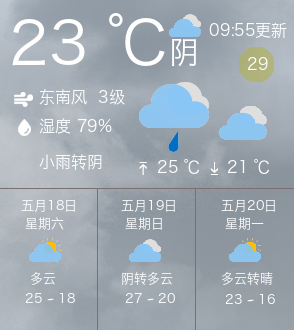
根据中国天气网生成天气信息,抓取最近四天内的天气以及实时数据, 附带一些农历日历信息。
效果预览
安装
pip install py-weathercn --user
使用
weathercn -f <自定义字体> <城市ID或城市名>
- 城市ID:如http://www.weather.com.cn/weather1d/101190401.shtml 中的101190401
- 将会在用户文件夹下生成.cache/weatherCN目录,为缓存weather.json, weather.png, icon.png文件
- weather.json为json文件
- weather.png为生成图片
- icon.png为当前天气的icon图标(例如用于waybar等)
- 自定义字体支持路径,fontconfig
json展示
{
    "current": {
        "humidity": "79%",
        "wind_direction": "东南风 ",
        "wind_level": "3级",
        "air_quality": "29",
        "air_pressure": "1004",
        "updateat": "09:55",
        "cur_weather": "阴",
        "temperature": "23 ℃",
        "weather": "小雨转阴",
        "dcode": "d07",
        "ncode": "d02",
        "high": "25 ℃",
        "low": "21 ℃",
        "code": "d02",
        "unsuited": "修坟-安葬-入宅-安门-安床",
        "suited": "嫁娶-移徙-赴任-除服-纳采",
        "lunar": "四月十三",
        "shizhai": ""
    },
    "forcast": [
        {
            "date": "五月18日",
            "weekday": "星期六",
            "high": "25",
            "low": "18",
            "dcode": "d01",
            "ncode": "n01",
            "weather": "多云"
        },
        {
            "date": "五月19日",
            "weekday": "星期日",
            "high": "27",
            "low": "20",
            "dcode": "d02",
            "ncode": "n01",
            "weather": "阴转多云"
        },
        {
            "date": "五月20日",
            "weekday": "星期一",
            "high": "23",
            "low": "16",
            "dcode": "d01",
            "ncode": "n00",
            "weather": "多云转晴"
        }
    ]
}
json释义
- humidity: 湿度
- wind_level: 风级
- wind_direction: 风向
- air_quality: 空气质量
- air_pressure: 气压
- updateat: 更新时间
- cur_weather: 当前天气
- temperature: 当前气温
- weather: 小雨转阴,
- dcode: 白天天气图标
- ncode: 夜间天气图标
- high: 最高温度
- low: 最低温度
- code: 当前天气图标
- unsuited: 不宜
- suited: 宜
- lunar: 农历
- shizhai: 是否是地藏十斋日
- date: 日期


Download files
Download the file for your platform. If you're not sure which to choose, learn more about installing packages.
Source Distribution
py_weathercn-0.2.3.tar.gz
(152.0 kB
view details)
Built Distribution
Filter files by name, interpreter, ABI, and platform.
If you're not sure about the file name format, learn more about wheel file names.
Copy a direct link to the current filters
File details
Details for the file py_weathercn-0.2.3.tar.gz.
File metadata
- Download URL: py_weathercn-0.2.3.tar.gz
- Upload date:
- Size: 152.0 kB
- Tags: Source
- Uploaded using Trusted Publishing? No
- Uploaded via: uv/0.7.12
File hashes
| Algorithm | Hash digest | |
|---|---|---|
| SHA256 |
6a6a3f3d9323ca27d8652f227dac946e4e997eea387fb6954df7d9948bc66efc
|
|
| MD5 |
4bd3c81f279673ffc7d92388ae0ef346
|
|
| BLAKE2b-256 |
36a03a0254da42f4394992de7c1d736e13e5f40a88b7e00c81c433425106e64d
|
File details
Details for the file py_weathercn-0.2.3-py3-none-any.whl.
File metadata
- Download URL: py_weathercn-0.2.3-py3-none-any.whl
- Upload date:
- Size: 27.9 kB
- Tags: Python 3
- Uploaded using Trusted Publishing? No
- Uploaded via: uv/0.7.12
File hashes
| Algorithm | Hash digest | |
|---|---|---|
| SHA256 |
c195bfa2aab92184a0efeb9c0bb8de99ce4e5345f4e08bb5248774dd723d610d
|
|
| MD5 |
b85f81700bbd66d57db7c6853a87d089
|
|
| BLAKE2b-256 |
3f2e5829053f6bd4524796648a1b09422ead5d2246840204e084befa0c3d043a
|






