
py3dframe
Description
py3dframe provides tools to create, manipulate and query orthogonal,
right‑handed 3‑D frames of reference.
All input arrays are automatically converted to numpy.float64 so that
every calculation is performed in double‑precision, guaranteeing numerical
stability throughout the library.
Authors
-
Artezaru artezaru.github@proton.me
-
Git Plateform: https://github.com/Artezaru/py3dframe.git
-
Online Documentation: https://Artezaru.github.io/py3dframe
Installation
Install with pip
pip install py3dframe
pip install git+https://github.com/Artezaru/py3dframe.git
Clone with git
git clone https://github.com/Artezaru/py3dframe.git
Usage
This section will guide you through the basic usage of the py3dframe package.
Construct a right-handed frame
To create a frame, you can provide the origin and the axes of the frame as follows:
import numpy as np
from py3dframe import Frame

origin = np.array([1, 2, 3])
x_axis = np.array([1, 0, 0])
y_axis = np.array([0, 1, 0])
z_axis = np.array([0, 0, 1])

frame = Frame.from_axes(origin=origin, x_axis=x_axis, y_axis=y_axis, z_axis=z_axis)
You can also construct a frame from a rotation and a translation using one of the 8 possible conventions:
| Index | Formula |
|---|---|
| 0 | Xe = R ⋅ Xf + T |
| 1 | Xe = R ⋅ Xf − T |
| 2 | Xe = R (Xf + T) |
| 3 | Xe = R (Xf − T) |
| 4 | Xf = R ⋅ Xe + T |
| 5 | Xf = R ⋅ Xe − T |
| 6 | Xf = R (Xe + T) |
| 7 | Xf = R (Xe − T) |
Where Xe is the point expressed in the parent (or global) frame E, Xf is the point expressed in the child (or local) frame F, R is the rotation matrix and T is the translation vector.
from py3dframe import Frame, Rotation

rotation = Rotation.from_euler('xyz', [0, 0, 0], degrees=True)
translation = np.array([1, 2, 3]).reshape(3, 1)

frame = Frame.from_rotation(translation=translation, rotation=rotation, convention=0)
Construct a system of frames
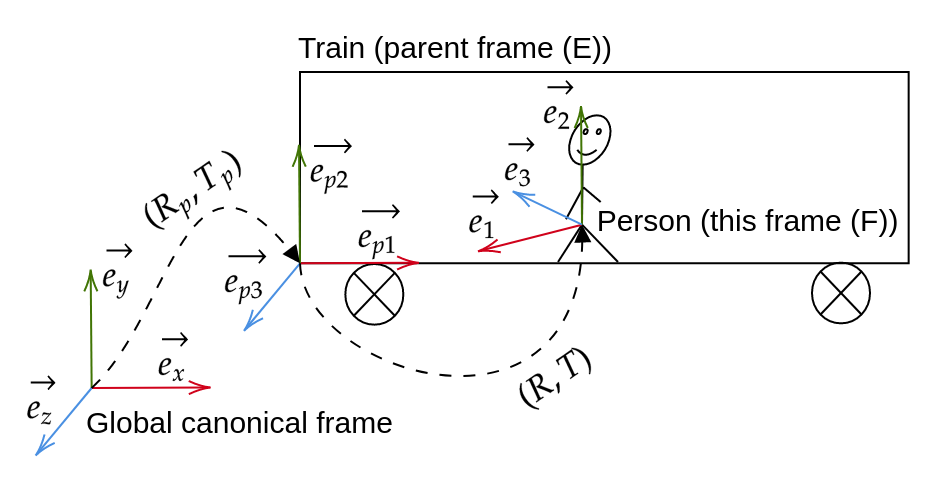
Let’s consider a person walking in a train. The person is represented by a frame F and the train is represented by a frame E. It is possible to represent the position of the person in the train by defining the frame F in the frame E coordinates.
from py3dframe import Frame, FrameTransform

rotation = Rotation.from_euler('xyz', [0, 0, 0], degrees=True)
translation = np.array([1, 2, 3]).reshape(3, 1)

frame_E = Frame.from_rotation(translation=translation, rotation=rotation, convention=0)

rotation = Rotation.from_euler('xyz', [0, 0, 0], degrees=True)
translation = np.array([0, 0, 0]).reshape(3, 1)

frame_F = Frame.from_rotation(translation=translation, rotation=rotation, convention=0, parent=frame_E)
In this case, when the frame E moves, the frame F moves with it.
Transformation between frames
The transformation between two frames can be computed using the FrameTransform class:
from py3dframe import Frame, FrameTransform

rotation = Rotation.from_euler('xyz', [0, 0, 0], degrees=True)
translation = np.array([1, 2, 3]).reshape(3, 1)

frame_E = Frame.from_rotation(translation=translation, rotation=rotation, convention=0)

rotation = Rotation.from_euler('xyz', [0, 0, 0], degrees=True)
translation = np.array([0, 0, 0]).reshape(3, 1)

frame_F = Frame.from_rotation(translation=translation, rotation=rotation, convention=0, parent=frame_E)

transform = FrameTransform(input_frame=frame_E, output_frame=frame_F)

print(transform.translation)
print(transform.rotation.as_euler('xyz', degrees=True))
This object can be used to transform points or vectors from one frame to another:
point_E = np.array([1, 2, 3]).reshape(3, 1)
point_F = transform.transform(point=point_E) # In convention 0: pE = R * pF + T
point_E = transform.inverse_transform(point=point_F)

vector_E = np.array([1, 2, 3]).reshape(3, 1)
vector_F = transform.transform(vector=vector_E) # In convention 0: vE = R * vF
vector_E = transform.inverse_transform(vector=vector_F)
When the frame E moves, the transform object will automatically update the transformation between the two frames.
License
Copyright 2025 Artezaru
Licensed under the Apache License, Version 2.0 (the "License"); you may not use this file except in compliance with the License. You may obtain a copy of the License at
http://www.apache.org/licenses/LICENSE-2.0
Unless required by applicable law or agreed to in writing, software distributed under the License is distributed on an "AS IS" BASIS, WITHOUT WARRANTIES OR CONDITIONS OF ANY KIND, either express or implied. See the License for the specific language governing permissions and limitations under the License.
1 maintainer

Download files
Download the file for your platform. If you're not sure which to choose, learn more about installing packages.
Source Distribution
Built Distribution
Filter files by name, interpreter, ABI, and platform.
If you're not sure about the file name format, learn more about wheel file names.
Copy a direct link to the current filters
File details
Details for the file py3dframe-2.0.1.tar.gz.
File metadata
- Download URL: py3dframe-2.0.1.tar.gz
- Upload date:
- Size: 420.6 kB
- Tags: Source
- Uploaded using Trusted Publishing? No
- Uploaded via: twine/6.2.0 CPython/3.10.19
File hashes
| Algorithm | Hash digest | |
|---|---|---|
| SHA256 |
b7bd51a0ca3456e0e2c1e2dadd42bdf076a9a5681f973dda3cfde6fc86a7a725
|
|
| MD5 |
499faf6a2553af531f3ac966404dc42e
|
|
| BLAKE2b-256 |
320bdb48dd114ce87151a97f8433850a6f616663153d08b248011a15b7c0cccf
|
File details
Details for the file py3dframe-2.0.1-py3-none-any.whl.
File metadata
- Download URL: py3dframe-2.0.1-py3-none-any.whl
- Upload date:
- Size: 111.2 kB
- Tags: Python 3
- Uploaded using Trusted Publishing? No
- Uploaded via: twine/6.2.0 CPython/3.10.19
File hashes
| Algorithm | Hash digest | |
|---|---|---|
| SHA256 |
1396b5777a988fa74728c7dc7b8e2b84cabe38fa8333ae379641de5189fd9337
|
|
| MD5 |
380cce10acc27179875f9c12ecbf2814
|
|
| BLAKE2b-256 |
d9ece20462678bd395e6c34d927839932da58418ef9936f5a6a14a0ce196b556
|







