
A python library to simulate cache behavior.
Verified details
These details have been verified by PyPIProject links
GitLab Statistics
Maintainers

Project description
pyCacheSimulator
A python library to simulate cache behavior.
Table of contents
[[TOC]]
Features
- Configurable cache parameters
- Number of lines
- Bytes per line
- Associativity
- Replacement algorithms: FIFO, LRU
- Write policy: write-back, write-through
- Write-miss policy: write-allocate, no-write-allocate
- Memory references: load and store
- Cache invalidation and flushing
- Multi-level cache hierarchies
- UI functions to display:
- Cache information and hierarchy structure
- State of the cache directory
- Results of memory references and cache flushes and invalidations
- Statistics of a hierarchy level
- Data structure library to easily compute memory addresses of n-dimensional arrays of arbitrary-size datatypes
Future steps
Currently, a single hierarchy level can be used as the lower level for N child levels, for example, for multicore CPU or GPU -like caches.
However, the current version of pyCacheSimulator does not provide any means for thread safety.
For these kinds of hierarchies, the memory references must be serialized by the user.
It may be interesting to add some kind of support for multithreading with:
- Cache coherency protocols
- Memory models for consistency
- Atomic and other advanced operations
Usage
An example for the usage of the library is included in the main.py file.
The example simulates some iterations of the following C code, with A starting at address 0x2000 and B just after A.
#define N 8
float A[N][N], B[N];

for (i = 0; i < N; ++i) {
    for (j = 0; j < N; ++j) {
        A[i][j] = B[i];
        B[i] = A[j][i];
    }
}
Each iteration of the inner loop would be compiled to a pseudo-assembly like this.
Instructions are fetched from memory, and ld and st perform additional memory accesses.
ld  $r, %i($t1)    # load B[i]
st  $r, %ij($t0)   # store A[i, j]
ld  $r, %ji($t0)   # load A[j, i]
st  $r, $i($t1)    # store B[i]
The system uses a two level cache, with separate data/instruction L1 and unified L2. The hierarchy information is printed at the beginning.
    L2 = Level("L2", Cache(
        lines=16,
        line_size=16,
        associativity=4,
        write_back=True,
        write_allocate=True,
        replacement=LRU))
    L1i = Level("L1i", Cache(
        lines=4,
        line_size=8,
        associativity=1,
        write_back=False,
        write_allocate=False,
        replacement=FIFO), lower=L2)
    L1d = Level("L1d", Cache(
        lines=4,
        line_size=8,
        associativity=1,
        write_back=True,
        write_allocate=True,
        replacement=LRU), lower=L2)

    print(fmt.infoTree([L1i, L1d]))
The data structures are defined as per the C code:
    N = 8
    A = C_float([N, N], 0x2000)  # float A[N][N], &a = 0x2000
    B = C_float([N], A.after())  # float B[N], b after a
    dsize = A._dsize             # sizeof(float)
The table of references for the L1d cache is printed during the execution of the code. Some references to L1d generate references to L2, but these are skipped from the table for clarity. The instruction-fetches are referenced to the L1i instead of the L1d. The L1i is also updated (with collateral effects to the L2), but a table is not created for it.
    table = ECTable(L1d, address_bits=16)
    table.separator()
    table.header()
    table.separator()

    for i in range(2):                                        # for (i = 0; i < 2; ++i)
        for j in range(2):                                        # for (j = 0; j < 2; ++j)
            L1i.reference(0x1000, 4, False)                           # instruction-fetch (load)
            table.load(f"B[{i}]", B[i], dsize, skip_ll=True)          # load B[i]
            L1i.reference(0x1004, 4, False)                           # instruction-fetch (store)
            table.store(f"A[{i},{j}]", A[i, j], dsize, skip_ll=True)  # store A[i][j]
            L1i.reference(0x1008, 4, False)                           # instruction-fetch (load)
            table.load(f"A[{j},{i}]", A[j, i], dsize, skip_ll=True)   # load A[j][i]
            L1i.reference(0x100C, 4, False)                           # instruction-fetch (store)
            table.store(f"B[{i}]", B[i], dsize, skip_ll=True)         # store B[i]
Then, the statistics and the state of the directory of each level are formatted and printed.
    print(fmt.statistics(L1i))
    print(fmt.directory(L1i, 16))

    print(fmt.statistics(L1d))
    print(fmt.directory(L1d, 16))

    print(fmt.statistics(L2))
    print(fmt.directory(L2, 16))
Last, the L2 cache is flushed, formatting the result to show the modified lines that would be written to memory.
print(fmt.flush(L2, L2.flush(), 16))
The output that this program generates to the standard output is:
MEMORY
 L2 Cache 256 B, 16 B/line, 16 lines, 4-way associative/LRU (4 sets), write-back, write-allocate
  L1i Cache 32 B, 8 B/line, 4 lines, direct mapped, write-through, no-write-allocate
  L1d Cache 32 B, 8 B/line, 4 lines, direct mapped, write-back, write-allocate

---------+-------+--------------+----------------+------+----------+---------------------------------
  DATA   | LEVEL | ADDRESS+SIZE | SET:TAG+OFFSET | HIT? | REPLACES |           LOWER-LEVEL
---------+-------+--------------+----------------+------+----------+---------------------------------
  B[0]   |  L1d  | (R)0x2100+4  |    0:108+0     | miss |          | [L2]   (R)0x2100+8
 A[0,0]  |  L1d  | (W)0x2000+4  |    0:100+0     | miss |   108    | [L2]   (R)0x2000+8
 A[0,0]  |  L1d  | (R)0x2000+4  |    0:100+0     | hit  |          |
  B[0]   |  L1d  | (W)0x2100+4  |    0:108+0     | miss |   100    | [L2]   (W)0x2000+8, (R)0x2100+8
  B[0]   |  L1d  | (R)0x2100+4  |    0:108+0     | hit  |          |
 A[0,1]  |  L1d  | (W)0x2004+4  |    0:100+4     | miss |   108    | [L2]   (W)0x2100+8, (R)0x2000+8
 A[1,0]  |  L1d  | (R)0x2020+4  |    0:101+0     | miss |   100    | [L2]   (W)0x2000+8, (R)0x2020+8
  B[0]   |  L1d  | (W)0x2100+4  |    0:108+0     | miss |   101    | [L2]   (R)0x2100+8
  B[1]   |  L1d  | (R)0x2104+4  |    0:108+4     | hit  |          |
 A[1,0]  |  L1d  | (W)0x2020+4  |    0:101+0     | miss |   108    | [L2]   (W)0x2100+8, (R)0x2020+8
 A[0,1]  |  L1d  | (R)0x2004+4  |    0:100+4     | miss |   101    | [L2]   (W)0x2020+8, (R)0x2000+8
  B[1]   |  L1d  | (W)0x2104+4  |    0:108+4     | miss |   100    | [L2]   (R)0x2100+8
  B[1]   |  L1d  | (R)0x2104+4  |    0:108+4     | hit  |          |
 A[1,1]  |  L1d  | (W)0x2024+4  |    0:101+4     | miss |   108    | [L2]   (W)0x2100+8, (R)0x2020+8
 A[1,1]  |  L1d  | (R)0x2024+4  |    0:101+4     | hit  |          |
  B[1]   |  L1d  | (W)0x2104+4  |    0:108+4     | miss |   101    | [L2]   (W)0x2020+8, (R)0x2100+8
---------+-------+--------------+----------------+------+----------+---------------------------------

L1i statistics:
  16 references, 14 cache hits, miss rate = 0.1250
  0 lines replaced
  16 B read from L2
  0 B written to L2
L1i cache directory:
  SET | TAG | MODIFIED
 -----+-----+----------
   0  | 080 |
   1  | 080 |

L1d statistics:
  16 references, 5 cache hits, miss rate = 0.6875
  10 lines replaced
  88 B read from L2
  56 B written to L2
L1d cache directory:
  SET | TAG | MODIFIED
 -----+-----+----------
   0  | 108 |    *

L2 statistics:
  20 references, 16 cache hits, miss rate = 0.2000
  0 lines replaced
  64 B read from MEM
  0 B written to MEM
L2 cache directory:
  SET | TAG | MODIFIED
 -----+-----+----------
   0  | 040 |
   0  | 084 |    *
   0  | 080 |    *
   2  | 080 |    *

L2 flush:
  0:084 -> [MEM] (W)0x2100+10
  0:080 -> [MEM] (W)0x2000+10
  2:080 -> [MEM] (W)0x2020+10
Development
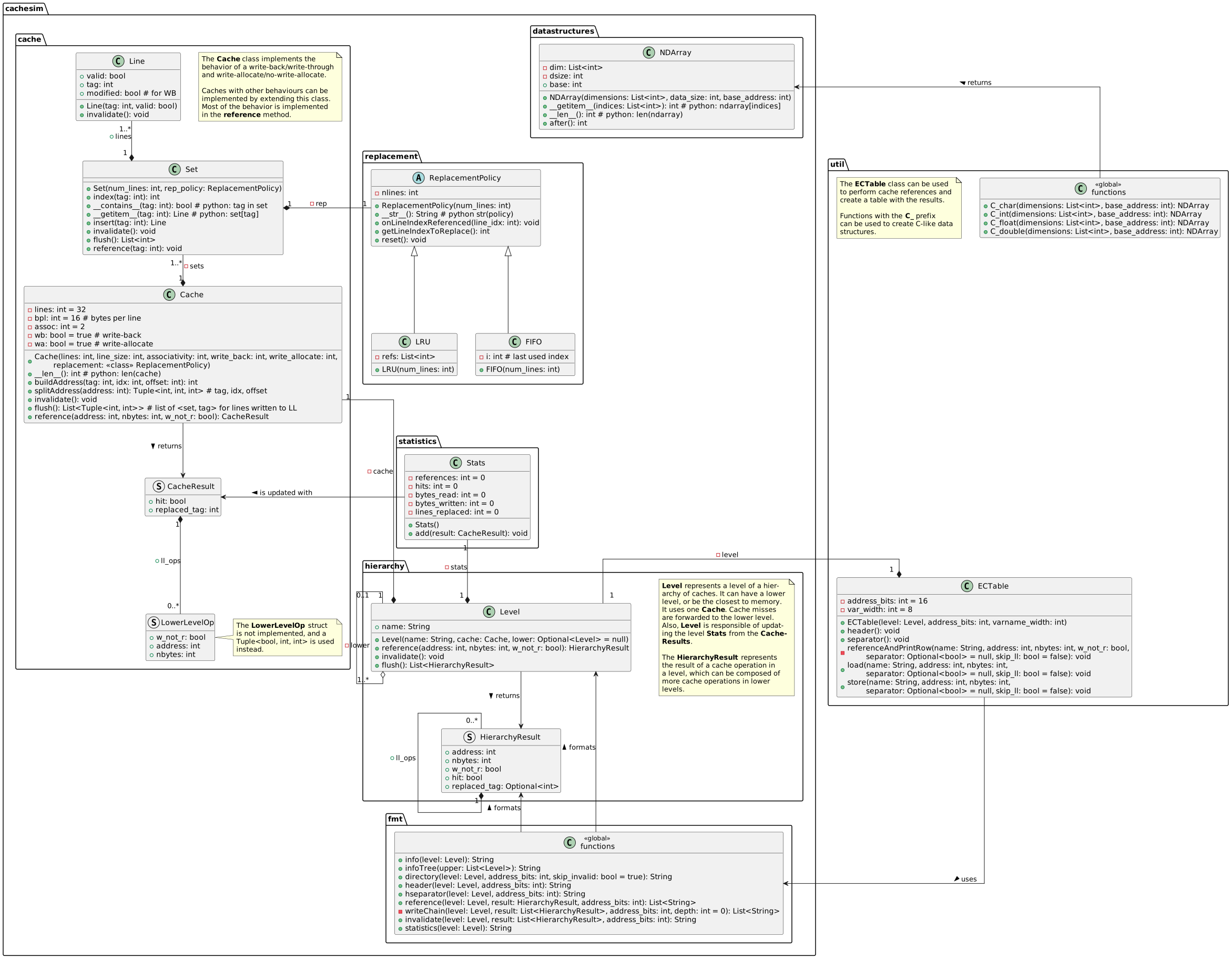
UML class diagrams can be found under the doc/ directory.
Project details
Verified details
These details have been verified by PyPIProject links
GitLab Statistics
Maintainers
Release history Release notifications | RSS feed


Download files
Download the file for your platform. If you're not sure which to choose, learn more about installing packages.
Source Distribution
Built Distribution
Filter files by name, interpreter, ABI, and platform.
If you're not sure about the file name format, learn more about wheel file names.
Copy a direct link to the current filters
File details
Details for the file pycachesimulator-1.0.0.tar.gz.
File metadata
- Download URL: pycachesimulator-1.0.0.tar.gz
- Upload date:
- Size: 13.4 kB
- Tags: Source
- Uploaded using Trusted Publishing? Yes
- Uploaded via: twine/6.1.0 CPython/3.13.7
File hashes
| Algorithm | Hash digest | |
|---|---|---|
| SHA256 |
e165683e084f971c04fd8d6e61f4305efce68eaae6c7b3108c6008a4ab9b016b
|
|
| MD5 |
88d5ccecf2b76d9fe146f8cda49b96a3
|
|
| BLAKE2b-256 |
12f52e734045bee2dfd4ed5da4c1436ed646cdea999755ff4a6cf81a45e5911d
|
File details
Details for the file pycachesimulator-1.0.0-py3-none-any.whl.
File metadata
- Download URL: pycachesimulator-1.0.0-py3-none-any.whl
- Upload date:
- Size: 12.5 kB
- Tags: Python 3
- Uploaded using Trusted Publishing? Yes
- Uploaded via: twine/6.1.0 CPython/3.13.7
File hashes
| Algorithm | Hash digest | |
|---|---|---|
| SHA256 |
f3902e8982714f7b7a10df24e198b65dd95116747acfad2afda94d5c85d93974
|
|
| MD5 |
e5aea8509bee02036b3860b6c53f000b
|
|
| BLAKE2b-256 |
2620cad0369eae661de78d2eebebb4c8ad2d633686ae971646744d78a6a8103a
|






