
pyChatGPT



An unofficial Python wrapper for OpenAI's ChatGPT API
Features
- Cloudflare's anti-bot protection bypass using
undetected_chromedriver - OpenAI / Google / Microsoft login support (experimental)
- Captcha solvers support (2Captcha, PyPasser)
- Headless machines support
- Proxy support (only without basic auth)
Getting Started
Since version 0.3.0, this library is using only the
undetected_chromedriverto bypass Cloudflare's anti-bot protection.requestsmodule is no longer used due to the complexity of the protection. Please make sure you have Google Chrome / Chromium before using this wrapper.
Installation
pip install -U pyChatGPT
Usage
Obtaining session_token
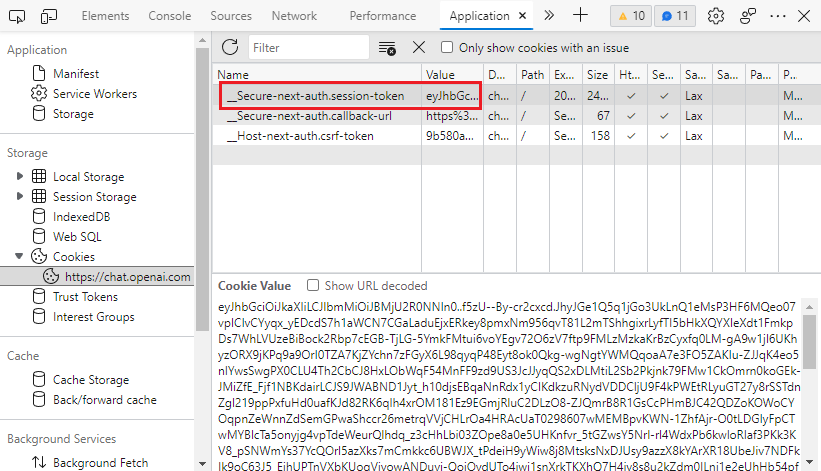
- Go to https://chat.openai.com/chat and open the developer tools by
F12. - Find the
__Secure-next-auth.session-tokencookie inApplication>Storage>Cookies>https://chat.openai.com. - Copy the value in the
Cookie Valuefield.
Interactive mode
python3 -m pyChatGPT
Import as a module
from pyChatGPT import ChatGPT

session_token = 'abc123'  # `__Secure-next-auth.session-token` cookie from https://chat.openai.com/chat
api = ChatGPT(session_token)  # auth with session token
api = ChatGPT(session_token, conversation_id='some-random-uuid')  # specify conversation id
api = ChatGPT(session_token, proxy='https://proxy.example.com:8080')  # specify proxy
api = ChatGPT(session_token, chrome_args=['--window-size=1920,768'])  # specify chrome args
api = ChatGPT(session_token, moderation=False)  # disable moderation
api = ChatGPT(session_token, verbose=True)  # verbose mode (print debug messages)

# auth with google login
api = ChatGPT(auth_type='google', email='example@gmail.com', password='password')
# auth with microsoft login
api = ChatGPT(auth_type='microsoft', email='example@gmail.com', password='password')
# auth with openai login (captcha solving using speech-to-text engine)
api = ChatGPT(auth_type='openai', email='example@gmail.com', password='password')
# auth with openai login (manual captcha solving)
api = ChatGPT(
    auth_type='openai', captcha_solver=None,
    email='example@gmail.com', password='password'
)
# auth with openai login (2captcha for captcha solving)
api = ChatGPT(
    auth_type='openai', captcha_solver='2captcha', solver_apikey='abc',
    email='example@gmail.com', password='password'
)
# reuse cookies generated by successful login before login,
# if `login_cookies_path` does not exist, it will process logining  with `auth_type`, and save cookies to `login_cookies_path`
# only works when `auth_type` is `openai` or `google`
api = ChatGPT(auth_type='openai', email='example@xxx.com', password='password',
    login_cookies_path='your_cookies_path',
)

resp = api.send_message('Hello, world!')
print(resp['message'])

api.reset_conversation()  # reset the conversation
api.clear_conversations()  # clear all conversations
api.refresh_chat_page()  # refresh the chat page
Frequently Asked Questions
How do I get it to work on headless linux server?
# install chromium & X virtual framebuffer
sudo apt install chromium-browser xvfb

# start your script
python3 your_script.py
How do I get it to work on Google Colab?
It is normal for the seession to be crashed when installing dependencies. Just ignore the error and run your script.
# install dependencies
!apt install chromium-browser xvfb
!pip install -U selenium_profiles pyChatGPT

# install chromedriver
from selenium_profiles.utils.installer import install_chromedriver
install_chromedriver()
# start your script as normal
!python3 -m pyChatGPT
Insipration
This project is inspired by
Disclaimer
This project is not affiliated with OpenAI in any way. Use at your own risk. I am not responsible for any damage caused by this project. Please read the OpenAI Terms of Service before using this project.
License
This project is licensed under the GPLv3 License - see the LICENSE file for details.
1 maintainer

Metadata
1 maintainer
Release files for pyChatGPT 0.4.3.3
For a detailed explanation of source distributions (sdists) and built distributions (wheels), please see the package formats documentation.
Source distribution (sdist)
| File | Size | Uploaded | Provenance | |
|---|---|---|---|---|
| pyChatGPT-0.4.3.3.tar.gz | 24.0 kB | Without provenance | Details |
Built distribution (wheel)
| File | Interpreter | ABI | Platform | Reset |
|---|---|---|---|---|
| pyChatGPT-0.4.3.3-py3-none-any.whl | Python 3 | none | any | Details |
Total release size: 47.3 kB
Release files / pyChatGPT-0.4.3.3.tar.gz
| Download URL | pyChatGPT-0.4.3.3.tar.gz |
|---|---|
| Size | 24.0 kB |
| Tags | Source |
|
SHA-256 checksum How to use checksums |
33671607fd70a4f2efdb0a9d0915d117f0ba1e266643b47ffa207e4c23f99612
|
|
BLAKE2b-256 checksum How to use checksums |
52119aa77973e364019b67c05613f19a2bb043ad0f537a3bf3cf9e20f38e22f8
|
| Upload date | |
|
Uploaded using Trusted Publishing? What is trusted publishing? |
No |
| Uploaded via |
twine/4.0.1 CPython/3.11.1
|
Release files / pyChatGPT-0.4.3.3-py3-none-any.whl
| Download URL | pyChatGPT-0.4.3.3-py3-none-any.whl |
|---|---|
| Size | 23.3 kB |
| Tags | Python 3 |
|
SHA-256 checksum How to use checksums |
ce737e2ace30af107e577b65d21f5dc419102eb0be7c551281d7936f11f4bc2e
|
|
BLAKE2b-256 checksum How to use checksums |
493aee2af2f891f3a30ee7c48b307f25eb22c8a3a501eb4dcf0b3f5eb4f747d2
|
| Upload date | |
|
Uploaded using Trusted Publishing? What is trusted publishing? |
No |
| Uploaded via |
twine/4.0.1 CPython/3.11.1
|
Security for pyChatGPT 0.4.3.3
Provenance
Provenance describes where a file came from. On PyPI, provenance is shared via attestations, which provide a verifiable record of the build or publishing details. View details, limitations and caveats.
No provenance found
None of the files in this release were uploaded with provenance metadata.
A note on package security
PyPI is a repository for distributing packages, not a service for auditing them. While third-party security researchers and our staff do their best to detect and remove malicious packages, PyPI cannot guarantee the quality, security or suitability of any given package.
To learn more about protecting yourself from malicious actors, visit our package security documentation.














