
An unofficial Python wrapper for OpenAI's ChatGPT API

Project description
pyChatGPT



An unofficial Python wrapper for OpenAI's ChatGPT API
Features
- Bypass Cloudflare's anti-bot protection using
undetected_chromedriver -
Captcha solver when auth with login credentials (experimental) - Support headless machines
- Proxy support (only without basic auth)
- Google login support (experimental)
Getting Started
On version 0.3.0, this library is using only the
undetected_chromedriverto bypass Cloudflare's anti-bot protection.requestsmodule is no longer used due to the complexity of the protection. Please make sure you have Google Chrome before using this wrapper. From now on, this library will not support specifying a conversation (i.e.parent_idandconversation_idparameters) but you can still reset the conversation by callingreset_conversation().
Installation
pip install -U pyChatGPT
Usage
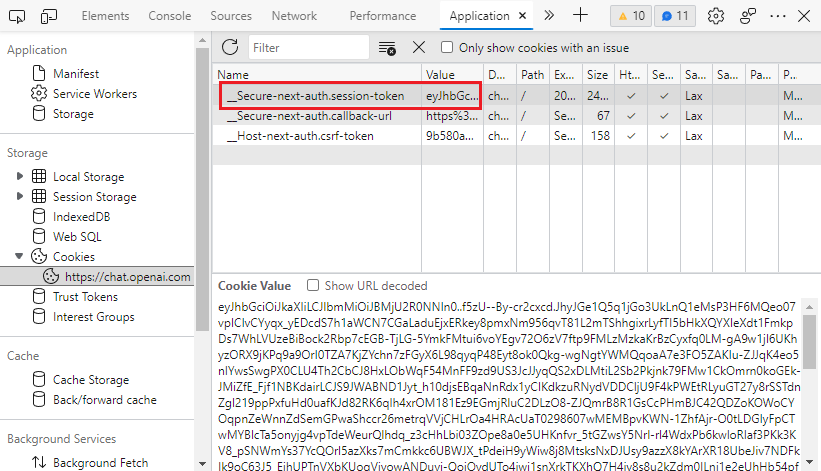
Obtaining session_token
- Go to https://chat.openai.com/chat and open the developer tools by
F12. - Find the
__Secure-next-auth.session-tokencookie inApplication>Storage>Cookies>https://chat.openai.com. - Copy the value in the
Cookie Valuefield.
Interactive mode
python -m pyChatGPT
Import as a module
from pyChatGPT import ChatGPT

session_token = 'abc123'  # `__Secure-next-auth.session-token` cookie from https://chat.openai.com/chat
api1 = ChatGPT(session_token)  # auth with session token
api2 = ChatGPT(session_token, proxy='http://proxy.example.com:8080')  # specify proxy
api3 = ChatGPT(auth_type='google', email='example@gmail.com', password='password') # auth with google login
api4 = ChatGPT(session_token, verbose=True)  # verbose mode (print debug messages)

resp = api1.send_message('Hello, world!')
print(resp['message'])

api1.reset_conversation()  # reset the conversation
api1.close()  # close the session
Frequently Asked Questions
How do I get it to work on headless linux server?
# install chromium & X virtual framebuffer
sudo apt install chromium-browser xvfb

# start your script
python3 your_script.py
How do I get it to work on Google Colab?
It is normal for the seession to be crashed when installing dependencies. Just ignore the error and run your script.
# install dependencies
!apt install chromium-browser xvfb
!pip install -U selenium_profiles pyChatGPT

# install chromedriver
from selenium_profiles.utils.installer import install_chromedriver
install_chromedriver()
# start your script as normal
!python3 -m pyChatGPT
Insipration
This project is inspired by
Disclaimer
This project is not affiliated with OpenAI in any way. Use at your own risk. I am not responsible for any damage caused by this project. Please read the OpenAI Terms of Service before using this project.
License
This project is licensed under the GPLv3 License - see the LICENSE file for details.
Release history Release notifications | RSS feed


Download files
Download the file for your platform. If you're not sure which to choose, learn more about installing packages.
Source Distribution
Built Distribution
Filter files by name, interpreter, ABI, and platform.
If you're not sure about the file name format, learn more about wheel file names.
Copy a direct link to the current filters
File details
Details for the file pyChatGPT-0.3.6.tar.gz.
File metadata
- Download URL: pyChatGPT-0.3.6.tar.gz
- Upload date:
- Size: 20.5 kB
- Tags: Source
- Uploaded using Trusted Publishing? No
- Uploaded via: twine/4.0.1 CPython/3.11.1
File hashes
| Algorithm | Hash digest | |
|---|---|---|
| SHA256 |
2b47df056084e7e02e1a543a43b45a338056c617fbddab35e7000b0f982c2c4c
|
|
| MD5 |
4f5c2f5b82aede2cadb881ad83c68a42
|
|
| BLAKE2b-256 |
a04bf4bf9618515d0d241a6a6edcb7ebb9d6c8479b463b3d456ba26d7adcce65
|
File details
Details for the file pyChatGPT-0.3.6-py3-none-any.whl.
File metadata
- Download URL: pyChatGPT-0.3.6-py3-none-any.whl
- Upload date:
- Size: 19.6 kB
- Tags: Python 3
- Uploaded using Trusted Publishing? No
- Uploaded via: twine/4.0.1 CPython/3.11.1
File hashes
| Algorithm | Hash digest | |
|---|---|---|
| SHA256 |
023f0c7560d219c579f3f065087c4008d1bfafb1eb06998a2e1f500fd3c1e59a
|
|
| MD5 |
1a1a8d5d8b28c84219caee28e8e9b778
|
|
| BLAKE2b-256 |
f773b90ff6dbdb44de17c8fbf4ecf131e53fed2515a7815d4bf4d34a62761452
|






