
pyMEAL: Multi-Encoder-Augmentation-Aware-Learning

Project description
pyMEAL: Multi-Encoder-Augmentation-Aware-Learning
pyMEAL is a multi-encoder framework for augmentation-aware learning that accurately performs CT-to-T1-weighted MRI translation under diverse augmentations. It utilizes four dedicated encoders and three fusion strategies, concatenation (CC), fusion layer (FL), and controller block (BD), to capture augmentation-specific features. MEAL-BD outperforms conventional augmentation methods, achieving SSIM > 0.83 and PSNR > 25 dB in CT-to-T1w translation.
Model Architecture Overview
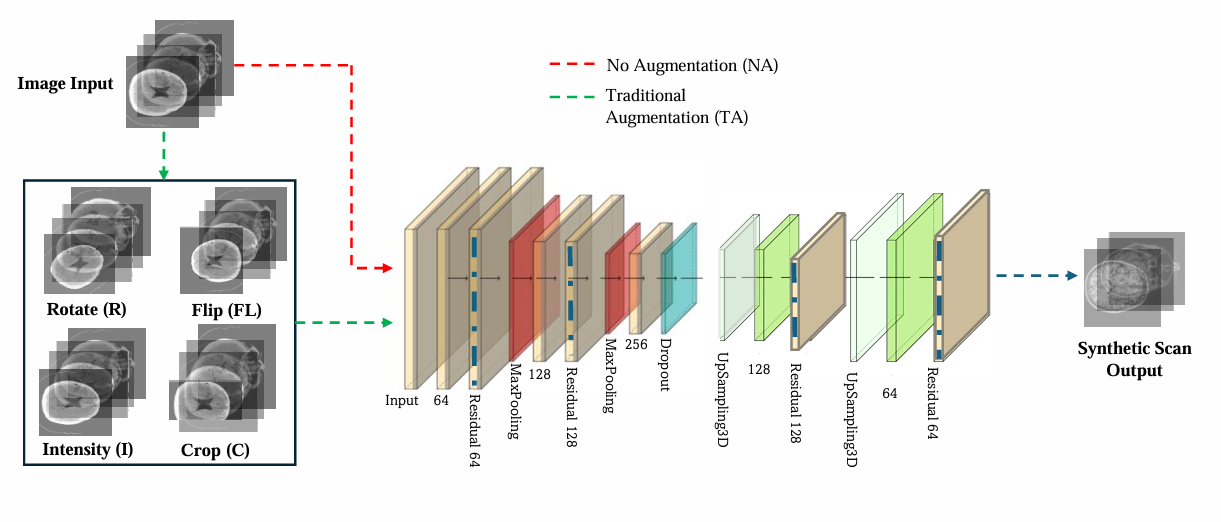
Fig. 1:Model architecture for the model having no augmentation and traditional augmentation
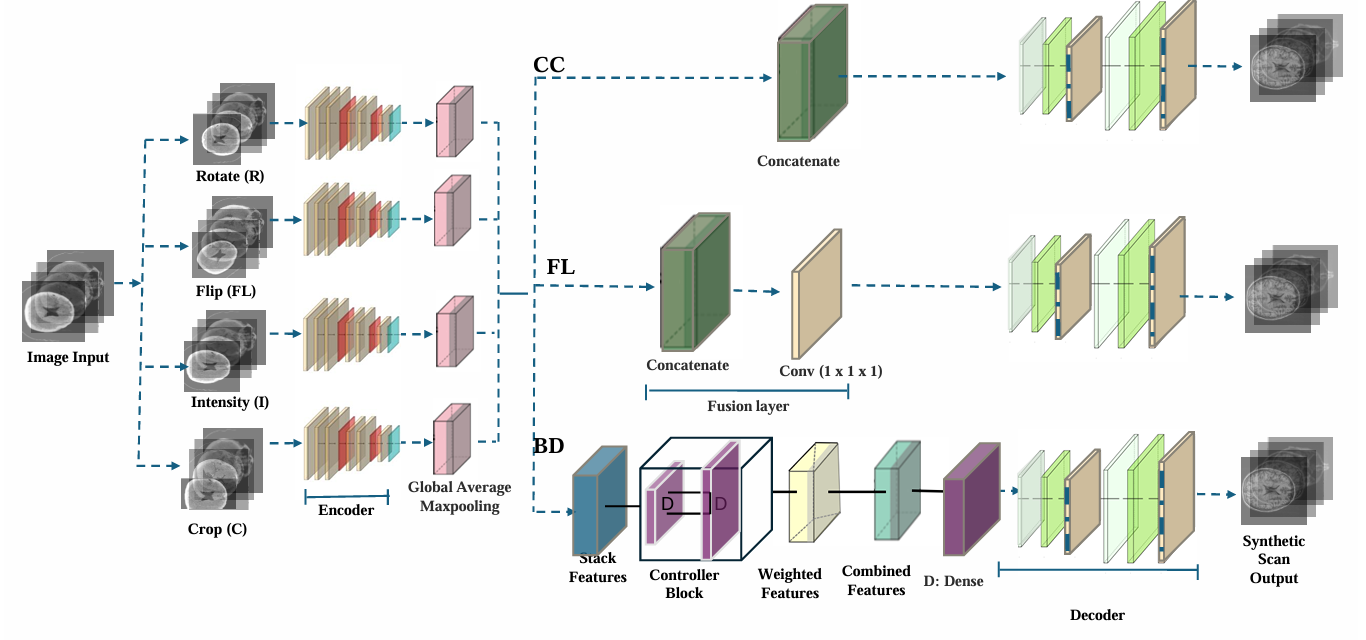
Fig. 2: Model architecture for Multi-Stream with a Builder Controller block method (BD), Fusion layer (FL) and Encoder concatenation (CC)
Dependecies
tensorflow
matplotlib
SimpleITK
scipy
antspyx
Available Models
| Model ID | File Name | Description |
|---|---|---|
| BD | builder1_mode1l1abW512_1_11211z1p1rt_.h5 |
Builder-based architecture model |
| CC | best_moderRl_RHID2_1mo.h5 |
Encoder-concatenation-based configuration |
| FL | bestac22_mode3l_512m2_m21.h5 |
Feature-level fusion-based model |
| NA | direct7_11ag23f11.h5 |
Direct training baseline model |
| TA | best_modelaf2ndab7_221ag12g11.h5 |
traditional augmentation configuration model |
Download Model Files
You can download any .h5 file directly:
- Download builder1_mode1l1abW512_1_11211z1p1rt_.h5
- Download best_moderRl_RHID2_1mo.h5
- Download bestac22_mode3l_512m2_m21.h5
- Download direct7_11ag23f11.h5
- Download best_modelaf2ndab7_221ag12g11.h5
or alternatively, you can use the following Python script to downlaod all the models from Huggingface.
from huggingface_hub import hf_hub_download
import tensorflow as tf

my_folder = "./my_models"  # or any path you want

model_path = hf_hub_download(
    repo_id="AI-vBRAIN/pyMEAL",
    filename="builder1_mode1l1abW512_1_11211z1p1rt_.h5",  # or any other desired model in our Huggingface.
    repo_type="model",
    cache_dir=my_folder
)

# Load the model from that path
model = tf.keras.models.load_model(model_path, compile=False)
# Run inference
output = model.predict(input_data)
Here, input_data refers to a CT image, and the corresponding T1-weighted (T1w) image is predicted as the output.
For detailed instructions on how to use each module of the pyMEAL software, please refer to the tutorial section on our GitHub repository.
Finally, create and activate a virtual environment, then install pyMEAL.
conda create -n pyMEAL python=3.9
conda activate pyMEAL
pip install pyMEAL
How to get support?
For help, contact:
Dr. Ilyas (amoiIyas@hkcoche.org) or Dr. Maradesa (amaradesa@hkcoche.org)
Release history Release notifications | RSS feed


Download files
Download the file for your platform. If you're not sure which to choose, learn more about installing packages.
Source Distribution
Built Distribution
Filter files by name, interpreter, ABI, and platform.
If you're not sure about the file name format, learn more about wheel file names.
Copy a direct link to the current filters
File details
Details for the file pymeal-1.0.1.tar.gz.
File metadata
- Download URL: pymeal-1.0.1.tar.gz
- Upload date:
- Size: 23.4 kB
- Tags: Source
- Uploaded using Trusted Publishing? No
- Uploaded via: twine/6.1.0 CPython/3.9.22
File hashes
| Algorithm | Hash digest | |
|---|---|---|
| SHA256 |
0fba808b089b10b99482922254b47ce9725f085843f11e002c73679be56d9783
|
|
| MD5 |
b76f4739093d7ff33798c9ab09ed2799
|
|
| BLAKE2b-256 |
9121c75f1b60e31293a63145afd742b47f9baf7401436eb4aca26c2cd7d0e5c2
|
File details
Details for the file pymeal-1.0.1-py3-none-any.whl.
File metadata
- Download URL: pymeal-1.0.1-py3-none-any.whl
- Upload date:
- Size: 27.9 kB
- Tags: Python 3
- Uploaded using Trusted Publishing? No
- Uploaded via: twine/6.1.0 CPython/3.9.22
File hashes
| Algorithm | Hash digest | |
|---|---|---|
| SHA256 |
a3b319d166bb29a65db83307afa4875e8754aac7597ddc84aa9ae09ea9e535ff
|
|
| MD5 |
bdc714c65fd1f57ec73860d33f02bb28
|
|
| BLAKE2b-256 |
228aedd489d4a5767f2e8a6f9ec1a83ab718f636a54617367512c0a3691b60b5
|






