
pyPreservicaFSDate
Python module which queries a local file system to try and add file system dates (created, modified, accessed) etc to objects in already in Preservica.
Contributing
Bug reports and pull requests are welcome on GitHub at https://github.com/carj/pyPreservicaFSDate
Support
pyPreservicaFSDate is 3rd party open source client and is not affiliated or supported by Preservica Ltd. There is no support for use of the library by Preservica Ltd. Bug reports can be raised directly on GitHub.
Users of pyPreservicaFSDate should make sure they are licensed to use the Preservica REST APIs.
License
The package is available as open source under the terms of the Apache License 2.0
Installation
pyPreservica is available from the Python Package Index (PyPI)
https://pypi.org/project/pyPreservicaFSDate/
To install pyPreservicaFSDate, simply run this simple command in your terminal of choice:
$ pip install pyPreservicaFSDate
Usage
pyPreservicaFSDate uses the pyPreservica python library for ingesting content. This means that pyPreservicaFSDate can use the same authentication methods as pyPreservica for reading Preservica credentials. See: https://pypreservica.readthedocs.io/en/latest/intro.html#authentication
The most straightforward way is to use a properties file to hold the Preservica credentials.
Properties File
Create a properties file called "credentials.properties" with the following property names and save to the working directory ::
[credentials]
username=test@test.com
password=123444
tenant=PREVIEW
server=preview.preservica.com
To run the module you need to specify a Preservica collection you wish to process and a local directory containing the original files:
$ python -m pyPreservicaFSDate -c a7ad52e3-2cb3-4cb5-af2a-3ab08829a2a8 -p c://my-directory/images
By default, the module will try and match Preservica assets to local file names by using the Asset title, this is the fastest way of processing the dates, but may not correctly match files to assets.
The alternative to to match using fixity values stored in Preservica, this can be turned on by using the -f flag:
$ python -m pyPreservicaFSDate -c a7ad52e3-2cb3-4cb5-af2a-3ab08829a2a8 -p c://my-directory/images -f
Matching using fixity will be slower than using Asset titles.
usage: pyPreservicaFSDate [-h] [-c COLLECTION] [-p PATH] [-f]

Add file system dates to Preservica assets Search local file system for
matching files and add the file system dates to Preservica. Files are either
matched on Asset title and filename or by fixity which is slower You provide
both a Preservica collection UUID and a local file system folder to look for
matches

options:
  -h, --help            show this help message and exit
  -c, --collection COLLECTION
                        The Preservica parent collection uuid
  -p, --path PATH       The file system path to search
  -f, --fixity          Use fixity matching (slow)
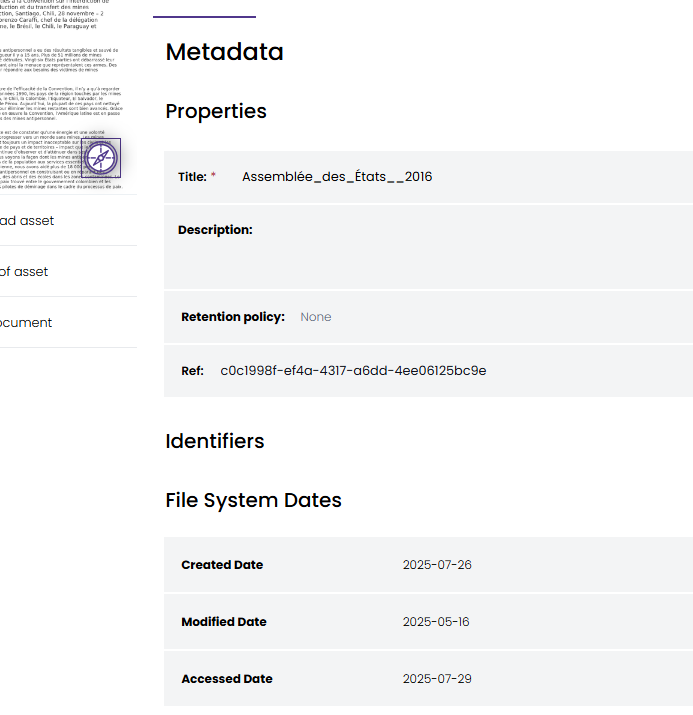
The dates will appear as a new metadata form within the Asset
1 maintainer

Metadata
1 maintainer
Release files for pyPreservicaFSDate 0.1.0
For a detailed explanation of source distributions (sdists) and built distributions (wheels), please see the package formats documentation.
Source distribution (sdist)
| File | Size | Uploaded | Provenance | |
|---|---|---|---|---|
| pypreservicafsdate-0.1.0.tar.gz | 9.1 kB | Without provenance | Details |
Built distribution (wheel)
| File | Interpreter | ABI | Platform | Reset |
|---|---|---|---|---|
| pypreservicafsdate-0.1.0-py3-none-any.whl | Python 3 | none | any | Details |
Total release size: 18.9 kB
Release files / pypreservicafsdate-0.1.0.tar.gz
| Download URL | pypreservicafsdate-0.1.0.tar.gz |
|---|---|
| Size | 9.1 kB |
| Tags | Source |
|
SHA-256 checksum How to use checksums |
8a43fc1bd50c350b7bca15f5127940d0b42d51d49ce238ce40d1dfd72f322e24
|
|
BLAKE2b-256 checksum How to use checksums |
d6e060c0b1a0360856d71a0f62ac31281727704f85af170bac412c25f3ef55ab
|
| Upload date | |
|
Uploaded using Trusted Publishing? What is trusted publishing? |
No |
| Uploaded via |
twine/6.1.0 CPython/3.13.0
|
Release files / pypreservicafsdate-0.1.0-py3-none-any.whl
| Download URL | pypreservicafsdate-0.1.0-py3-none-any.whl |
|---|---|
| Size | 9.8 kB |
| Tags | Python 3 |
|
SHA-256 checksum How to use checksums |
682ce8063cff3b931ce868d97a84ba7237004e858e17b00d3c09934567f2a7fb
|
|
BLAKE2b-256 checksum How to use checksums |
6dea72b8b75d179bf639f24a02df4f2580824083ef0962c62c7cb09b23a78973
|
| Upload date | |
|
Uploaded using Trusted Publishing? What is trusted publishing? |
No |
| Uploaded via |
twine/6.1.0 CPython/3.13.0
|
Security for pyPreservicaFSDate 0.1.0
Provenance
Provenance describes where a file came from. On PyPI, provenance is shared via attestations, which provide a verifiable record of the build or publishing details. View details, limitations and caveats.
No provenance found
None of the files in this release were uploaded with provenance metadata.
A note on package security
PyPI is a repository for distributing packages, not a service for auditing them. While third-party security researchers and our staff do their best to detect and remove malicious packages, PyPI cannot guarantee the quality, security or suitability of any given package.














