
pySimBlocks




A deterministic block-diagram simulation framework for discrete-time modeling, co-simulation and research prototyping in Python.
pySimBlocks allows you to build, configure, and execute discrete-time systems using either:
- A pure Python API
- A graphical editor (PySide6)
- YAML project configuration with exportable Python runner (
run.py) - Optional SOFA and hardware integration
Installation
pip install pySimBlocks
Full documentation — user guide, tutorials, and API reference — is available on Read the Docs.
Getting Started
Quick Example
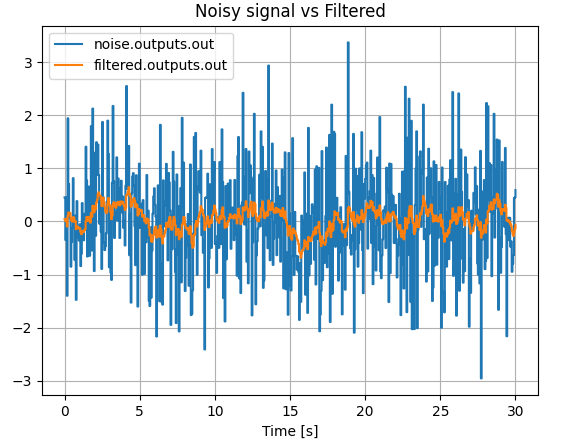
The following example models a simple first-order low-pass filter, defined by the difference equation:
$$ y[k] = \alpha x[k] + (1-\alpha) y[k-1] $$
It can be implemented in pySimBlocks using the following code:
from pySimBlocks import Model, Simulator, SimulationConfig, PlotConfig
from pySimBlocks.blocks.operators import Gain, Sum, Delay
from pySimBlocks.blocks.sources import WhiteNoise
from pySimBlocks.project.plot_from_config import plot_from_config

# 1. Create the blocks
noise = WhiteNoise(name="noise", std=1.0)
delay = Delay(name="delay")
filtered = Sum("filtered", signs="++")
alpha_gain = Gain(name="alpha", gain=0.1)
complement = Gain(name="complement", gain=0.9)

# 2. Build the model
model = Model("Example")
for block in [noise, delay, filtered, alpha_gain, complement]:
    model.add_block(block)

model.connect("noise", "out", "alpha", "in")
model.connect("delay", "out", "complement", "in")
model.connect("alpha", "out", "filtered", "in1")
model.connect("complement", "out", "filtered", "in2")
model.connect("filtered", "out", "delay", "in")

# 3. Simulate the model
sim_cfg = SimulationConfig(dt=0.05, T=30.)
sim = Simulator(model, sim_cfg)
logs = sim.run(logging=["noise.outputs.out", "filtered.outputs.out"])

# 4. Plot the results
plot_cfg = PlotConfig([
    {"title": "Noisy signal vs Filtered",
     "signals": ["noise.outputs.out", "filtered.outputs.out"],},
    ])
plot_from_config(logs, plot_cfg)
The resulting plot should look like this:
See examples/quick_start/filter.py to run the example yourself.
Graphical Editor
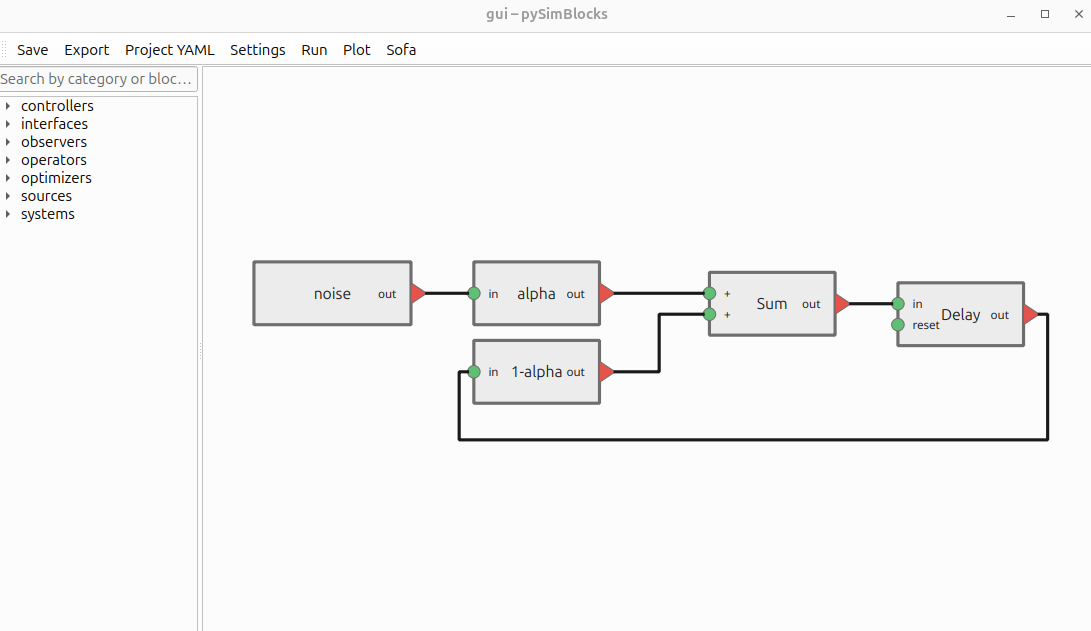
The exact same model can be constructed visually using the graphical editor (as shown in the image above of this README).
To open the graphical editor, run:
pysimblocks gui examples/quick_start/gui
The quick-start GUI project is stored in a single examples/quick_start/gui/project.yaml file.
Learning Resources
Tutorials
Three step-by-step tutorials are available in the documentation:
| Tutorial | Description | |
|---|---|---|
| 1 | Python API | Build a closed-loop PI control system in pure Python |
| 2 | GUI | Build the same system visually with the graphical editor |
| 3 | SOFA | Replace the plant with a SOFA physics simulation |
Other Examples
A collection of basic and advanced examples is available in the examples directory, including:
- Control system demonstrations
- SOFA-based simulations (tested with SOFA v24.06 and later.)
- Hardware and real-time use cases
- Comparisons with external tools
See examples/README.md for an overview.
Information
License
pySimBlocks is licensed under LGPL-3.0-or-later.
© 2026 Université de Lille & INRIA – Licensed under LGPL-3.0-or-later
1 maintainer

Metadata
1 maintainer
Release files for pySimBlocks 0.1.1
For a detailed explanation of source distributions (sdists) and built distributions (wheels), please see the package formats documentation.
Source distribution (sdist)
| File | Size | Uploaded | |
|---|---|---|---|
| pysimblocks-0.1.1.tar.gz | 204.8 kB | Details |
Built distribution (wheel)
| File | Interpreter | ABI | Platform | Reset |
|---|---|---|---|---|
| pysimblocks-0.1.1-py3-none-any.whl | Python 3 | none | any | Details |
Total release size: 600.0 kB
Release files / pysimblocks-0.1.1.tar.gz
| Download URL | pysimblocks-0.1.1.tar.gz |
|---|---|
| Size | 204.8 kB |
| Tags | Source |
|
SHA-256 checksum How to use checksums |
a570124a991be05b910ebc7ffd5ad591768eaba313581cc310ef53036629eb0d
|
|
BLAKE2b-256 checksum How to use checksums |
266de0a0d6b2fd1dc88f025e7ace3e045e6739b5fd4f28ae3c3b71797c16992d
|
| Upload date | |
|
Uploaded using Trusted Publishing? What is trusted publishing? |
No |
| Uploaded via |
twine/6.2.0 CPython/3.10.20
|
Release files / pysimblocks-0.1.1-py3-none-any.whl
| Download URL | pysimblocks-0.1.1-py3-none-any.whl |
|---|---|
| Size | 395.2 kB |
| Tags | Python 3 |
|
SHA-256 checksum How to use checksums |
becbeeb2675eca08c9f6376e3ad24bf8c2ef94cacf798a4e019f9183ab50b82e
|
|
BLAKE2b-256 checksum How to use checksums |
f61d70cac4a139791b1495f18b03b9dfc552a4ac58e7586e519cf3eda8b62fca
|
| Upload date | |
|
Uploaded using Trusted Publishing? What is trusted publishing? |
No |
| Uploaded via |
twine/6.2.0 CPython/3.10.20
|














