
python library to control the Infineon TLE9012DQU BMS IC

Project description
pyTLE9012DQU
python library to control one or multiple Infineon TLE9012DQU BMS ICs
Table of Contents
Installation
If your python environment includes setuptools, you can get the library with the following command:
python -m pip install “pyTLE9012DQU”
Or alternatively, you can just place the subfolder pyTLE9012DQU into your project’s source folder.
Introduction
The library is using python-serial to connect to any serial port of your PC and enables you to control one or multiple Infineon BMS cell management devices (TLE9012DQU) in a chain. Basic low-level functions are provided for bus handling (wake), device enumeration and register control.
In this way you can build and test applications with just a few lines of code while you have complete access to all device capabilities. There are some examples of the basic functionality (see examples subfolder), but to give you an idea: here’s a short code snippet to read and display a device’s manufacturer and version id:
from tle9012dqu.registers import *
from tle9012dqu.control import *

isoUART = TLE9012DQU(prompt_serialport(baudrate=2000000))
isoUART.wake() # wake the BMS IC
isoUART.assignNodeID(0x01) # assign addr to first BMS IC
err,data = isoUART.readICVID(0x01) # read
print(“manufacturer: %02x\nversion_id: %02x”%(data[1],data[0]))
Hardware
On your PC you’ll most likely connect to your hardware using a USB-to-Serial converter. I’ve tested the library with some common USB-to-Serial products, but it should work with any device on the market:
- FTDI FT2232H
- CH340
- Cypress CY7
- BluePill with virtual serial ports firmware (e.g. bluepill-serial-monster)
If you have access to Infineon Evaluation Boards, then you should use the TLE9015DQU isoUART Transceiver Board in combination with one or multiple TLE9012DQU Sensing Boards as shown in the picture below.
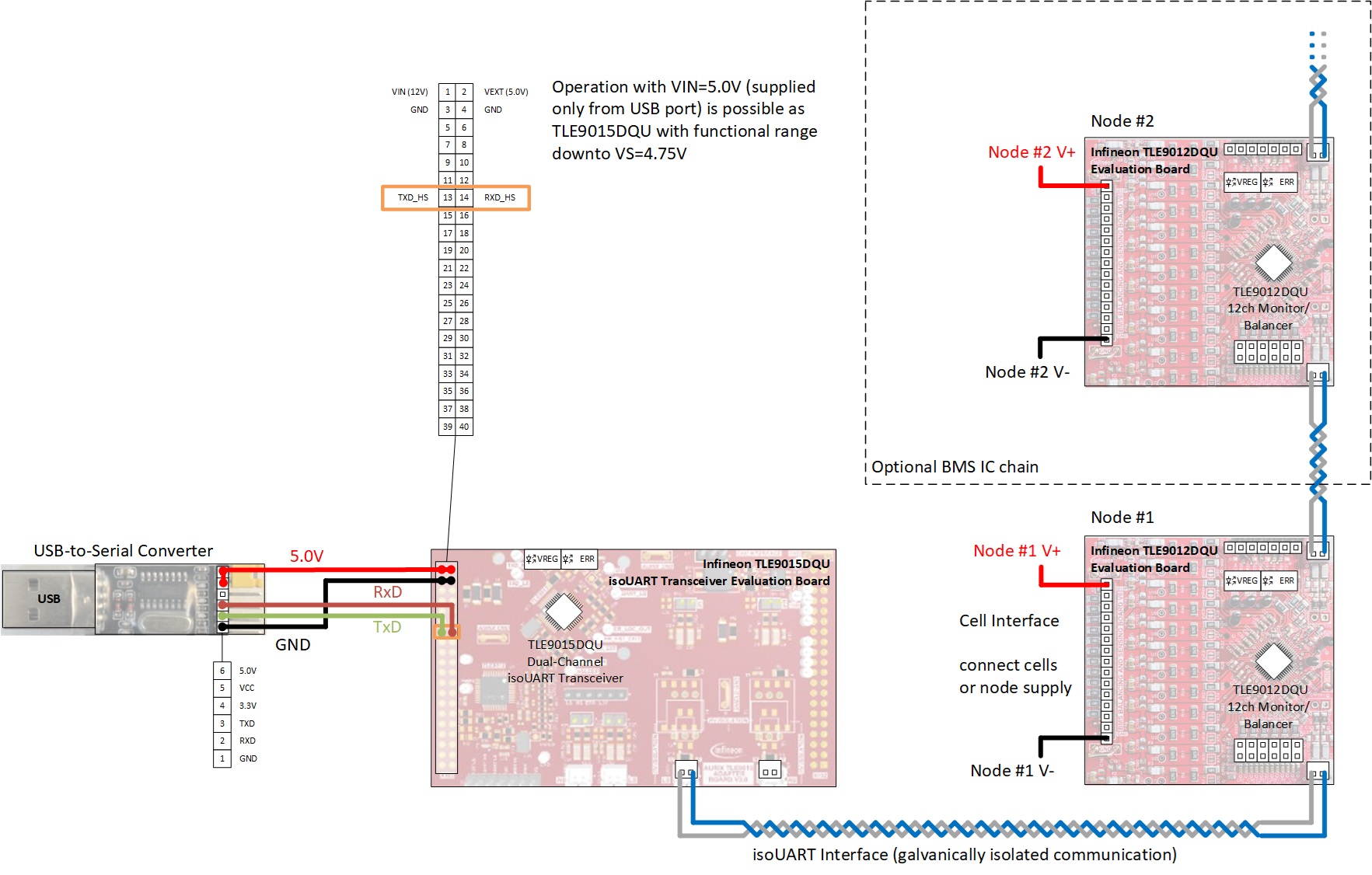
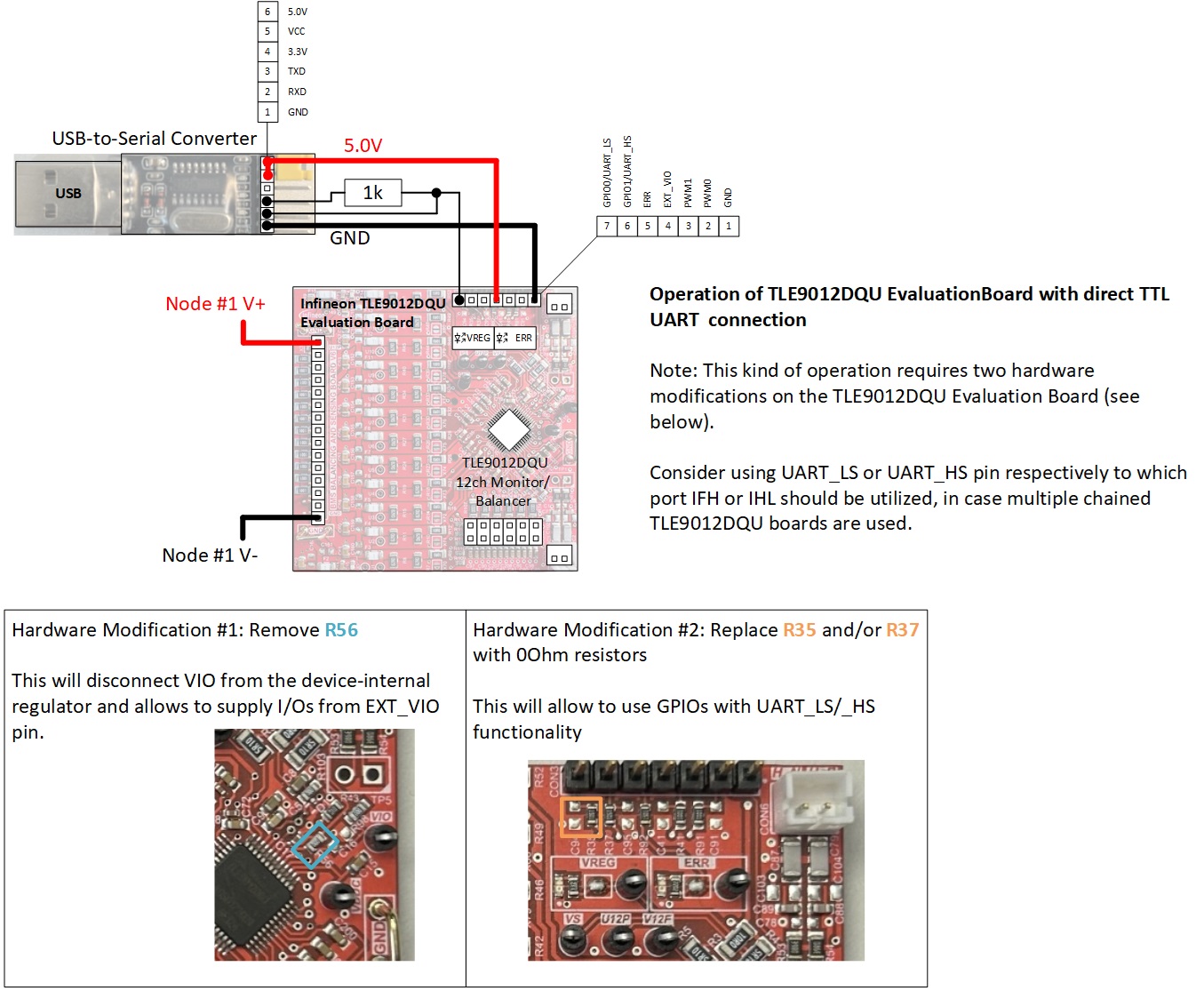
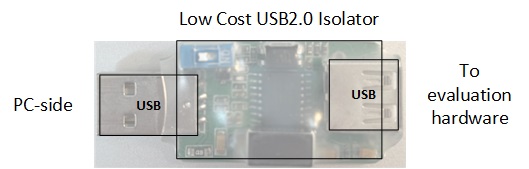
Here’s some more detailed description of the Infineon Evaluation Boards:
TLE9012DQU
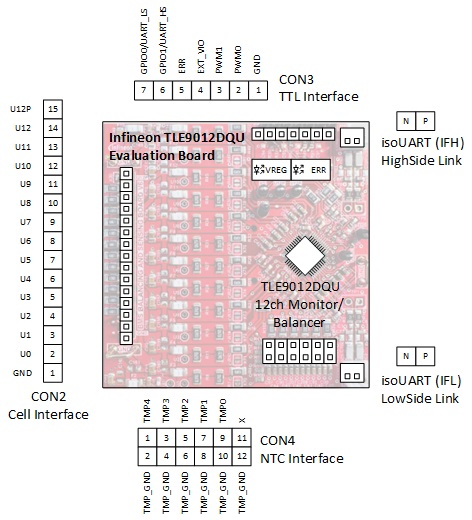
TLE9015DQU
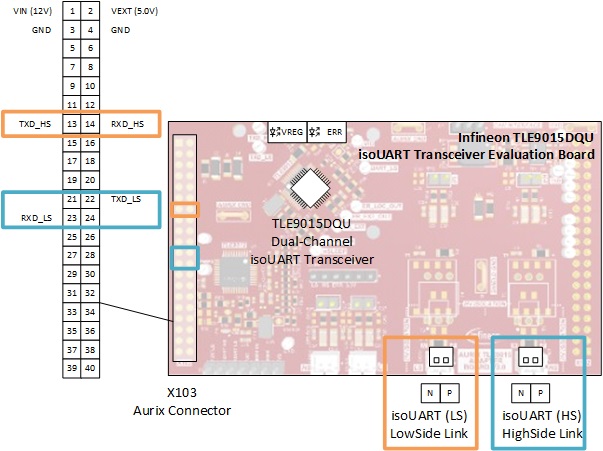
By the way, if you don’t want to buy the Infineon Evaluationboards, then you can also build your own TLE9012DQU board and a low-cost USB-to-isoUART converter based on a simple TLE9015DQU board + bluepill. Instructions and code can be found (soon here on this) repository.
Release history Release notifications | RSS feed

Download files
Download the file for your platform. If you're not sure which to choose, learn more about installing packages.
Source Distribution
Built Distribution
Filter files by name, interpreter, ABI, and platform.
If you're not sure about the file name format, learn more about wheel file names.
Copy a direct link to the current filters
File details
Details for the file pytle9012dqu-0.9.0.tar.gz.
File metadata
- Download URL: pytle9012dqu-0.9.0.tar.gz
- Upload date:
- Size: 6.8 kB
- Tags: Source
- Uploaded using Trusted Publishing? No
- Uploaded via: twine/6.0.1 CPython/3.13.1
File hashes
| Algorithm | Hash digest | |
|---|---|---|
| SHA256 |
ff1cedaee7f633ef7904041fb1975121c10bfe9faffaafb9fbbb928182847113
|
|
| MD5 |
7db7271954116d3ac27b4d42fd453e0f
|
|
| BLAKE2b-256 |
6278c5bc68a28fcbe1eb48c21ca1dd55dea69d54fc658fbeca3e95ab7b037c10
|
File details
Details for the file pyTLE9012DQU-0.9.0-py3-none-any.whl.
File metadata
- Download URL: pyTLE9012DQU-0.9.0-py3-none-any.whl
- Upload date:
- Size: 7.3 kB
- Tags: Python 3
- Uploaded using Trusted Publishing? No
- Uploaded via: twine/6.0.1 CPython/3.13.1
File hashes
| Algorithm | Hash digest | |
|---|---|---|
| SHA256 |
2a285d2efd44f9c054d524e35ac649b7571f901b7debbcc28e1e99ab04046d37
|
|
| MD5 |
ed342b442aa0969ba307de8d389b3e8f
|
|
| BLAKE2b-256 |
19d9a013757638f8171871f9a44244b9f10ba743250c1ef57243f3c03192a9b2
|






