
Supports the conversion from TRLC files to other formats.

Project description
pyTRLCConverter




pyTRLCConverter is a command-line tool to convert TRLC files to different output formats. Since the definition of TRLC types is project-specific, the built-in converters can be extended in an object-oriented manner.
Currently out of the box supported formats:
- Markdown
- docx
- reStructuredText
- dump
Find the requirements, test cases, coverage and etc. on the github pages.
Table of Contents
- Overview
- Installation
- Usage
- Examples
- Compile into an executable
- SW Documentation
- Tools
- Used Libraries
- Issues, Ideas And Bugs
- License
- Contribution
Overview
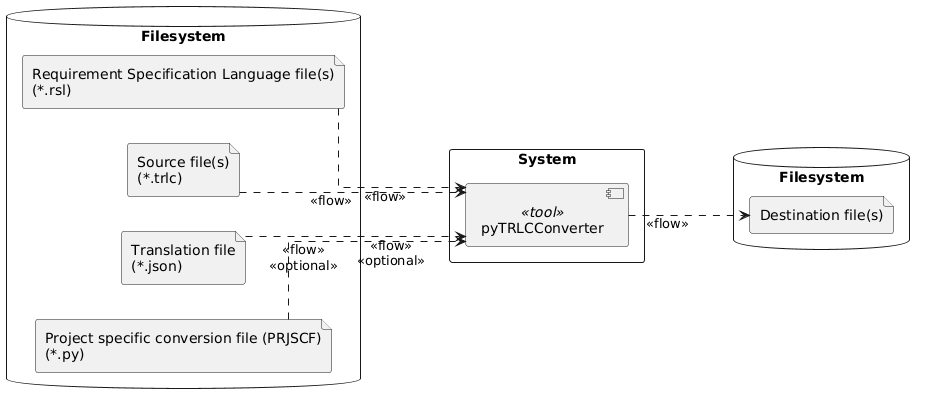
Find the requirements, test cases, coverage and etc. deployed on github pages.
Installation
Follow these steps to setup an editable pyTRLCConverter workspace using a virtual python environment.
Clone this Project
git clone https://github.com/NewTec-GmbH/pyTRLCConverter.git
cd pyTRLCConverter
Setup a virtual Python Environment
python -m venv .venv
.venv\Scripts\activate.ps1 # <- Windows Power Shell version
Note:
- For Windows CMD shell, use
.venv\Scripts\activate.batto activate the virtual environment. - For Linux/Macos, use
source .venv/bin/activateto activate the virtual environment.
Tool Installation
pip install -e .
Usage
Conversion to Markdown format
The tool requires two kinds of TRLC input sources for the conversion. These are the requirements (*.trlc) files and the model (*.tls) files. These input files are specified using one or more --source or -s options followed by a file name or directory path. If a path is given, all files with a .trlc or .tls extension are read by the tool.
pyTRLCConverter --source trlc/model --source trlc/swe-req markdown
It will create a Markdown file with the same name as the requirements file (*.trlc) in the current directory, but with the Markdown extension (.md).
If the requirements are split into several files, a Markdown file will be created for each. To generate a single Markdown file the argument --single-document can be used, which will create an output.md file by default.
The converter supports additional arguments that are shown by adding the --help option after the markdown subcommand.
pyTRLCConverter markdown --help

usage: pyTRLCConverter markdown [-h] [-n NAME] [-sd] [-tl TOP_LEVEL]

options:
  -h, --help            show this help message and exit
  -n NAME, --name NAME  Name of the generated output file inside the output folder (default = output.md) in case a single document is generated.
  -sd, --single-document
                        Generate a single document instead of multiple files. The default is to generate multiple files.
  -tl TOP_LEVEL, --top-level TOP_LEVEL
                        Name of the top level heading, required in single document mode. (default = Specification)
More examples are shown in the examples folder.
Conversion to docx format
Similar to the Markdown conversion, minimal required are the requirements (*.trlc) and the model (*.tls). Both can be added by file name or just the path where they are located.
pyTRLCConverter --source trlc/model --source trlc/swe-req docx
It will create a docx file with default name output.docx in the current directory.
If the requirements are split in several files, they will be all part of a single docx file.
The converter supports additional arguments that are shown by adding the --help option after the docx subcommand.
pyTRLCConverter docx --help

usage: pyTRLCConverter docx [-h] [-t TEMPLATE] [-n NAME]

options:
  -h, --help            show this help message and exit
  -t TEMPLATE, --template TEMPLATE
                        Load the given docx file as a template to append to.
  -n NAME, --name NAME  Name of the generated output file inside the output folder (default = output.docx).
Conversion to reStructuredText format
The tool requires two kinds of TRLC input sources for the conversion. These are the requirements (*.trlc) files and the model (*.tls) files. These input files are specified using one or more --source or -s options followed by a file name or directory path. If a path is given, all files with a .trlc or .tls extension are read by the tool.
pyTRLCConverter --source trlc/model --source trlc/swe-req rst
If the requirements are split into several files (*.trlc), a reStructuredText file will be created for each. To generate a single reStructuredText file the argument --single-document can be used, which will create an output.md file by default.
The converter supports additional arguments that are shown by adding the --help option after the reStructuredText subcommand.
pyTRLCConverter rst --help

usage: pyTRLCConverter rst [-h] [-e EMPTY] [-n NAME] [-sd] [-tl TOP_LEVEL]

options:
  -h, --help            show this help message and exit
  -e EMPTY, --empty EMPTY
                        Every attribute value which is empty will output the string (default = N/A).
  -n NAME, --name NAME  Name of the generated output file inside the output folder (default = output.rst) in case a single document is generated.
  -sd, --single-document
                        Generate a single document instead of multiple files. The default is to generate multiple files.
  -tl TOP_LEVEL, --top-level TOP_LEVEL
                        Name of the top level heading, required in single document mode (default = Specification).
More examples are shown in the examples folder.
Dump TRLC item list to console
Mainly for development all TRLC items can be dumped to the console.
pyTRLCConverter --source trlc/model --source trlc/swe-req dump
Use an attribute name translation
The built-in converters display the requirements and their attributes in a table. The first column always contains the attribute name, and the second column contains the attribute value. Since the attribute names must comply with the TRLC standard, they are not always human-readable.
Therefore a translation JSON file can be used to translate the attribute names. Use the --translation argument to specify the translation file.
Translation file example:
{
    "SwRequirement": {
        "desc": "Description"
    }
}
See the example for more information.
Show tool version
Show the version of the tool to see whether the required one is used.
pyTRLCConverter --help
PlantUML
With the PlantUML extension the tool supports the automatic diagram generation out of a PlantUML file.
Activate the support by adding the path to the java jar file to the PLANTUML environment variable.
Examples
Check out the all the Examples.
Compile into an executable
It is possible to create an executable file that contains the tool and all its dependencies. "PyInstaller" is used for this. Just run the following command on the root of the folder:
pyinstaller --noconfirm --onefile --console --name "pyTRLCConverter" --add-data "./pyproject.toml;." "./src/pyTRLCConverter/__main__.py"
SW Documentation
More information on the deployment and architecture can be found in the documentation
For Detailed Software Design run $ /doc/detailed-design/make html to generate the detailed design documentation that then can be found
in the folder /doc/detailed-design/_build/html/index.html
Tools
Tools used for development or automations, see Tools.
Used Libraries
Used 3rd party libraries which are not part of the standard Python package:
| Library | Description | License |
|---|---|---|
| PlantUML | Generate UML diagrams. | GPL-3.0 |
| python-docx | Creation of Microsoft Word 2007+ (.docx) files. | MIT |
| requests | HTTP processing | Apache-2.0 |
| sphinx | Using Sphinx for documentation deployment. | BSD |
| toml | Parsing TOML | MIT |
| trlc | Treat Requirements Like Code | GPL-3.0 |
see also requirements.txt
Issues, Ideas And Bugs
If you have further ideas or you found some bugs, great! Create an issue or if you are able and willing to fix it by yourself, clone the repository and create a pull request.
License
The whole source code is published under GPL-3.0. Consider the different licenses of the used third party libraries too!
Contribution
Unless you explicitly state otherwise, any contribution intentionally submitted for inclusion in the work by you, shall be licensed as above, without any additional terms or conditions.


Download files
Download the file for your platform. If you're not sure which to choose, learn more about installing packages.
Source Distribution
Built Distribution
Filter files by name, interpreter, ABI, and platform.
If you're not sure about the file name format, learn more about wheel file names.
Copy a direct link to the current filters
File details
Details for the file pytrlcconverter-1.0.2.tar.gz.
File metadata
- Download URL: pytrlcconverter-1.0.2.tar.gz
- Upload date:
- Size: 1.7 MB
- Tags: Source
- Uploaded using Trusted Publishing? No
- Uploaded via: twine/6.1.0 CPython/3.12.8
File hashes
| Algorithm | Hash digest | |
|---|---|---|
| SHA256 |
c8924ec7812844d80efab81f9d4837bba2ca417565e5fccd041fe13b0b47ffac
|
|
| MD5 |
f5e25da78ff5b33cef03cabe9a1c4420
|
|
| BLAKE2b-256 |
0ae5bf0013c0d4d48efa6a7531cdac5e4105fce90de45a1980f639bd29fa6fbd
|
File details
Details for the file pytrlcconverter-1.0.2-py3-none-any.whl.
File metadata
- Download URL: pytrlcconverter-1.0.2-py3-none-any.whl
- Upload date:
- Size: 53.4 kB
- Tags: Python 3
- Uploaded using Trusted Publishing? No
- Uploaded via: twine/6.1.0 CPython/3.12.8
File hashes
| Algorithm | Hash digest | |
|---|---|---|
| SHA256 |
0fa6053ab3915d3bf7368bda8d701350d9b215f941c6242fb2494e6427c41b6d
|
|
| MD5 |
7870ec447269ae9d761c26043f6e2828
|
|
| BLAKE2b-256 |
8a9fdc00b6438fca2f34a52dfdce96b9024876607d5d77064f684286408ec2de
|






