

The full documentation for pyAMARES can be found at pyAMARES Documentation.
What is pyAMARES?
The pyAMARES package provides the MRS community with an open-source, easy-to-use MRS fitting method in Python. It imports prior knowledge from Excel or CSV spreadsheets as initial values and constraints for fitting MRS data according to the AMARES model function.
Getting Started
Requirements


Installation
pip install pyamares-xmris(The import name remains pyAMARES. To install the original upstream distribution instead, use pip install pyAMARES — note that it does not install on arm64.)
That is the fitting engine only: numpy, scipy, pandas, matplotlib, lmfit, sympy, nmrglue, jinja2 and tqdm. Everything else lives behind an extra, and each one is additive:
pip install 'pyamares-xmris[jupyter]'   # the notebooks and interactive workflows: Jupyter, requests, and the matlab/excel extras below
pip install 'pyamares-xmris[matlab]'    # mat73, for reading MATLAB v7.3 (HDF5) .mat files
pip install 'pyamares-xmris[excel]'     # openpyxl and xlrd, for .xlsx / .xls prior knowledge spreadsheets
pip install 'pyamares-xmris[hlsvd]'     # hlsvdpro, the optional native HSVD backend (x86_64 only; unused on numpy 2+)
Prior knowledge in CSV form and MATLAB files older than v7.3 need no extra. If an extra is missing, the function that needs it raises an ImportError naming the one to install. The HSVD path never needs [hlsvd]: without it pyAMARES uses its own bundled pure-Python implementation, which is what every numpy 2 install has used all along.
See the Installation Guide for detailed information.
Run pyAMARES in any web browser
New: PyAMARES now offers a user-friendly web interface for fitting AMARES models without writing any code. The web app provides a graphical interface to:
Upload your FID data file
Upload the prior knowledge spreadsheet (Excel or CSV)
Edit the prior knowledge spreadsheet as needed
Set MR parameters (MHz, spectrum width, deadtime, etc)
Visualize results with interactive plots
Download fitted results and figures

No installation required - just visit the link and start fittting your MRS data right away!
Run pyAMARES as standard-alone script
amaresFit -f ./pyAMARES/examples/fid.txt -p ./pyAMARES/examples/example_human_brain_31P_7T.csv --MHz 120.0 --sw 10000 --deadtime 300e-6 --ifplot --xlim 10 -20 -o simple_exampleRun pyAMARES in a Jupyter Notebook
Try Jupyter Notebook on Google Colab here
import pyAMARES
# Load FID from a 2-column ASCII file, and set the MR parameters
MHz = 120.0 # 31P nuclei at 7T
sw = 10000 # spectrum width in Hz
deadtime = 300e-6 # 300 us begin time for the FID signal acquisition

fid = pyAMARES.readmrs('./pyAMARES/examples/fid.txt')
# Load Prior Knowledge
FIDobj = pyAMARES.initialize_FID(fid=fid,
                                 priorknowledgefile='./pyAMARES/examples/example_human_brain_31P_7T.csv',
                                 MHz=MHz,
                                 sw=sw,
                                 deadtime=deadtime,
                                 preview=False,
                                 normalize_fid=False,
                                 xlim=(10, -20))# Region of Interest for visualization, -20 to 10 ppm

# Initialize the parameter using Levenberg-Marquard method
out1 = pyAMARES.fitAMARES(fid_parameters=FIDobj,
                           fitting_parameters=FIDobj.initialParams,
                           method='leastsq',
                           ifplot=False)

# Fitting the MRS data using the optimized parameter

out2 = pyAMARES.fitAMARES(fid_parameters=out1,
                          fitting_parameters=out1.fittedParams, # optimized parameter for last step
                          method='least_squares',
                          ifplot=False)

# Save the data
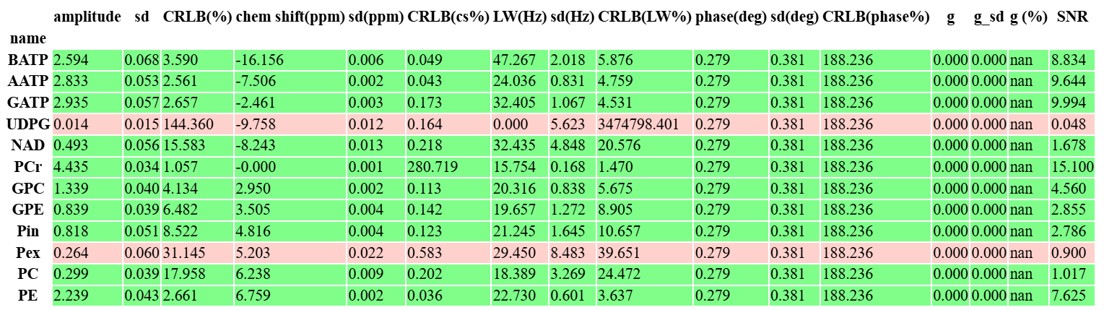
out2.styled_df.to_html('simple_example.html') # Save highlighted table to an HTML page
                                              # Python 3.6 does not support to_html.
out2.result_sum.to_csv('simple_example.csv') # Save table to CSV spreadsheet
out2.plotParameters.lb = 2.0 # Line Broadening factor for visualization
out2.plotParameters.ifphase = True # Phase the spectrum for visualization
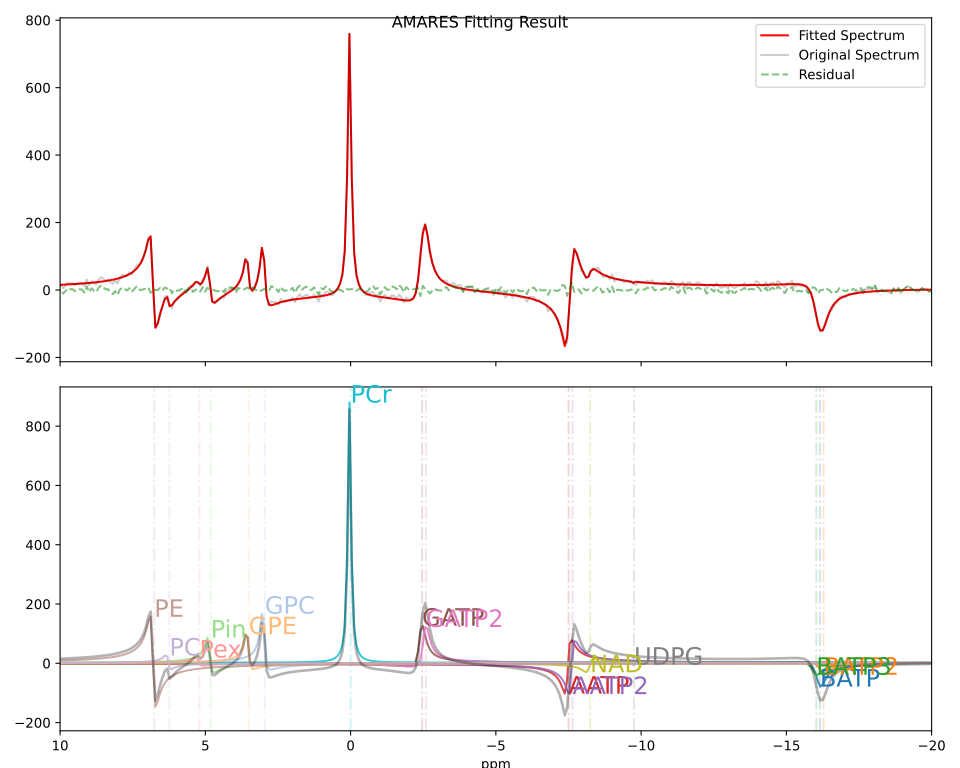
pyAMARES.plotAMARES(fid_parameters=out1, filename='simple_example.svg') # Save plot to SVG
Fitting Result for Example 31P MRS data
Contributing
PyAMARES is currently in its early stages of development and is actively being improved. We welcome contributions to pyAMARES! Please see our CONTRIBUTING.rst guidelines for more information on how to get started.
How to cite
If you use pyAMARES in your research, please cite:
Xu, J.; Vaeggemose, M.; Schulte, R.F.; Yang, B.; Lee, C.-Y.; Laustsen, C.; Magnotta, V.A. PyAMARES, an Open-Source Python Library for Fitting Magnetic Resonance Spectroscopy Data. Diagnostics 2024, 14, 2668. https://doi.org/10.3390/diagnostics14232668
1 maintainer

Download files
Download the file for your platform. If you're not sure which to choose, learn more about installing packages.
Source Distribution
Built Distribution
Filter files by name, interpreter, ABI, and platform.
If you're not sure about the file name format, learn more about wheel file names.
Copy a direct link to the current filters
File details
Details for the file pyamares_xmris-0.5.0.tar.gz.
File metadata
- Download URL: pyamares_xmris-0.5.0.tar.gz
- Upload date:
- Size: 1.0 MB
- Tags: Source
- Uploaded using Trusted Publishing? Yes
- Uploaded via:
twine/6.1.0 CPython/3.13.14
File hashes
| Algorithm | Hash digest | |
|---|---|---|
| SHA256 |
df5daa39b3169fb446f707d774a0a07f87794ceb6f703d9bd72944fb5c1bde35
|
|
| MD5 |
4bb61a369a1d9e485b9b26a52160c896
|
|
| BLAKE2b-256 |
cae456d8085f8d91cd803c3a2665b8eb1349aebe1f3bc9dd5d9d050b5af509c6
|
Provenance
The following attestation bundles were made for pyamares_xmris-0.5.0.tar.gz:
Publisher:
publish.yml on andrewendlinger/pyAMARES
-
Statement:
-
Statement type:
https://in-toto.io/Statement/v1 -
Predicate type:
https://docs.pypi.org/attestations/publish/v1 -
Subject name:
pyamares_xmris-0.5.0.tar.gz -
Subject digest:
df5daa39b3169fb446f707d774a0a07f87794ceb6f703d9bd72944fb5c1bde35 - Sigstore transparency entry: 2507173208
- Sigstore integration time:
-
Permalink:
andrewendlinger/pyAMARES@873d9198f2e963baa3c1c61ce91977850ca5cfd6 -
Branch / Tag:
refs/tags/v0.5.0 - Owner: https://github.com/andrewendlinger
-
Access:
public
-
Token Issuer:
https://token.actions.githubusercontent.com -
Runner Environment:
github-hosted -
Publication workflow:
publish.yml@873d9198f2e963baa3c1c61ce91977850ca5cfd6 -
Trigger Event:
push
-
Statement type:
File details
Details for the file pyamares_xmris-0.5.0-py3-none-any.whl.
File metadata
- Download URL: pyamares_xmris-0.5.0-py3-none-any.whl
- Upload date:
- Size: 277.8 kB
- Tags: Python 3
- Uploaded using Trusted Publishing? Yes
- Uploaded via:
twine/6.1.0 CPython/3.13.14
File hashes
| Algorithm | Hash digest | |
|---|---|---|
| SHA256 |
782bbe00437c738933e5bc9643be3ef87df77ff1a8fdb0dda85807ffa41a7a31
|
|
| MD5 |
2f236b56b7f969c51926a7edf22f5d70
|
|
| BLAKE2b-256 |
3dd8c3cbcf2a00cc73505b9ef0e7a11ab06558484f7c339eecc4c7c27201c1ff
|
Provenance
The following attestation bundles were made for pyamares_xmris-0.5.0-py3-none-any.whl:
Publisher:
publish.yml on andrewendlinger/pyAMARES
-
Statement:
-
Statement type:
https://in-toto.io/Statement/v1 -
Predicate type:
https://docs.pypi.org/attestations/publish/v1 -
Subject name:
pyamares_xmris-0.5.0-py3-none-any.whl -
Subject digest:
782bbe00437c738933e5bc9643be3ef87df77ff1a8fdb0dda85807ffa41a7a31 - Sigstore transparency entry: 2507173416
- Sigstore integration time:
-
Permalink:
andrewendlinger/pyAMARES@873d9198f2e963baa3c1c61ce91977850ca5cfd6 -
Branch / Tag:
refs/tags/v0.5.0 - Owner: https://github.com/andrewendlinger
-
Access:
public
-
Token Issuer:
https://token.actions.githubusercontent.com -
Runner Environment:
github-hosted -
Publication workflow:
publish.yml@873d9198f2e963baa3c1c61ce91977850ca5cfd6 -
Trigger Event:
push
-
Statement type:














