
PyAnatomogram is a python package to annotate and highlight organs and tissues in figures

Project description

Table of contents
[TOC]
What is PyAnatomogram?
PyAnatomogram is a python package to annotate and highlight organs and tissues in figures.
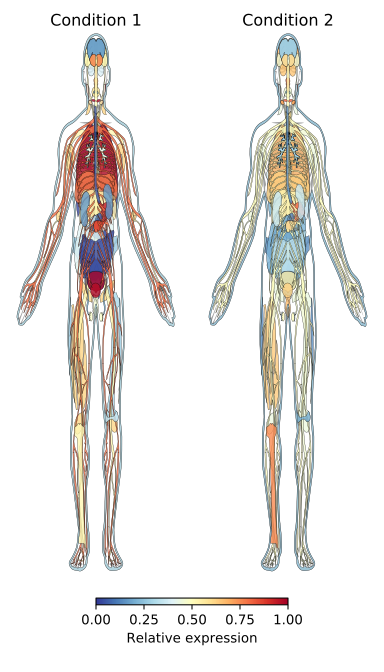
PyAnatomogram parses anatomy svg images from the EBI Gene Expression Group's anatomogram repository and provides a python interface for programmatically annotating the individual organs with colors or other style attributes. See ebi-gene-expression-group anatomogram repository for a for a full list of animal and plant organisms that are supported.
This package was inspired by the gganatogram R-package by Jesper Maag, and was written to provide similar functionality in python and to provide full resolution figures.
Example use - Gallus Gallus (chicken)
Highlight individual organs
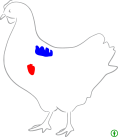
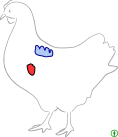
Let's color-code the heart and lung in a chicken image according to some measurement of interest.
import pyanatomogram
anatomogram = pyanatomogram.Anatomogram('gallus_gallus')
anatomogram.set_tissue_style('heart', fill='red')
anatomogram.set_tissue_style('lung', fill='blue')
anatomogram.to_matplotlib()
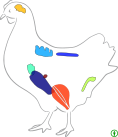
A full list of organs that can be highlighted in the gallus gallus svg image can be obtained by:
import pyanatomogram
anatomogram = pyanatomogram.Anatomogram('gallus_gallus')
anatomogram.get_tissue_names()
Highlight multiple organs with measurement using a matplotlib colormap
Multiple organs can be highlighted by passing a dictionary or a pandas Series to hightlight_tissues. Values will be
mapped to colors using a matplotlib colormap.
import pyanatomogram
anatomogram = pyanatomogram.Anatomogram('gallus_gallus')
anatomogram.highlight_tissues({'heart': 0, 'lung': 2, 'brain': 3, 'colon': 1, 'liver': 4}, cmap='Reds')
anatomogram.to_matplotlib()
Style organs with CSS
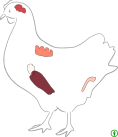
Custom CSS style attributes can be used to tailor the visualization.
import pyanatomogram
anatomogram = pyanatomogram.Anatomogram('gallus_gallus')
anatomogram.set_tissue_style('heart', **{'fill': 'red', 'stroke': 'black', 'stroke-width': 1, 'fill-opacity': 0.8})
anatomogram.set_tissue_style('lung', **{'fill': 'cornflowerblue', 'stroke': 'darkblue', 'stroke-width': 1,
                                        'fill-opacity': 0.5})
anatomogram.to_matplotlib()
Import into matplotlib axes
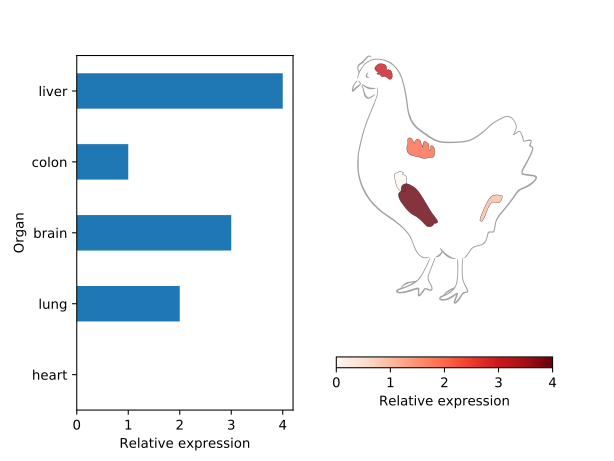
The anatomogram can be imported into a matplotlib figure with the to_matplotlib() method, and combined with
other figure elements in matplotlib.
import matplotlib.pyplot
import pandas
import pyanatomogram

data = pandas.Series({'heart': 0, 'lung': 2, 'brain': 3, 'colon': 1, 'liver': 4})

fig, axes = matplotlib.pyplot.subplots(nrows=1, ncols=2)

data.plot(kind='barh', ax=axes[0])
axes[0].set_xlabel('Relative expression')
axes[0].set_ylabel('Organ')

cmap = matplotlib.cm.Reds
norm = matplotlib.colors.Normalize()
norm.autoscale(data)
anatomogram = pyanatomogram.Anatomogram('gallus_gallus')
anatomogram.highlight_tissues(data.to_dict(), cmap=cmap, norm=norm)
anatomogram.to_matplotlib(ax=axes[1])

matplotlib.pyplot.colorbar(matplotlib.cm.ScalarMappable(norm=norm, cmap=cmap), ax=axes[1],
                           orientation='horizontal', label='Relative expression')
helper for use in seaborn facetgrid
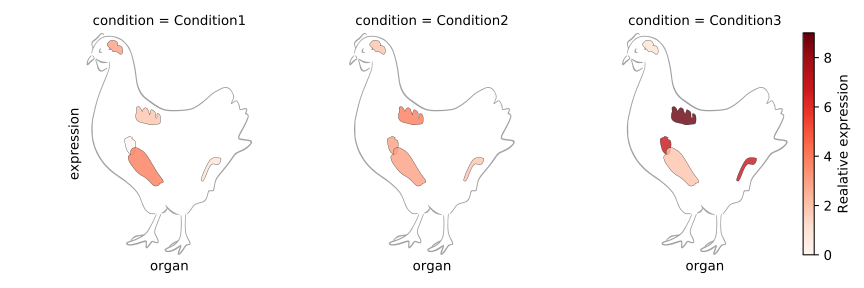
PyAnatomogram comes with a helper function facetgrid_helper() to be used together with the seaborn FacetGrid
class to generate multiple anatomogram subplots faceted by grouping variable(s).
import pandas
import pyanatomogram
import seaborn
import matplotlib

data = pandas.DataFrame({
    'Condition1': {'heart': 0, 'lung': 2, 'brain': 3, 'colon': 1, 'liver': 4},
    'Condition2': {'heart': 3, 'lung': 4, 'brain': 2, 'colon': 2, 'liver': 3},
    'Condition3': {'heart': 7, 'lung': 9, 'brain': 1, 'colon': 7, 'liver': 2},
}).stack().rename_axis(['organ', 'condition']).to_frame('expression')

g = seaborn.FacetGrid(data.reset_index(), col='condition')
cmap = matplotlib.cm.Reds
norm = matplotlib.colors.Normalize()
norm.autoscale(data)
g.map(pyanatomogram.facetgrid_helper, 'organ', 'expression', name='gallus_gallus', cmap=cmap, norm=norm)
g.fig.colorbar(matplotlib.cm.ScalarMappable(norm=norm, cmap=cmap), label='Relative expression')
Generate SVG file
Alternatively to importing the anatomogram into a matplotlib figure, the anatomogram can be saved directly to svg
with the save_svg() method.
import pyanatomogram
anatomogram = pyanatomogram.Anatomogram('gallus_gallus')
anatomogram.set_tissue_style('heart', fill='red')
anatomogram.set_tissue_style('lung', fill='blue')
anatomogram.save_svg('anatomogram.svg')
Release history Release notifications | RSS feed

Download files
Download the file for your platform. If you're not sure which to choose, learn more about installing packages.
Source Distribution
Built Distribution
Filter files by name, interpreter, ABI, and platform.
If you're not sure about the file name format, learn more about wheel file names.
Copy a direct link to the current filters
File details
Details for the file pyanatomogram-0.1.1.tar.gz.
File metadata
- Download URL: pyanatomogram-0.1.1.tar.gz
- Upload date:
- Size: 5.1 MB
- Tags: Source
- Uploaded using Trusted Publishing? No
- Uploaded via: twine/3.6.0 importlib_metadata/4.8.2 pkginfo/1.7.1 requests/2.22.0 requests-toolbelt/0.9.1 tqdm/4.62.3 CPython/3.8.10
File hashes
| Algorithm | Hash digest | |
|---|---|---|
| SHA256 |
7f7caa1ca844de3f5ac749682fc2963d4d73197ec2c312dcd3f4a77de7073919
|
|
| MD5 |
648ad931319717124335525392e43a38
|
|
| BLAKE2b-256 |
80dd9eaf1d49426f7fbc71349ce78da72a07c555d1a0b6642c4ace93d2501c18
|
File details
Details for the file pyanatomogram-0.1.1-py3-none-any.whl.
File metadata
- Download URL: pyanatomogram-0.1.1-py3-none-any.whl
- Upload date:
- Size: 5.1 MB
- Tags: Python 3
- Uploaded using Trusted Publishing? No
- Uploaded via: twine/3.6.0 importlib_metadata/4.8.2 pkginfo/1.7.1 requests/2.22.0 requests-toolbelt/0.9.1 tqdm/4.62.3 CPython/3.8.10
File hashes
| Algorithm | Hash digest | |
|---|---|---|
| SHA256 |
7f751ca15fefc9cba344750f053576c6e2fae3659c9b913c40b45641f75237c7
|
|
| MD5 |
259e810494b51ea355c298f6bdf25120
|
|
| BLAKE2b-256 |
ac2e2620a87b7e018cdf3af6a2a4fa74942815476f844c9bf5d2b1b3d585d8c1
|






