
State-of-the-art speaker diarization toolkit

Project description

pyannote speaker diarization toolkit
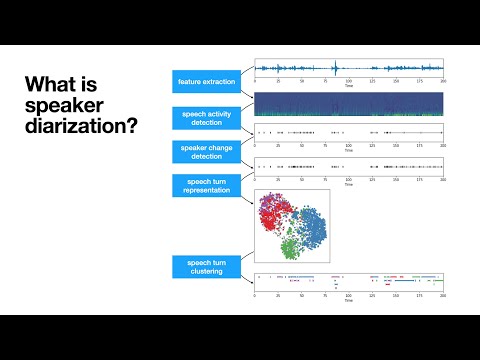
pyannote.audio is an open-source toolkit written in Python for speaker diarization. Based on PyTorch machine learning framework, it comes with state-of-the-art pretrained models and pipelines, that can be further finetuned to your own data for even better performance.
Highlights
- :exploding_head: state-of-the-art performance (see Benchmark)
- :hugs: pretrained pipelines (and models) on :hugs: model hub
- :rocket: built-in support for pyannoteAI premium speaker diarization
- :snake: Python-first API
- :zap: multi-GPU training with pytorch-lightning
community-1 open-source speaker diarization
- Make sure
ffmpegis installed on your machine (needed bytorchcodecaudio decoding library) - Install with
uvadd pyannote.audio(recommended) orpip install pyannote.audio - Accept
pyannote/speaker-diarization-community-1user conditions - Create Huggingface access token at
hf.co/settings/tokens
import torch
from pyannote.audio import Pipeline
from pyannote.audio.pipelines.utils.hook import ProgressHook

# Community-1 open-source speaker diarization pipeline
pipeline = Pipeline.from_pretrained(
    "pyannote/speaker-diarization-community-1",
    token="HUGGINGFACE_ACCESS_TOKEN")

# send pipeline to GPU (when available)
pipeline.to(torch.device("cuda"))

# apply pretrained pipeline (with optional progress hook)
with ProgressHook() as hook:
    output = pipeline("audio.wav", hook=hook)  # runs locally

# print the result
for turn, speaker in output.speaker_diarization:
    print(f"start={turn.start:.1f}s stop={turn.end:.1f}s speaker_{speaker}")
# start=0.2s stop=1.5s speaker_0
# start=1.8s stop=3.9s speaker_1
# start=4.2s stop=5.7s speaker_0
# ...
precision-2 premium speaker diarization
- Create pyannoteAI API key at
dashboard.pyannote.ai - Enjoy free credits!
from pyannote.audio import Pipeline

# Precision-2 premium speaker diarization service
pipeline = Pipeline.from_pretrained(
    "pyannote/speaker-diarization-precision-2", token="PYANNOTEAI_API_KEY")

output = pipeline("audio.wav")  # runs on pyannoteAI servers

# print the result
for turn, speaker in output.speaker_diarization:
    print(f"start={turn.start:.1f}s stop={turn.end:.1f}s {speaker}")
# start=0.2s stop=1.6s SPEAKER_00
# start=1.8s stop=4.0s SPEAKER_01
# start=4.2s stop=5.6s SPEAKER_00
# ...
Visit docs.pyannote.ai to learn about other pyannoteAI features (voiceprinting, confidence scores, ...)
Benchmark
| Benchmark (last updated in 2025-09) | legacy (3.1) |
community-1 |
precision-2 |
|---|---|---|---|
| AISHELL-4 | 12.2 | 11.7 | 11.4 |
| AliMeeting (channel 1) | 24.5 | 20.3 | 15.2 |
| AMI (IHM) | 18.8 | 17.0 | 12.9 |
| AMI (SDM) | 22.7 | 19.9 | 15.6 |
| AVA-AVD | 49.7 | 44.6 | 37.1 |
| CALLHOME (part 2) | 28.5 | 26.7 | 16.6 |
| DIHARD 3 (full) | 21.4 | 20.2 | 14.7 |
| Ego4D (dev.) | 51.2 | 46.8 | 39.0 |
| MSDWild | 25.4 | 22.8 | 17.3 |
| RAMC | 22.2 | 20.8 | 10.5 |
| REPERE (phase2) | 7.9 | 8.9 | 7.4 |
| VoxConverse (v0.3) | 11.2 | 11.2 | 8.5 |
Diarization error rate (in %, the lower, the better)
Compared to the 3.1 legacy pipeline, community-1 brings significant improvement in terms of speaker counting and assignment.
precision-2 premium pipeline further improves accuracy as well as processing speed (in its self-hosted version).
| Benchmark (last updated in 2025-09) | community-1 |
precision-2 |
Speed up |
|---|---|---|---|
| AMI (IHM), ~1h files | 31s per hour of audio | 14s per hour of audio | 2.2x faster |
| DIHARD 3 (full), ~5min files | 37s per hour of audio | 14s per hour of audio | 2.6x faster |
Self-hosted speed on a NVIDIA H100 80GB HBM3
Telemetry
With the optional telemetry feature in pyannote.audio, you can choose to send anonymous usage metrics to help the pyannote team improve the library.
What we track
For each call to Pipeline.from_pretrained({origin}) (or Model.from_pretrained({origin})), we track information about {origin} in the following privacy-preserving way:
- If
{origin}is an officialpyannoteorpyannoteAIpipeline (or model) hosted onHuggingface, we track it as{origin}. - If
{origin}is a pipeline (or model) hosted onHuggingfacefrom any other organization, we track it ashuggingface. - If
{origin}is a path to a local file or directory, we track it aslocal.
We also track the pipeline Python class (e.g. pyannote.audio.pipelines.SpeakerDiarization).
For each file processed with a pipeline, we track
- the file duration in seconds
- the value of
num_speakers,min_speakers, andmax_speakersfor speaker diarization pipelines
We do not track any information that could identify who the user is.
Configuring telemetry
Telemetry can be configured in three ways:
- Using an environment variable
- Within the current Python session only
- Globally across sessions
All of these options will modify the value of the environment variable for consistency.
If the environment variable is not set, pyannote.audio will read the default value in the telemetry config.
The default config can also be changed from Python.
Using environment variable
You can control telemetry by setting the PYANNOTE_METRICS_ENABLED environment variable:
# enable metrics
export PYANNOTE_METRICS_ENABLED=1

# disable metrics
export PYANNOTE_METRICS_ENABLED=0
For current session
To control telemetry for your current Python kernel session:
from pyannote.audio.telemetry import set_telemetry_metrics

# enable metrics for current session
set_telemetry_metrics(True)

# disable metrics for current session
set_telemetry_metrics(False)
Global configuration
To set telemetry preferences that persist across sessions:
from pyannote.audio.telemetry import set_telemetry_metrics

# enable metrics globally
set_telemetry_metrics(True, save_choice_as_default=True)

# disable metrics globally
set_telemetry_metrics(False, save_choice_as_default=True)
Documentation
- Changelog
- Videos
- Speaker diarization, a
loveloss story / JSALT 2025 plenary talk / 60 min - Introduction to speaker diarization / JSALT 2023 summer school / 90 min
- Speaker segmentation model / Interspeech 2021 / 3 min
- First release of pyannote.audio / ICASSP 2020 / 8 min
- Speaker diarization, a
- Blog
- Community contributions (not maintained by the core team)
- 2024-04-05 > Offline speaker diarization (speaker-diarization-3.1) by Simon Ottenhaus
- 2024-09-24 > Evaluating
pyannotepretrained speech separation pipelines by Clément Pagés
- Tutorials
Those tutorials were written for older versions of pyannote.audio and should be updated. Interested in working for pyannoteAI as a community manager or developer advocate? This might be a nice place to start!
Citations
If you use pyannote.audio please use the following citations:
@inproceedings{Plaquet23,
  author={Alexis Plaquet and Hervé Bredin},
  title={{Powerset multi-class cross entropy loss for neural speaker diarization}},
  year=2023,
  booktitle={Proc. INTERSPEECH 2023},
}
@inproceedings{Bredin23,
  author={Hervé Bredin},
  title={{pyannote.audio 2.1 speaker diarization pipeline: principle, benchmark, and recipe}},
  year=2023,
  booktitle={Proc. INTERSPEECH 2023},
}
Development
The commands below will setup pre-commit hooks and packages needed for developing the pyannote.audio library.
pip install -e .[dev,testing]
pre-commit install
Test
pytest
Release history Release notifications | RSS feed


Download files
Download the file for your platform. If you're not sure which to choose, learn more about installing packages.
Source Distributions
Built Distribution
Filter files by name, interpreter, ABI, and platform.
If you're not sure about the file name format, learn more about wheel file names.
Copy a direct link to the current filters
File details
Details for the file pyannote_audio_ng-5.0.0-py3-none-any.whl.
File metadata
- Download URL: pyannote_audio_ng-5.0.0-py3-none-any.whl
- Upload date:
- Size: 892.6 kB
- Tags: Python 3
- Uploaded using Trusted Publishing? No
- Uploaded via: uv/0.7.1
File hashes
| Algorithm | Hash digest | |
|---|---|---|
| SHA256 |
1a87ad1f550ff05eea9f75bc687940ab22b938076688738c6a56dcd80676b3ce
|
|
| MD5 |
c7a4e00520a517a74b0fb01788d8cec3
|
|
| BLAKE2b-256 |
49aadfb0cd24cf33c39736ef0b1d276fcdb603bace655e5216a872fec0327cd7
|






