

Installation
$ pip install pyannote.pipeline
Tutorial
In this tutorial, we are going to tune hyper-parameters of a clustering pipeline.
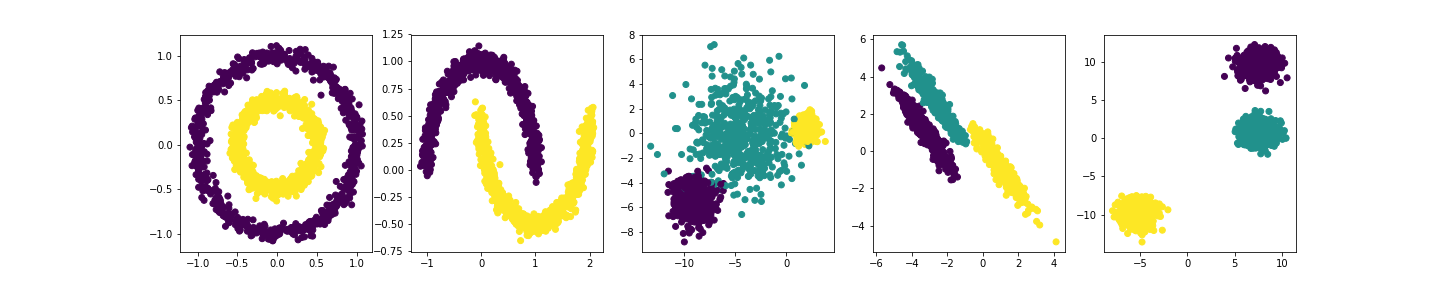
We start by gathering a "training set" of 5 different clustering datasets.
>>> # shamelessly stolen from https://scikit-learn.org/stable/auto_examples/cluster/plot_cluster_comparison.html
...
... import numpy as np
>>> from sklearn import datasets
...
>>> np.random.seed(0)
...
>>> n_samples = 1500
>>> noisy_circles = datasets.make_circles(n_samples=n_samples, factor=.5,
...                                       noise=.05)
>>> noisy_moons = datasets.make_moons(n_samples=n_samples, noise=.05)
>>> blobs = datasets.make_blobs(n_samples=n_samples, random_state=8)
...
>>> # Anisotropicly distributed data
... random_state = 170
>>> X, y = datasets.make_blobs(n_samples=n_samples, random_state=random_state)
>>> transformation = [[0.6, -0.6], [-0.4, 0.8]]
>>> X_aniso = np.dot(X, transformation)
>>> aniso = (X_aniso, y)
...
>>> # blobs with varied variances
... varied = datasets.make_blobs(n_samples=n_samples,
...                              cluster_std=[1.0, 2.5, 0.5],
...                              random_state=random_state)
...
>>> datasets = [noisy_circles, noisy_moons, varied, aniso, blobs]
...
>>> figsize(20, 4)
>>> for d, dataset in enumerate(datasets):
...     X, y = dataset
...     subplot(1, len(datasets), d + 1)
...     scatter(X[:, 0], X[:, 1], c=y)
>>> savefig('README_datasets.png')
<Figure size 1440x288 with 5 Axes>
Then, we define the clustering pipeline (including its set of hyper-parameters and the objective function).
>>> from pyannote.pipeline import Pipeline
>>> from pyannote.pipeline.parameter import Uniform
>>> from pyannote.pipeline.parameter import Integer
>>> from sklearn.cluster import DBSCAN
>>> from sklearn.metrics import v_measure_score
...
>>> # a pipeline should inherit from `pyannote.pipeline.Pipeline`
... class SimplePipeline(Pipeline):
...
...     # this pipeline has two hyper-parameters.
...     # `eps` follows a uniform distribution between 0 and 10
...     # `min_samples` is a random integer between 1 and 20
...     def __init__(self):
...         super().__init__()
...         self.eps = Uniform(0, 10)
...         self.min_samples = Integer(1, 20)
...
...     # `initialize` should be used to setup the pipeline. it
...     # is called every time a new set of hyper-parameters is
...     # tested.
...     def initialize(self):
...         # this pipeline relies on scikit-learn DBSCAN.
...         self._dbscan = DBSCAN(eps=self.eps,
...                               min_samples=self.min_samples)
...
...     # this is where the pipeline is applied to a dataset
...     def __call__(self, dataset):
...         X = dataset[0]
...         y_pred = self._dbscan.fit_predict(X)
...         return y_pred
...
...     # this is the loss we are trying to minimize
...     def loss(self, dataset, y_pred):
...         # we rely on sklearn v_measure_score
...         y_true = dataset[1]
...         return 1. - v_measure_score(y_true, y_pred)
...
>>> pipeline = SimplePipeline()
This is where the hyper-parameter optimization actually happens.
>>> !rm dbscan.db
>>> # we initialize an optimizer (that store its trials in SQLite file dbscan.db)
... from pyannote.pipeline import Optimizer
>>> optimizer = Optimizer(pipeline, db=Path('dbscan.db'))
>>> # we run 100 optimization iterations and display the best set of hyper-parameters
... optimizer.tune(datasets, n_iterations=100)
>>> optimizer.best_params
{'eps': 0.1912781975831715, 'min_samples': 18}
Multi-objective optimization
A pipeline can optimize several objectives by returning one loss value and one direction per objective:
class TradeoffPipeline(SimplePipeline):
    def loss(self, dataset, y_pred):
        y_true = dataset[1]
        return 1.0 - v_measure_score(y_true, y_pred), np.unique(y_pred).size

    def get_direction(self):
        return "minimize", "minimize"


multi_optimizer = Optimizer(TradeoffPipeline())
multi_optimizer.tune(datasets, n_iterations=100)

# each entry contains "number", "values", and nested "params"
for point in multi_optimizer.pareto_front:
    print(point["values"], point["params"])
Alternatively, get_metric can return a sequence of pyannote.metrics
instances. get_direction must return the same number of directions. Scalar
pipelines keep using best_loss, best_params, and best_pipeline unchanged.
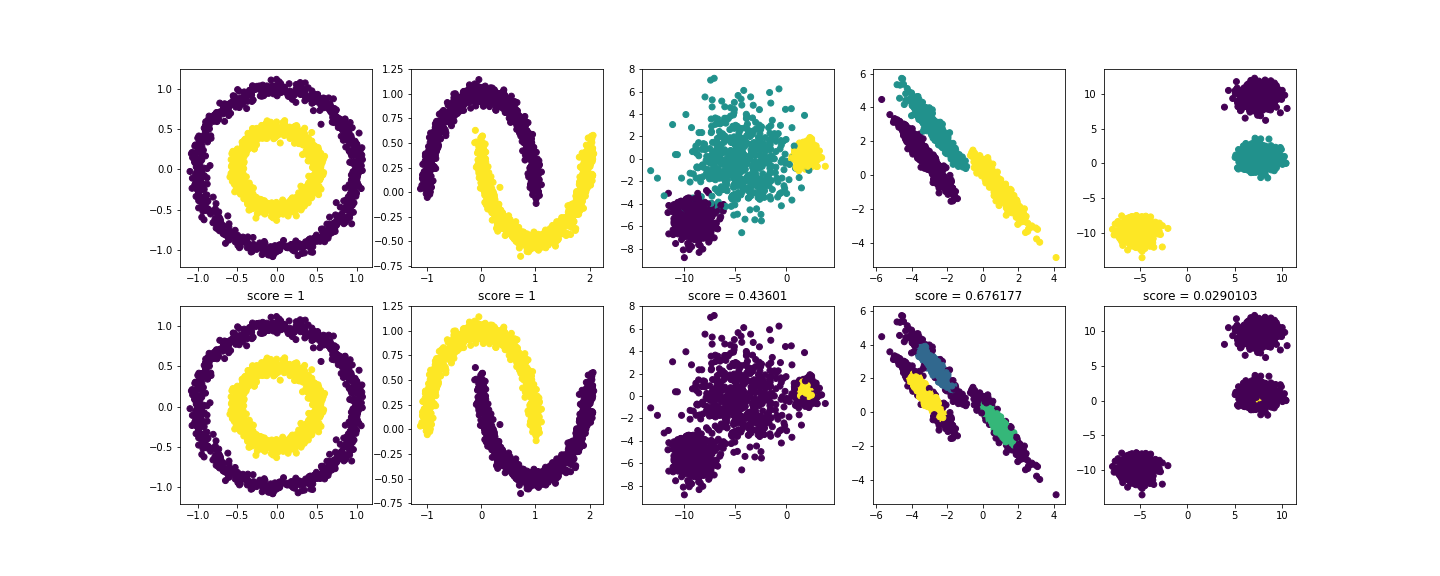
We then compare expected (upper row) and actual (lower row) clustering results with the best set of hyper-parameters
>>> best_pipeline = optimizer.best_pipeline
>>> # equivalent to
... # best_pipeline = pipeline.instantiate(optimizer.best_params)
...
... figsize(20, 8)
>>> for d, dataset in enumerate(datasets):
...     X, y_true = dataset
...     y_pred = best_pipeline(dataset)
...     subplot(2, len(datasets), d + 1)
...     scatter(X[:, 0], X[:, 1], c=y_true)
...     subplot(2, len(datasets), d + 1 + len(datasets))
...     scatter(X[:, 0], X[:, 1], c=y_pred)
...     title(f'score = {v_measure_score(y_true, y_pred):g}')
>>> savefig('README_results.png')
<Figure size 1440x576 with 10 Axes>
Documentation
pyannote.pipeline can do much more than that (including composing pipelines and freezing hyper-parameters).
See pyannote.audio.pipeline for advanced examples.
1 maintainer

Metadata
1 maintainer
Release files for pyannote-pipeline 4.1.0
For a detailed explanation of source distributions (sdists) and built distributions (wheels), please see the package formats documentation.
Source distribution (sdist)
| File | Size | Uploaded | |
|---|---|---|---|
| pyannote_pipeline-4.1.0.tar.gz | 1.1 MB | Details |
Built distribution (wheel)
| File | Interpreter | ABI | Platform | Reset |
|---|---|---|---|---|
| pyannote_pipeline-4.1.0-py3-none-any.whl | Python 3 | none | any | Details |
Total release size: 1.1 MB
Release files / pyannote_pipeline-4.1.0.tar.gz
| Download URL | pyannote_pipeline-4.1.0.tar.gz |
|---|---|
| Size | 1.1 MB |
| Tags | Source |
|
SHA-256 checksum How to use checksums |
b5a7bc909ce6d175a6cf5f860dac6f8ef9d231437b506b0cfaed856bb0c7f325
|
|
BLAKE2b-256 checksum How to use checksums |
0c9292f12076f3aefb346b192c6424067718ca46913d4c059743685dafc96228
|
| Upload date | |
|
Uploaded using Trusted Publishing? What is trusted publishing? |
Yes |
| Uploaded via |
uv/0.13.1 {"installer":{"name":"uv","version":"0.13.1","subcommand":["publish"]},"python":null,"implementation":{"name":null,"version":null},"distro":{"name":"Ubuntu","version":"24.04","id":"noble","libc":null},"system":{"name":null,"release":null},"cpu":null,"openssl_version":null,"setuptools_version":null,"rustc_version":null,"ci":true}
|
Release files / pyannote_pipeline-4.1.0-py3-none-any.whl
| Download URL | pyannote_pipeline-4.1.0-py3-none-any.whl |
|---|---|
| Size | 23.9 kB |
| Tags | Python 3 |
|
SHA-256 checksum How to use checksums |
0f0b303a5b7cea638ce2266f14a2ea539b8bb5441e336539f878cf8d8fb78dd6
|
|
BLAKE2b-256 checksum How to use checksums |
a24186644f9e0beee6e39758ca192283eb24adcd890231855d641e6a97b19366
|
| Upload date | |
|
Uploaded using Trusted Publishing? What is trusted publishing? |
Yes |
| Uploaded via |
uv/0.13.1 {"installer":{"name":"uv","version":"0.13.1","subcommand":["publish"]},"python":null,"implementation":{"name":null,"version":null},"distro":{"name":"Ubuntu","version":"24.04","id":"noble","libc":null},"system":{"name":null,"release":null},"cpu":null,"openssl_version":null,"setuptools_version":null,"rustc_version":null,"ci":true}
|














