


PyAstar2D
This is a very simple C++ implementation of the A* algorithm for pathfinding on a two-dimensional grid. The solver itself is implemented in C++, but is callable from Python. This combines the speed of C++ with the convenience of Python.
I have not done any formal benchmarking, but the solver finds the solution to a 1802 by 1802 maze in 0.29s and a 4008 by 4008 maze in 0.83s when running on my nine-year-old Intel(R) Core(TM) i7-2630QM CPU @ 2.00GHz. See Example Results for more details.
See src/cpp/astar.cpp for the core C++ implementation of the A* shortest
path search algorithm, src/pyastar2d/astar_wrapper.py for the Python wrapper
and examples/example.py for example usage.
When determining legal moves, 4-connectivity is the default, but it is possible
to set allow_diagonal=True for 8-connectivity.
Installation
Instructions for installing pyastar2d are given below.
From PyPI
The easiest way to install pyastar2d is directly from the Python package index:
pip install pyastar2d
From source
You can also install pyastar2d by cloning this repository and building it
yourself. If running on Linux or MacOS, simply run
pip install .
from the root directory. If you are using Windows you may have to install Cython manually first:
pip install Cython
pip install .
To check that everything worked, run the example:
python examples/example.py
As a dependency
Include pyastar2d in your requirements.txt to install from pypi, or add
this line to requirements.txt:
pyastar2d @ git+git://github.com/hjweide/pyastar2d.git@master#egg=pyastar2d
Usage
A simple example is given below:
import numpy as np
import pyastar2d
# The minimum cost must be 1 for the heuristic to be valid.
# The weights array must have np.float32 dtype to be compatible with the C++ code.
weights = np.array([[1, 3, 3, 3, 3],
                    [2, 1, 3, 3, 3],
                    [2, 2, 1, 3, 3],
                    [2, 2, 2, 1, 3],
                    [2, 2, 2, 2, 1]], dtype=np.float32)
# The start and goal coordinates are in matrix coordinates (i, j).
path = pyastar2d.astar_path(weights, (0, 0), (4, 4), allow_diagonal=True)
print(path)
# The path is returned as a numpy array of (i, j) coordinates.
array([[0, 0],
       [1, 1],
       [2, 2],
       [3, 3],
       [4, 4]])
Note that all grid points are represented as (i, j) coordinates. An example
of using pyastar2d to solve a maze is given in examples/maze_solver.py.
Example Results
To test the implementation, I grabbed two nasty mazes from Wikipedia. They are
included in the mazes directory, but are originally from here:
Small and
Large.
I load the .png files as grayscale images, and set the white pixels to 1
(open space) and the black pixels to INF (walls).
To run the examples specify the input and output files using the --input and
--output flags. For example, the following commands will solve the small and
large mazes:
python examples/maze_solver.py --input mazes/maze_small.png --output solns/maze_small.png
python examples/maze_solver.py --input mazes/maze_large.png --output solns/maze_large.png
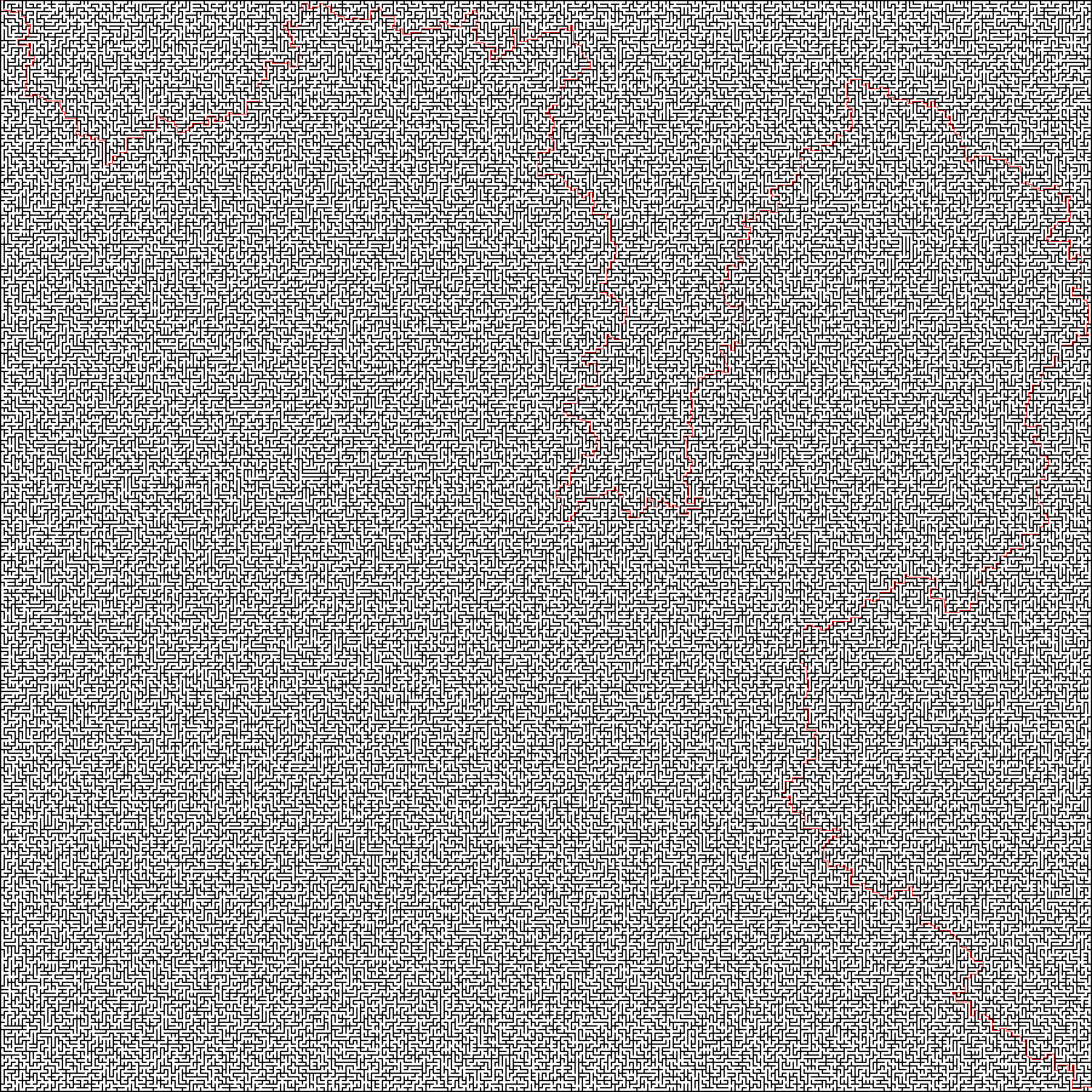
Small Maze (1802 x 1802):
time python examples/maze_solver.py --input mazes/maze_small.png --output solns/maze_small.png
Loaded maze of shape (1802, 1802) from mazes/maze_small.png
Found path of length 10032 in 0.292794s
Plotting path to solns/maze_small.png
Done

real	0m1.214s
user	0m1.526s
sys	0m0.606s
The solution found for the small maze is shown below:
Large Maze (4002 x 4002):
time python examples/maze_solver.py --input mazes/maze_large.png --output solns/maze_large.png
Loaded maze of shape (4002, 4002) from mazes/maze_large.png
Found path of length 783737 in 0.829181s
Plotting path to solns/maze_large.png
Done

real	0m29.385s
user	0m29.563s
sys	0m0.728s
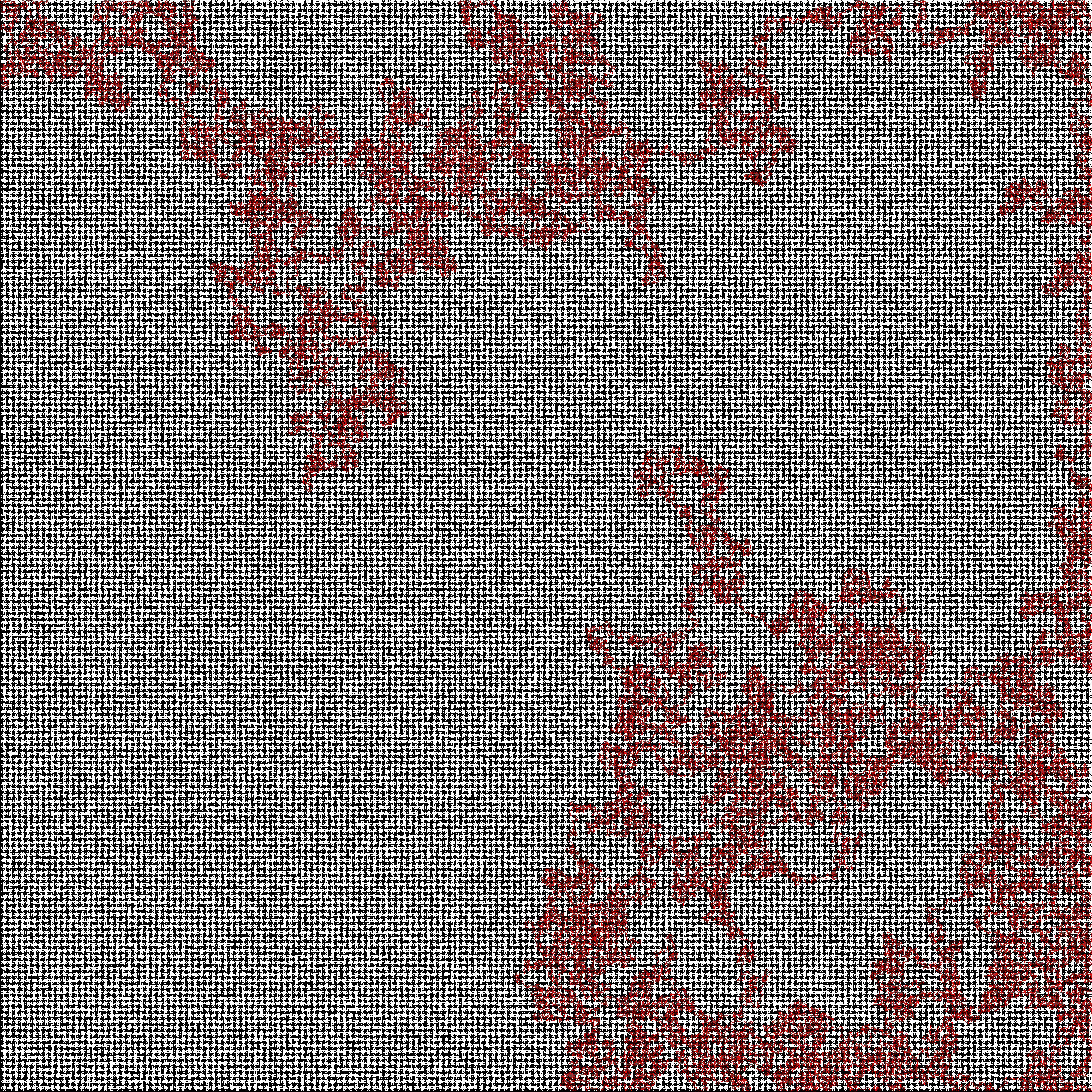
The solution found for the large maze is shown below:
Motivation
I recently needed an implementation of the A* algorithm in Python to find the
shortest path between two points in a cost matrix representing an image.
Normally I would simply use networkx, but for
graphs with millions of nodes the overhead incurred to construct the graph can
be expensive. Considering that I was only interested in graphs that may be
represented as two-dimensional grids, I decided to implement it myself using
this special structure of the graph to make various optimizations.
Specifically, the graph is represented as a one-dimensional array because there
is no need to store the neighbors. Additionally, the lookup tables for
previously-explored nodes (their costs and paths) are also stored as
one-dimensional arrays. The implication of this is that checking the lookup
table can be done in O(1), at the cost of using O(n) memory. Alternatively, we
could store only the nodes we traverse in a hash table to reduce the memory
usage. Empirically I found that replacing the one-dimensional array with a
hash table (std::unordered_map) was about five times slower.
Tests
The default installation does not include the dependencies necessary to run the tests. To install these, first run
pip install -r requirements-dev.txt
before running
pytest
The tests are fairly basic but cover some of the more common pitfalls. Pull requests for more extensive tests are welcome.
Code Formatting
It's recommended that you use pre-commit to ensure linting procedures are
run on any code you write. See pre-commit.com for
more information.
Reference pre-commit's installation instructions
for software installation on your OS/platform. After you have the software
installed, run pre-commit install on the command line. Now every time you commit
to this project's code base the linter procedures will automatically run over the
changed files. To run pre-commit on files preemtively from the command line use:
pip install -r requirements-dev.txt
pre-commit run --all-files
The code base has been formatted by Black.
Furthermore, try to conform to PEP8. You should set up your preferred editor to
use flake8 as its Python linter, but pre-commit will ensure compliance before a
git commit is completed. This will use the flake8 configuration within
.flake8, which ignores several errors and stylistic considerations.
References
1 maintainer

Download files
Download the file for your platform. If you're not sure which to choose, learn more about installing packages.
Source Distribution
Built Distributions
Filter files by name, interpreter, ABI, and platform.
If you're not sure about the file name format, learn more about wheel file names.
Copy a direct link to the current filters
File details
Details for the file pyastar2d-1.1.4.tar.gz.
File metadata
- Download URL: pyastar2d-1.1.4.tar.gz
- Upload date:
- Size: 4.6 MB
- Tags: Source
- Uploaded using Trusted Publishing? No
- Uploaded via:
twine/6.1.0 CPython/3.13.7
File hashes
| Algorithm | Hash digest | |
|---|---|---|
| SHA256 |
3f2716cf22e28f8fbec96de0419ce544f56d8e9f6195c1fc5f1c533f88e93a64
|
|
| MD5 |
90caf576e040488a6b7d021a02983866
|
|
| BLAKE2b-256 |
226646e5d5100815d5b7387389a50bc6d073b40025992646a14557aa9ceedd4b
|
File details
Details for the file pyastar2d-1.1.4-cp39-abi3-win_amd64.whl.
File metadata
- Download URL: pyastar2d-1.1.4-cp39-abi3-win_amd64.whl
- Upload date:
- Size: 15.4 kB
- Tags: CPython 3.9+, Windows x86-64
- Uploaded using Trusted Publishing? No
- Uploaded via:
twine/6.1.0 CPython/3.13.7
File hashes
| Algorithm | Hash digest | |
|---|---|---|
| SHA256 |
8e36cdfa174ed280edb9780d6aff43a8c470194ddb365fcebb76630952b8b102
|
|
| MD5 |
60cebc8a8b8a31e7708843b0abd056e8
|
|
| BLAKE2b-256 |
9acde3d565782c122dab1949675c5b6cafe7e6f24a0aff4e8bf756584226cae2
|
File details
Details for the file pyastar2d-1.1.4-cp39-abi3-win32.whl.
File metadata
- Download URL: pyastar2d-1.1.4-cp39-abi3-win32.whl
- Upload date:
- Size: 14.8 kB
- Tags: CPython 3.9+, Windows x86
- Uploaded using Trusted Publishing? No
- Uploaded via:
twine/6.1.0 CPython/3.13.7
File hashes
| Algorithm | Hash digest | |
|---|---|---|
| SHA256 |
1be597e6462166456851cb2133815eb8a8f2336cf754487916e3ff4f1c2a4716
|
|
| MD5 |
0dd897bdc2f8f2ddaf3258874eb052c5
|
|
| BLAKE2b-256 |
fe635abf2e70e3383d8acddd0810d3ee0e086d3294464b3299e8da6b30348787
|
File details
Details for the file pyastar2d-1.1.4-cp39-abi3-musllinux_1_2_x86_64.whl.
File metadata
- Download URL: pyastar2d-1.1.4-cp39-abi3-musllinux_1_2_x86_64.whl
- Upload date:
- Size: 1.1 MB
- Tags: CPython 3.9+, musllinux: musl 1.2+ x86-64
- Uploaded using Trusted Publishing? No
- Uploaded via:
twine/6.1.0 CPython/3.13.7
File hashes
| Algorithm | Hash digest | |
|---|---|---|
| SHA256 |
d8ad689ff210e55a3880c8d89bc06be9337c75659028bb39d55219945bdabd60
|
|
| MD5 |
1dd2381e05cdb85060cb117c56344672
|
|
| BLAKE2b-256 |
8231c1ae991904df892392801a26ff06eedd7ce6b4b208481f4babfd291d0342
|
File details
Details for the file pyastar2d-1.1.4-cp39-abi3-musllinux_1_2_aarch64.whl.
File metadata
- Download URL: pyastar2d-1.1.4-cp39-abi3-musllinux_1_2_aarch64.whl
- Upload date:
- Size: 1.0 MB
- Tags: CPython 3.9+, musllinux: musl 1.2+ ARM64
- Uploaded using Trusted Publishing? No
- Uploaded via:
twine/6.1.0 CPython/3.13.7
File hashes
| Algorithm | Hash digest | |
|---|---|---|
| SHA256 |
0e05a341d596c6f7945afb863f5e1ac287bf6cfdfd2f3cb9d8ae860cde83bc93
|
|
| MD5 |
f3b69e869bb5d8aef4c3cc9678f93d26
|
|
| BLAKE2b-256 |
0fdb55247b5d3d1e27fda2c792c6324adeb2745cadaecc62a1e8802fc27e20d4
|
File details
Details for the file pyastar2d-1.1.4-cp39-abi3-manylinux_2_24_x86_64.manylinux_2_28_x86_64.whl.
File metadata
- Download URL: pyastar2d-1.1.4-cp39-abi3-manylinux_2_24_x86_64.manylinux_2_28_x86_64.whl
- Upload date:
- Size: 56.7 kB
- Tags: CPython 3.9+, manylinux: glibc 2.24+ x86-64, manylinux: glibc 2.28+ x86-64
- Uploaded using Trusted Publishing? No
- Uploaded via:
twine/6.1.0 CPython/3.13.7
File hashes
| Algorithm | Hash digest | |
|---|---|---|
| SHA256 |
73f2dba4abd972188ed93f19290a215f260b0f9780d7de53398777f9b56f1b7b
|
|
| MD5 |
5d881d7524add9cbb119f0800045b9b4
|
|
| BLAKE2b-256 |
93cf3dc781f0d23b67e38b85a3c3e046c38f30dd83d8fb47b419e08f14010dec
|
File details
Details for the file pyastar2d-1.1.4-cp39-abi3-manylinux_2_24_aarch64.manylinux_2_28_aarch64.whl.
File metadata
- Download URL: pyastar2d-1.1.4-cp39-abi3-manylinux_2_24_aarch64.manylinux_2_28_aarch64.whl
- Upload date:
- Size: 56.6 kB
- Tags: CPython 3.9+, manylinux: glibc 2.24+ ARM64, manylinux: glibc 2.28+ ARM64
- Uploaded using Trusted Publishing? No
- Uploaded via:
twine/6.1.0 CPython/3.13.7
File hashes
| Algorithm | Hash digest | |
|---|---|---|
| SHA256 |
5b0d05b582ac262ef47ec680b7a6e05f59df0b71765e4c1725da1a16b7079220
|
|
| MD5 |
c3b7ca27e1cbfffff23e16720eef4dbe
|
|
| BLAKE2b-256 |
6a0182f470e1a27e8069c70ad2dc80efc5f4e7be5c65096ca4af467d0b89b113
|
File details
Details for the file pyastar2d-1.1.4-cp39-abi3-macosx_11_0_arm64.whl.
File metadata
- Download URL: pyastar2d-1.1.4-cp39-abi3-macosx_11_0_arm64.whl
- Upload date:
- Size: 12.7 kB
- Tags: CPython 3.9+, macOS 11.0+ ARM64
- Uploaded using Trusted Publishing? No
- Uploaded via:
twine/6.1.0 CPython/3.13.7
File hashes
| Algorithm | Hash digest | |
|---|---|---|
| SHA256 |
9dfe07c6f8074bc9f3634ca5afd054f34f0cad593396eda9a9b83bf8752439b7
|
|
| MD5 |
2e9fae376bad81f842373d2a8dfbf698
|
|
| BLAKE2b-256 |
eee26ba4d65d869449f8d80d8ba83b0fb470a145d0f4fba9397fe5dab923f67c
|
File details
Details for the file pyastar2d-1.1.4-cp39-abi3-macosx_10_9_x86_64.whl.
File metadata
- Download URL: pyastar2d-1.1.4-cp39-abi3-macosx_10_9_x86_64.whl
- Upload date:
- Size: 12.2 kB
- Tags: CPython 3.9+, macOS 10.9+ x86-64
- Uploaded using Trusted Publishing? No
- Uploaded via:
twine/6.1.0 CPython/3.13.7
File hashes
| Algorithm | Hash digest | |
|---|---|---|
| SHA256 |
bd2a2e69616862ea1a99c36ddc4f2bf115b88304eaf46f6ad7a4e5629962fdc3
|
|
| MD5 |
2b238482cfe23ac8ee1d58f3cba9e05d
|
|
| BLAKE2b-256 |
1b86af9217b498ec34f1af0f2e91d707441a14562e927775a150c60c53c7c28b
|
















