
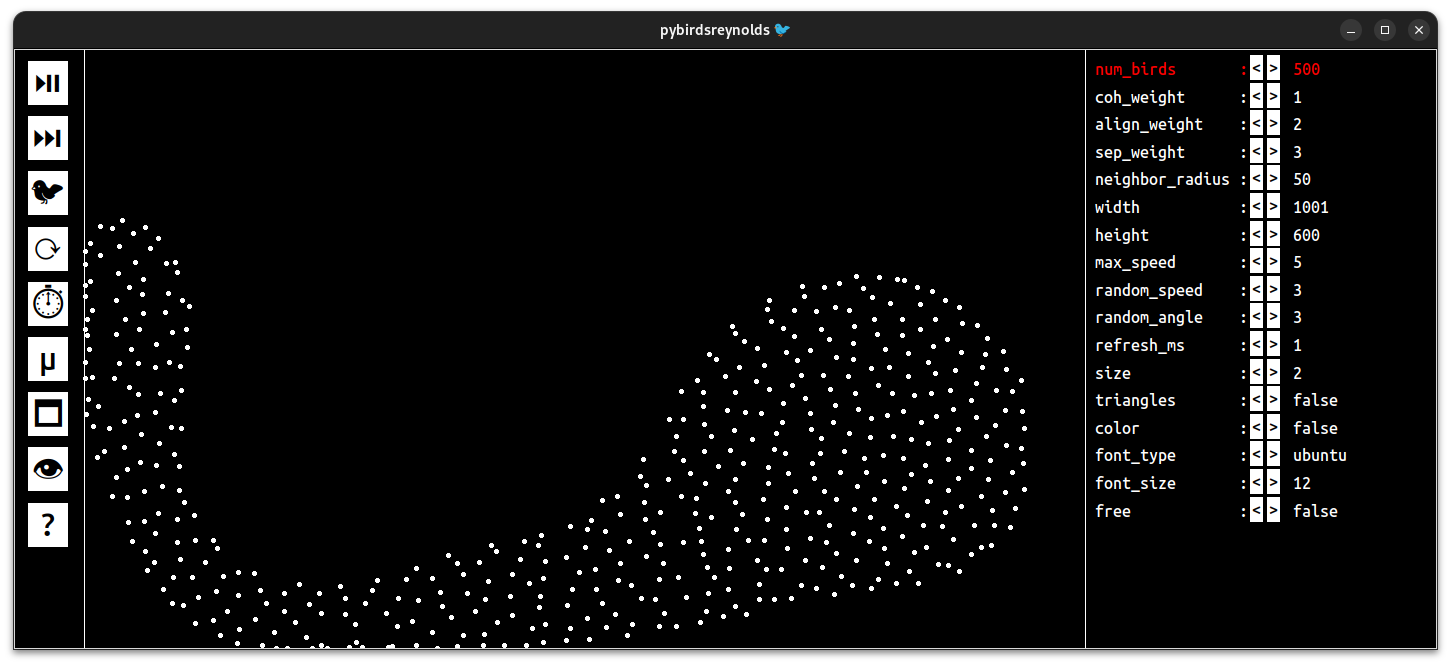
this project is an interactive simulation of the Reynolds Boids model, implemented in Python with Tkinter. It allows you to visualize and experiment with the collective behavior of a flock of virtual birds by adjusting parameters such as cohesion, alignment, separation, speed, and neighborhood radius in real time. The interface also provides several controls (pause, reset, new generation, FPS display, etc.) to easily explore the dynamics of the system.

Project description
pybirdsreynolds
This project is an interactive simulation of the Reynolds Boids model, implemented in Python with Tkinter. It allows you to visualize and experiment with the collective behavior of a flock of virtual birds by adjusting parameters such as cohesion, alignment, separation, speed, and neighborhood radius in real time. The interface also provides several controls (pause, reset, new generation, FPS display, etc.) to easily explore the dynamics of the system.
Installation/Upgrade/Use
Prerequisites
- Install Python 3 on your system
- Install pipx on your system
- Install git on your system
Why use pipx?
pipx installs Python applications in isolated environments, which prevents dependency conflicts with your system or other projects.
It also allows you to run CLI tools globally without polluting your Python installation.
This makes it safer and cleaner than using pip or pip3 for installing standalone tools.
Clean old versions
If you have installed an old version with pip or pip3 (depending on your system), use one of the following commands:
pip3 uninstall pybirdsreynolds
pip uninstall pybirdsreynolds
pip3 uninstall pybirdsreynolds --break-system-packages
pip uninstall pybirdsreynolds --break-system-packages
Installation
pipx install pybirdsreynolds
Upgrade
pipx upgrade pybirdsreynolds
pipx reinstall pybirdsreynolds #to force update dependencies
This command upgrades the application to the latest version and also updates all its dependencies.
Uninstall
pipx uninstall pybirdsreynolds
Use
pybirdsreynolds
- If you obtain error about tk, install python3-tk
sudo apt install python3-tk #for ubuntu
sudo pacman -S tk #for arch
brew install python-tk #for mac
Documentation and options
pybirdsreynolds --help
Release history Release notifications | RSS feed


Download files
Download the file for your platform. If you're not sure which to choose, learn more about installing packages.
Source Distribution
Built Distribution
Filter files by name, interpreter, ABI, and platform.
If you're not sure about the file name format, learn more about wheel file names.
Copy a direct link to the current filters
File details
Details for the file pybirdsreynolds-3.0.7.tar.gz.
File metadata
- Download URL: pybirdsreynolds-3.0.7.tar.gz
- Upload date:
- Size: 19.1 kB
- Tags: Source
- Uploaded using Trusted Publishing? No
- Uploaded via: twine/6.1.0 CPython/3.12.3
File hashes
| Algorithm | Hash digest | |
|---|---|---|
| SHA256 |
d9e812e7e43aadbd7cc1d56c68941ae9d2dd77c9aa6525b3dd3d75c44c74da9b
|
|
| MD5 |
533c57ea3510b2668641ef5418bfedca
|
|
| BLAKE2b-256 |
151cb0de5936d1c8fd6ae1f176ac94d94b3f4235a6bacd9b92ac1dc450d35de3
|
File details
Details for the file pybirdsreynolds-3.0.7-py3-none-any.whl.
File metadata
- Download URL: pybirdsreynolds-3.0.7-py3-none-any.whl
- Upload date:
- Size: 21.7 kB
- Tags: Python 3
- Uploaded using Trusted Publishing? No
- Uploaded via: twine/6.1.0 CPython/3.12.3
File hashes
| Algorithm | Hash digest | |
|---|---|---|
| SHA256 |
740430c1629212b0e7369189871eae77ff28471b06f554ab50b7f48ee4c563b8
|
|
| MD5 |
1b8b7a7c5c92d6b0f3972800b6899dea
|
|
| BLAKE2b-256 |
c9f60b5f1b6af0057f80b6dbfed442d4be21647c3d7b519a0a58e453012c2f39
|






