
pyblish-simple
A Pyblish GUI trying to be more 'intuitive' than pyblish lite & pyblish-qml
Limitations
⚠️ It was designed for validating instances, and currently doesn't show context, export or publish plugins.
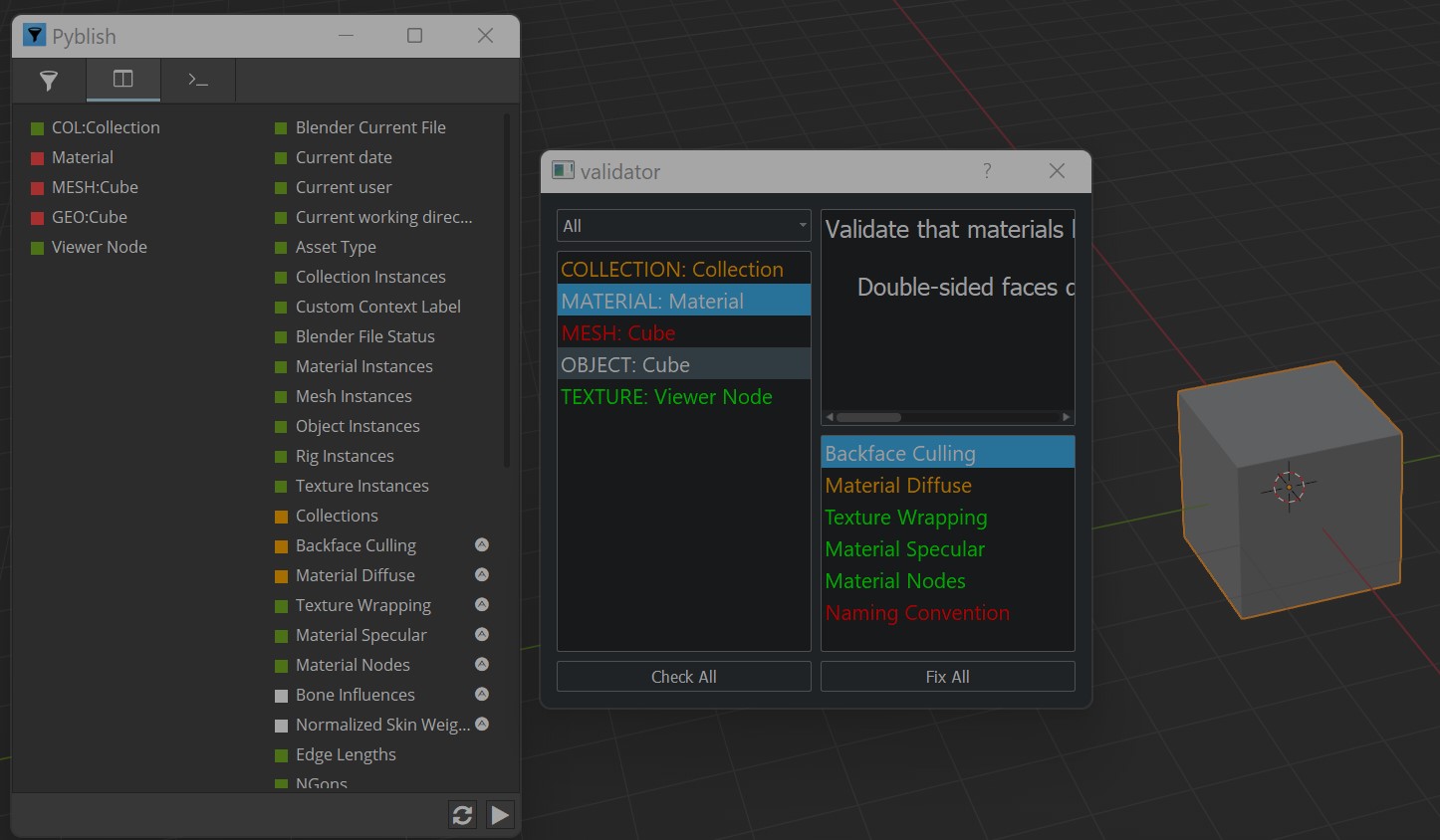
How to use
Users
- Collected instances show on the left
- Select an instance to show relevant validations in the bottom right
- Select a validation to show it's description in the top right
- right click an instance or plugin to show it's actions in the menu.
colors:
- 🟢 green: the validation passed
- 🟠 orange: a warning, soft fail, publishing is allowed to continue
- 🔴 red: an error, hard fail, publishing is not allowed to continue
- ⚪ white: validation did not run
- ⚫ grey: validation is disabled but registered (NOT YET IMPLEMENTED)
Devs
- to hook up the
fix allbutton: Give your plugins the attributefix.
Pyblish simple assumes this is a pyblish action & runs it
# code in pyblish simple
if hasattr(plugin, 'fix'):
    pyblish_action = plugin.fix
    pyblish_action.process(self=pyblish_action, context=self.context, plugin=plugin)
- avoid context plugins, and use instance plugins instead.
install
- copy paste the pyblish_simple module
- install the dependencies
Qt.py& optionallyPyQt5_stylesheets
to launch the UI, run:
import pyblish_simple
pyblish_simple.show()
What's pyblish simple & why was it developed?
The standard UI for Pyblish confused artists:
- it shows which validation failed, but not which instance failed.
e.g. Pyblish flags that a vertex is incorrect, but not which one. The artist is frustrated, because they don't know which vertex to fix. - it shows a lot of info, overwhelming non-technical users. Artists don't find it intuitive.
To solve this, pyblish-simple shows a list of instances.
When you select an instance, it only shows the valiations that affected that instance.
This UI is much more intuitive for 3D artists.
- it shows only relevant info for each instance, hiding all other validations. Making the UI less overwhelming
- It's more relatable, because a list of instances is something the 3d artist is used to.
e.g. a list of meshes in the scene, a list of materials in the scene, the outliner in 3ds Max, Maya, Unreal, Unity, ...
development
- improve the stylesheet. current dark mode doesn't look as nice as pyblish lite
- selected color overwrites the color, which is bad UX, fix this
- clean up the code. It's in need of some love, since it was quickly put together.
- it was designed for validating instances, and currently assumes a standard collect, validate, export, publish workflow.
- research how to show context plugins
- research how to show export and publish plugins
PR-s are welcome.
community
1 maintainer

Metadata
1 maintainer
Release files for pyblish-simple 0.0.2
For a detailed explanation of source distributions (sdists) and built distributions (wheels), please see the package formats documentation.
Source distribution (sdist)
| File | Size | Uploaded | |
|---|---|---|---|
| pyblish-simple-0.0.2.tar.gz | 131.4 kB | Details |
Built distribution (wheel)
| File | Interpreter | ABI | Platform | Reset |
|---|---|---|---|---|
| pyblish_simple-0.0.2-py3-none-any.whl | Python 3 | none | any | Details |
Total release size: 137.3 kB
Release files / pyblish-simple-0.0.2.tar.gz
| Download URL | pyblish-simple-0.0.2.tar.gz |
|---|---|
| Size | 131.4 kB |
| Tags | Source |
|
SHA-256 checksum How to use checksums |
c754f7ca074294ca864c4f4ef6d3de04f225904b94e5da5a08d711a4bfde5503
|
|
BLAKE2b-256 checksum How to use checksums |
7ee4b665eeec978e581f9ddafbfd16fa992f076dbf1122609c87569b48da0724
|
| Upload date | |
|
Uploaded using Trusted Publishing? What is trusted publishing? |
No |
| Uploaded via |
twine/4.0.2 CPython/3.9.17
|
Release files / pyblish_simple-0.0.2-py3-none-any.whl
| Download URL | pyblish_simple-0.0.2-py3-none-any.whl |
|---|---|
| Size | 6.0 kB |
| Tags | Python 3 |
|
SHA-256 checksum How to use checksums |
0f64c537c5cd4e9c0c47cf9aa773dc9a4f4e6dcd583aa28c5c57dd9f91b526a1
|
|
BLAKE2b-256 checksum How to use checksums |
6efaa5c82610afc27a99f58d7cf22ee1470acae0e42d9cbd61efe78c810f68c7
|
| Upload date | |
|
Uploaded using Trusted Publishing? What is trusted publishing? |
No |
| Uploaded via |
twine/4.0.2 CPython/3.9.17
|














