


PyBot: can Python be a chatbot?
This is the PyPI distribution of PyBot by Hugging Face, published as pybot-hf.
LLMs drive today’s chatbots and agents, but chatbots long predate them. Sixty years ago, ELIZA held conversations by matching patterns in what the user typed and answering with predefined templates. It could seem insightful, but its repertoire was narrow, and expanding it meant writing more rules by hand. How far could a rule-based chatbot go if a swarm of agents did that work instead?
We challenged a swarm of over 1,000 agents to build a chatbot entirely in Python: no weights, no training, just if-else branches, regex patterns and lookup tables. The agents wrote and evaluated over 5,000 versions, and the chatbot’s win rate on SmolTalkBench, where an LLM judge compares each reply with a reference answer, climbed from 0% to 26%. That puts it on par with SmolLM-360M-Instruct, which just a few years ago was state of the art for models under 1B parameters.
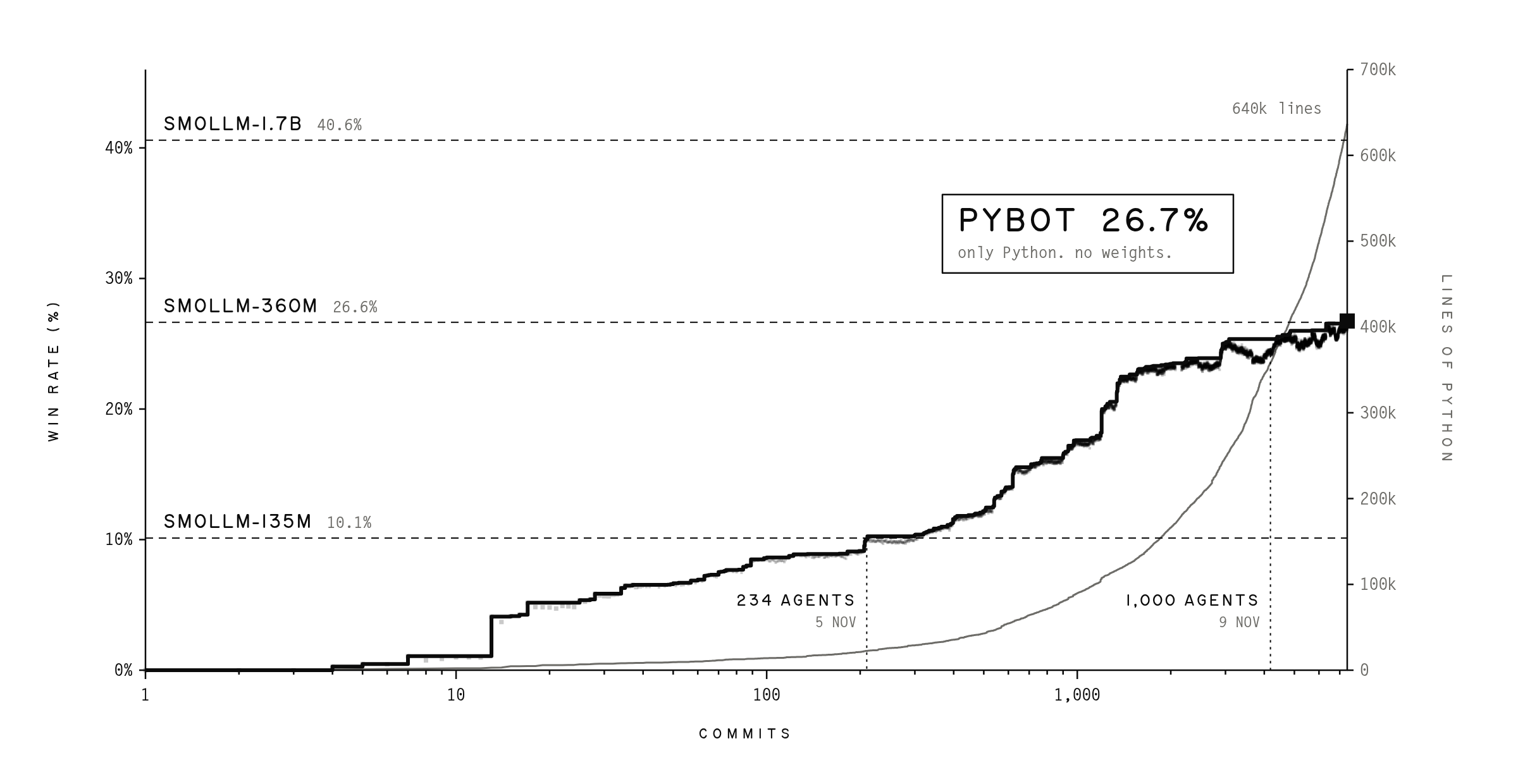
The result is PyBot: around 640k lines of code that can answer everyday questions, backed by 550k lines of tests the agents wrote themselves.
Try it out
Try PyBot in your terminal below, or in the browser on Hugging Face, where each reply shows which of PyBot’s modules produced it.
PyBot needs Python 3.8 or newer and nothing else: no packages to install and no model to download.
pip install pybot-hf
pybot
That starts a chat in your terminal:
    ____        ____        __
   / __ \__  __/ __ )____  / /_
  / /_/ / / / / __  / __ \/ __/
 / ____/ /_/ / /_/ / /_/ / /_
/_/    \__, /_____/\____/\__/
      /____/

A chatbot written in plain Python. No weights, no training, just rules.
Type a message and press Enter. /reset starts a new conversation, /exit quits.

user: hi, i'm Sam
pybot: Nice to meet you, Sam. What can I help with?

user: my kettle is full of limescale, how do i get rid of it?
pybot: Half fill the kettle with equal parts water and white vinegar, or a sachet of citric acid, boil it and leave it half an hour, then tip it out and boil fresh water twice before you use it again. In a hard-water area do it every couple of months: the scale forms because hard water leaves calcium behind as it boils, and a thick layer makes the kettle slow and puts a scum on the tea.

user: how long does that take
pybot: Half an hour.

user: what's my name?
pybot: You're Sam.
Type /reset to clear the screen and start a new conversation, and /exit to quit. PyBot takes a few seconds to start, because Python has about 640,000 lines of code to load, and about a second to reply.
To ask one question and exit, or to pipe messages in and get one reply per line:
pybot -p "Why do onions make you cry?"
echo "how long should i boil an egg" | pybot
| Option | What it does |
|---|---|
-p TEXT, --prompt TEXT |
reply to this one message and exit |
-i, --interactive |
with -p, keep chatting after the first reply |
-s N, --seed N |
fix PyBot's choice of wording, to get the same replies again |
-v, --verbose |
after each reply, show the module that produced it and the time it took |
To run from source instead, clone the repository and install it with pip install .:
git clone https://github.com/huggingface/pybot
cd pybot
pip install .
What is in this repository
| Path | What it holds |
|---|---|
bot/ |
PyBot itself: 528 Python files and about 640,000 lines, exactly as the swarm wrote them |
pybot.py |
the command line shown above. It contains no chatbot logic |
tests/ |
tests for the command line: python -m unittest discover -s tests |
assets/ |
the banner and the chart |
Every turn, each module in bot/modules/ may propose a reply, and an arbiter (bot/modules/arbiter.py) picks the one you get. The modules build on four shared parts:
| Part | Where | Lines |
|---|---|---|
| Understanding engine: what you typed and meant, with typos, chat-speak, the topic and what "it" refers to | bot/understanding/ |
25,000 |
| Memory store: what you and PyBot have said so far | bot/memory/ |
109,000 |
| Knowledge base: facts about the world, kept as data | bot/knowledge/ |
317,000 |
| Response composer: how a reply is phrased, and what to say when nothing fits | bot/compose/ |
104,000 |
The modules themselves are another 81,000 lines.
License
Apache License 2.0. See LICENSE.
1 maintainer

Metadata
1 maintainer
Release files for pybot-hf 0.1.1
For a detailed explanation of source distributions (sdists) and built distributions (wheels), please see the package formats documentation.
Source distribution (sdist)
| File | Size | Uploaded | Provenance | Actions |
|---|---|---|---|---|
| pybot_hf-0.1.1.tar.gz | 12.6 MB | Without provenance | Details for pybot_hf-0.1.1.tar.gz |
Built distribution (wheel)
| File | Interpreter | ABI | Platform | Actions Reset |
|---|---|---|---|---|
| pybot_hf-0.1.1-py3-none-any.whl | Python 3 | none | any | Details for pybot_hf-0.1.1-py3-none-any.whl |
Total release size: 25.5 MB
Release files / pybot_hf-0.1.1.tar.gz
| Download URL | pybot_hf-0.1.1.tar.gz |
|---|---|
| Size | 12.6 MB |
| Tags | Source |
|
SHA-256 checksum How to use checksums |
ad455de4818796cdae87ec418830e6fef494e96c0b7ae6179d7d8064f0f3a74c
|
|
BLAKE2b-256 checksum How to use checksums |
fdd0ace4f4347a8607cc99c4e935af2ffa7b252dc797c7c01c645e65e9699b29
|
| Upload date | |
|
Uploaded using Trusted Publishing? What is trusted publishing? |
No |
| Uploaded via |
twine/7.0.0 CPython/3.12.3
|
Release files / pybot_hf-0.1.1-py3-none-any.whl
| Download URL | pybot_hf-0.1.1-py3-none-any.whl |
|---|---|
| Size | 12.9 MB |
| Tags | Python 3 |
|
SHA-256 checksum How to use checksums |
2c3a9e0ea427c64b515b46b4d7eaa258949c16f2d7f5d702986b323925bad644
|
|
BLAKE2b-256 checksum How to use checksums |
0d0e627e78a0547ddefed93262acabf21f2b111638bb9ba790ec119e25b3076e
|
| Upload date | |
|
Uploaded using Trusted Publishing? What is trusted publishing? |
No |
| Uploaded via |
twine/7.0.0 CPython/3.12.3
|
Security for pybot-hf 0.1.1
Provenance
Provenance describes where a file came from. On PyPI, provenance is shared via attestations, which provide a verifiable record of the build or publishing details. View details, limitations and caveats.
No provenance found
None of the files in this release were uploaded with provenance metadata.
A note on package security
PyPI is a repository for distributing packages, not a service for auditing them. While third-party security researchers and our staff do their best to detect and remove malicious packages, PyPI cannot guarantee the quality, security or suitability of any given package.
To learn more about protecting yourself from malicious actors, visit our package security documentation.














