
PyBUD: Python Beauty


A python library for creating beautiful GUIs in console, optimized with a Rust backend, with tons of different modules, such as Drawer, Session, Windows, Widgets, and many more!
Installation
to install using pip:
pip install pybud-gui -U
or if you want to install from source:
pip install git+https://github.com/amiralimollaei/pybud-gui.git
Documentation
Table of Contents
- Build Your First Window
- Add Your First Widget
- ComboBox Example
- TextBox Example
- Advanced Example 1
- Advanced Example 2
Build Your First Window
First import modules:
from pybud.session import Session
from pybud.window import Window
You can think of Session as a display monitor, the display has a refresh rate (session.TPS) and size (datatypes.Size), and can show multiple Windows on it.
Next, build the main class:
class Main(Window):
    def __init__(self):
        super().__init__(
            size = (100, 10),
            position = (0, 0),
            title = "Window Example",
        )
And finally, show the window:
# only for windows users
import pybud.drawer.ansi as ansi
ansi.init()

# add `Main` to session and show
s = Session((100, 10), background=(100, 100, 250))
s.add_window(Main())
s.show()
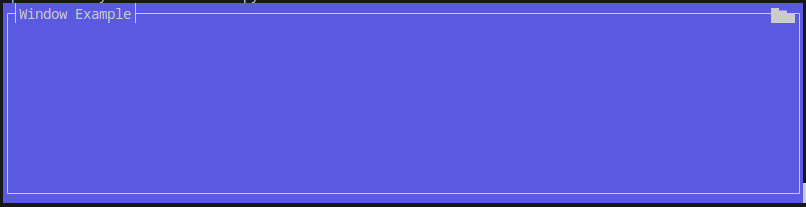
Output:
Add Your First Widget
First import modules:
from pybud.session import Session
from pybud.window import Window
from pybud.widgets import Label
# using `ansi` module you can define colored text with graphics
from pybud.drawer import ansi
Next, build the Main class just like above, but add a Label widget.
# build the main window
class Main(Window):
    def __init__(self):
        super().__init__(
            size = (50, 9),
            position = (0, 0),
            title = "Colored Text Example",
        )

        # add a label widget, set text, width and position
        self.add_widget(Label(
            # define a ansi.AnsiString object that renders text with colors
            # you can set both forecolor and backcolor
            text = ansi.AnsiString("Hello world!", fore = (90, 250, 90)),
            position = (19, 4),
            size = (60, 1)
            )
        )
And finally, show the window:
# only for windows users
import pybud.drawer.ansi as ansi
ansi.init()

# add `Main` to session and show
s = Session((50, 9), background=(100, 100, 250))
s.add_window(Main())
s.show()
Output:

ComboBox Example
First import modules:
from pybud.session import Session
from pybud.window import Window
from pybud.widgets import ComboBox
Next, build the Main class and add a ComboBox widget.
class Main(Window):
    def __init__(self):
        super().__init__(
            size = (50, 9),
            position = (0, 0),
            title = "ComboBox Example",
        )

        self.add_widget(ComboBox(
            text = "Choose an option: ",
            options = {
                "Option 1": self.option1,
                "Option 2": self.option2,
                "Option 3": self.option3,
            },
            size = (40, 1),
            position = (5, 4),
        ))

    def option1(self):
        print("Option 1 selected")

    def option2(self):
        print("Option 2 selected")

    def option3(self):
        print("Option 3 selected")
And finally, show the window:
# only for windows users
import pybud.drawer.ansi as ansi
ansi.init()

# add `Main` to session and show
s = Session((50, 9), background=(100, 100, 250))
s.add_window(Main())
s.show()
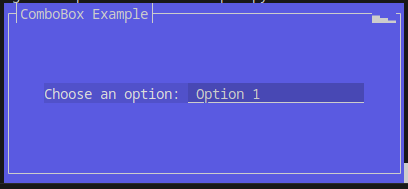
Output:
Advanced Example 1
First import modules:
from pybud.session import Session
from pybud.window import Window
from pybud.widgets import VerticalMultipleChoice
from pybud.drawer import ansi
Next, build the Main class and add a VerticalMultipleChoice widget.
class Main(Window):
    def __init__(self):
        super().__init__(
            size = (76, 11),
            position = (0, 0),
            title = "Vertical Multiple Choice Example"
        )

        self.add_widget(VerticalMultipleChoice(
            text = ansi.AnsiString("Choose an option: ", fore=(150, 250, 50)),
            options = {
                "Nice!": self.nice_option,
                "Very Good!": self.verygood_option,
                "Brilliant!": self.brilliant_option,
            },
            default_option = 2,
            size = (self.size.width - 4, 1),
            position = (2, 5),
        ))
        self.lbl_result = Label(
            "",
            centered = True,
            size = (self.size.width - 2, 1),
            position = (1, 9),
        )
        self.add_widget(self.lbl_result)

    def brilliant_option(self):
        self.lbl_result.text = ansi.AnsiString("Brilliant!", fore=(0, 255, 0))

    def verygood_option(self):
        self.lbl_result.text = ansi.AnsiString("Very Good!", fore=(255, 0, 0))

    def nice_option(self):
        self.lbl_result.text = ansi.AnsiString("Nice!", fore=(0, 0, 255))
And finally, show the window:
# only for windows users
import pybud.drawer.ansi as ansi
ansi.init()

# add `Main` to session and show
s = Session((76, 11), background=(90, 110, 220))
s.add_window(Main())
s.show()
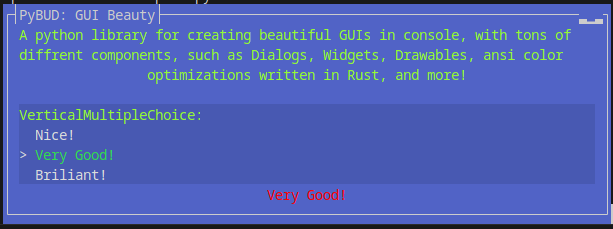
Output:
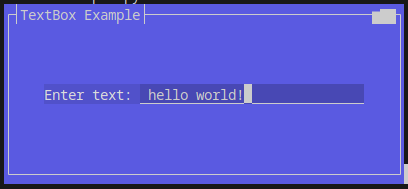
TextBox Example
First import modules:
from pybud.session import Session
from pybud.window import Window
from pybud.widgets import TextBox
Next, build the Main class and add a TextBox widget.
class Main(Window):
    def __init__(self):
        super().__init__(
            size = (50, 9),
            position = (0, 0),
            title = "TextBox Example",
        )

        self.add_widget(TextBox(
            text = "Enter text: ",
            size = (40, 1),
            position = (5, 4),
        ))
And finally, show the window:
# only for windows users
import pybud.drawer.ansi as ansi
ansi.init()

# add `Main` to session and show
s = Session((50, 9), background=(100, 100, 250))
s.add_window(Main())
s.show()
Output:
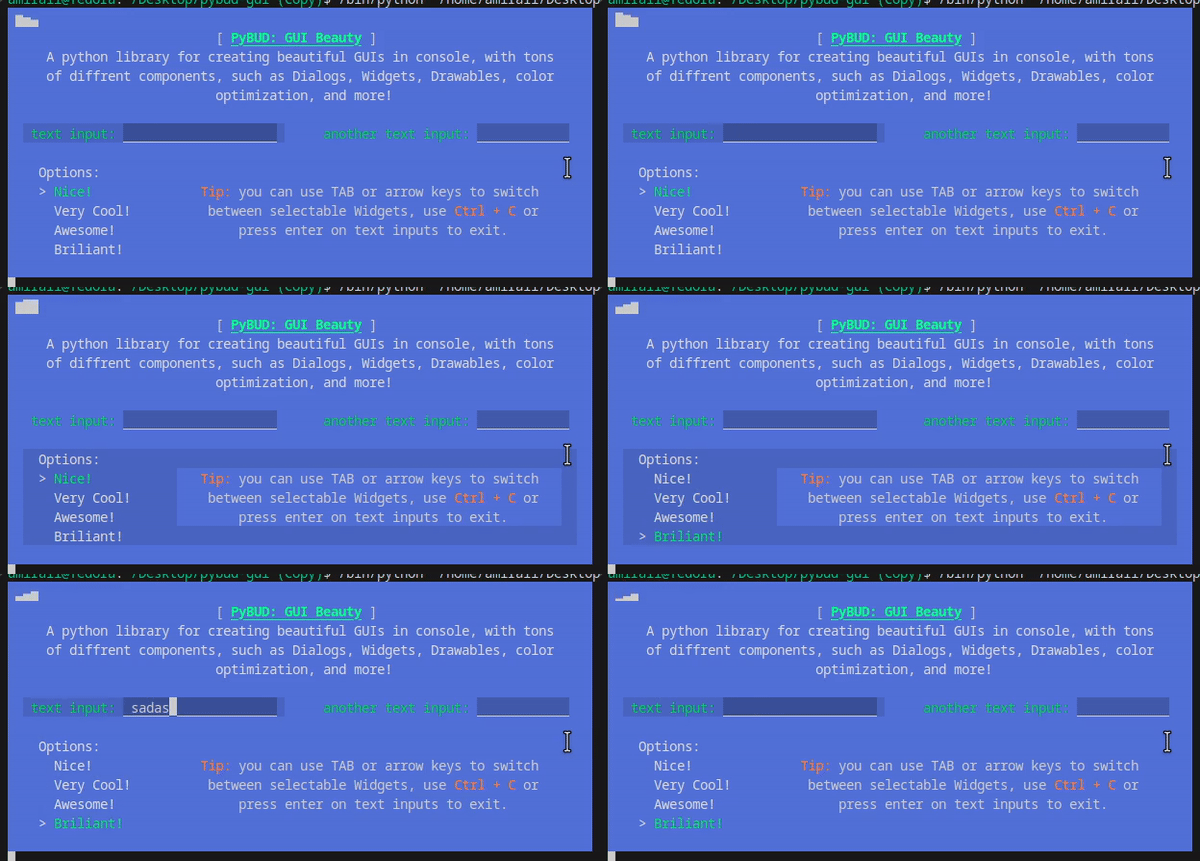
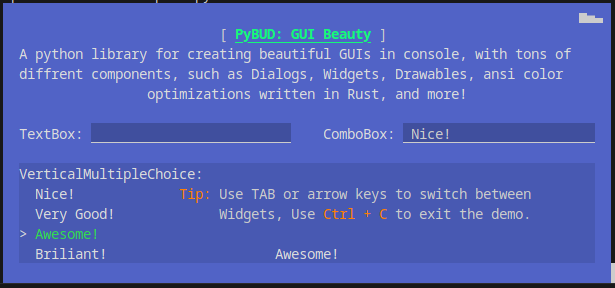
Advanced Example 2
First import modules:
from pybud.drawer import ansi
from pybud.session import Session
from pybud.window import Window
from pybud.widgets import TextBox, Label, ComboBox, VerticalMultipleChoice
Next, build the Main class and add multiple widgets.
class Main(Window):
    def __init__(self):
        super().__init__(
            size = (76, 14),
            position = (0, 0),
            has_border = False,
            opacity = 1.0,
            title = "PyBUD: GUI Beauty"
        )

        title = ansi.AnsiString("PyBUD: GUI Beauty", fore = (20, 250, 120))
        title.add_graphics(ansi.AnsiGraphicMode.BOLD | ansi.AnsiGraphicMode.UNDERLINE)

        title = ansi.AnsiString("[ ") + title + ansi.AnsiString(" ]")

        self.add_widget(Label(
            title,
            centered = True,
            size = (self.size.width - 4, 1),
            position = (2, 1),
        ))

        caption = "A python library for creating beautiful GUIs in console, with tons of different components, such as Dialogs, Widgets, Drawables, ansi color optimizations written in Rust, and more!"

        self.add_widget(Label(
            caption,
            centered = True,
            size = (self.size.width - 4, 1),
            position = (2, 2),
        ))
        self.add_widget(TextBox(
            "TextBox: ",
            size = (self.size.width//2 - 4, 1),
            position = (2, 6),
        ))
        self.add_widget(ComboBox(
            "ComboBox: ",
            options = {
                "Nice!": self.nice_option,
                "Very Good!": self.verygood_option,
                "Awesome!": self.awesome_option,
                "Brilliant!": self.brilliant_option,
            },
            size = (self.size.width//2 - 4, 1),
            position = (self.size.width//2 + 2, 6),
        ))
        self.add_widget(VerticalMultipleChoice(
            "VerticalMultipleChoice:",
            options = {
                "Nice!": self.nice_option,
                "Very Good!": self.verygood_option,
                "Awesome!": self.awesome_option,
                "Brilliant!": self.brilliant_option,
            },
            size = (self.size.width-4, 1),
            position = (2, 8),
        ))
        self.add_widget(Label(
            ansi.AnsiString("Tip: ", fore = (255, 128, 0)) +
            ansi.AnsiString("Use TAB or arrow keys to switch between Widgets, Use ") +
            ansi.AnsiString("Ctrl + C", fore = (255, 128, 0)) + ansi.AnsiString(" to exit the demo."),
            centered = True,
            size = (self.size.width - 26, 1),
            position = (22, 9),
            name = "tip-label"
        ))
        self.lbl_result = Label(
            "",
            centered = True,
            size = (self.size.width - 4, 1),
            position = (2, 12),
            name = "result-label"
        )
        self.add_widget(self.lbl_result)

    def brilliant_option(self):
        self.lbl_result.text = "Brilliant!"

    def verygood_option(self):
        self.lbl_result.text = "Very Good!"

    def nice_option(self):
        self.lbl_result.text = "Nice!"

    def awesome_option(self):
        self.lbl_result.text = "Awesome!"
And finally, show the window:
# only for windows users
import pybud.drawer.ansi as ansi
ansi.init()

# add `Main` to session and show
main_window = Main()
s = Session((76, 14), background=(90, 110, 220))
s.add_window(main_window)
s.show()

print(f"Session Closed! Widget Data:\n")
for i, w in enumerate(main_window._widgets):
    print(w.name + ":")
    if isinstance(w, TextBox):
        print(f"- text=\"{w.text}\", input=\"{w.input}\"")
    elif isinstance(w, (VerticalMultipleChoice, ComboBox)):
        print(f"- selected_option_id={w.selected_option_id}")
        print(f"- selected option text=\"{list(w.options)[w.selected_option_id]}\"")
    if isinstance(w, Label):
        print(f"- text=\"{w.text}\"")
    else:
        print("- no data")
    print("")
Output:
License: BSD 4-clause License
2 maintainers


Metadata
2 maintainers
Release files for pybud-gui 3.1.0
For a detailed explanation of source distributions (sdists) and built distributions (wheels), please see the package formats documentation.
Source distribution (sdist)
| File | Size | Uploaded | Provenance | |
|---|---|---|---|---|
| pybud_gui-3.1.0.tar.gz | 24.1 kB | With provenance | Details |
Built distributions (wheels)
Total release size: 5.6 MB
Release files / pybud_gui-3.1.0.tar.gz
| Download URL | pybud_gui-3.1.0.tar.gz |
|---|---|
| Size | 24.1 kB |
| Tags | Source |
|
SHA-256 checksum How to use checksums |
a98dfcd3b11cf40e9ad2f44236cb0b76e84bf69f5a72fcd3112b6342df6e769e
|
|
BLAKE2b-256 checksum How to use checksums |
c5984f60a70e689d6b74458131d9109fe7de8f92491c22a611dd6d4ccefd2ef2
|
| Upload date | |
|
Uploaded using Trusted Publishing? What is trusted publishing? |
Yes |
| Uploaded via |
twine/6.1.0 CPython/3.12.9
|
Provenance
Provenance describes where a file came from. On PyPI, provenance is shared via attestations, which provide a verifiable record of the build or publishing details. View details, limitations and caveats.


PyPI Publish Attestation
PyPI verified that this artifact, at this checksum, originated from the publisher listed below.
Signed by GitHub Actions, verified by PyPI on Mar 4, 2025.
Transparency logRelease files / pybud_gui-3.1.0-pp310-pypy310_pp73-win_amd64.whl
| Download URL | pybud_gui-3.1.0-pp310-pypy310_pp73-win_amd64.whl |
|---|---|
| Size | 215.6 kB |
| Tags | PyPy 3.10 PyPy 3.10 7.3 Windows x86-64 |
|
SHA-256 checksum How to use checksums |
a8ae1232040d44648f650cad08465870c984f4373c43a0ae50ccb7e6e4ffa6ae
|
|
BLAKE2b-256 checksum How to use checksums |
b9320b302947d623e757ccfbefc106a8cf23023b23b5cde77a940c6a9a3c59c5
|
| Upload date | |
|
Uploaded using Trusted Publishing? What is trusted publishing? |
Yes |
| Uploaded via |
twine/6.1.0 CPython/3.12.9
|
Provenance
Provenance describes where a file came from. On PyPI, provenance is shared via attestations, which provide a verifiable record of the build or publishing details. View details, limitations and caveats.
PyPI Publish Attestation
PyPI verified that this artifact, at this checksum, originated from the publisher listed below.
Signed by GitHub Actions, verified by PyPI on Mar 4, 2025.
Transparency logRelease files / pybud_gui-3.1.0-pp310-pypy310_pp73-manylinux_2_34_x86_64.whl
| Download URL | pybud_gui-3.1.0-pp310-pypy310_pp73-manylinux_2_34_x86_64.whl |
|---|---|
| Size | 355.8 kB |
| Tags | Linux glibc 2.34+ x86-64 PyPy 3.10 PyPy 3.10 7.3 |
|
SHA-256 checksum How to use checksums |
9bc080a82eaa56159513fa234beba9910d2d2531d667727a9c270aebaf5b2f8d
|
|
BLAKE2b-256 checksum How to use checksums |
0db370b6ae7f36b6e824e0207662223592ca502bd0b037d0d6b39d0dc77b9d0f
|
| Upload date | |
|
Uploaded using Trusted Publishing? What is trusted publishing? |
Yes |
| Uploaded via |
twine/6.1.0 CPython/3.12.9
|
Provenance
Provenance describes where a file came from. On PyPI, provenance is shared via attestations, which provide a verifiable record of the build or publishing details. View details, limitations and caveats.
PyPI Publish Attestation
PyPI verified that this artifact, at this checksum, originated from the publisher listed below.
Signed by GitHub Actions, verified by PyPI on Mar 4, 2025.
Transparency logRelease files / pybud_gui-3.1.0-pp310-pypy310_pp73-macosx_11_0_arm64.whl
| Download URL | pybud_gui-3.1.0-pp310-pypy310_pp73-macosx_11_0_arm64.whl |
|---|---|
| Size | 325.2 kB |
| Tags | PyPy 3.10 PyPy 3.10 7.3 macOS 11.0+ ARM64 |
|
SHA-256 checksum How to use checksums |
eaeb109ef036797988ef46bbab4f48b94c857023acf747413e1289eb7baa7422
|
|
BLAKE2b-256 checksum How to use checksums |
af610a3e04b6e4fb387447ee343f3b2a1c2d6322e9a1a8eba8112b55bab31d83
|
| Upload date | |
|
Uploaded using Trusted Publishing? What is trusted publishing? |
Yes |
| Uploaded via |
twine/6.1.0 CPython/3.12.9
|
Provenance
Provenance describes where a file came from. On PyPI, provenance is shared via attestations, which provide a verifiable record of the build or publishing details. View details, limitations and caveats.
PyPI Publish Attestation
PyPI verified that this artifact, at this checksum, originated from the publisher listed below.
Signed by GitHub Actions, verified by PyPI on Mar 4, 2025.
Transparency logRelease files / pybud_gui-3.1.0-pp310-pypy310_pp73-macosx_10_15_x86_64.whl
| Download URL | pybud_gui-3.1.0-pp310-pypy310_pp73-macosx_10_15_x86_64.whl |
|---|---|
| Size | 332.6 kB |
| Tags | PyPy 3.10 PyPy 3.10 7.3 macOS 10.15+ x86-64 |
|
SHA-256 checksum How to use checksums |
0ae9c8288e738bc40c8cca4e467e175440781776b3e2cb7db1b50480efde013d
|
|
BLAKE2b-256 checksum How to use checksums |
570381ab1fe746ae454681ba99a647b9dc5ffa3032b63ca1876a223f5f5871f6
|
| Upload date | |
|
Uploaded using Trusted Publishing? What is trusted publishing? |
Yes |
| Uploaded via |
twine/6.1.0 CPython/3.12.9
|
Provenance
Provenance describes where a file came from. On PyPI, provenance is shared via attestations, which provide a verifiable record of the build or publishing details. View details, limitations and caveats.
PyPI Publish Attestation
PyPI verified that this artifact, at this checksum, originated from the publisher listed below.
Signed by GitHub Actions, verified by PyPI on Mar 4, 2025.
Transparency logRelease files / pybud_gui-3.1.0-cp313-cp313-win_amd64.whl
| Download URL | pybud_gui-3.1.0-cp313-cp313-win_amd64.whl |
|---|---|
| Size | 215.1 kB |
| Tags | CPython 3.13 Windows x86-64 |
|
SHA-256 checksum How to use checksums |
46528110a6466964003333ded9eab157442e9252639d224a2d7486c586d52223
|
|
BLAKE2b-256 checksum How to use checksums |
8f127a35014ad545d116ec1ab68ed6a02564e4850ee1335fe5b6841fc3cd4488
|
| Upload date | |
|
Uploaded using Trusted Publishing? What is trusted publishing? |
Yes |
| Uploaded via |
twine/6.1.0 CPython/3.12.9
|
Provenance
Provenance describes where a file came from. On PyPI, provenance is shared via attestations, which provide a verifiable record of the build or publishing details. View details, limitations and caveats.
PyPI Publish Attestation
PyPI verified that this artifact, at this checksum, originated from the publisher listed below.
Signed by GitHub Actions, verified by PyPI on Mar 4, 2025.
Transparency logRelease files / pybud_gui-3.1.0-cp313-cp313-win32.whl
| Download URL | pybud_gui-3.1.0-cp313-cp313-win32.whl |
|---|---|
| Size | 204.7 kB |
| Tags | CPython 3.13 Windows x86-32 |
|
SHA-256 checksum How to use checksums |
e919ac7f9a54eec9d260989cbd1ce3f58674524c4bbac6420ce51150f469b7e4
|
|
BLAKE2b-256 checksum How to use checksums |
85f4ce5902eae1ec2e627581423f03ff47b32b5a5456fb8543feec7a1d9cea97
|
| Upload date | |
|
Uploaded using Trusted Publishing? What is trusted publishing? |
Yes |
| Uploaded via |
twine/6.1.0 CPython/3.12.9
|
Provenance
Provenance describes where a file came from. On PyPI, provenance is shared via attestations, which provide a verifiable record of the build or publishing details. View details, limitations and caveats.
PyPI Publish Attestation
PyPI verified that this artifact, at this checksum, originated from the publisher listed below.
Signed by GitHub Actions, verified by PyPI on Mar 4, 2025.
Transparency logRelease files / pybud_gui-3.1.0-cp313-cp313-manylinux_2_34_x86_64.whl
| Download URL | pybud_gui-3.1.0-cp313-cp313-manylinux_2_34_x86_64.whl |
|---|---|
| Size | 355.5 kB |
| Tags | CPython 3.13 Linux glibc 2.34+ x86-64 |
|
SHA-256 checksum How to use checksums |
e340ead31030b600cce723477e2e2f98c6011fc3fb587d5741560b783a592ae4
|
|
BLAKE2b-256 checksum How to use checksums |
29aa8f2f5e4b362bd31e9b706eab212734e8086ccd9f1736936d0254b0840f33
|
| Upload date | |
|
Uploaded using Trusted Publishing? What is trusted publishing? |
Yes |
| Uploaded via |
twine/6.1.0 CPython/3.12.9
|
Provenance
Provenance describes where a file came from. On PyPI, provenance is shared via attestations, which provide a verifiable record of the build or publishing details. View details, limitations and caveats.
PyPI Publish Attestation
PyPI verified that this artifact, at this checksum, originated from the publisher listed below.
Signed by GitHub Actions, verified by PyPI on Mar 4, 2025.
Transparency logRelease files / pybud_gui-3.1.0-cp313-cp313-macosx_11_0_universal2.whl
| Download URL | pybud_gui-3.1.0-cp313-cp313-macosx_11_0_universal2.whl |
|---|---|
| Size | 318.1 kB |
| Tags | CPython 3.13 macOS 11.0+ universal2 (ARM64, x86-64) |
|
SHA-256 checksum How to use checksums |
5928bd7d6ad9e6997fae22958d284af2d6751ba4a7f58c6bc5fcf4975b62e444
|
|
BLAKE2b-256 checksum How to use checksums |
4a06bb314fa290b72a096f8980908aa6601a39de086f609065b1dd022363c492
|
| Upload date | |
|
Uploaded using Trusted Publishing? What is trusted publishing? |
Yes |
| Uploaded via |
twine/6.1.0 CPython/3.12.9
|
Provenance
Provenance describes where a file came from. On PyPI, provenance is shared via attestations, which provide a verifiable record of the build or publishing details. View details, limitations and caveats.
PyPI Publish Attestation
PyPI verified that this artifact, at this checksum, originated from the publisher listed below.
Signed by GitHub Actions, verified by PyPI on Mar 4, 2025.
Transparency logRelease files / pybud_gui-3.1.0-cp312-cp312-win_amd64.whl
| Download URL | pybud_gui-3.1.0-cp312-cp312-win_amd64.whl |
|---|---|
| Size | 215.8 kB |
| Tags | CPython 3.12 Windows x86-64 |
|
SHA-256 checksum How to use checksums |
136de2f8de24b547aab8a26bd81036634afccada9c937bedb926987d6601c80e
|
|
BLAKE2b-256 checksum How to use checksums |
bf4ed314dd77c0c15844137376990cbfcabc43c61b879d12697d621179b7ec53
|
| Upload date | |
|
Uploaded using Trusted Publishing? What is trusted publishing? |
Yes |
| Uploaded via |
twine/6.1.0 CPython/3.12.9
|
Provenance
Provenance describes where a file came from. On PyPI, provenance is shared via attestations, which provide a verifiable record of the build or publishing details. View details, limitations and caveats.
PyPI Publish Attestation
PyPI verified that this artifact, at this checksum, originated from the publisher listed below.
Signed by GitHub Actions, verified by PyPI on Mar 4, 2025.
Transparency logRelease files / pybud_gui-3.1.0-cp312-cp312-win32.whl
| Download URL | pybud_gui-3.1.0-cp312-cp312-win32.whl |
|---|---|
| Size | 205.1 kB |
| Tags | CPython 3.12 Windows x86-32 |
|
SHA-256 checksum How to use checksums |
87f964a7362b46575e901f84643d7b06d1d6f0cea306c5a491b29b9145df95d1
|
|
BLAKE2b-256 checksum How to use checksums |
938fd06c2787092bc747dbd582621a5f055b3b232d8777097e4c6edfdd98f6bd
|
| Upload date | |
|
Uploaded using Trusted Publishing? What is trusted publishing? |
Yes |
| Uploaded via |
twine/6.1.0 CPython/3.12.9
|
Provenance
Provenance describes where a file came from. On PyPI, provenance is shared via attestations, which provide a verifiable record of the build or publishing details. View details, limitations and caveats.
PyPI Publish Attestation
PyPI verified that this artifact, at this checksum, originated from the publisher listed below.
Signed by GitHub Actions, verified by PyPI on Mar 4, 2025.
Transparency logRelease files / pybud_gui-3.1.0-cp312-cp312-manylinux_2_34_x86_64.whl
| Download URL | pybud_gui-3.1.0-cp312-cp312-manylinux_2_34_x86_64.whl |
|---|---|
| Size | 356.0 kB |
| Tags | CPython 3.12 Linux glibc 2.34+ x86-64 |
|
SHA-256 checksum How to use checksums |
81d698cb3d60ff63d19391980372ada9168772f9963521c85f7512ed6ab4c33c
|
|
BLAKE2b-256 checksum How to use checksums |
eb81a84eb144d9d76e04e26679c627fa1db584af3b26597a5fc8ce6f56aaa272
|
| Upload date | |
|
Uploaded using Trusted Publishing? What is trusted publishing? |
Yes |
| Uploaded via |
twine/6.1.0 CPython/3.12.9
|
Provenance
Provenance describes where a file came from. On PyPI, provenance is shared via attestations, which provide a verifiable record of the build or publishing details. View details, limitations and caveats.
PyPI Publish Attestation
PyPI verified that this artifact, at this checksum, originated from the publisher listed below.
Signed by GitHub Actions, verified by PyPI on Mar 4, 2025.
Transparency logRelease files / pybud_gui-3.1.0-cp312-cp312-macosx_11_0_universal2.whl
| Download URL | pybud_gui-3.1.0-cp312-cp312-macosx_11_0_universal2.whl |
|---|---|
| Size | 318.8 kB |
| Tags | CPython 3.12 macOS 11.0+ universal2 (ARM64, x86-64) |
|
SHA-256 checksum How to use checksums |
f2f72f74907bb2b7c9336ad4d35a4b8af753714eba0dc65ec525b8c6ee818ef1
|
|
BLAKE2b-256 checksum How to use checksums |
af0eaca3cdc681c6f149c4e5e85d635a6b96c0c56e071c168ff8bcc0fe4fb249
|
| Upload date | |
|
Uploaded using Trusted Publishing? What is trusted publishing? |
Yes |
| Uploaded via |
twine/6.1.0 CPython/3.12.9
|
Provenance
Provenance describes where a file came from. On PyPI, provenance is shared via attestations, which provide a verifiable record of the build or publishing details. View details, limitations and caveats.
PyPI Publish Attestation
PyPI verified that this artifact, at this checksum, originated from the publisher listed below.
Signed by GitHub Actions, verified by PyPI on Mar 4, 2025.
Transparency logRelease files / pybud_gui-3.1.0-cp311-cp311-win_amd64.whl
| Download URL | pybud_gui-3.1.0-cp311-cp311-win_amd64.whl |
|---|---|
| Size | 214.7 kB |
| Tags | CPython 3.11 Windows x86-64 |
|
SHA-256 checksum How to use checksums |
b0946871eec42dc3d6dbf82d5049ec84ba5a87aa3b694806d2aede4eca7738c8
|
|
BLAKE2b-256 checksum How to use checksums |
13731bfa60ef7cec49840e2d42ac5b5aea666188dce2d073915c7009cdae05b9
|
| Upload date | |
|
Uploaded using Trusted Publishing? What is trusted publishing? |
Yes |
| Uploaded via |
twine/6.1.0 CPython/3.12.9
|
Provenance
Provenance describes where a file came from. On PyPI, provenance is shared via attestations, which provide a verifiable record of the build or publishing details. View details, limitations and caveats.
PyPI Publish Attestation
PyPI verified that this artifact, at this checksum, originated from the publisher listed below.
Signed by GitHub Actions, verified by PyPI on Mar 4, 2025.
Transparency logRelease files / pybud_gui-3.1.0-cp311-cp311-win32.whl
| Download URL | pybud_gui-3.1.0-cp311-cp311-win32.whl |
|---|---|
| Size | 204.1 kB |
| Tags | CPython 3.11 Windows x86-32 |
|
SHA-256 checksum How to use checksums |
b165c5a9d582e83b5cc14f407c8358bedd8e31b29d69c9c00fcd343d18fc1fa2
|
|
BLAKE2b-256 checksum How to use checksums |
cc95945e7466a51af99ef34df36afcf73ee53703fa015a874ad3473cdeb5322a
|
| Upload date | |
|
Uploaded using Trusted Publishing? What is trusted publishing? |
Yes |
| Uploaded via |
twine/6.1.0 CPython/3.12.9
|
Provenance
Provenance describes where a file came from. On PyPI, provenance is shared via attestations, which provide a verifiable record of the build or publishing details. View details, limitations and caveats.
PyPI Publish Attestation
PyPI verified that this artifact, at this checksum, originated from the publisher listed below.
Signed by GitHub Actions, verified by PyPI on Mar 4, 2025.
Transparency logRelease files / pybud_gui-3.1.0-cp311-cp311-manylinux_2_34_x86_64.whl
| Download URL | pybud_gui-3.1.0-cp311-cp311-manylinux_2_34_x86_64.whl |
|---|---|
| Size | 354.7 kB |
| Tags | CPython 3.11 Linux glibc 2.34+ x86-64 |
|
SHA-256 checksum How to use checksums |
50db64f644a235e6761db2f1cfc7820b110fcb7287cd5044c1749bc708a8a109
|
|
BLAKE2b-256 checksum How to use checksums |
a3bb9896d11deb1470b016b77ac25b9621f84d37db9e417c71e2798045fda58c
|
| Upload date | |
|
Uploaded using Trusted Publishing? What is trusted publishing? |
Yes |
| Uploaded via |
twine/6.1.0 CPython/3.12.9
|
Provenance
Provenance describes where a file came from. On PyPI, provenance is shared via attestations, which provide a verifiable record of the build or publishing details. View details, limitations and caveats.
PyPI Publish Attestation
PyPI verified that this artifact, at this checksum, originated from the publisher listed below.
Signed by GitHub Actions, verified by PyPI on Mar 4, 2025.
Transparency logRelease files / pybud_gui-3.1.0-cp311-cp311-macosx_11_0_universal2.whl
| Download URL | pybud_gui-3.1.0-cp311-cp311-macosx_11_0_universal2.whl |
|---|---|
| Size | 324.2 kB |
| Tags | CPython 3.11 macOS 11.0+ universal2 (ARM64, x86-64) |
|
SHA-256 checksum How to use checksums |
064ded8b18d09424abbf25510a1d049fae1a32deea664f8d1e500a05e204ba6a
|
|
BLAKE2b-256 checksum How to use checksums |
bfbce0f526370d332a30b3804ea2040bc96f7af3e7e5fcd76bfe778dd4a1943a
|
| Upload date | |
|
Uploaded using Trusted Publishing? What is trusted publishing? |
Yes |
| Uploaded via |
twine/6.1.0 CPython/3.12.9
|
Provenance
Provenance describes where a file came from. On PyPI, provenance is shared via attestations, which provide a verifiable record of the build or publishing details. View details, limitations and caveats.
PyPI Publish Attestation
PyPI verified that this artifact, at this checksum, originated from the publisher listed below.
Signed by GitHub Actions, verified by PyPI on Mar 4, 2025.
Transparency logRelease files / pybud_gui-3.1.0-cp310-cp310-win_amd64.whl
| Download URL | pybud_gui-3.1.0-cp310-cp310-win_amd64.whl |
|---|---|
| Size | 214.6 kB |
| Tags | CPython 3.10 Windows x86-64 |
|
SHA-256 checksum How to use checksums |
f35cc13a956e2cdfe7a159fcdeb499ae25bf0353256817c7e6568b3dfd3fa4a5
|
|
BLAKE2b-256 checksum How to use checksums |
115eb7b5ab000109cf4aa0c46a29b7f0f4a191996841e9f5f4138f49dccd653d
|
| Upload date | |
|
Uploaded using Trusted Publishing? What is trusted publishing? |
Yes |
| Uploaded via |
twine/6.1.0 CPython/3.12.9
|
Provenance
Provenance describes where a file came from. On PyPI, provenance is shared via attestations, which provide a verifiable record of the build or publishing details. View details, limitations and caveats.
PyPI Publish Attestation
PyPI verified that this artifact, at this checksum, originated from the publisher listed below.
Signed by GitHub Actions, verified by PyPI on Mar 4, 2025.
Transparency logRelease files / pybud_gui-3.1.0-cp310-cp310-win32.whl
| Download URL | pybud_gui-3.1.0-cp310-cp310-win32.whl |
|---|---|
| Size | 203.9 kB |
| Tags | CPython 3.10 Windows x86-32 |
|
SHA-256 checksum How to use checksums |
1039115b3802c050c0ea409b865fb39d08d6a0664ab02cb9a17b006a4d38028b
|
|
BLAKE2b-256 checksum How to use checksums |
56e8d96aaf651e2502ef6391978f68247533968181d29b84351ccda330427532
|
| Upload date | |
|
Uploaded using Trusted Publishing? What is trusted publishing? |
Yes |
| Uploaded via |
twine/6.1.0 CPython/3.12.9
|
Provenance
Provenance describes where a file came from. On PyPI, provenance is shared via attestations, which provide a verifiable record of the build or publishing details. View details, limitations and caveats.
PyPI Publish Attestation
PyPI verified that this artifact, at this checksum, originated from the publisher listed below.
Signed by GitHub Actions, verified by PyPI on Mar 4, 2025.
Transparency logRelease files / pybud_gui-3.1.0-cp310-cp310-manylinux_2_34_x86_64.whl
| Download URL | pybud_gui-3.1.0-cp310-cp310-manylinux_2_34_x86_64.whl |
|---|---|
| Size | 355.0 kB |
| Tags | CPython 3.10 Linux glibc 2.34+ x86-64 |
|
SHA-256 checksum How to use checksums |
83a3d243d559c916024260ac3c442933c782c00a33a1f1a93a51b083b2ce38d0
|
|
BLAKE2b-256 checksum How to use checksums |
35e97924ac0dd340f4762285e710b4cc54213245df8b0603d30101d4e7fb8747
|
| Upload date | |
|
Uploaded using Trusted Publishing? What is trusted publishing? |
Yes |
| Uploaded via |
twine/6.1.0 CPython/3.12.9
|
Provenance
Provenance describes where a file came from. On PyPI, provenance is shared via attestations, which provide a verifiable record of the build or publishing details. View details, limitations and caveats.
PyPI Publish Attestation
PyPI verified that this artifact, at this checksum, originated from the publisher listed below.
Signed by GitHub Actions, verified by PyPI on Mar 4, 2025.
Transparency logRelease files / pybud_gui-3.1.0-cp310-cp310-macosx_11_0_universal2.whl
| Download URL | pybud_gui-3.1.0-cp310-cp310-macosx_11_0_universal2.whl |
|---|---|
| Size | 324.5 kB |
| Tags | CPython 3.10 macOS 11.0+ universal2 (ARM64, x86-64) |
|
SHA-256 checksum How to use checksums |
f32d476a223780656498fc22e354bc7b833be72ffcd7d0ddb7d42c25e4273022
|
|
BLAKE2b-256 checksum How to use checksums |
8f38e25d0fce39536db70ffe3c2914ecd678ae81e3b9d5dd72bfd92104cb3283
|
| Upload date | |
|
Uploaded using Trusted Publishing? What is trusted publishing? |
Yes |
| Uploaded via |
twine/6.1.0 CPython/3.12.9
|
Provenance
Provenance describes where a file came from. On PyPI, provenance is shared via attestations, which provide a verifiable record of the build or publishing details. View details, limitations and caveats.
PyPI Publish Attestation
PyPI verified that this artifact, at this checksum, originated from the publisher listed below.
Signed by GitHub Actions, verified by PyPI on Mar 4, 2025.
Transparency logSecurity for pybud-gui 3.1.0
Provenance
Provenance describes where a file came from. On PyPI, provenance is shared via attestations, which provide a verifiable record of the build or publishing details. View details, limitations and caveats.
Full provenance
All 21 files in this release have been uploaded with provenance metadata.
Attestation for pybud_gui-3.1.0.tar.gz
PyPI Publish Attestation
PyPI verified that this artifact, at this checksum, originated from the publisher listed below.
Signed by GitHub Actions, verified by PyPI on Mar 4, 2025.
Transparency logA note on package security
PyPI is a repository for distributing packages, not a service for auditing them. While third-party security researchers and our staff do their best to detect and remove malicious packages, PyPI cannot guarantee the quality, security or suitability of any given package.
To learn more about protecting yourself from malicious actors, visit our package security documentation.














