


pycallgraphix
pycallgraphix is a simple python package that enables users to easily visualize their python code structure. pycallgraphix takes standard call graph python packages a step further by allowing users to create a visual from only the functions they select. Users simply wrap the functions they wish to include with a pre-defined wrapper and pycallgraphix generates an image based on their connections.
Features
- Call graph visualization of selected python functions in a PNG format
- Includes the time spent running selected functions and the number of calls to selected functions
- Color coded call graph image, based on the time spent running function calls
- Optional profiling of selected functions using cProfile
Installation
Directly install via pip as follows:
pip install pycallgraphix
Alternatively, clone a local copy of the repository to your computer:
git clone https://github.com/FZJ-IEK3-VSA/pycallgraphix
Then install pycallgraphix via pip as follows:
cd pycallgraphix
pip install .
Finally, run the unit tests to ensure it is installed correctly:
python -m unittest test.test_store_calls
python -m unittest test.test_store_funcs
Basic Workflow
A small example how to use pycallgraphix is as follows:
import cProfile
from pycallgraphix.wrapper import MethodChart, register_method
Enable the profiler (optional):
profiler = cProfile.Profile()
profiler.enable()
Define the call graph object. The execute function contains all the scripts or functions you wish to include in the graph. Scripts and functions do not need to be a part of the PyCallGraphObject class but all functions included in the call graph must be wrapped with the @register_method wrapper:
class PyCallGraphObject:

    def __init__(self) -> None:
        self.execute()
        methodchart = MethodChart()
        methodchart.make_graphviz_chart(
            time_resolution=3, filename="Method_Pattern.png"
        )
        profiler.disable()
        profiler.dump_stats("profile.prof")

    def execute(self):
        self.sum_recursive(3, 4)

    @register_method
    def sum_recursive(self, a, b):
        if b > 0:
            a += 1
            b -= 1
            self.print_value(prefix='current', value=a)
            return self.sum_recursive(a, b)
        else:
            self.print_value(prefix='final', value=a)
            return a

    @register_method
    def print_value(self, prefix, value):
        print("{} value = {}".format(prefix,value))
Finally run the code by initializing the PyCallGraphObject:
run = PyCallGraphObject()
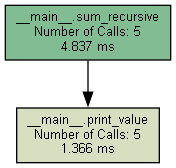
If created succesfully, the resulting graph looks like:
Including functions from other directories and scripts
To include functions from other python files and scripts, simply import the wrapper into your script as follows:
from pycallgraphix.wrapper import register_method
And wrap the desired functions. pycallgraphix will automatically locate it when creating the call graph:
@register_method
def myExampleFunction(a, b):
    ....
Detailed Example
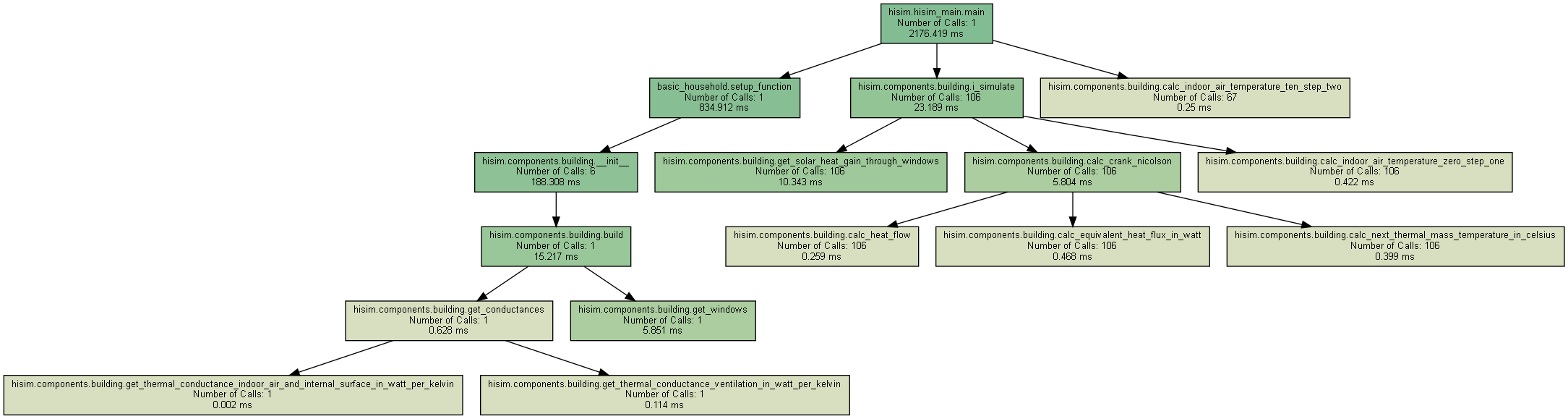
A detailed example of what can be created with pycallgraphix was generated for one module of the House Infrastructure Simulator (HiSim).
License
MIT License
Copyright (c) 2022-2023 Katharina Rieck (FZJ/IEK-3), Matthew Keller (FZJ/IEK-3), Noah Pflugradt (FZJ/IEK-3), Jann Weinand (FZJ/IEK-3), Detlef Stolten (FZJ/IEK-3)
You should have received a copy of the MIT License along with this program. If not, see https://opensource.org/licenses/MIT
About Us
We are the Institute of Energy and Climate Research - Techno-economic Systems Analysis (IEK-3) belonging to the Forschungszentrum Jülich. Our interdisciplinary department's research is focusing on energy-related process and systems analyses. Data searches and system simulations are used to determine energy and mass balances, as well as to evaluate performance, emissions and costs of energy systems. The results are used for performing comparative assessment studies between the various systems. Our current priorities include the development of energy strategies, in accordance with the German Federal Government’s greenhouse gas reduction targets, by designing new infrastructures for sustainable and secure energy supply chains and by conducting cost analysis studies for integrating new technologies into future energy market frameworks.
Acknowledgments
-
To create the singleton pattern, the following work was referenced: https://refactoring.guru/design-patterns/singleton/python/example#example-1
-
pycallgraphix makes use of the python graphviz package.


Release files for pycallgraphix 1.0.2
For a detailed explanation of source distributions (sdists) and built distributions (wheels), please see the package formats documentation.
Source distribution (sdist)
| File | Size | Uploaded | Provenance | Actions |
|---|---|---|---|---|
| pycallgraphix-1.0.2.tar.gz | 56.1 kB | Without provenance | Details for pycallgraphix-1.0.2.tar.gz |
Built distribution (wheel)
| File | Interpreter | ABI | Platform | Actions Reset |
|---|---|---|---|---|
| pycallgraphix-1.0.2-py3-none-any.whl | Python 3 | none | any | Details for pycallgraphix-1.0.2-py3-none-any.whl |
Total release size: 67.0 kB
Release files / pycallgraphix-1.0.2.tar.gz
| Download URL | pycallgraphix-1.0.2.tar.gz |
|---|---|
| Size | 56.1 kB |
| Tags | Source |
|
SHA-256 checksum How to use checksums |
5339c36196936c1763be789990de868503a651e6fa63b8200074fd83a388df2d
|
|
BLAKE2b-256 checksum How to use checksums |
f8f2ff81c0f18dc023f234f96f83e5fa1771deaa1e3dfb15d62b02150bbabfe3
|
| Upload date | |
|
Uploaded using Trusted Publishing? What is trusted publishing? |
No |
| Uploaded via |
twine/4.0.2 CPython/3.9.16
|
Release files / pycallgraphix-1.0.2-py3-none-any.whl
| Download URL | pycallgraphix-1.0.2-py3-none-any.whl |
|---|---|
| Size | 10.9 kB |
| Tags | Python 3 |
|
SHA-256 checksum How to use checksums |
35f3926e2190a64e59227a9773b06d17d59c6f0fc1da46859fbf6caf120c886c
|
|
BLAKE2b-256 checksum How to use checksums |
3213efab2d32525dd924cdcd7e4fa7525aece1c1739982863f4fb7e4eae044bb
|
| Upload date | |
|
Uploaded using Trusted Publishing? What is trusted publishing? |
No |
| Uploaded via |
twine/4.0.2 CPython/3.9.16
|
Security for pycallgraphix 1.0.2
Provenance
Provenance describes where a file came from. On PyPI, provenance is shared via attestations, which provide a verifiable record of the build or publishing details. View details, limitations and caveats.
No provenance found
None of the files in this release were uploaded with provenance metadata.
A note on package security
PyPI is a repository for distributing packages, not a service for auditing them. While third-party security researchers and our staff do their best to detect and remove malicious packages, PyPI cannot guarantee the quality, security or suitability of any given package.
To learn more about protecting yourself from malicious actors, visit our package security documentation.














