

pycangui




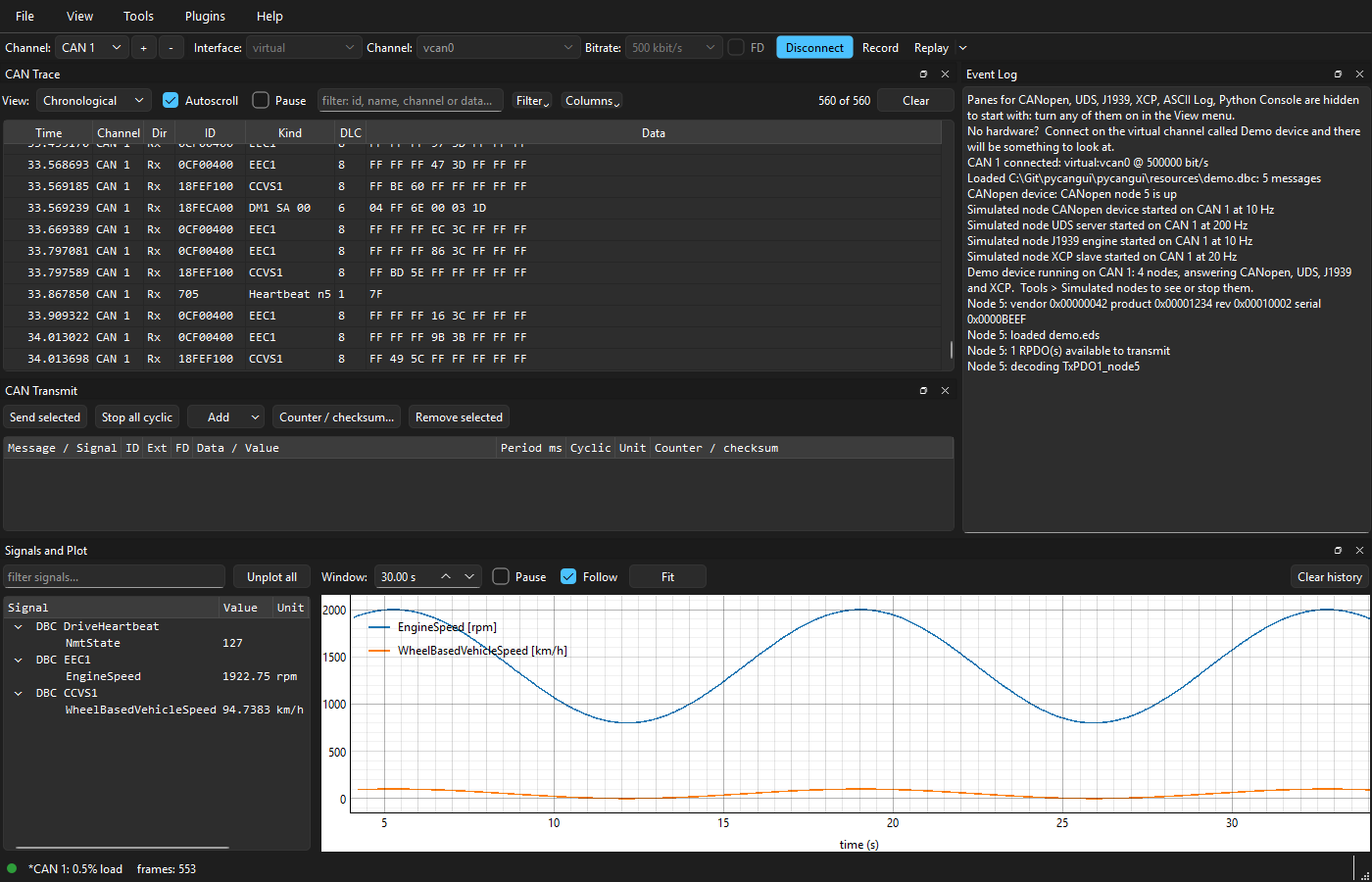
A graphical CAN bus tool: live trace and plots, transmit, CANopen, UDS, J1939, XCP and CCP, and Python scripting, on any adapter supported by python-can.
Install and run
pip install pycangui
pycangui
Python 3.12 or newer, on Windows, Linux or macOS. python -m pycangui starts it too.
To include everything optional up front -- today that is the reader for MDF and MF4 measurement files -- install all. Without it, pycangui offers to install the reader the first time a measurement file is opened.
pip install "pycangui[all]"
What it does
- Live trace of every connected channel on one clock, CAN FD included, with filtering that hides rather than discards, recording to six log formats, and replay of a log onto a bus.
- Transmit raw frames, DBC messages edited by signal, or a CANopen RPDO.
- CANopen: node list, object dictionary, PDO configuration, EMCY, LSS, SYNC, DCF save and apply.
- Custom panes: the CANopen objects a job needs, laid out as a form with labels and units. Built from the object dictionary with no code, and polled into Signals and Plot.
- UDS over ISO-TP: sessions, security access, DIDs, DTCs, routines, and firmware transfer in either direction.
- J1939: nodes from address claims, DM1 faults with lamp status and the failure mode in words, multi-packet messages (TP.BAM and TP.CM), requesting and sending PGNs, and SPNs decoded from a J1939 DBC.
- XCP and CCP on CAN: connect, seed and key, and reading and writing A2L measurements and characteristics by polling.
- ASCII Log: reads any CAN identifier as text, for devices that print a console into the data bytes.
- Signals and Plot from DBC decode, CANopen TPDOs or XCP and CCP polling, and out to CSV.
- Python hooks with hot reload, replaceable components (your own CAN interface, ISO-TP transport, or XCP or CCP engine), a live console and Run script.
- Plugins that add a pane of their own, installed from a zip. Three come with pycangui: CANopen firmware download (CiA 302-3), DCF compare, and CiA 402 motor control.
- Simulated nodes: devices written as Python files, on a virtual bus or standing on a real adapter, and gateways between channels.
- Workspaces: one per product, holding its hooks, EDS files, databases, channels and layout, and exported as one zip.
The manual covers each of these, and is also under Help > Documentation in the application.
Adapters
Any adapter python-can supports: PEAK, IXXAT, Kvaser, Vector, socketcan, the low-cost USB dongles and more. Install the vendor's driver and python-can finds it at run time.
No hardware is needed to try it: the virtual interface's Demo device channel has a simulated device on it that answers CANopen, UDS, J1939, XCP and CCP.
More
Safety notice and licence
pycangui talks to real equipment. It is intended only for people trained and experienced in working with CAN networks and the equipment connected to them.
Joining a bus at the wrong bitrate makes a controller signal an error on every frame it sees, and those error frames go out on the wire -- they can impact the nodes that are already on the bus. Transmitting, replaying a log, writing parameters, enabling a drive and downloading firmware all change what equipment does, and not all of them can be undone.
Know what is on the bus before you join it, and what a device will do before you write to it. The confirmations pycangui asks for along the way are a reminder, not a safeguard: like any software it can have faults, so do not rely on it to keep anything off the bus. Where a mistake could hurt someone or damage equipment, keep a way to stop that equipment within reach.
The hook and simulated-node templates copied into a workspace are under MIT-0, so what you write in them carries no conditions. pycangui itself is provided under the Apache License 2.0, without warranty of any kind.
1 maintainer

Metadata
1 maintainer
Release files for pycangui 0.1.1
For a detailed explanation of source distributions (sdists) and built distributions (wheels), please see the package formats documentation.
Source distribution (sdist)
| File | Size | Uploaded | |
|---|---|---|---|
| pycangui-0.1.1.tar.gz | 927.7 kB | Details |
Built distribution (wheel)
| File | Interpreter | ABI | Platform | Reset |
|---|---|---|---|---|
| pycangui-0.1.1-py3-none-any.whl | Python 3 | none | any | Details |
Total release size: 1.7 MB
Release files / pycangui-0.1.1.tar.gz
| Download URL | pycangui-0.1.1.tar.gz |
|---|---|
| Size | 927.7 kB |
| Tags | Source |
|
SHA-256 checksum How to use checksums |
418496bff18e4257247e11f11676a9b8fa5d560f26c9b6a6d30c63353e3002b1
|
|
BLAKE2b-256 checksum How to use checksums |
f3594b9b78259999e64eaeffb635df0648ce65ced02bdd17cc7dada8d01b45a6
|
| Upload date | |
|
Uploaded using Trusted Publishing? What is trusted publishing? |
Yes |
| Uploaded via |
twine/7.0.0 CPython/3.13.14
|
Provenance
Provenance describes where a file came from. On PyPI, provenance is shared via attestations, which provide a verifiable record of the build or publishing details. View details, limitations and caveats.


PyPI Publish Attestation
PyPI verified that this artifact, at this checksum, originated from the publisher listed below.
Signed by GitHub Actions, verified by PyPI on Sep 30, 2026.
Transparency logRelease files / pycangui-0.1.1-py3-none-any.whl
| Download URL | pycangui-0.1.1-py3-none-any.whl |
|---|---|
| Size | 764.1 kB |
| Tags | Python 3 |
|
SHA-256 checksum How to use checksums |
aee8053ec83f5e1c424c54926f1dadba47cf6e58a1c19fa8d079d3a54d5c3bbd
|
|
BLAKE2b-256 checksum How to use checksums |
00c2cd345e7acea26c1c4c4b753d0b31f4ab26f5ff6ed85bf4fce19b471c02cc
|
| Upload date | |
|
Uploaded using Trusted Publishing? What is trusted publishing? |
Yes |
| Uploaded via |
twine/7.0.0 CPython/3.13.14
|
Provenance
Provenance describes where a file came from. On PyPI, provenance is shared via attestations, which provide a verifiable record of the build or publishing details. View details, limitations and caveats.
PyPI Publish Attestation
PyPI verified that this artifact, at this checksum, originated from the publisher listed below.
Signed by GitHub Actions, verified by PyPI on Sep 30, 2026.
Transparency log













