
pyCapCut
A lightweight, flexible Python tool for generating and editing CapCut drafts
This project shares its origins with PyJianYingDraft and targets CapCut drafts.
⚠️ 0.1.0 preview: The next version will align track ordering and references with pyJianYingDraft, introduce
append_track(s)/insert_track(s)andTrackSpec/TrackRef, and removeadd_track. Scripts that depend on the old API or track layering behavior will need updating; a migration guide will accompany the release. To keep the current behavior, pinpip install pycapcut==0.0.4and refer to that version's documentation and example.
📢 Join the Discord server to discuss usage and new features
Workflow
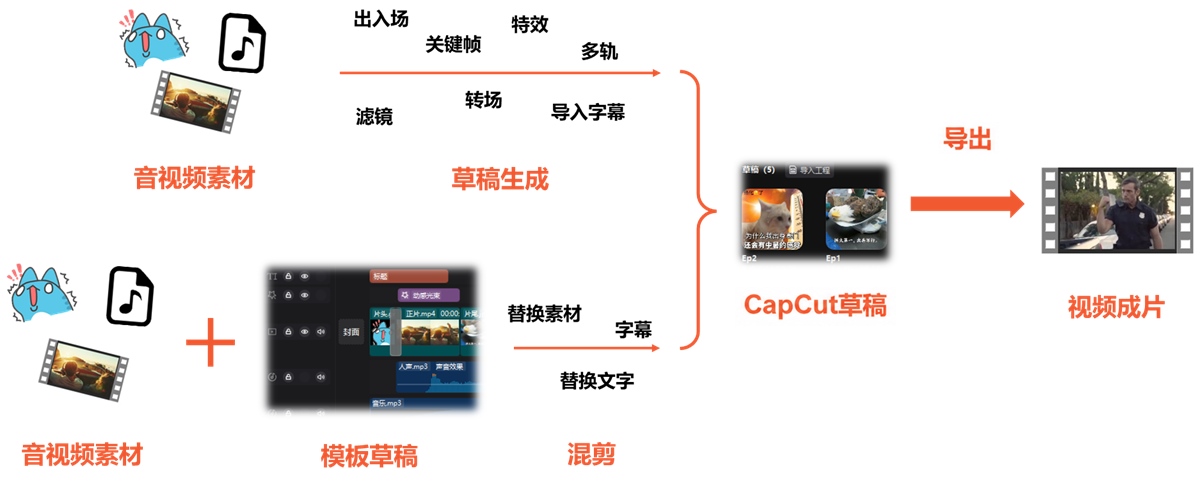
Open the generated draft in CapCut and export the video manually. Automated export is currently unsupported.
Feature List
✅ Supported. The validation version column lists confirmed CapCut versions; “—” means no version is recorded. It does not specify a minimum version or guarantee compatibility with every version.
Video and Image
| Feature | Support | Validation version |
|---|---|---|
| Local video/image media and timing | ✅ | 8.2.0 |
| Global video adjustments | ✅ | 8.2.0 |
| Video keyframes | ✅ | — |
| Video masks | ✅ | 9.5.0.4050 |
| Video chroma keying | ✅ | 9.5.0.4050 |
| Video blend modes | ✅ | 9.5.0.4050 |
| Video background fill (example) | ✅ | — |
| Audio fades for videos with audio | ✅ | — |
| Pitch change during speed adjustment for videos with audio | ✅ | 9.5.0.4050 |
Stickers
| Feature | Support | Validation version |
|---|---|---|
| Add stickers using resource metadata | ✅ | — |
| Sticker keyframes | ✅ | — |
Audio
| Feature | Support | Validation version |
|---|---|---|
| Local audio media and timing | ✅ | 9.5.0.4050 |
| Audio fades, volume and keyframes | ✅ | — |
| Pitch change during speed adjustment | ✅ | 9.5.0.4050 |
| Scene audio effects | ✅ | — |
| Tone effects | ✅ | 9.5.0.4050 (花栗鼠) |
Tracks
| Feature | Support | Validation version |
|---|---|---|
| Add tracks and segments | ✅ | 8.2.0 |
| Track layer ordering | ✅ | 8.2.0 (video tracks) |
| Main track magnet | ✅ | 8.2.0 |
Effects, Filters, and Transitions
| Feature | Support | Validation version |
|---|---|---|
| Video segment animations | ✅ | — |
| Video segment effects | ✅ | — |
| Video segment filters | ✅ | — |
| Standalone effect and filter tracks | ✅ | — |
| Transitions (example) | ✅ | — |
Text and Subtitles
| Feature | Support | Validation version |
|---|---|---|
| Text and styles | ✅ | 8.2.0 |
| Fonts | ✅ | 9.5.0.4050 |
| Text keyframes | ✅ | — |
| Text animations | ✅ | — |
| Text stroke, background and shadow | ✅ | — |
| Text bubbles and fancy text (example) | ✅ | 9.5.0.4050 (fancy text) |
| Automatic line wrapping | ✅ | — |
| Import SRT subtitles | ✅ | — |
Template Mode
| Feature | Support | Validation version |
|---|---|---|
| Load plaintext drafts | ✅ | 8.2.0 |
| Replace media by name | ✅ | — |
| Replace media by segment | ✅ | — |
| Replace text content | ✅ | — |
| Import template tracks | ✅ | — |
| Extract resource metadata | ✅ | — |
Installation
pyCapCut now supports pip installation (excluding demo).
pip install pycapcut
Cross-platform Compatibility
Install the library on Windows, Linux or macOS to generate and edit drafts. Open the generated drafts in CapCut for Windows and export videos manually.
For complete usage examples, see the full documentation.
1 maintainer

Metadata
1 maintainer
Release files for pycapcut 0.0.4
For a detailed explanation of source distributions (sdists) and built distributions (wheels), please see the package formats documentation.
Source distribution (sdist)
| File | Size | Uploaded | |
|---|---|---|---|
| pycapcut-0.0.4.tar.gz | 353.4 kB | Details |
Built distribution (wheel)
| File | Interpreter | ABI | Platform | Reset |
|---|---|---|---|---|
| pycapcut-0.0.4-py3-none-any.whl | Python 3 | none | any | Details |
Total release size: 700.2 kB
Release files / pycapcut-0.0.4.tar.gz
| Download URL | pycapcut-0.0.4.tar.gz |
|---|---|
| Size | 353.4 kB |
| Tags | Source |
|
SHA-256 checksum How to use checksums |
4d3a5644060f490d58b1d8d0b69a19406d2c2c7c4b78be2448c2ab54a9df8138
|
|
BLAKE2b-256 checksum How to use checksums |
adba223b0283f5b3ec6417feaf8567a0c40d07f5f927a12c5f99310d4929b364
|
| Upload date | |
|
Uploaded using Trusted Publishing? What is trusted publishing? |
No |
| Uploaded via |
twine/6.1.0 CPython/3.8.10
|
Release files / pycapcut-0.0.4-py3-none-any.whl
| Download URL | pycapcut-0.0.4-py3-none-any.whl |
|---|---|
| Size | 346.7 kB |
| Tags | Python 3 |
|
SHA-256 checksum How to use checksums |
044e923f3021634c970f6b449ef46a864ad13cc6af6228333d0970f20e37fc28
|
|
BLAKE2b-256 checksum How to use checksums |
a9a66422012dcc67cf4e281016f4d417ef365d92303262644678b9bc93a0b129
|
| Upload date | |
|
Uploaded using Trusted Publishing? What is trusted publishing? |
No |
| Uploaded via |
twine/6.1.0 CPython/3.8.10
|














