










Build predictable, state-driven interfaces with discord.py.
A flexible, Redux-inspired UI framework that introduces centralized state, access control, lifecycle control, and predictable data flow to Discord applications.
Why CascadeUI
Interactive Discord UIs become difficult to manage as they grow. State accumulates across
Viewsubclass attributes, components stop responding after bot restarts, multi-step forms lose data between pages, and sharing data between views requires manualmessage.edit()plumbing in every callback.
CascadeUI introduces structure built on a Redux-inspired core:
- Centralized state instead of scattered view attributes, so every view reads from a single source of truth and stays in sync automatically.
- Predictable updates through dispatched actions, with one way to change state and one way to read it. No callback spaghetti.
- Clear separation between logic and presentation. Reducers handle data, views render it, and neither knows about the other.
- Reusable UI patterns instead of one-off implementations. Menus, pagination, forms, wizards, tabs, and persistent panels are first-class library primitives.
- Built-in interaction control for ownership, instance limits, and navigation. Restrict who can click what, cap how many concurrent instances a user or guild can hold, and push, pop, or replace views without tracking message history by hand.
- Persistence, undo/redo, and lifecycle handling without the boilerplate. Components survive bot restarts, state history is one method call away, and session cleanup happens automatically.
The pattern scales from simple panels to full application-style interfaces.
Architecture
CascadeUI follows a unidirectional data flow model:
User interaction -> dispatch(action)
  -> middleware
  -> reducer (state update)
  -> subscribers notified
  -> views re-render
All state lives in a single store. Actions describe what happened. Reducers define how state changes. Views subscribe to relevant state and update automatically.
Coming from Redux or React?
CascadeUI ports Redux's mental model onto Discord. Most core primitives have a closest analogue in frameworks you already know:
| CascadeUI | Closest Redux / React analogue |
|---|---|
StateStore |
Redux store |
@cascade_reducer |
Redux reducer |
@computed |
Reselect / useMemo |
build_ui() |
React component render() |
on_state_changed |
componentDidUpdate + auto re-render |
push() / pop() / replace() |
React Router navigation |
| Middleware chain | applyMiddleware |
PersistenceMiddleware |
redux-persist (opt-in per slot) |
The table is the whole mapping; the analogues stop being useful where Discord's platform does not resemble a browser. Middleware is async, state outlives the process because Discord messages do, and the interaction model (a three-second acknowledgement wall, webhook tokens that expire at fifteen minutes, per-channel rate limits) has no React or Redux equivalent. Those are covered on their own terms in Core Concepts under Data Flow, State Topology, and Discord Interactions, rather than as a comparison.
When to Use
Every discord.py view requires access control, session cleanup, and interaction safety. CascadeUI handles all of that out of the box with class-level declarations - no boilerplate, no manual checks.
Even a single-view panel benefits from owner_only = True and instance_limit = 1. As your interface grows, the same framework scales to:
- Shared state across multiple views via
StateStore - Real data and message persistence via
PersistenceMiddleware - Cross-view reactivity with
dispatch()andsubscribed_actions - Multi-step flows and validation via
WizardLayoutViewandFormLayoutView - Navigation stacks (
push()/pop()/replace()), session policies, andparticipant_limit - Grid-based game boards with
emoji_grid()andbutton_grid()
Getting Started
pip install pycascadeui
Optional dependencies:
pip install pycascadeui[sqlite]      # single-process persistence
pip install pycascadeui[postgres]    # multi-process persistence with LISTEN/NOTIFY
Requirements:
- Python 3.10+
- discord.py 2.7+
Hello World
A minimal CascadeUI view: per-user counter with ownership, instance replacement, and state-driven rebuilds - in about 20 lines.
import discord
from discord.ui import ActionRow
from cascadeui import StatefulButton, StatefulLayoutView, card

class CounterView(StatefulLayoutView):
    # Class-level policy -- ownership and instance control in three lines.
    owner_only = True              # Only the opener can click
    instance_limit = 1             # One live counter per user
    instance_policy = "replace"    # Second open replaces the first

    # Reactivity -- build_ui() re-runs whenever scoped state changes.
    subscribed_actions = {"SCOPED_UPDATE"}
    state_scope = "user"

    def __init__(self, *args, **kwargs):
        super().__init__(*args, **kwargs)
        self.build_ui()  # First render: send() needs components to ship

    def build_ui(self):
        self.clear_items()
        count = self.scoped_state.get("count", 0)
        self.add_item(card(f"Count: **{count}**"))
        self.add_item(ActionRow(StatefulButton(
            label="+1",
            style=discord.ButtonStyle.primary,
            callback=self._increment,
        )))

    async def _increment(self, interaction):
        count = self.scoped_state.get("count", 0)
        await self.dispatch_scoped({"count": count + 1})

# In a cog command:
#   view = CounterView(context=ctx)
#   await view.send()
See the Quickstart for the detailed walkthrough and examples/v2_hello_world.py for the full runnable cog.
Feature Showcase
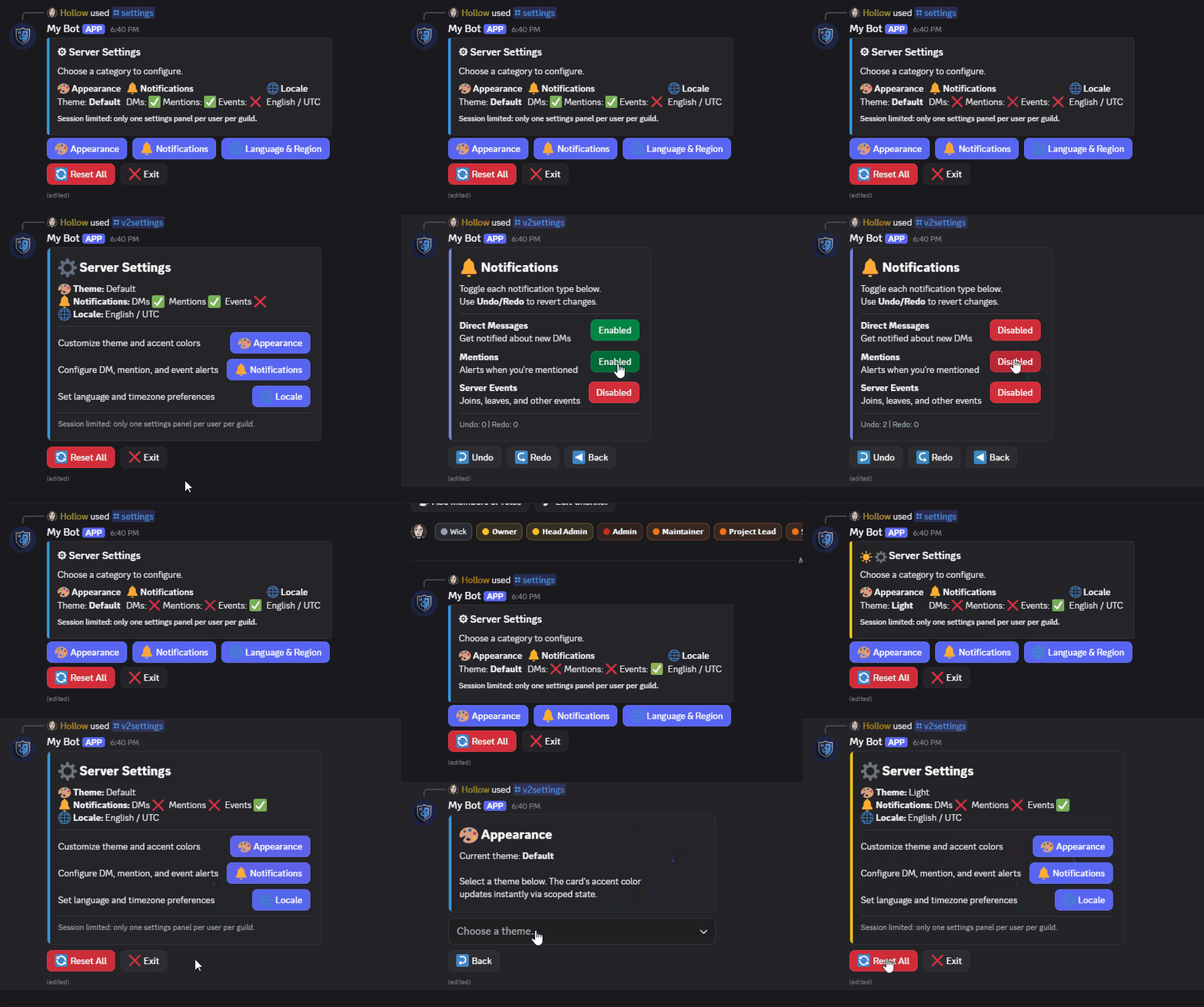
Cross-View Reactivity
Dispatch actions from any view and update all subscribers instantly across the interface.
# Any view can dispatch a named action.
await self.dispatch("SETTINGS_UPDATED", {"theme": "dark"})

# Any other open view that subscribes wakes up automatically --
# no manual message.edit(), no cross-view wiring.
class NotificationPanel(StatefulLayoutView):
    subscribed_actions = {"SETTINGS_UPDATED"}
    # build_ui() re-runs whenever SETTINGS_UPDATED fires anywhere.
Dynamic Rendering
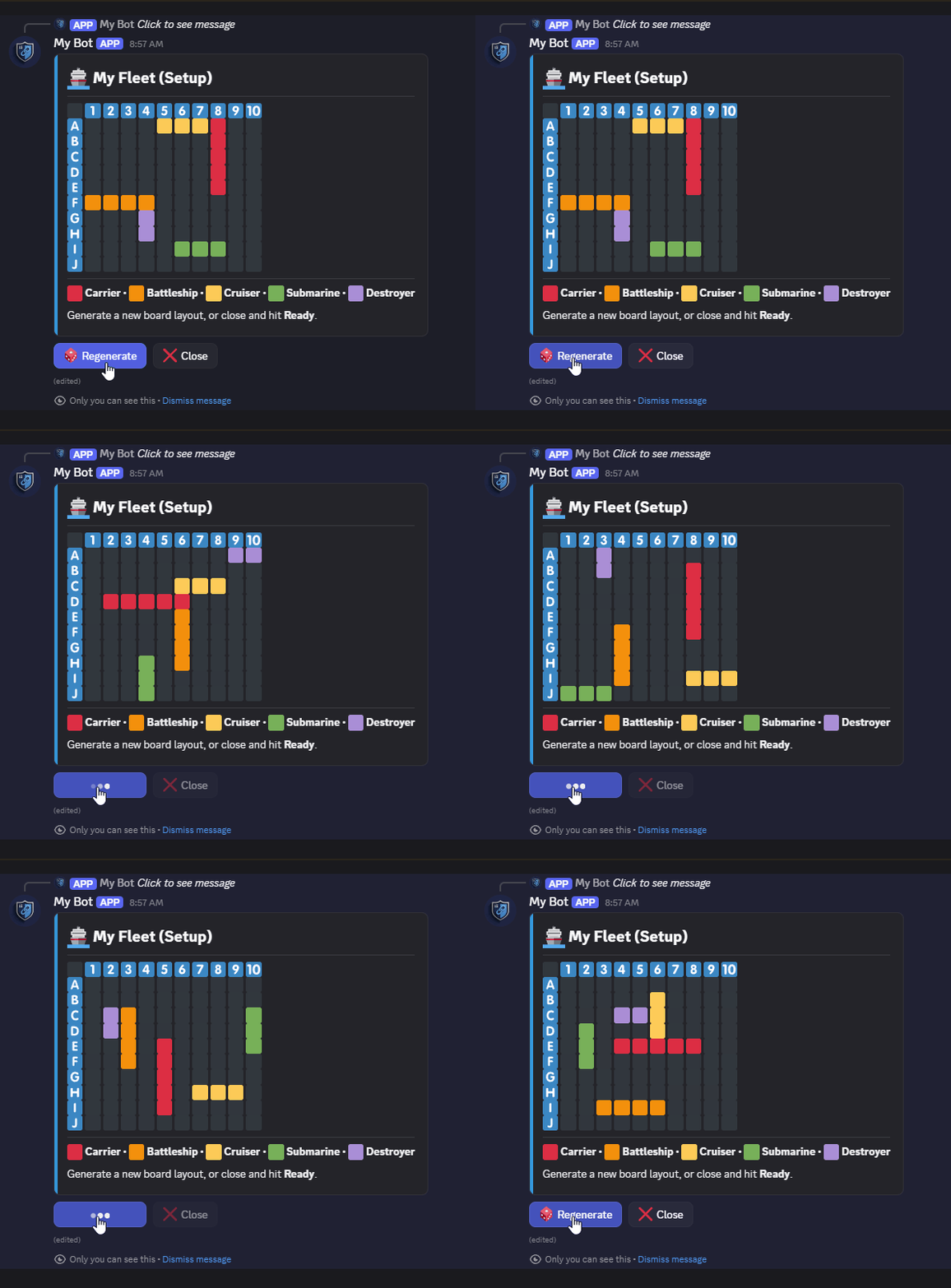
Define
build_ui()once. The library calls it on every relevant state change and ships the edit for you. Noon_state_changed()override, no manualrefresh(), nomessage.edit()plumbing.
class MyFleetView(StatefulLayoutView):
    state_scope = "user"
    subscribed_actions = {"FLEET_REROLLED"}

    def __init__(self, **kwargs):
        super().__init__(**kwargs)
        self.build_ui()  # First render: send() needs components to ship

    def build_ui(self):
        self.clear_items()
        grid = emoji_grid(10, 10, fill="\U0001f7e6", row_labels="alpha", col_labels="numeric")
        for row, col in self.ship_cells():
            grid[row, col] = "\U0001f6a2"

        self.add_item(card("## My Fleet", divider(), grid, color=discord.Color.blue()))
        self.add_item(ActionRow(
            StatefulButton(label="Regenerate", emoji="\U0001f3b2", callback=self._reroll),
        ))

    async def _reroll(self, interaction):
        await self.dispatch("FLEET_REROLLED", {"cells": random_placement()})

# build_ui() runs automatically on every FLEET_REROLLED dispatch --
# no manual refresh() or on_state_changed() override needed.
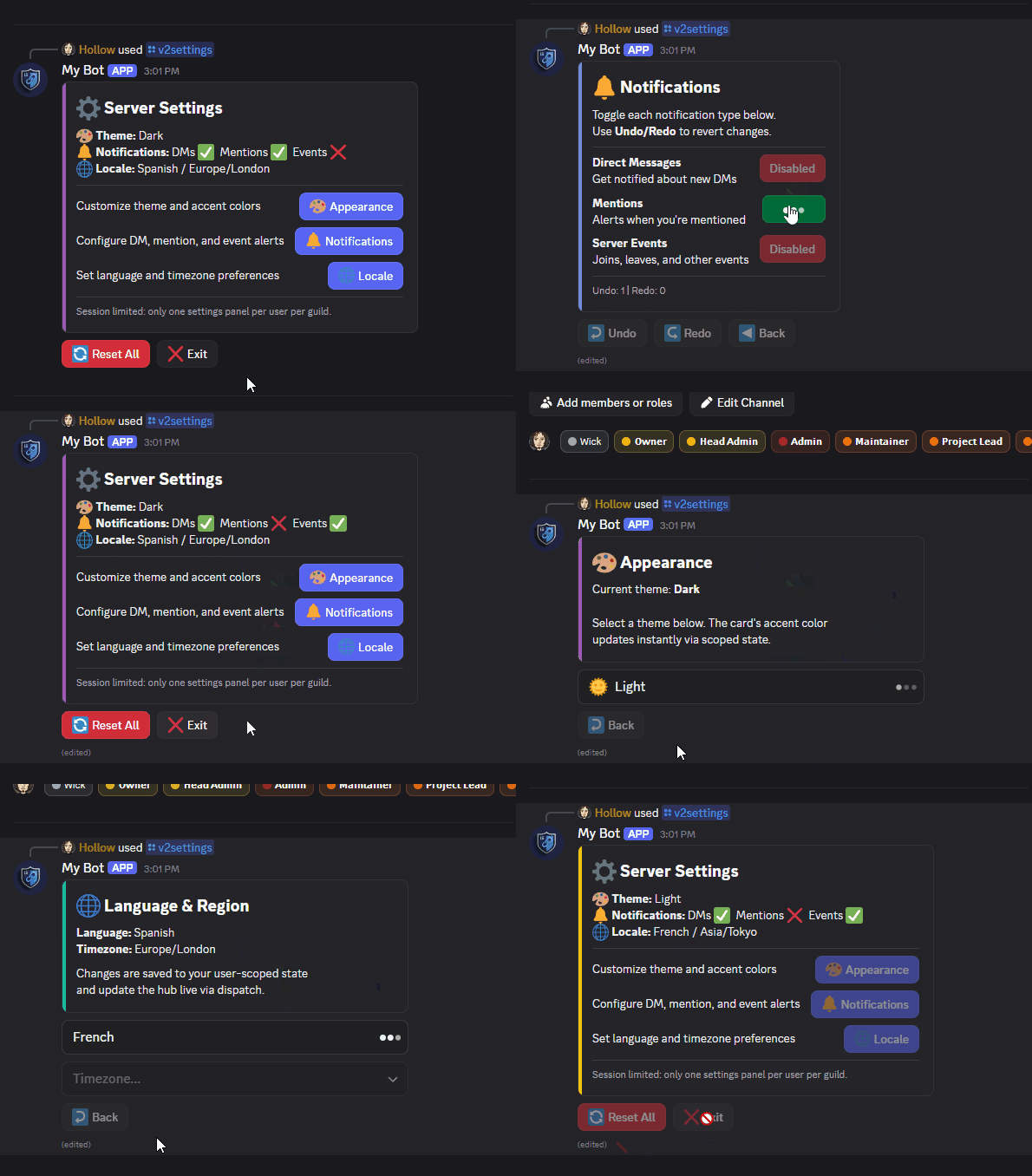
Navigation and Flow
Push, pop, and replace views on a shared navigation stack.
MenuLayoutViewhandles the wiring for category-based hubs -- declare your categories and target views, the pattern generates the push callbacks andaction_section()items automatically.
from cascadeui import MenuLayoutView

class SettingsMenu(MenuLayoutView):
    instance_limit = 1
    instance_scope = "user_guild"
    instance_policy = "replace"

    def __init__(self, *args, **kwargs):
        categories = [
            {"label": "Appearance", "emoji": "\N{ARTIST PALETTE}",
             "description": "Theme and accent colors", "view": AppearanceView},
            {"label": "Notifications", "emoji": "\N{BELL}",
             "description": "Alert preferences", "view": NotificationsView},
            {"label": "Locale", "emoji": "\N{GLOBE WITH MERIDIANS}",
             "description": "Language and timezone", "view": LocaleView},
        ]
        super().__init__(*args, categories=categories, **kwargs)
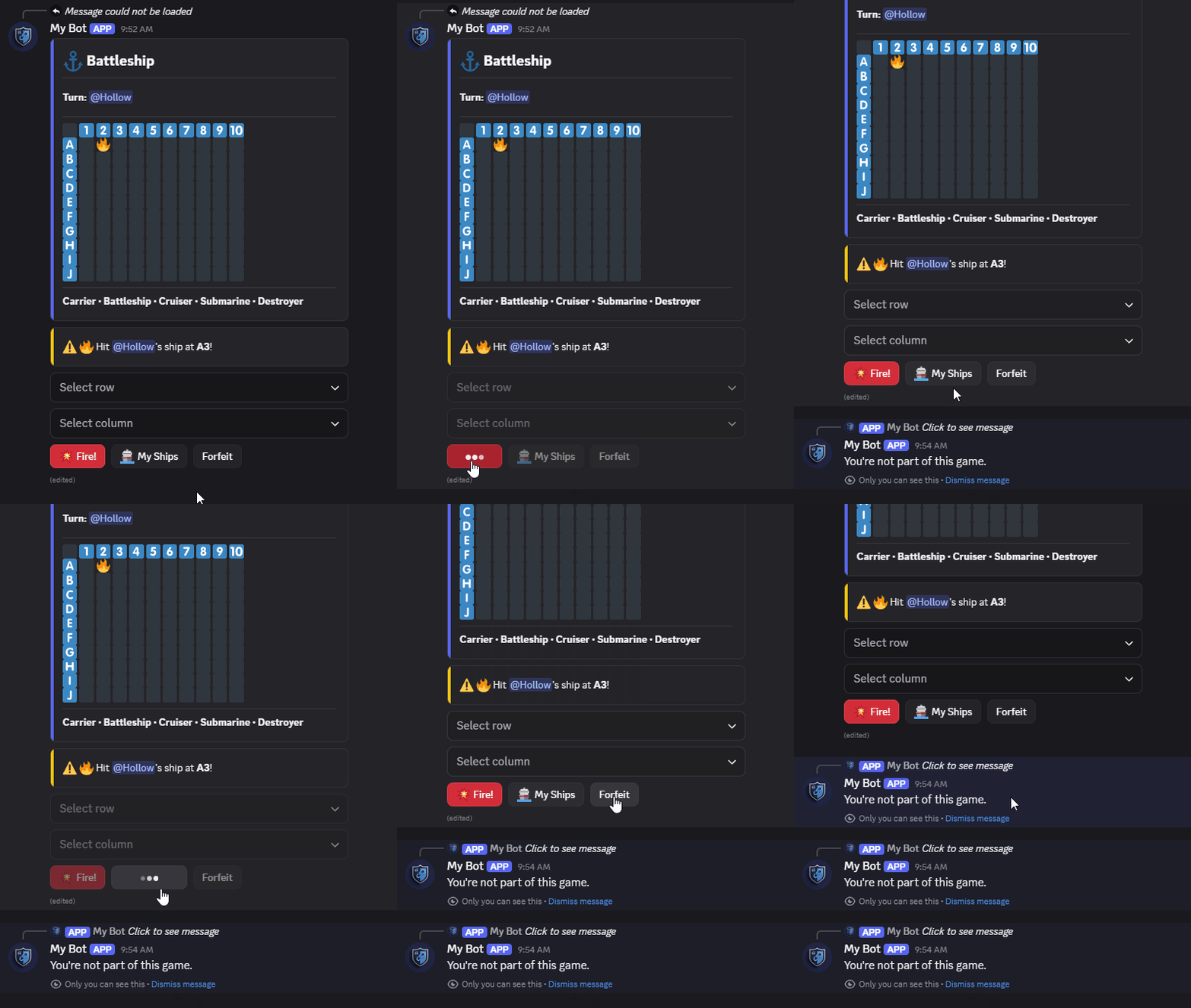
Ownership Control
Views are owner-only by default - only the user who opened it can interact. For multi-user scenarios,
allowed_usersandparticipant_limitextend that control.
class BattleshipView(StatefulLayoutView):
    unauthorized_message = "You're not part of this game."
    instance_limit = 1
    instance_policy = "reject"
    participant_limit = 2
    auto_register_participants = True

    def __init__(self, *args, opponent_id: int, **kwargs):
        super().__init__(*args, **kwargs)
        self.allowed_users = {self.user_id, opponent_id}
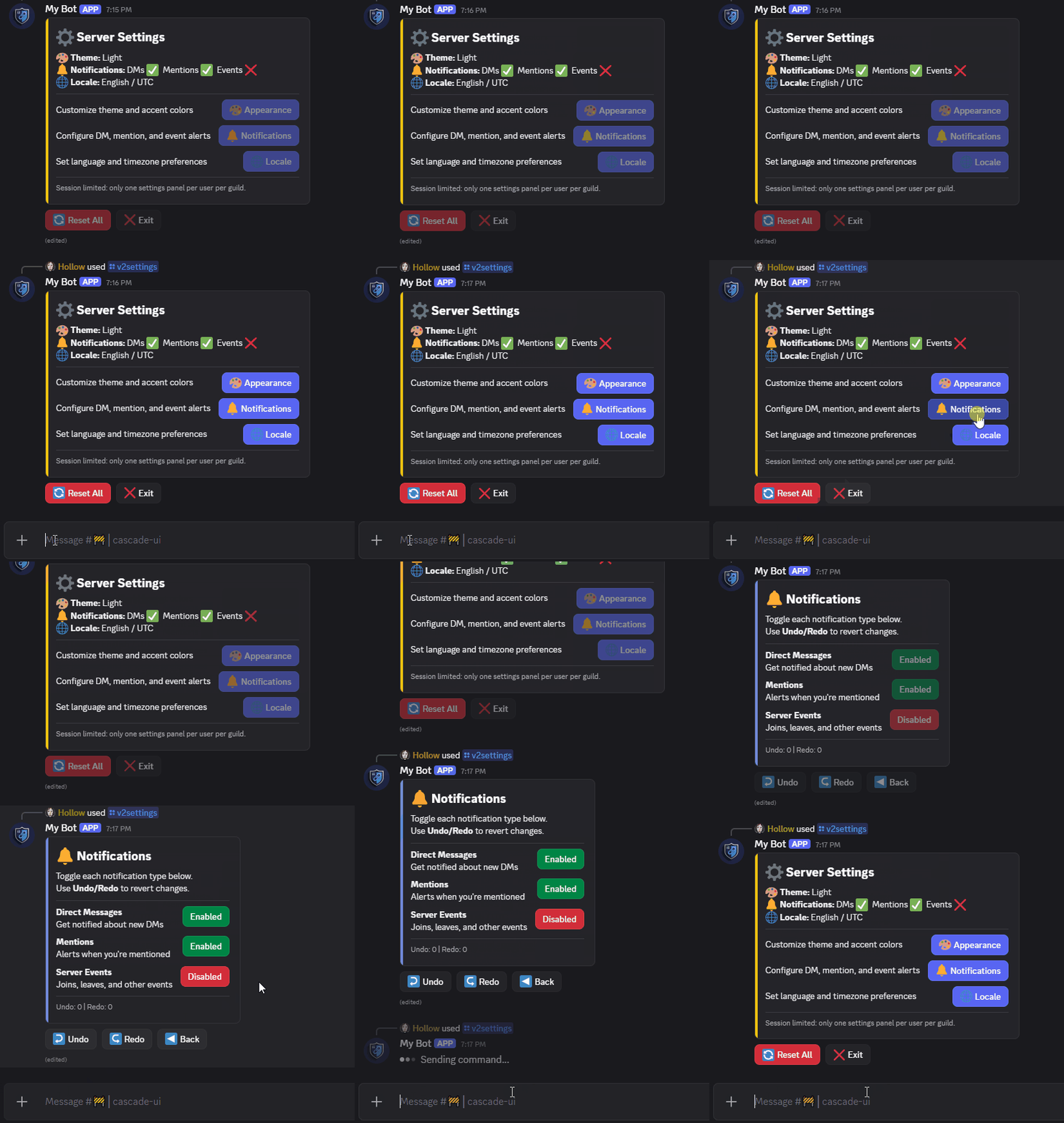
Lifecycle Control
Cap active sessions per user, guild, or globally. Pick how a collision resolves and how the old view cleans up when a new one opens.
class SettingsHubView(MenuLayoutView):
    instance_limit = 1               # Only one open at a time
    instance_scope = "user_guild"    # Per user per guild
    instance_policy = "replace"      # Exit the old one, open the new one
    exit_policy = "disable"          # Old view's buttons grey out, message stays
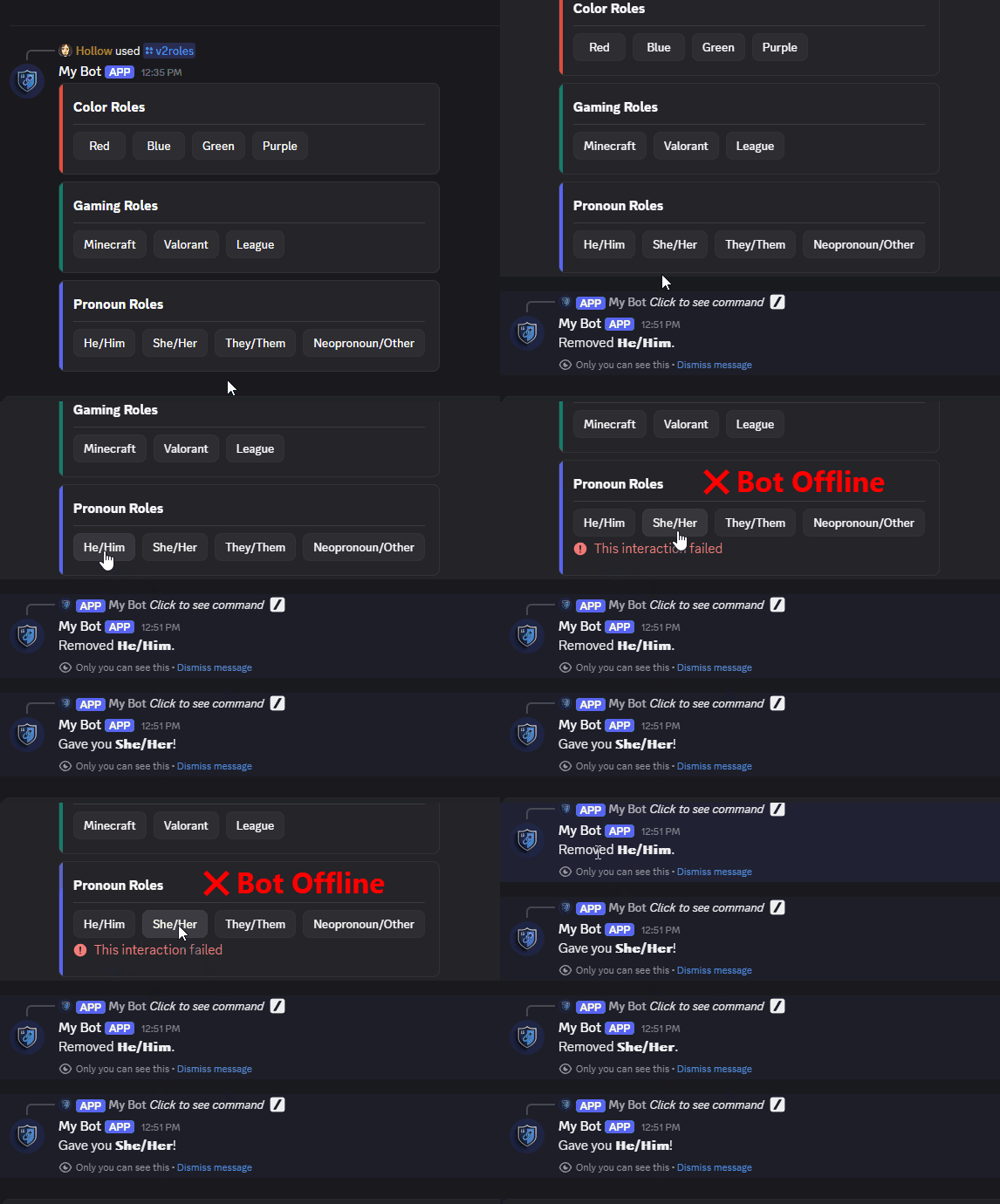
Persistence and Continuity
Persist views and state across restarts with automatic restoration.
from cascadeui import PersistenceMiddleware, SQLiteBackend, setup_middleware

# Install PersistenceMiddleware once in your bot's setup_hook:
async def setup_hook(self):
    await setup_middleware(
        PersistenceMiddleware(backend=SQLiteBackend("cascadeui.db"), bot=self),
    )
Subclass PersistentRolesLayoutView and declare your categories. The pattern handles button rendering, cardinality enforcement, and restart re-attachment. A stable persistence_key is the match identity the middleware uses to find this panel after restart:
class GuildRoles(PersistentRolesLayoutView):
    categories = [
        RoleCategory(name="Color Roles", exclusive=True, roles={"Red": 123, "Blue": 456}),
        RoleCategory(name="Pronouns", required=True, roles={"He/Him": 789, "She/Her": 12}),
    ]

# Same key in, same panel out -- across bot restarts.
panel = GuildRoles(context=ctx, persistence_key=f"roles:{ctx.guild.id}")
await panel.send()
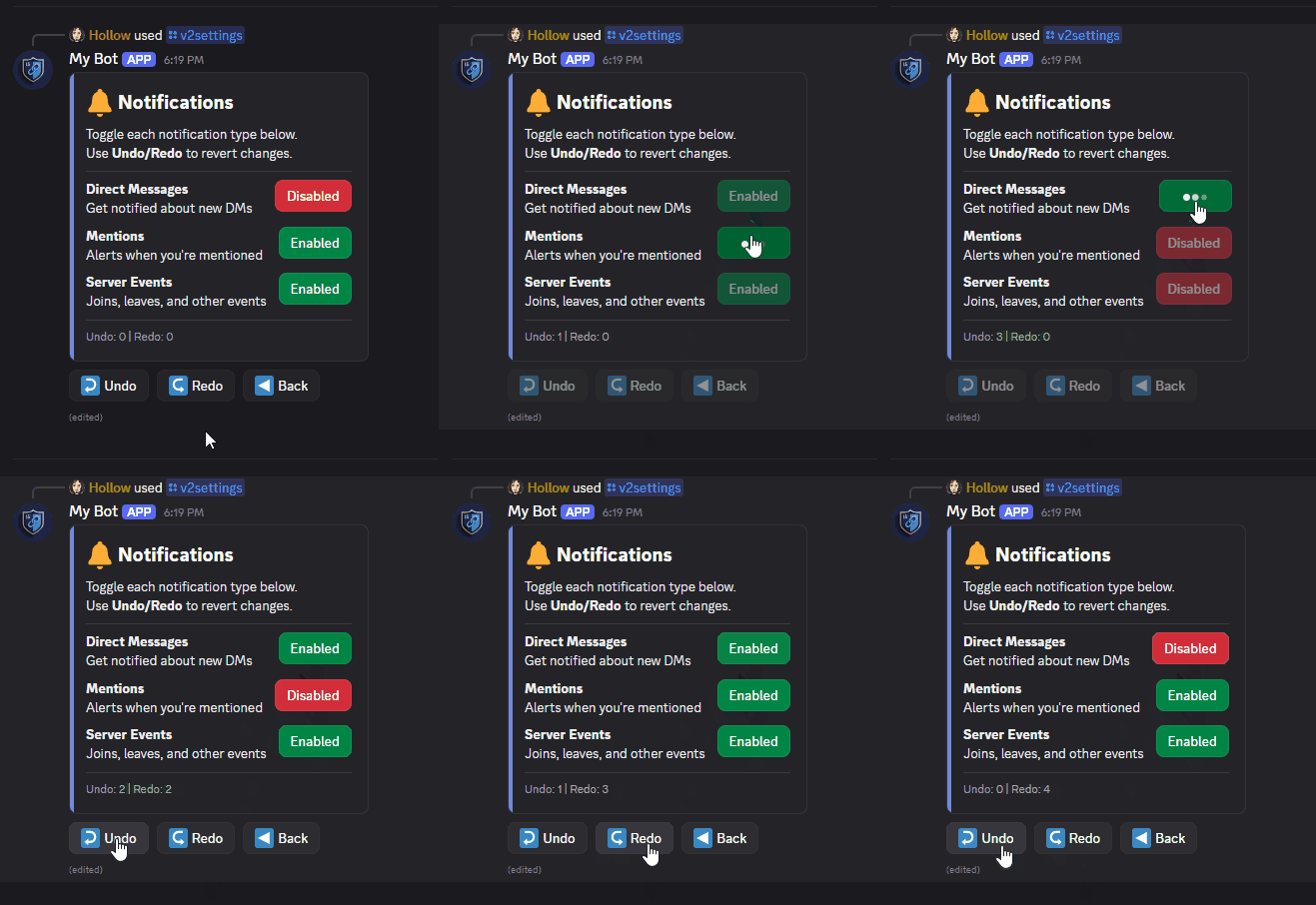
State History (Undo/Redo)
Snapshot-based state history per session with built-in undo and redo support.
class NotificationsView(StatefulLayoutView):
    enable_undo = True   # Every dispatch captures a snapshot
    undo_limit = 10      # Stack depth cap (self.undo_depth / self.redo_depth read live)

    async def _undo(self, interaction):
        await self.undo()   # Restore previous snapshot

    async def _redo(self, interaction):
        await self.redo()   # Reapply the reverted snapshot
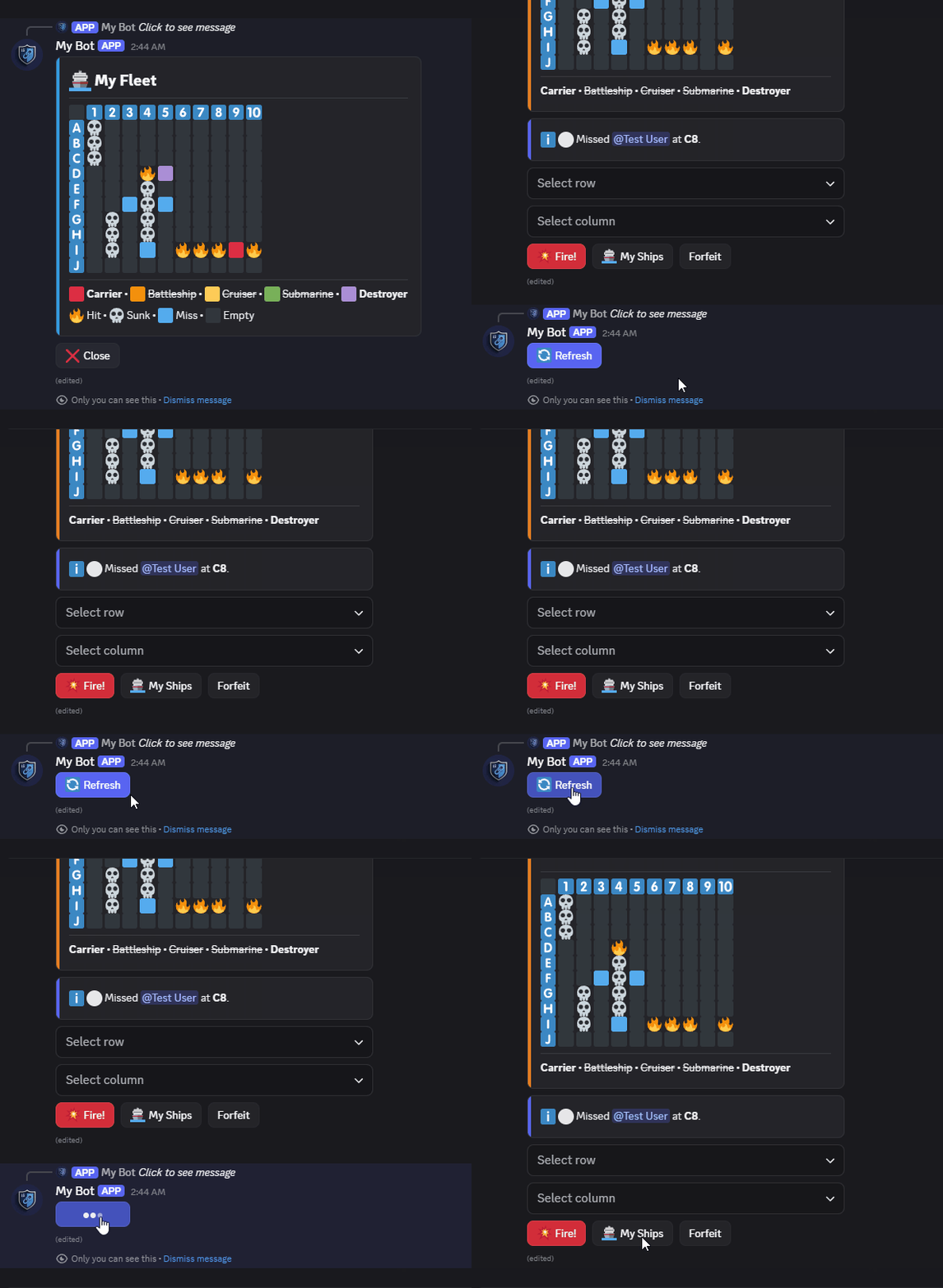
Ephemeral Refresh
Discord ephemeral messages become uneditable after 15 minutes. CascadeUI handles the token handoff automatically.
class FleetView(StatefulLayoutView):
    timeout = 3600                       # Handoff auto-engages for timeout > 900s
    refresh_button_label = "Refresh"     # Default: "Continue Session"
Developer Tools
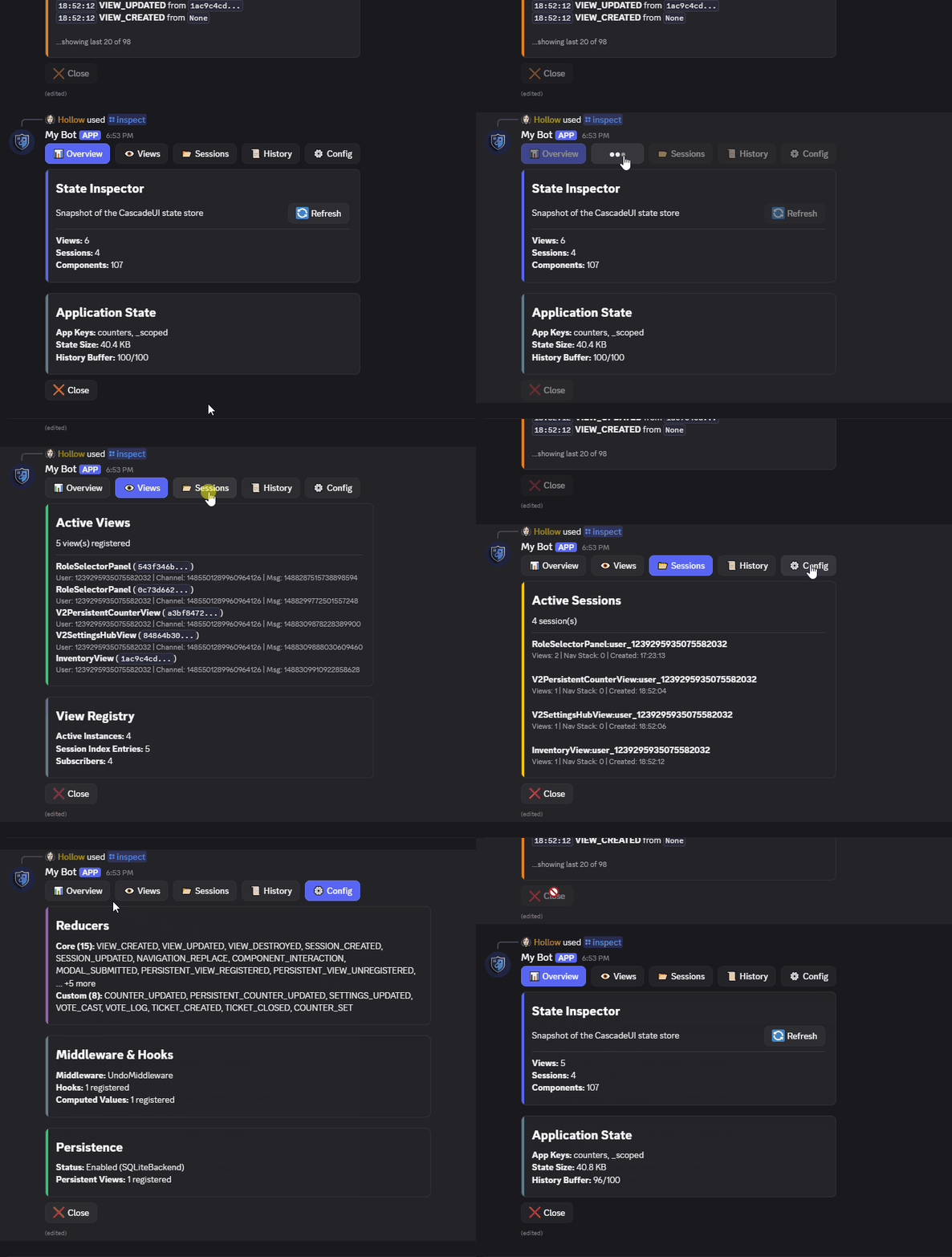
Inspect live state, session activity, and performance timings without leaving your Discord client.
from cascadeui import DevToolsCog

# In your bot's setup_hook:
await bot.add_cog(DevToolsCog(bot))
View Patterns
Category Menu
Category-based navigation hubs with automatic drill-down, themed cards, and declarative per-category styling.
from cascadeui import MenuLayoutView, card, key_value

class ConfigHub(MenuLayoutView):
    menu_style = discord.ButtonStyle.primary
    auto_exit_button = True

    def __init__(self, *args, **kwargs):
        categories = [
            {"label": "General", "emoji": "\u2699\ufe0f",
             "description": "Core settings", "view": GeneralView},
            {"label": "Moderation", "emoji": "\U0001f6e1\ufe0f",
             "description": "AutoMod and logging", "view": ModerationView},
        ]
        super().__init__(*args, categories=categories, **kwargs)

    def build_header(self):
        return [card("## Server Config", key_value(self._summary()))]
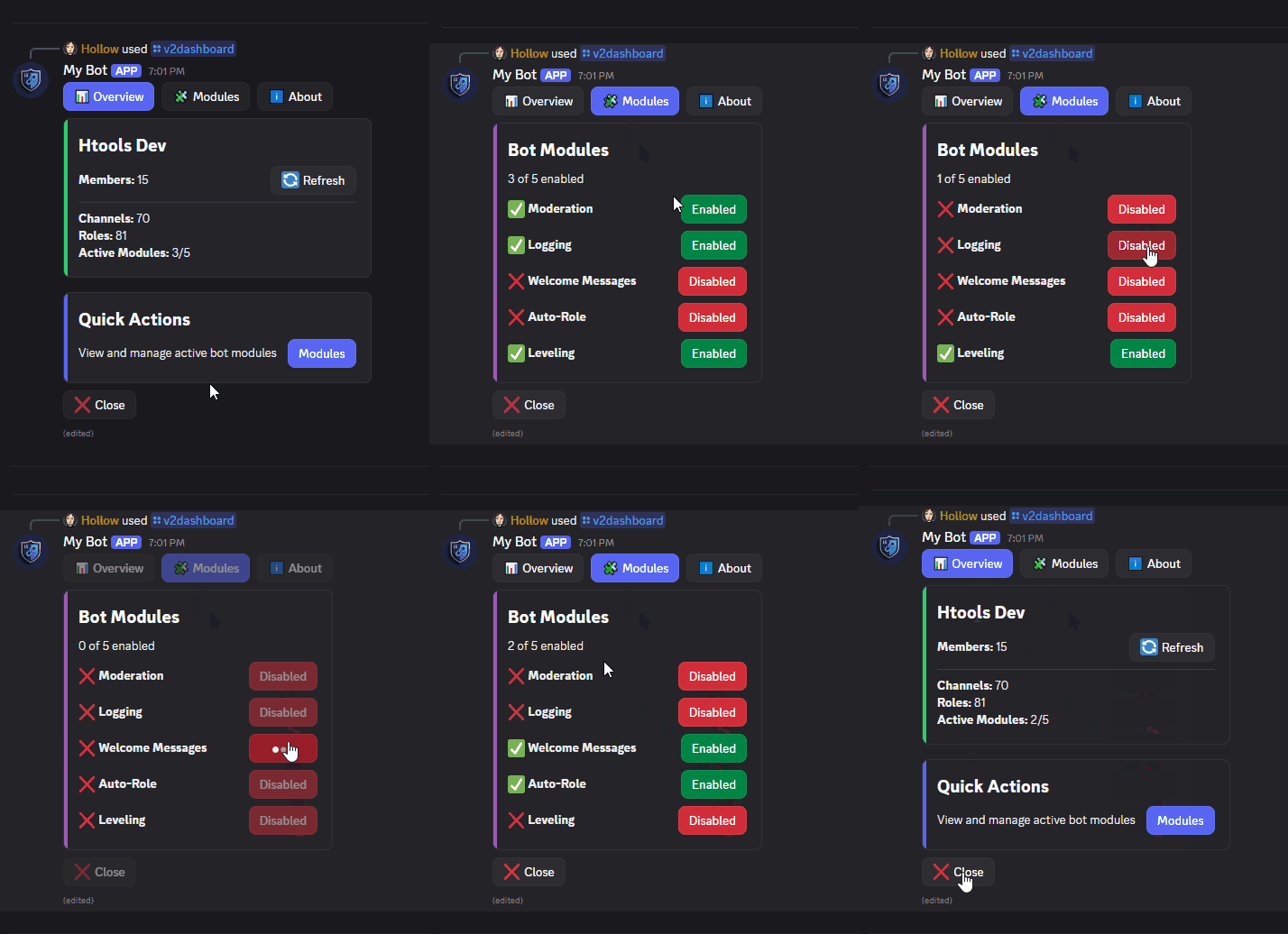
Tabbed Dashboard
Structured, multi-section interfaces with tab-based navigation and composable layouts.
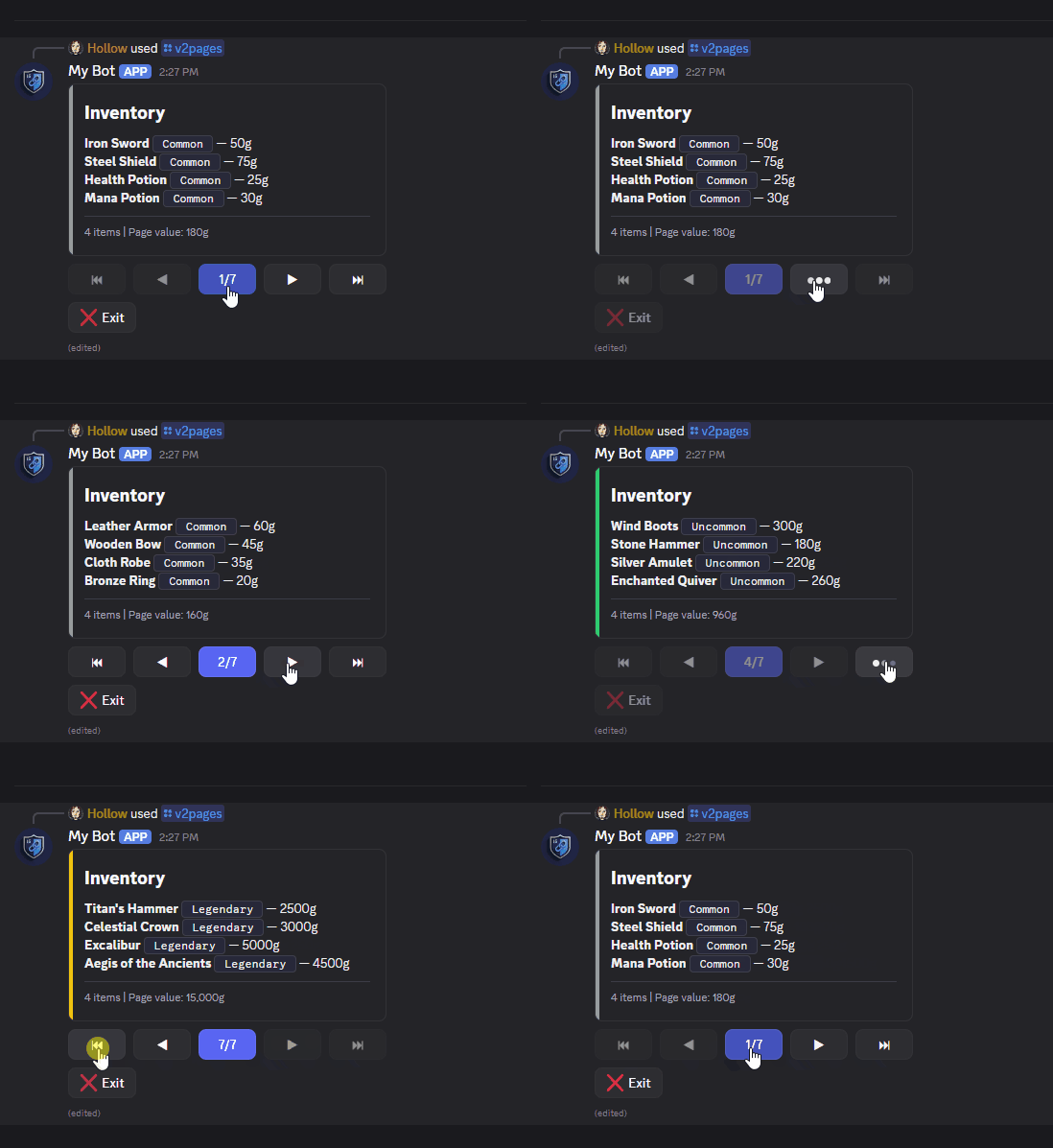
Dynamic Pagination
Generate paginated interfaces from raw data with built-in navigation and formatting helpers.
import discord
from cascadeui import PaginatedLayoutView, card, divider

def format_page(items):
    lines = [f"**{item['name']}** | {item['rarity']} | {item['value']}g" for item in items]
    return [card(
        "## Inventory",
        divider(),
        "\n".join(lines),
        color=discord.Color.blue(),
    )]

view = await PaginatedLayoutView.from_data(
    items=all_items,
    per_page=4,
    formatter=format_page,
    context=ctx,
)
await view.send()
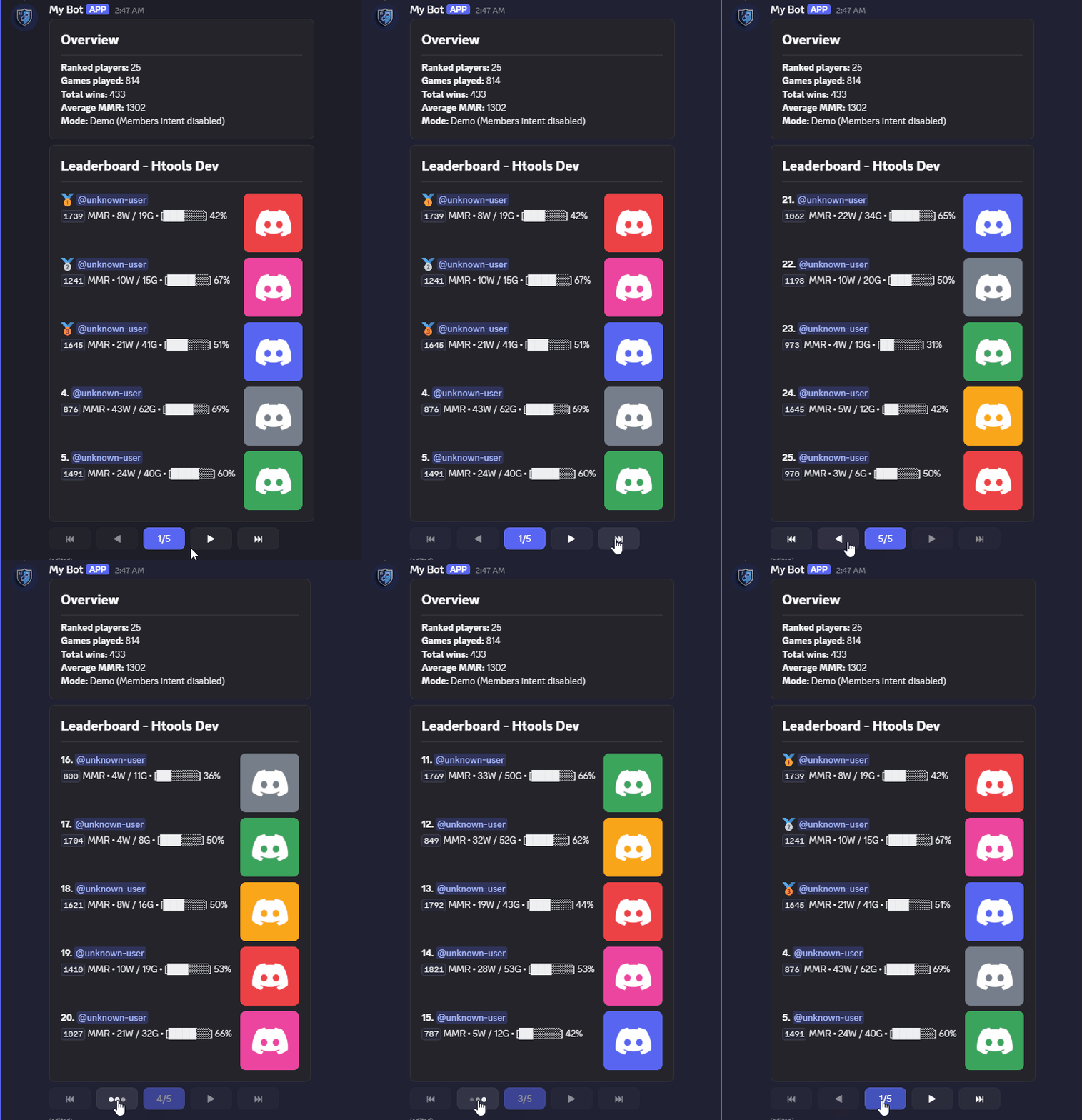
Leaderboards
Paginated ranked displays with cross-page numbering, optional page-frame hooks (
build_header/build_footer) for aggregate stats, and a persistent variant for admin-posted panels that refresh on live data without a bot restart.
from cascadeui import LeaderboardLayoutView, PersistentLeaderboardLayoutView, get_store, stats_card

class BattleshipLeaderboard(LeaderboardLayoutView):
    leaderboard_top_n = 25
    leaderboard_per_page = 10
    title = "Battleship Rankings"

    def format_stats(self, user_id, stats):
        wins = stats.get("wins", 0)
        games = stats.get("games", 0)
        return f"**{wins}W** / {games - wins}L"

    def build_header(self, page):
        # Aggregate stats read from the loaded top-N, rendered above the
        # rankings on every page. Each game contributes to two player rows,
        # so halve for unique games.
        unique_games = sum(s.get("games", 0) for _, s in self.ranked_entries) // 2
        return stats_card(
            "Overview",
            {"Players": str(len(self.ranked_entries)), "Games Played": str(unique_games)},
        )


# One-shot usage: fetch live entries and pass them in.
entries = get_store().computed["battleship_leaderboards"].get(guild_id, [])
view = BattleshipLeaderboard(context=ctx, entries=entries)
await view.send()


# Persistent variant -- admin-posted panel that survives bot restarts
# and re-fetches live data on every restore.
class PersistentBoard(PersistentLeaderboardLayoutView):
    pass

panel = PersistentBoard(
    context=ctx,
    persistence_key="battleship-leaderboard-main",
)
await panel.send()
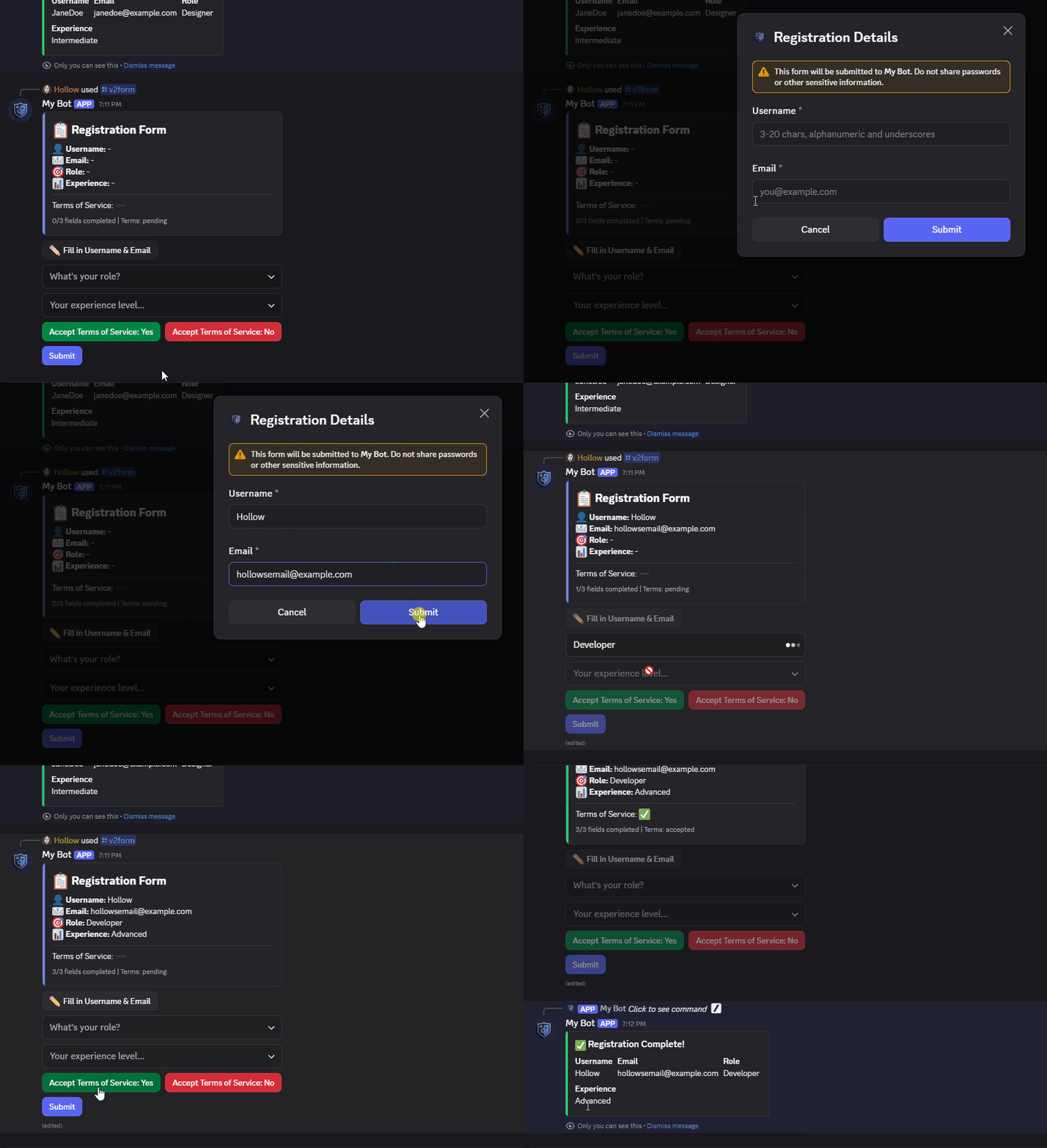
Forms and Validation
Define structured input flows with declarative fields, native text inputs, and per-field validation.
from cascadeui import FormLayoutView, min_length, regex

class RegistrationForm(FormLayoutView):
    instance_limit = 1
    instance_policy = "reject"
    exit_policy = "delete"

    def __init__(self, *args, **kwargs):
        fields = [
            {
                "id": "username", "label": "Username", "type": "text",
                "required": True, "min_length": 3, "max_length": 20,
                "validators": [
                    min_length(3),
                    regex(r"^[a-zA-Z0-9_]+$", "Alphanumeric and underscores only"),
                ],
            },
            {
                "id": "role", "label": "Role", "type": "select",
                "required": True,
                "options": [
                    {"label": "Developer", "value": "dev"},
                    {"label": "Designer", "value": "design"},
                ],
            },
        ]
        super().__init__(*args, title="Registration", fields=fields, **kwargs)

    async def on_submit(self, interaction, values):
        await self.respond(
            interaction, f"Welcome, {values['username']}!", ephemeral=True,
        )
        await self.exit()
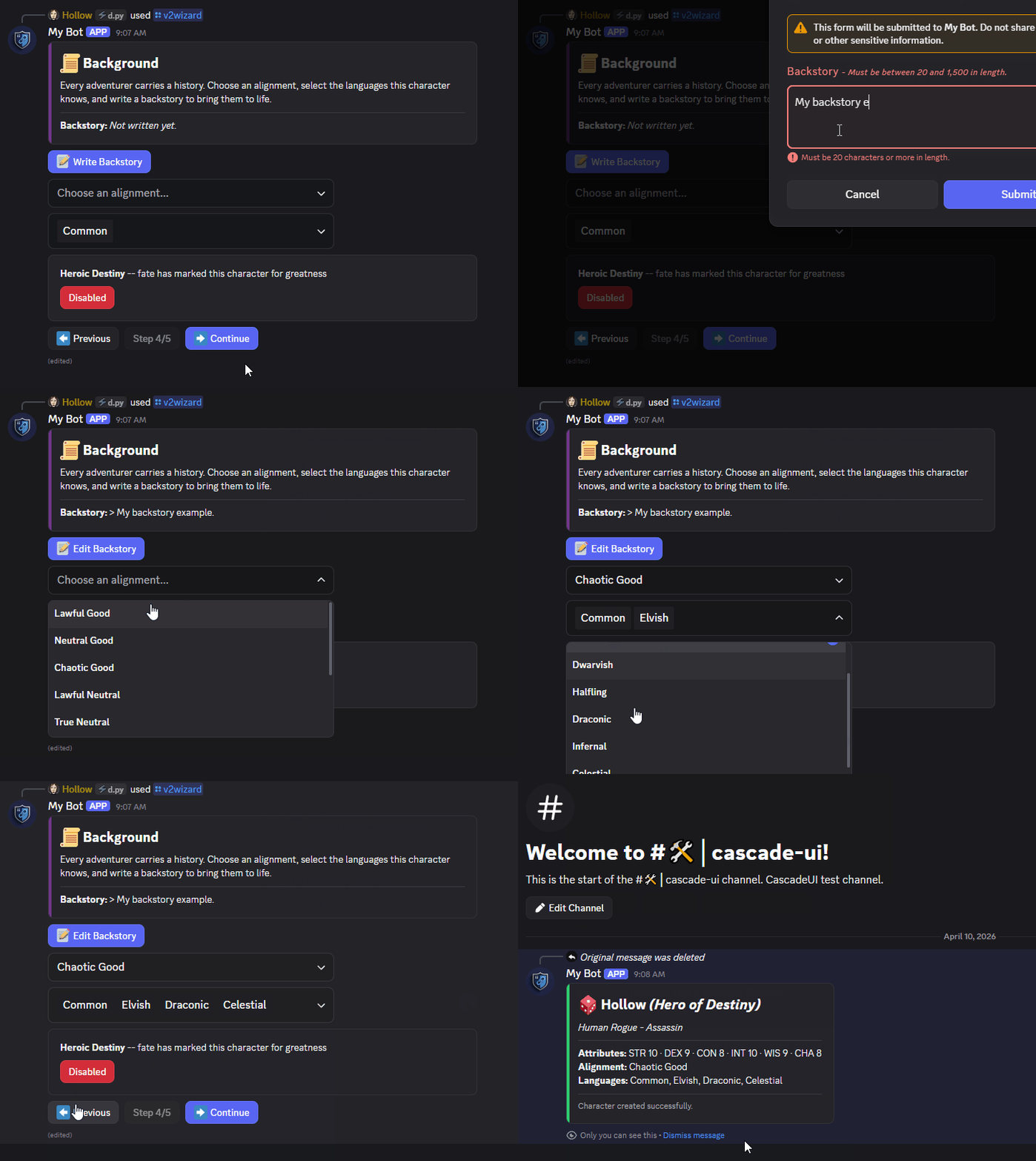
Multi-Step Wizard
Multi-step flows with back/next/finish navigation, per-step builders and validators, and fully customizable button styling.
from cascadeui import WizardLayoutView

class CharacterCreator(WizardLayoutView):
    instance_limit = 1
    instance_policy = "replace"
    exit_policy = "delete"

    back_button_label = "Previous"
    next_button_label = "Continue"
    finish_button_label = "Create Character"
    finish_button_style = discord.ButtonStyle.success

    def __init__(self, *args, **kwargs):
        steps = [
            {"name": "Identity", "builder": self.build_identity},
            {"name": "Class",    "builder": self.build_class},
            {"name": "Stats",    "builder": self.build_stats},
            {"name": "Review",   "builder": self.build_review},
        ]
        super().__init__(*args, steps=steps, **kwargs)
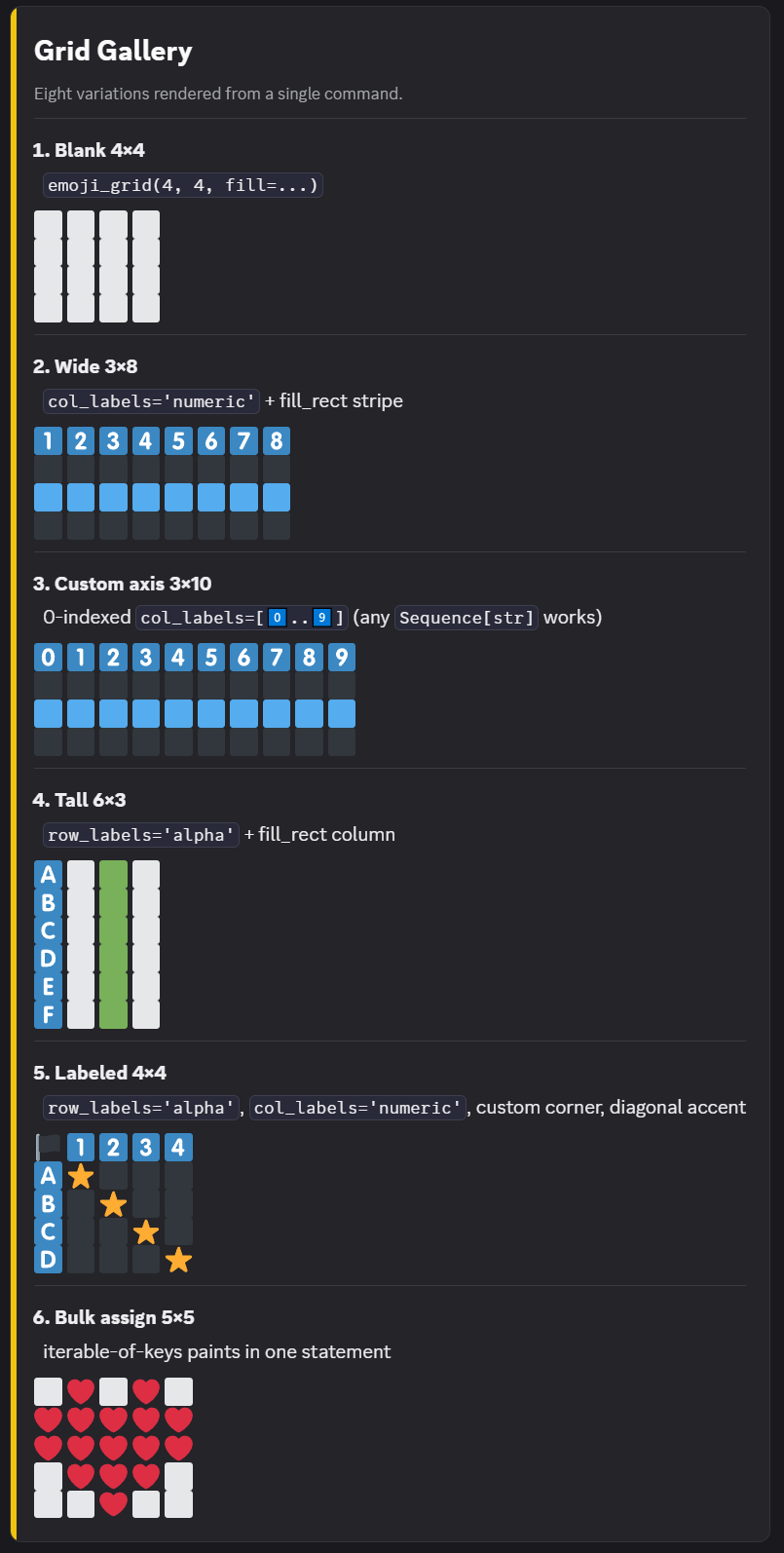
Emoji Grid
Text-rendered grids with optional axis labels and a mutation API. Plugs directly into
card()andContainer.
from cascadeui import emoji_grid, card

grid = emoji_grid(4, 4, fill="\u2b1c", col_labels="numeric")
grid.fill_rect((1, 0), (1, 3), "\U0001f7e6")
grid[(2, 2)] = "\u2764\ufe0f"

view.add_item(card(grid))
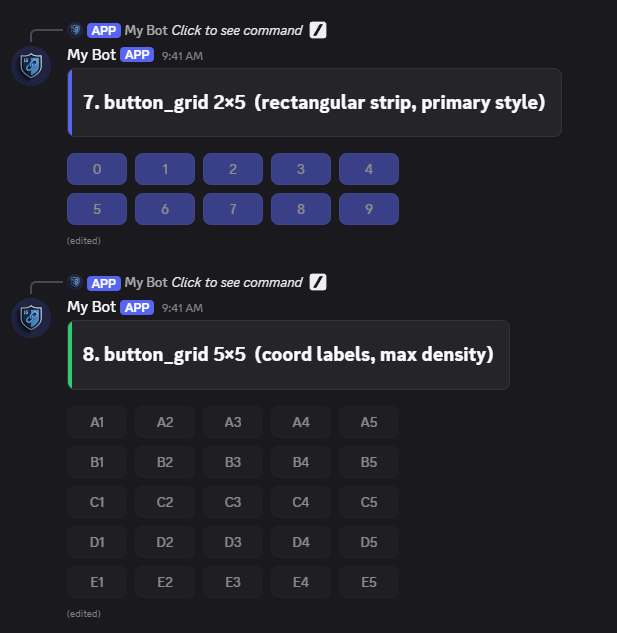
Button Grid
Interactive cell grids packed into
ActionRowcomponents. Discord's 5x5 limit is enforced automatically.
from cascadeui import button_grid, StatefulButton

rows = button_grid(3, 3, lambda r, c: StatefulButton(
    label=f"{chr(65 + r)}{c + 1}",
    style=discord.ButtonStyle.secondary,
    callback=on_cell_click,
))
for row in rows:
    view.add_item(row)
Features
For full details, see the official documentation.
State
- Centralized store with dispatch and reducer cycle
- Custom reducers via
@cascade_reducerwith automatic deep copy and collision guards - Action batching with nested-batch collapse and a single notification per commit
@computedvalues with selector-based cache invalidation (≈ Reselect /useMemo)- Selector-based subscriptions for targeted re-renders
- Scoped state family:
get_scoped(),set_scoped(),merge_scoped(),iter_scoped() - Slot helpers:
access_slot(),read_slot(),slot_property - Middleware pipeline for logging, persistence, and transformation (Redux-style, async)
- Event hooks for lifecycle observation
- Cross-view reactivity: dispatch from any view, all subscribers update instantly
Views
- V2 layout-based system for structured, container-driven interfaces
- Full support for traditional discord.py Views (V1)
- Pre-built patterns: menus, tabs, wizards, forms, pagination, leaderboards, roles
PaginatedView.from_cursor()for lazy cursor-driven pagination with LRU page cacheDisplayLayoutViewfor one-shot V2 sends from a pre-built container- Automatic state-driven rebuilds: define
build_ui(), the library handles the edit (≈ Reactrender()) refresh_cooldown_msto pace library-initiated re-renders, with always-on reactive 429 backoff that retries at the window boundary- Theming with per-view overrides and a
ContextVarthat propagates through builders (≈React.Context)
Components
- Stateful buttons, selects, and modals with state integration
- Modal inputs beyond text:
Checkbox,CheckboxGroup,RadioGroup,FileUpload, sharing one validator + custom_id contract withTextInput - Select callbacks can opt into a
valuessecond parameter - V2 builders:
card(),stats_card(),action_section(),toggle_section(),image_section(),link_section(),confirm_section(),button_row(),cycle_button(),toggle_button(),tab_nav(),choice_row(),key_value(),alert(),progress_bar(),divider(),gap(),gallery(),file_attachment() - V2 stateful composites:
PaginatedRegion(per-section pager),Collapsible(inline disclosure) - Grid helpers:
emoji_grid()andbutton_grid() - Typed modal fields (
text,integer,float,date) with per-field validation - Declarative
FormSchemaandWizardSchemabase classes - Component wrappers: loading states, confirmation dialogs, cooldowns
Interaction Control
- Owner-only views by default;
allowed_usersopens access to specific users - Instance limits per user, guild, user+guild, or globally with replace or reject policies
participant_limitwithon_participant_limithook andauto_register_participantscheck_instance_available()for fail-fast pre-checks before constructing expensive views- Auto-defer with
respond(),open_modal(), and_safe_defer()helpers - Interaction serialization so rapid clicks process sequentially
with_cooldown()to rate-limit one control per clicker, surviving the component being rebuiltedit_timeoutceiling that cancels stalled Discord edits before they pin a view- Silent snowflake coercion at every public boundary
- Class-attribute validation at subclass-definition time
Navigation and Lifecycle
- Navigation stack:
push(),pop(),replace()on one shared message (≈ React Router) - Parent/child view lifecycle via
attach_child()orparent=with automatic cleanup session_continuityopt-in for repeat-open state coalescingauto_refresh_ephemeralfor user-driven token handoff past the 15-minute ephemeral wall- Automatic message re-fetch so long-lived views survive the interaction token's 15-minute window
Persistence
- Persistent views that survive bot restarts with automatic message re-attachment
- Opt-in per slot via
persistent_slots = (...)(≈redux-persist) - Built-in SQLite, PostgreSQL, and in-memory backends; custom backends via capability-flag
Protocol - Cross-process scoped invalidation through PostgreSQL
LISTEN/NOTIFY(multi-worker bots) - Named scoped buckets via
scoped_slotfor per-subsystem persistence - Two-namespace model (
registryandapplication) with per-namespace debounce and retry backoff - Undo and redo via snapshot-based state history (opt in with
enable_undo)
Developer Tools
- Built-in profiler with markdown and JSON exports
DevToolsCogwith a tabbed state inspector and owner-only/cascadeuicommand group
Examples
The documentation includes full implementations demonstrating practical usage:
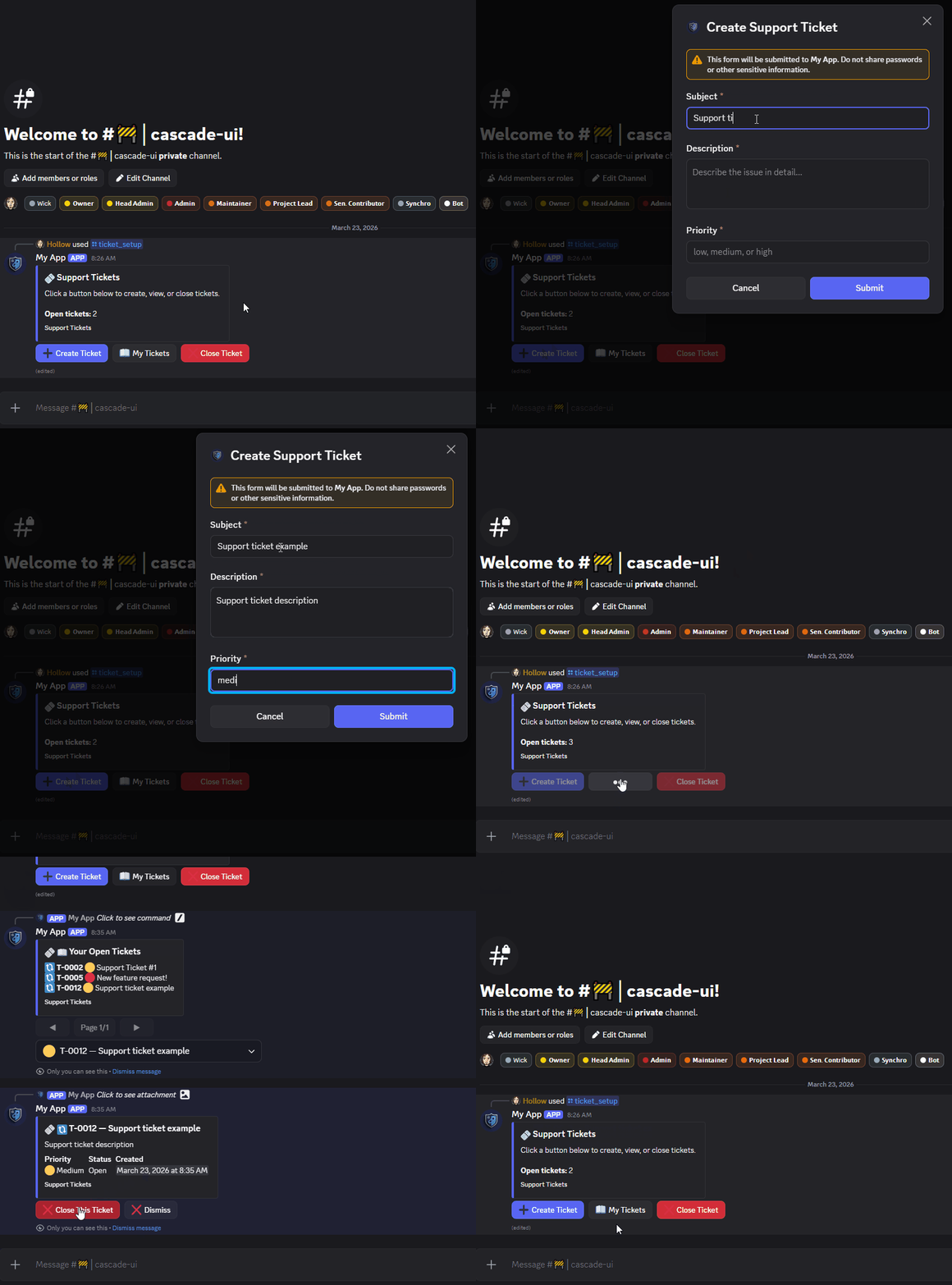
- Dashboards and control panels
- Settings systems
- Pagination
- Forms and wizards
- Persistent views
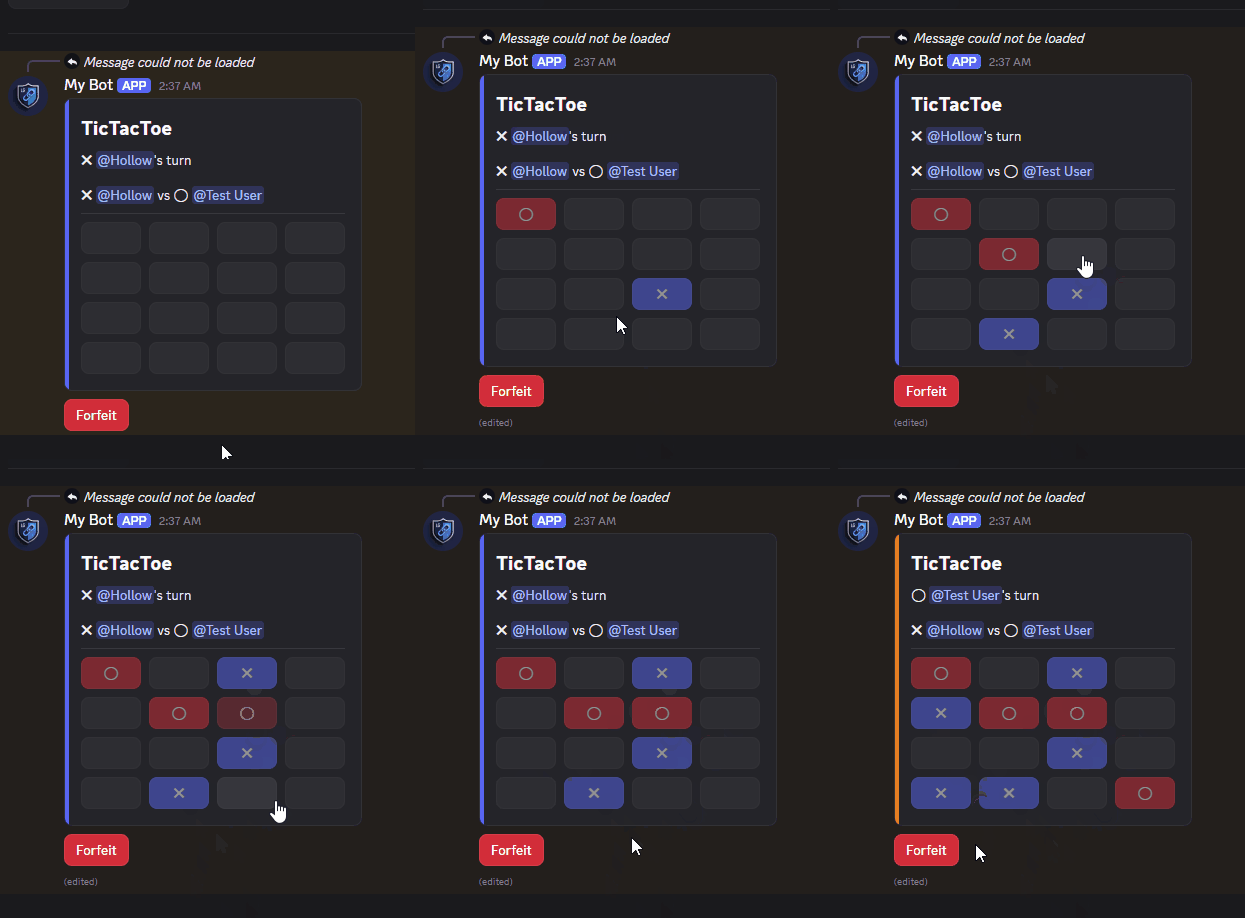
- Multi-user games with shared state, hidden information, and challenge flows (TicTacToe, Battleship)
- Open-join lobbies with capacity caps and host-vs-participant authority (Werewolf-style)
V1 Components
CascadeUI supports traditional discord.py Views and embeds.
Use V1 when you need:
- Embed-specific features such as fields or timestamps
- Simpler layouts without containers
All core features such as navigation, persistence, and undo/redo are supported.
Documentation
Support
- Discord: https://discord.com/invite/9Xj68BpKRb
- Issues: https://github.com/HollowTheSilver/CascadeUI/issues
Development
git clone https://github.com/HollowTheSilver/CascadeUI.git
cd CascadeUI
pip install -e ".[dev]"

pytest tests/ -v
black cascadeui/
isort cascadeui/
Developer's Note
I built CascadeUI with over ten years of Python, and roughly fifteen years of development experience. All documentation, docstrings and test modules are written and designed using custom Anthropic Opus sub-agents. I do not attempt to conceal this fact. I'm a proponent of efficient and responsible agent application in software design. That experience is what makes these tools effective. They're amplifiers, not substitutes.
-- Hollow
MIT License
1 maintainer

Metadata
1 maintainer
Release files for pycascadeui 3.10.0
For a detailed explanation of source distributions (sdists) and built distributions (wheels), please see the package formats documentation.
Source distribution (sdist)
| File | Size | Uploaded | |
|---|---|---|---|
| pycascadeui-3.10.0.tar.gz | 753.3 kB | Details |
Built distribution (wheel)
| File | Interpreter | ABI | Platform | Reset |
|---|---|---|---|---|
| pycascadeui-3.10.0-py3-none-any.whl | Python 3 | none | any | Details |
Total release size: 1.2 MB
Release files / pycascadeui-3.10.0.tar.gz
| Download URL | pycascadeui-3.10.0.tar.gz |
|---|---|
| Size | 753.3 kB |
| Tags | Source |
|
SHA-256 checksum How to use checksums |
689eca2c4d5d4e64ef41724b9ab714ec94bb7da3f1e5ac65d84cd967dd7e712d
|
|
BLAKE2b-256 checksum How to use checksums |
c442b24b8f02533b3e6a11f4f0434ef44a4fda0952b8d9a41592393b7ef3c3b1
|
| Upload date | |
|
Uploaded using Trusted Publishing? What is trusted publishing? |
Yes |
| Uploaded via |
twine/7.0.0 CPython/3.13.14
|
Provenance
Provenance describes where a file came from. On PyPI, provenance is shared via attestations, which provide a verifiable record of the build or publishing details. View details, limitations and caveats.


PyPI Publish Attestation
PyPI verified that this artifact, at this checksum, originated from the publisher listed below.
Signed by GitHub Actions, verified by PyPI on Aug 10, 2026.
Transparency logRelease files / pycascadeui-3.10.0-py3-none-any.whl
| Download URL | pycascadeui-3.10.0-py3-none-any.whl |
|---|---|
| Size | 444.6 kB |
| Tags | Python 3 |
|
SHA-256 checksum How to use checksums |
32eb4daf81da395bb8b3d48708568c3af122f5735bfce2663800a80cbaf625a6
|
|
BLAKE2b-256 checksum How to use checksums |
587836cff583a3fe93327eff8c5d3f81f5519caaa87a323761316aa052f96824
|
| Upload date | |
|
Uploaded using Trusted Publishing? What is trusted publishing? |
Yes |
| Uploaded via |
twine/7.0.0 CPython/3.13.14
|
Provenance
Provenance describes where a file came from. On PyPI, provenance is shared via attestations, which provide a verifiable record of the build or publishing details. View details, limitations and caveats.
PyPI Publish Attestation
PyPI verified that this artifact, at this checksum, originated from the publisher listed below.
Signed by GitHub Actions, verified by PyPI on Aug 10, 2026.
Transparency log













