
Program controls catalytic activity of materials measurement equipment as well calculations

Project description
pycatalicism
Program controls catalytic activity of materials measurement equipment (to be developed...) as well as calculates main parameters relevant for catalyst functional properties characterization (conversion, activity, selectivity, stability, activation energy).
Contents
- Installation
- Calculation of catalyst functional properties
- Furnace control
- Chromatograph control
- Mass flow controllers
Installation
Arch Linux
Install python:
pacman -S python
Install python libraries:
pacman -S python-matplotlib python-numpy python-pyserial
pip install pymodbus bronkhorst-propar
Install git:
pacman -S git
Clone repository (this will create pycatalicism directory inside your current directory):
git clone https://github.com/leybodv/pycatalicism.git
Create alias in your .bashrc file:
pycat='PYTHONPATH="/path/to/pycatalicism-parent-directory" /path/to/pycat.py'
Windows
Install python from python.org
Install python libraries (better to start cmd as administrator):
pip install matplotlib numpy pyserial pymodbus bronkhorst-propar
Install git for windows from gitforwindows.org
Clone repository in git bash:
cd path/to/repository-storage-dir
git clone https://github.com/leybodv/pycatalicism.git
Add PYHTONPATH system variable with path/to/repository-storage-dir value
Download and install driver for usb -> com from silabs.com
Calculation of catalyst functional properties
NB: on Windows pycat must be replaced with python path/to/pycat.py
pycat calc --conversion|--selectivity [--output-data OUTPUT_DATA] [--show-plot] [--output-plot OUPUT_PLOT] [--products-basis] [--sample-name SAMPLE_NAME] input-data-path initial-data-path {co-oxidation|co2-hydrogenation}
positional arguments:
| input-data-path | path to directory with files from concentration measurement device |
| initial-data-path | path to file with data of initial composition of gas |
| {co-oxidation|co2-hydrogenation} | reaction for which to calculate data |
parameters:
| --conversion|--selectivity | whether to calculate conversion or selectivity for the specified reaction (at least one must be specified, can be specified both of them) |
| --ouput-data OUPUT_DATA | path to directory to save calculated data |
| --show-plot | whether to show data plot or not |
| --ouput-plot OUTPUT_PLOT | path to directory to save plot |
| --products-basis | calculate conversion based on products concentrations instead of reactants |
| --sample-name | sample name will be added to results data files and as a title to the resulting plots |
To calculate conversion and selectivity for the reaction of interest program needs to know initial parameters, i.e. the ones before catalytic reaction started, and results of measurement at different temperatures of catalytic reaction. Minimal parameters are reaction participants concentrations in mol.% and temperatures of catalytic reaction. Parameters are provided as files with strictly defined format:
    Температура<tab>temperature
    <br>
    Название<tab>Время, мин<tab>Детектор<tab>Концентрация<tab>Ед, измерения<tab>Площадь<tab>Высота
    compound-name<tab>retention-time<tab>detector-name<tab>compound-concentration<tab>concentration-units<tab>peak-area<tab>peak-height
    [<br>
    Темп. (газовые часы)<tab>flow-temperature
    Давление (газовые часы)<tab>flow-pressure
    Поток<tab>flow-rate]
If program encounters file with wrong format, the file is ignored and corresponding warning is logged to console.
| temperature | temperature of catalytic reaction which will be used as X coordinate | units does not matter, but expected to be the same for one series of experiment |
| compound-name | chemical formula of compound | table with these parametes is simply copy-pasted from chromatec analytics software |
| compound-concentraion | concentration of compound in mol.% | |
| flow-temperature | temperature at the point of gas total flow rate measurement in °C | These parameters are optional and should be measured by means of gas clocks. If they are absent, program still will be able to calculate results, however, there will be error due to the change in reaction volume. |
| flow-pressure | pressure at the point of gas total flow rate measurement in Pa | |
| flow-rate | gas total flow rate |
Calculations are made using following equations:
CO oxidation
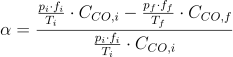
where


CO2 hydrogenation
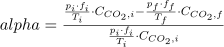
where


where
S - selectivity towards ith component

n - stoichiometry coefficient in CO2 hydrogenation reaction (number of C atoms in product molecule)
CO2 hydrogenation, products basis
Sometimes the results obtained with above equation give erroneous results with large negative conversions. It is useful to calculate CO2 conversion based on products. However, this method is prone to error due to the assumption, that only certain products are formed.

where

n - stoichiometry coefficient in CO2 hydrogenation reaction (number of C atoms in product molecule)
If flow rate measurement data is not provided, conversion is calculated based solely on concentrations and warning is logged to console in this case.
Furnace control
Furnace control is performed with Owen TPM101 controller. Communication is over serial port. All configuration values must be in a config.py file and must match controller's settings.
pycat furnace set-temperature temperature
Set setpoint value of furnace controller to specified value.
positional arguments:
| temperature | temperature in °C |
pycat furnace print-temperature
Print current furnace temperature.
Chromatograph control
Chromatec Crystal 5000 chromatograph can be controled via modbus protocol. The protocol requires modbus server to be run. Chromatec Control Panel and Chromatec Analytic with special module from chromatec installation media surve as modbus server (see chromatec documentation for details). Before using this python program, modbus server must be configured at Control Panel and Analytic software and relevant holding and input registers must be added. For the list of required registers see config.py file at the root of pycatalycism package.
Commands:
pycat chromatograph set-method method
Sets instrumental method to the specified one and starts preparation to analysis step. The list of methods must be in a config.py file. If chromatec Control Panel or Analytic are not ON, starts these programs and connects to chromatograph. In this case, program waits for successful connection establishment, so, if chromatograph is not on, program will be hang forever.
positional arguments:
| method | instrumental method |
pycat chromatograph start-analysis
Starts measurement.
pycat chromatograph set-passport --name NAME [--volume VOL] [--dilution DIL] [--purpose {analysis|graduation}] --operator OP --column COL [--lab-name LN]
Set parameters to a passport of chromatogram. This method should be run only after the analysis step is over and before next analysis is started.
required parameters:
| --name NAME | name of chromatogram |
| --operator OP | name of operator |
| --column COL | name of column |
optional parameters:
| --volume VOL | sample's volume, 0.5 by default |
| --dilution DIL | sample's dilution, 1 by default |
| --purpose {analysis|graduation} | purpose of chromatogram, analysis by default |
| --lab-name LN | name of lab, Inorganic Nanomaterials by default |
Mass flow controllers
Program controls Bronkhorst F201CV mass flow controllers to control flow rates of He, CO2, O2, H2, CO or CH4 gases. Parameters of corresponding mass flow controllers must be added to config.py file.
pycat mfc set-flow-rate --gas {He|CO2|O2|H2|CO|CH4} --flow-rate FR
Set gas flow rate to specified value in nml/min
| --gas {He|CO2|O2|H2|CO|CH4} | gas to set flow rate for. Program chooses mass flow controller based on this value |
| --flow-rate FR | Flow rate in nml/min |
pycat mfc set-calibration --gas {He|CO2|O2|H2|CO|CH4} --calibration-number CN
Set calibration of specified mass flow controller to the calibration number CN
| --gas {He|CO2|O2|H2|CO|CH4} | Gas to set calibration for. Program chooses mass flow controller based on this value. |
| --calibration-number CN | Calibration number which can be found in the documentaion supplied with mass flow controller |
pycat mfc print-flow-rate --gas {He|CO2|O2|H2|CO|CH4}
Print current flow rate in nml/min for specified gas.
| --gas {He|CO2|O2|H2|CO|CH4} | Gas to print current flow rate for. Program chooses mass flow controller based on this value. |
ToDo
- write co_oxidation.py script
- rewrite calc module. Selectivity should be calculated automatically if applicable. There should be two separate commands to calculate activity and conversion
- add furnace read temperature interface
- convert p, T, f data from gas clock to SI units before usage
Release history Release notifications | RSS feed


Download files
Download the file for your platform. If you're not sure which to choose, learn more about installing packages.
Source Distributions
Built Distribution
Filter files by name, interpreter, ABI, and platform.
If you're not sure about the file name format, learn more about wheel file names.
Copy a direct link to the current filters
File details
Details for the file pycatalicism-0.1-py3-none-any.whl.
File metadata
- Download URL: pycatalicism-0.1-py3-none-any.whl
- Upload date:
- Size: 56.8 kB
- Tags: Python 3
- Uploaded using Trusted Publishing? No
- Uploaded via: twine/3.6.0 importlib_metadata/4.8.2 pkginfo/1.8.3 requests/2.28.1 requests-toolbelt/0.9.1 tqdm/4.64.0 CPython/3.10.6
File hashes
| Algorithm | Hash digest | |
|---|---|---|
| SHA256 |
274f0f60c2a1f9f33f9901faf4295caf999c94f4d0779a76599370fb7a679c88
|
|
| MD5 |
0702b944e33d80fe597e2a9cf9f9f621
|
|
| BLAKE2b-256 |
5bdfa7cfd7df10255a49fcf62489343510053d1eef785480746844f1343d7b91
|






