
PyClaw
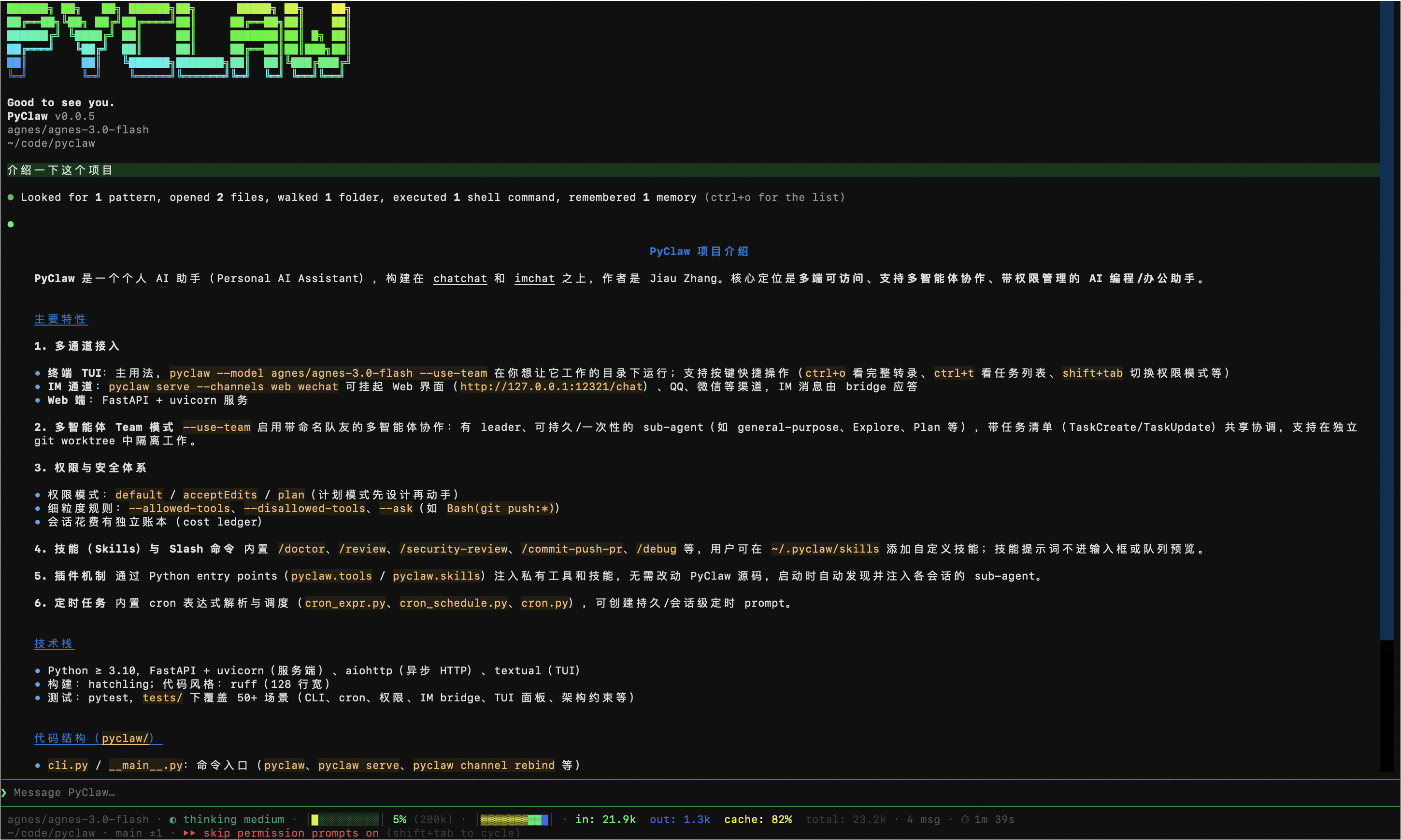
PyClaw is a personal AI assistant that works where you already work. The terminal UI is the main way in: one session, a team of agents when you want one, tools, skills, permission rules and a transcript you can rewind. The same session is also reachable from IM channels and from a headless HTTP/WS API. The agent runtime underneath is chatchat; the IM side is imchat.
Installation
pip install pyclaw
Python 3.10 or newer.
Configure a provider
Provider profiles are shared with chatchat and live in ~/.chatchat/config.json.
pyclaw config writes them:
pyclaw config --provider agnes --base-url https://apihub.agnes-ai.com/v1 --api-key YOUR_API_KEY --type openai
pyclaw config
--type picks the protocol, openai or anthropic, and is required. --rpm
caps requests per minute for that provider. With no write flags, pyclaw config
prints the provider profiles (api keys masked) and PyClaw's own settings.
A model is one provider/model string, defaulting to agnes/agnes-2.5-flash.
PyClaw's own settings live in ~/.pyclaw/config.json:
{
  "model": "agnes/agnes-3.0-flash",
  "gateway": {"http": {"port": 12321, "host": "127.0.0.1"}},
  "enabled_channels": ["wechat"],
  "permissions": {"defaultMode": "default"}
}
Terminal UI
Run it in the directory you want it to work in:
pyclaw --model agnes/agnes-3.0-flash --use-team
| Flag | Description |
|---|---|
--model PROVIDER/MODEL |
The model this run uses, overriding the config |
-p, --prompt PROMPT |
Run one prompt non-interactively and print the result |
--output {text,json} |
Output format of prompt mode |
--json-schema JSON |
Inline JSON Schema the answer has to match (needs --prompt); the run ends by calling the StructuredOutput tool with a validated payload |
--use-team |
Multi-agent mode with named teammates, fixed for the whole session |
--agents JSON |
Agent definitions, overriding the .pyclaw/agents files |
--worktree [NAME] |
Do the run in its own git worktree under .pyclaw/worktrees |
-c, --continue |
Continue the most recent session in this directory |
-r SESSION_ID, --resume |
Resume a specific session by id |
--permission-mode MODE |
default, acceptEdits, plan, allowAll or dontAsk |
--allow-all |
Unlock allowAll for the whole process; refused under root/sudo |
--allowed-tools, --disallowed-tools, --ask |
Permission rules, e.g. Bash(git push:*) |
--tools NAME ... |
The only tools this run has; every other one is refused, not just hidden |
--include-hook-events |
Show each hook run as its own line |
-d, --debug |
Log every streamed event to the conversation log |
In the prompt: enter sends, shift+enter or a trailing \ starts another
line, up edits what you queued, esc/ctrl+c stop the current work, ?
lists the shortcuts, ctrl+o opens the full transcript, ctrl+t the task
list, shift+tab cycles the permission mode.
Permission modes
default asks before a tool no rule covers, acceptEdits lets file edits
through, plan is read-only, allowAll skips prompts (--allow-all must have
unlocked it) and dontAsk never asks, refusing whatever the rules do not allow.
allow, ask and deny rules apply in every mode; /permissions shows the
current mode and the rules behind it.
Skills
Skills are slash commands the model can load on demand. Built in: /doctor,
/review, /security-review, /commit-push-pr, /debug. Your own live in
.pyclaw/skills for the project and ~/.pyclaw/skills for the user. A skill's
prompt is what the terminal writes for itself, so it never appears in the input
box or the queue preview.
Sessions are transcripts under ~/.pyclaw/logs; /resume picks one,
/branch continues in a copy and /rewind puts files and conversation back to
an earlier turn.
Headless runs
pyclaw -p "List the TODO comments in this repo" --output json
pyclaw -p "Summarise README.md" --json-schema '{"type":"object","properties":{"title":{"type":"string"}},"required":["title"]}'
Gateway and channels
pyclaw serve --channels wechat qq --use-team --model agnes/agnes-3.0-flash
| Option | Default | Description |
|---|---|---|
--channels |
wechat |
IM channels to enable (wechat, qq) |
--port |
12321 |
HTTP port (config gateway/http/port) |
--host |
127.0.0.1 |
Bind address (config gateway/http/host) |
--model |
config model |
Model as provider/model |
--use-team |
off | Give every conversation a team to work with |
--log-level |
INFO |
DEBUG, INFO, WARNING or ERROR |
--allow-all |
off | Every IM/web/cron session skips permission prompts; refused under root/sudo |
The web binding — the HTTP/WS routes under /chat and /v1 — is what
pyclaw api serves for pyclaw-desktop: it binds 127.0.0.1:0, generates a
per-run token and prints the endpoint as one stdout line,
PYCLAW_ENDPOINT {"port": …, "token": …}. It is not a browser UI. In
pyclaw serve, the web routes follow enabled_channels: add "web" there to
turn them on.
Stop a running gateway with pyclaw stop (it kills the listener on the port).
Rebind, i.e. re-authenticate, an IM channel:
pyclaw channel rebind wechat
Private Tools, Skills & Agents (Plugins)
Private tools and skills can be injected without touching pyclaw's source, via
entry points.
Create a private package that declares pyclaw.tools and/or pyclaw.skills:
[project.entry-points."pyclaw.tools"]
mypriv = "mypriv"

[project.entry-points."pyclaw.skills"]
mypriv = "mypriv"
The module must expose tools (a list of chatchat.tool.Tool) and/or skills
(a list of SKILL.md root directories):
from chatchat.tool import tool


@tool(
    name="secret_lookup",
    description="...",
    parameters={"type": "object", "properties": {"key": {"type": "string"}}, "required": ["key"]},
)
def secret_lookup(key):
    return get_secret(key)


tools = [secret_lookup]
skills = ["/abs/path/to/my/skill/roots"]
A third group, pyclaw.agents, exposes AGENTS_DIR: a package directory whose
.md files each define one agent, frontmatter plus prompt body, the way
claude-code plugins ship agents.
After pip install (a local pip install -e . works), pyclaw discovers them at
startup and injects them into every session. Discovered tool names are listed in
the leader instruction automatically.
Sponsor
| 公众号 | |
|---|---|
 |
|
| AliPay | WeChatPay |
 |
 |
1 maintainer

Metadata
1 maintainer
Release files for pyclaw 0.0.5
For a detailed explanation of source distributions (sdists) and built distributions (wheels), please see the package formats documentation.
Source distribution (sdist)
| File | Size | Uploaded | Provenance | Actions |
|---|---|---|---|---|
| pyclaw-0.0.5.tar.gz | 313.7 kB | With provenance | Details for pyclaw-0.0.5.tar.gz |
Built distribution (wheel)
| File | Interpreter | ABI | Platform | Actions Reset |
|---|---|---|---|---|
| pyclaw-0.0.5-py3-none-any.whl | Python 3 | none | any | Details for pyclaw-0.0.5-py3-none-any.whl |
Total release size: 554.9 kB
Release files / pyclaw-0.0.5.tar.gz
| Download URL | pyclaw-0.0.5.tar.gz |
|---|---|
| Size | 313.7 kB |
| Tags | Source |
|
SHA-256 checksum How to use checksums |
1edf9c471c9e981b2e605818dedcdc309605f0b2877b847ebc0266f2622aa098
|
|
BLAKE2b-256 checksum How to use checksums |
4b184ba14519d6c6ae0fea6ff7f004d8a73a56636729007c332fb263cd98fc95
|
| Upload date | |
|
Uploaded using Trusted Publishing? What is trusted publishing? |
Yes |
| Uploaded via |
twine/7.0.0 CPython/3.13.16
|
Provenance
Provenance describes where a file came from. On PyPI, provenance is shared via attestations, which provide a verifiable record of the build or publishing details. View details, limitations and caveats.


PyPI Publish Attestation
PyPI verified that this artifact, at this checksum, originated from the publisher listed below.
Signed by GitHub Actions, verified by PyPI on Oct 29, 2026.
Transparency logRelease files / pyclaw-0.0.5-py3-none-any.whl
| Download URL | pyclaw-0.0.5-py3-none-any.whl |
|---|---|
| Size | 241.1 kB |
| Tags | Python 3 |
|
SHA-256 checksum How to use checksums |
40e6752bd7b01782b7eb794590d67cb7bb88f35005ff09406026d09b02d49138
|
|
BLAKE2b-256 checksum How to use checksums |
9fda58dfd70c683f365f01751a626b7fe5b8f4a664d5aebea98db0cfab58f4b9
|
| Upload date | |
|
Uploaded using Trusted Publishing? What is trusted publishing? |
Yes |
| Uploaded via |
twine/7.0.0 CPython/3.13.16
|
Provenance
Provenance describes where a file came from. On PyPI, provenance is shared via attestations, which provide a verifiable record of the build or publishing details. View details, limitations and caveats.
PyPI Publish Attestation
PyPI verified that this artifact, at this checksum, originated from the publisher listed below.
Signed by GitHub Actions, verified by PyPI on Oct 29, 2026.
Transparency logSecurity for pyclaw 0.0.5
Provenance
Provenance describes where a file came from. On PyPI, provenance is shared via attestations, which provide a verifiable record of the build or publishing details. View details, limitations and caveats.
Full provenance
Both files in this release have been uploaded with provenance metadata.
Attestation for pyclaw-0.0.5.tar.gz
PyPI Publish Attestation
PyPI verified that this artifact, at this checksum, originated from the publisher listed below.
Signed by GitHub Actions, verified by PyPI on Oct 29, 2026.
Transparency logA note on package security
PyPI is a repository for distributing packages, not a service for auditing them. While third-party security researchers and our staff do their best to detect and remove malicious packages, PyPI cannot guarantee the quality, security or suitability of any given package.
To learn more about protecting yourself from malicious actors, visit our package security documentation.














