
pyclickimage
Description
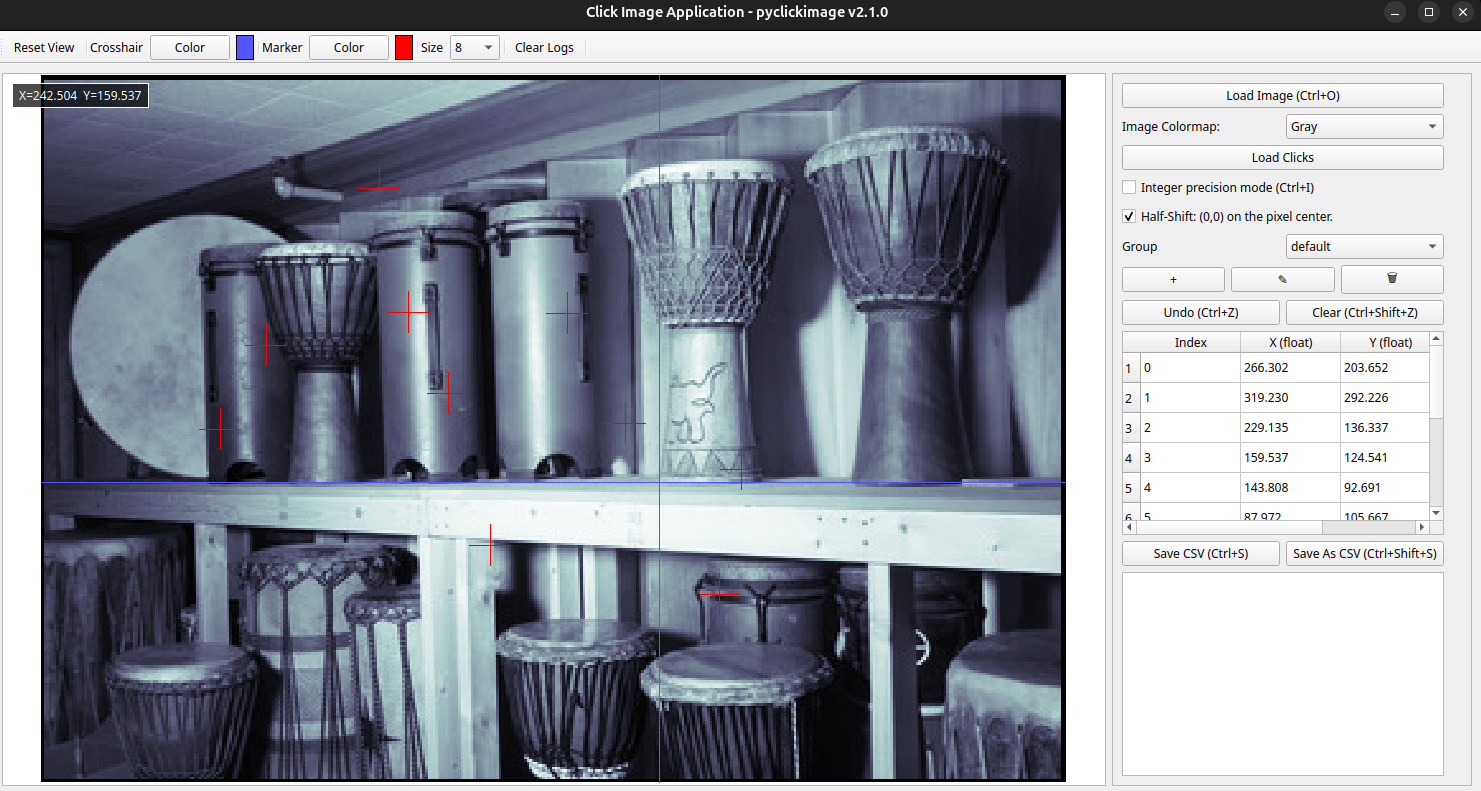
pyclickimage is a Python package providing a graphical interface to collect
2D coordinates of points on images.
The application supports:
- multiple images in the same annotation session,
- multiple annotation groups,
- floating-point coordinates for subpixel precision,
- CSV or JSON session import/export,
- visualization controls and annotation management.
Run the graphical application:
pyclickimage-gui
Annotation sessions
Annotations are stored as complete sessions.
Two file formats are supported:
- JSON: complete session backup and restoration.
- CSV: annotation export.
JSON session format
The JSON format is the recommended format for saving and restoring annotation projects.
It stores the complete state of the annotation session, including:
- image paths,
- annotation groups,
- click coordinates,
- current selections,
- session options.
A JSON session can be loaded later to restore the project exactly as it was saved.
Example:
{
    "precision_mode": "float",
    "current_image_index": 0,
    "current_group_index": 1,
    "groups": [
        "default",
        "Coco"
    ],
    "images": [
        {
            "path": "image_1.png",
            "groups": {
                "default": [
                    [128.5, 102.0],
                    [115.2, 153.7]
                ],
                "Coco": [
                    [201.0, 126.5]
                ]
            }
        }
    ]
}
CSV export format
The CSV format is intended for exporting annotations to external tools such as spreadsheets or data processing pipelines.
The exported CSV file has the following format:
Image,Group,Index,X,Y
image_1.png,default,0,128.5,102.0
image_1.png,default,1,115.2,153.7
image_1.png,Coco,0,201.0,126.5
image_2.png,default,0,80.0,45.3
The CSV columns are:
- Image: image file path.
- Group: annotation group name.
- Index: point index inside the group.
- X: horizontal coordinate.
- Y: vertical coordinate.
Coordinates
The coordinates can be stored either as floating-point values or displayed with integer precision depending on the selected application mode.
X is the horizontal coordinate (column index) and Y is the vertical coordinate (row index), following NumPy image indexing:
image[Y, X]
Empty points can also be stored when a click is intentionally skipped:
Image,Group,Index,X,Y image_1.png,default,2,,
CSV files do not store the complete application state. They are intended for annotation exchange and analysis.
For saving and restoring complete projects, use the JSON format.
Reading sessions
Session files can be loaded directly from Python without opening the GUI.
import pyclickimage

data = pyclickimage.read_session(
    "session.csv"
)

print(data)
The returned dictionary has the following structure:
{
    "image_1.png": {
        "default": [
            (128.5, 102.0),
            (115.2, 153.7),
        ],
        "Coco": [
            (201.0, 126.5),
        ],
    }
}
Authors
- Artezaru artezaru.github@proton.me
Project repository:
Documentation:
- Online documentation: https://Artezaru.github.io/pyclickimage
Releases (standalone application)
Ready-to-use executables are published for each version on the GitHub Releases page. No Python installation is required.
| Platform | File | Download |
|---|---|---|
| Windows | pyclickimage-windows.exe |
latest |
| Linux (any distribution) | pyclickimage-linux |
latest |
| Debian / Ubuntu | pyclickimage_X.Y.Z_amd64.deb |
releases page |
Windows
Download pyclickimage-windows.exe and double-click it.
Windows SmartScreen may display a warning because the executable is not signed: click More info then Run anyway.
Linux (standalone executable)
chmod +x pyclickimage-linux
./pyclickimage-linux
Debian / Ubuntu (.deb package)
Installing the .deb package adds pyclickimage to the applications menu
and installs the required system libraries:
sudo apt install ./pyclickimage_X.Y.Z_amd64.deb
Replace X.Y.Z with the downloaded version. To uninstall:
sudo apt remove pyclickimage
The executables accept the same options as the command line:
pyclickimage -i image1.tif image2.tif
pyclickimage -s annotations.json
Installation (Python package)
Install directly from GitHub:
pip install git+https://github.com/Artezaru/pyclickimage.git
Or clone the repository:
git clone https://github.com/Artezaru/pyclickimage.git
Requirements and compatibility
This package uses PyQt5 for the graphical interface.
If opencv-python is installed in the same environment, it is recommended to
replace it with opencv-python-headless to avoid conflicts between Qt and
OpenCV GUI backends.
The package is not compatible with the full opencv-python package.
License
Copyright 2025-2026 Artezaru
Licensed under the GNU General Public License v3.0 or later (GPL-3.0-or-later).
This program is free software: you can redistribute it and/or modify it under the terms of the GNU General Public License as published by the Free Software Foundation.
This program is distributed in the hope that it will be useful, but WITHOUT ANY WARRANTY; without even the implied warranty of MERCHANTABILITY or FITNESS FOR A PARTICULAR PURPOSE.
See the LICENSE file for more information.
1 maintainer

Metadata
1 maintainer
Release files for pyclickimage 4.0.0
For a detailed explanation of source distributions (sdists) and built distributions (wheels), please see the package formats documentation.
Source distribution (sdist)
| File | Size | Uploaded | Provenance | Actions |
|---|---|---|---|---|
| pyclickimage-4.0.0.tar.gz | 716.8 kB | Without provenance | Details for pyclickimage-4.0.0.tar.gz |
Built distribution (wheel)
| File | Interpreter | ABI | Platform | Actions Reset |
|---|---|---|---|---|
| pyclickimage-4.0.0-py3-none-any.whl | Python 3 | none | any | Details for pyclickimage-4.0.0-py3-none-any.whl |
Total release size: 1.2 MB
Release files / pyclickimage-4.0.0.tar.gz
| Download URL | pyclickimage-4.0.0.tar.gz |
|---|---|
| Size | 716.8 kB |
| Tags | Source |
|
SHA-256 checksum How to use checksums |
fa848306a93a53c7b1d351207953f3f76650ed106ac5ba7754689b55378b006e
|
|
BLAKE2b-256 checksum How to use checksums |
1fff96a1052b821c4d9d2159bd8945e8ff16bdcb5797e7390a85b51bbdc0d8d0
|
| Upload date | |
|
Uploaded using Trusted Publishing? What is trusted publishing? |
No |
| Uploaded via |
twine/7.0.0 CPython/3.11.17
|
Release files / pyclickimage-4.0.0-py3-none-any.whl
| Download URL | pyclickimage-4.0.0-py3-none-any.whl |
|---|---|
| Size | 484.6 kB |
| Tags | Python 3 |
|
SHA-256 checksum How to use checksums |
9453a47abd1c4e6e1fa9165822f8ef20117b68ffc5792e0c5de65fe71f6a610c
|
|
BLAKE2b-256 checksum How to use checksums |
065cfee5a9b5a8e2e9d6ecbba01367073a42dc88b67e1be8ff93892a3e292b65
|
| Upload date | |
|
Uploaded using Trusted Publishing? What is trusted publishing? |
No |
| Uploaded via |
twine/7.0.0 CPython/3.11.17
|
Security for pyclickimage 4.0.0
Provenance
Provenance describes where a file came from. On PyPI, provenance is shared via attestations, which provide a verifiable record of the build or publishing details. View details, limitations and caveats.
No provenance found
None of the files in this release were uploaded with provenance metadata.
A note on package security
PyPI is a repository for distributing packages, not a service for auditing them. While third-party security researchers and our staff do their best to detect and remove malicious packages, PyPI cannot guarantee the quality, security or suitability of any given package.
To learn more about protecting yourself from malicious actors, visit our package security documentation.













