
A Python package quality checker inspired by R's R CMD check.
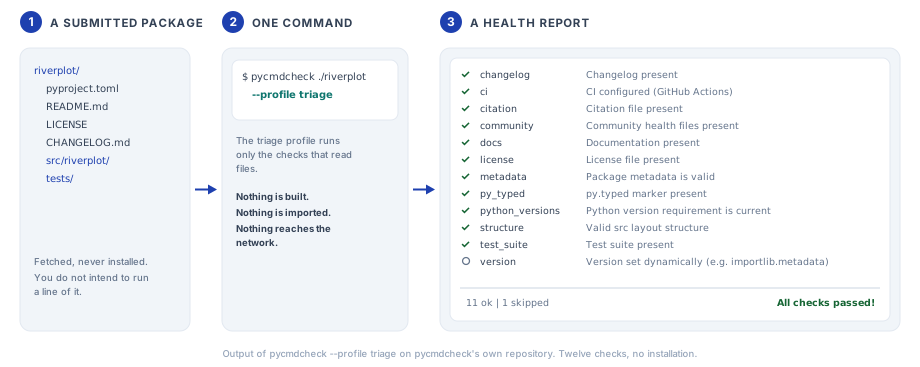
One command walks a Python package and reports where it falls short. Its
triage profile is built to read a package it has not installed, so you can
point it at a repository someone has just handed you without building,
importing, or executing any of it. The safe command for that is
pycmdcheck --profile triage PATH, because a run without a profile also runs
the project's tests, doctests and build.
Installation
pycmdcheck needs Python 3.11 or later.
pip install pycmdcheck
With uv, add it as a development dependency. A plain uv add would make it a
dependency of your own package.
uv add --dev pycmdcheck
To check a repository once without installing anything into it, run the
triage profile through uvx.
uvx pycmdcheck --profile triage /path/to/repository
The getting started guide walks through a first run.
Optional dependencies
The extras install tools that some checks run.
# mypy, for the typing check
pip install "pycmdcheck[typing-mypy]"

# pyright, for the typing check
pip install "pycmdcheck[typing-pyright]"

# ruff, for the linting and formatting checks
pip install "pycmdcheck[linting]"

# The build package, for the build check
pip install "pycmdcheck[build]"

# mypy, pyright, ruff and build together
pip install "pycmdcheck[all]"
There is no extra for pytest, and none for flake8, pylint or black. The
tests and doctests checks run pytest from the environment of the project
being checked, because pytest has to import that project. Install pytest
there. dev and docs were extras in 0.1.1 and are not any more. They are
dependency groups for people who work on pycmdcheck itself, and the
contributing guide
says how to install them.
A check whose tool is missing is reported as skipped, and its details name the command that installs the tool.
| Check | Tool it needs |
|---|---|
tests, doctests |
pytest on PATH (tests can use unittest instead) |
typing |
mypy or pyright on PATH |
linting |
ruff, flake8, or pylint on PATH |
formatting |
ruff or black |
build |
The build package in the environment that runs pycmdcheck |
linting, typing and formatting run the tool the project has configured,
and are skipped when the project has configured none. The Configuration
section below says how to name a tool yourself.
pytest, mypy, pyright, flake8 and pylint are looked up on PATH only, so run
these checks from the project's own environment. ruff and black are also found
when they are installed next to pycmdcheck, which is where pipx and uv tool
put them.
Usage
Command Line
# Check the current directory with every enabled check
pycmdcheck

# Check a specific directory
pycmdcheck /path/to/package

# Read files only, with no install, no tools, and no network
pycmdcheck --profile triage /path/to/package

# For a bot, one JSON report and exit code 0 whatever the checks find
pycmdcheck --profile triage --json --exit-zero /path/to/package

# For a bot that posts a comment, a Markdown report in a file
pycmdcheck --profile triage --format markdown --exit-zero --output report.md /path/to/package

# Run only specific checks
pycmdcheck --check metadata,license

# Skip specific checks
pycmdcheck --skip typing,linting

# Exit with code 1 on warnings as well as errors
pycmdcheck --fail-on warning

# Always exit with code 0, whatever the checks find
pycmdcheck --exit-zero

# Stop after the first error (fail fast)
pycmdcheck --fail-fast

# Show the detail lines and the timing of each check, and a suggestion for
# each finding
pycmdcheck --verbose

# Run checks one at a time instead of in parallel
pycmdcheck --no-parallel

# Print debug logging
pycmdcheck --debug

# Choose the report format, which is text unless you say otherwise
pycmdcheck --format json
pycmdcheck --format markdown

# JSON output, the same as --format json
pycmdcheck --json

# Write the report to a file and print nothing on standard output
pycmdcheck --output report.txt

# List the checks, the profiles or the rules (add --json for a JSON array).
# The list of profiles shows the checks and the options of each one. The list
# of rules shows the code of each rule, what it means and a suggestion for it
pycmdcheck --list
pycmdcheck --list-profiles
pycmdcheck --list-rules

# Use a check profile
pycmdcheck --profile minimal
pycmdcheck --profile core
pycmdcheck --profile pyopensci
pycmdcheck --profile strict

# Take the profile, the checks and their options from a settings file
pycmdcheck --config pycmdcheck-triage.toml /path/to/package

# Copy the skill for AI assistants to .claude/skills in the current directory
pycmdcheck --install-skill

# Show the help or the version
pycmdcheck --help
pycmdcheck --version
Five of these options have a one-letter form as well. -c is --check, -s
is --skip, -v is --verbose, -x is --fail-fast and -h is --help.
--check and --skip each take one name or several names separated by
commas, with no space after a comma, and each option can also be repeated.
--output FILE writes the report as UTF-8, and the directory of FILE must
exist. The JSON report holds the results, a summary, and the settings of the
run, such as the profile, the settings file given with --config, the
fail_on list in effect, and a failed flag that follows the exit code
rule. Each result has the keys name, status, message, details,
duration, findings and skip_reason. The last two are for programs, and
the Rule Codes section below shows them. The
command line reference
describes each option and the JSON report.
Every finding of a built-in check comes with a suggestion, which is one
sentence on what to do about it. --verbose prints it under the details of
the check, on a line that starts with "Suggestion:". The Markdown report
always lists it, after the detail lines of the result, as an item that starts
with **Suggestion:**. The JSON report holds it as the hint of the
finding, so a suggestion and a hint are the same sentence.
With uv
uv run pycmdcheck
uv run pycmdcheck --check tests,linting
Python API
import json
from pathlib import Path

from pycmdcheck import CheckStatus, check

# The path may be a string or a Path. profile= works like --profile.
report = check(Path("/path/to/package"), profile="triage")

# Without a profile, every enabled check runs
report = check("/path/to/package")

# The 13 core checks
report = check("/path/to/package", profile="core")

# Run only specific checks
report = check(".", checks=["metadata", "license"])

# Skip specific checks
report = check(".", profile="triage", skip=["citation", "community"])

# report.passed is True when no check returned an error
if report.passed:
    print("No errors")
else:
    for result in report.results:
        print(f"{result.status}: {result.name} - {result.message}")

# Each finding has a rule code, and a skipped result says why
for result in report.results:
    for finding in result.findings:
        print(f"{result.name}: {finding.code} ({finding.status})")
    if result.skip_reason:
        print(f"{result.name}: skipped, {result.skip_reason}")

# Get counts by status
counts = report.count_by_status()
print(f"OK: {counts[CheckStatus.OK]}, Errors: {counts[CheckStatus.ERROR]}")

# JSON output
print(json.dumps(report.to_dict(), indent=2))
check() raises FileNotFoundError or NotADirectoryError when the path is
not an existing directory. It raises ValueError for an unknown profile, and
for a name in checks= that no installed check has. An unknown name in
skip= is ignored with a logged warning, so skipping a plugin check that is
not installed keeps working. The command line is stricter. There, an unknown
name after --skip is a usage error with exit code 2.
report.to_dict() returns the keys package_path, passed, summary and
results, and each result has the same seven keys as in the command line's
JSON report. The other top-level keys of that report describe the command
line run, and the Python API does not add them.
With an AI assistant
pycmdcheck carries a skill that tells an AI assistant how to check a package
with pycmdcheck, fix what the report names, and ask you before it runs your
code or makes a choice that is yours. This command copies it to
.claude/skills/pycmdcheck in the current directory, where Claude Code looks
for it.
pycmdcheck --install-skill
In Claude Code 2.1.275 or later the skill can be installed as a plugin instead. Type this line inside Claude Code.
/plugin install pycmdcheck --marketplace coatless-py-pkg/pycmdcheck
The page With an AI Assistant covers both ways and says what the skill does.
Built-in Checks
pycmdcheck has 20 built-in checks. The first table holds the 13 checks of the
core profile, and the second holds the other seven.
Core checks
| Check | Description |
|---|---|
build |
Builds the package with python -m build and checks that a wheel or source distribution comes out. Skipped when pyproject.toml cannot be read or the project has nothing to build from |
dependencies |
Compares declared dependencies with the third-party imports in the code. An undeclared import is a warning and an unused dependency is a note. Dependencies with no version specifier are listed in the details only. Skipped when the dependencies are dynamic or cannot be read from pyproject.toml |
docs |
Looks for a README and checks that it is not very short. Looking for installation and usage text, looking for documentation beyond the README, and checking docstrings are options that are off by default |
formatting |
Runs ruff format --check or black --check, whichever the project has configured as its formatter. Skipped when the project configures neither. A ruff setup that is used only for linting does not count |
license |
Looks for a license file and reports the license type. A license declared as an expression of System Package Data Exchange (SPDX) identifiers is a note when it names no license approved by the Open Source Initiative (OSI). Free text, a license classifier and a type guessed from the license file are not graded |
linting |
Runs ruff, flake8, or pylint, whichever the project has configured. Skipped when the project configures none. ruff is told not to fix files, whatever the project's configuration says |
metadata |
Checks the [project] table of pyproject.toml for required, recommended, and extended fields and for values that cannot be valid. Metadata kept in setup.py or setup.cfg is a warning. This check reports a pyproject.toml that is missing or cannot be read, and the checks that need the file are then skipped |
py_typed |
Looks for the py.typed marker file that Python Enhancement Proposal (PEP) 561 defines. Suggests adding one only when at least half of the sampled public functions have type annotations. Skipped for a package that is not clearly typed |
structure |
Looks for an importable package or module in a src layout, a flat layout, or a source directory named by the build configuration. Skipped for a project that builds a native extension and has no Python package |
test_suite |
Looks for the project's tests without running them. A project with no tests is a warning. It looks for a tests or test directory, the testpaths of the pytest configuration, and files named like tests anywhere in the project |
tests |
Runs the test suite with pytest or unittest. Failing tests are an error, and so is a suite that pytest cannot collect. Collecting no tests is a warning. Skipped when the project has no tests, which the test_suite check reports |
typing |
Runs mypy or pyright, whichever the project has configured. Skipped when the project configures neither |
version |
Compares a literal __version__ in the code with the version in pyproject.toml. Skipped when there is nothing to compare, which includes a __version__ that is set when the package runs or is written as a number or a tuple |
pyOpenSci / community checks
| Check | Description |
|---|---|
changelog |
Looks for a changelog or news file such as CHANGELOG, CHANGES, NEWS, HISTORY or RELEASES in the project root, docs/ or doc/. A directory of news fragments or a changelog link in the project URLs also counts |
ci |
Looks for the configuration files of a continuous integration (CI) service such as GitHub Actions, GitLab CI, or CircleCI. It does not read what the configuration runs |
citation |
Looks for a CITATION file in the project root, such as CITATION.cff or CITATION.bib. Without one it accepts other citation metadata, which the Configuration section below lists |
community |
Looks for a contributing guide and a code of conduct in the project root, .github/, docs/ or doc/ |
doctests |
Runs the doctests in the project's own packages and modules with pytest --doctest-modules. A failed example is an error. A file whose import fails with an ImportError or a syntax error is left out and named in the details. It adds no finding and never gives a warning or an error. Skipped when it finds no doctest to run |
python_versions |
Reports a requires-python that still allows a Python version 180 days or more past its end-of-life (EOL) date. Python 3.10 reached end of life on 1 October 2026, so it is reported from 30 March 2027. Skipped when the [project] table has no valid requires-python, which the metadata check reports |
urls |
Requests each http or https address under the project URLs. A missing page or an unknown host is a warning, and an address that could not be verified is a note. An address on a local or private host is listed and not requested, and a redirect is followed only to another http or https address. Skipped when the project has no such address to request. Needs network access |
pycmdcheck --list prints the checks that are installed, plugins included.
That list also shows imports, which is a deprecated alias of dependencies.
The two checks were merged, and dependencies reports what imports used to
report, which is an import that no dependency accounts for. No profile holds
imports and a run with no profile leaves it out. Named with
--check imports, it looks at nothing and is skipped with the reason
deprecated, so use --check dependencies in its place. The name will be
removed in a later release.
Profiles
A profile selects a set of checks and sets some of their options.
| Profile | Description | Checks |
|---|---|---|
minimal |
Quick basic checks | metadata, structure, license |
triage |
Static checks that only read files. No install, no external tools, no network. Sets all five options of the docs check. It requires a README, looks in it for installation and usage text, looks for documentation beyond it, and leaves the docstring scan off |
The 12 static checks, which are changelog, ci, citation, community, docs, license, metadata, py_typed, python_versions, structure, test_suite and version |
core |
Metadata, layout, license, docs, and the code-quality tools | 13 checks, which are every check in the core table above |
default |
Deprecated alias of core, which was called default in 0.1.1 |
The same 13 checks |
pyopensci |
pyOpenSci onboarding requirements. Adds the README text check, the look for documentation beyond the README, and a docstring minimum of 50 percent | All 20 built-in checks |
strict |
As pyopensci, with a docstring minimum of 80 percent. Lints with ruff and type checks with mypy --strict, also when the project has configured neither tool |
All 20 built-in checks |
pycmdcheck --list-profiles prints the checks of each profile and the options
it sets. Add --json to get the same as a JSON array.
Every profile is built in. You cannot define a named profile of your own, and the Choosing Checks section below gives the reason and shows what to use in its place.
# Run pyOpenSci onboarding checks
pycmdcheck --profile pyopensci

# Static-only triage, safe on a repository that was only cloned
pycmdcheck --profile triage

# Quick check before committing
pycmdcheck --profile minimal

# A profile without some of its checks
pycmdcheck --profile pyopensci --skip urls,doctests
A run with no profile is not the core profile. It executes every enabled
check. Every check is enabled unless the project's configuration turns it off,
so that is all 20 built-in checks, the urls check and its network requests
included, plus any plugin checks that are installed. The deprecated imports
name is the one exception. It is left out, and a project that still enables
it under [tool.pycmdcheck.checks] gets a warning on standard error that
says so.
The name default still works. Each run that uses it prints the warning
"The profile name 'default' is deprecated. Use 'core' instead." on standard
error.
pyopensci and strict run all built-in checks. Run them from the project's
own environment, with the package installed there, pytest, a linter and a type
checker on PATH, and the build package installed in the environment that
runs pycmdcheck. core needs the same for the tool checks it contains. Under
core and pyopensci, the linting, typing and formatting checks are
skipped for a project that has configured no tool for them. Under strict,
only formatting is.
Four more rules decide what runs.
--checktogether with--profileruns only the checks named with--check. The profile then supplies its options and nothing else.--skiptakes the named checks out of the run, with or without a profile. A name after--skipmust be the name of an installed check. Any other name is a usage error with exit code 2, so a misspelled name cannot leave in the check it was meant to take out. A--skipthat takes out every check the run would hold is a usage error with exit code 2 as well.- A profile's set of checks wins over the enable flags in
[tool.pycmdcheck.checks], and a profile's options win over the same options inpyproject.toml. Sostrictruns ruff and mypy even when the project'spyproject.tomlnames another tool forlintingortyping. - Plugin checks are outside every profile. They run when no profile is given,
or when you name them with
--check. A run with--configcannot hold a plugin check.
Choosing Checks
Here are three ways to choose the checks of a run without changing the project that is checked. That is what someone needs who checks repositories they do not own, such as a bot or an organization with a standard of its own. Try the three in this order.
The first is a built-in profile. pycmdcheck --list-profiles shows what each
one holds.
pycmdcheck --profile triage /path/to/repository
The second is a profile trimmed on the command line. --skip takes a check
out, and --fail-on names the status that gives exit code 1. Giving
--fail-on also keeps the fail_on list of the checked project from
deciding the exit code. This one line is enough for most needs.
pycmdcheck --profile triage --skip citation --fail-on error /path/to/repository
The third is a settings file, for when that line grows or when the options of
a check have to be set from outside the project. The file is kept outside the
project that is checked and is given with --config. pycmdcheck does not
test where the file is, so keep it where the checked repository cannot change
it. The file is written in Tom's Obvious Minimal Language (TOML), the format
of pyproject.toml. The file below belongs to a bot.
# .github/pycmdcheck-triage.toml, in the bot's own repository
profile = "triage"
fail_on = "warning"

[checks]
citation = false
pycmdcheck --config .github/pycmdcheck-triage.toml /path/to/repository
That run holds the checks of triage other than citation, and it exits with
code 1 for a warning or an error. Four rules hold for the file.
- It must name one built-in profile. The deprecated name
defaultis refused. - It can take checks out of that profile and set options for the checks in it. It cannot add a check.
- A mistake in the file is a usage error with exit code 2, and it stops the run before any check starts. An unknown key, check or option is a mistake, and so is a value that an option cannot take.
- The
[tool.pycmdcheck]table of the checked project is not read at all.
--config cannot be used together with --profile, because the file names
the profile. --check narrows the run to checks that the file runs, and
--skip takes more checks out. A name after --check that the file does not
run is a usage error with exit code 2, and so is a --skip that leaves no
check to run.
You cannot define a named profile of your own, because a name that is not
built in would have to be looked up in the repository being checked.
--config belongs to the command line, and the Python API has no function
that reads such a file.
The documentation site covers the file in detail. See the pages on configuration, the command line and checking untrusted code.
Checking a repository you do not trust
Use the triage profile. Its checks read files and do nothing else. They start
no other program, import nothing from the repository, and make no network
requests.
timeout 120 pycmdcheck --profile triage --json --exit-zero /path/to/repository > report.json
- Call the
pycmdcheckcommand and pass the repository asPATH. Do not runpython -m pycmdcheckfrom inside the repository, where Python can load a module that the repository ships. If you need the module form, usepython -P -m pycmdcheck. - Give the run a time limit, as
timeoutdoes above.timeoutis part of GNU coreutils, which macOS does not include, so install coreutils there first. pycmdcheck caps the size of the files it reads. It does not limit the time the Python parser spends on a file that was written to be slow. - Do not add checks with
--check.--profile triage --check testsruns the tests. - Six of the other checks are not safe for this.
tests,doctestsandbuildexecute the project's code.typingandlintingcan load plugins and hooks that the project's configuration names.urlssends requests to the addresses the project lists. It leaves out local and private hosts, and it still contacts the public ones. The profile leaves outformattinganddependenciesfor another reason.formattingneeds a formatter to be installed, and the result ofdependenciesdepends on what is installed where pycmdcheck runs. - The repository's own
[tool.pycmdcheck]table cannot change a result of atriagerun. The profile fixes its set of checks and sets every option that those checks read. The table'sfail_onlist still acts when--fail-onis not given. It then decides the exit code, thefail_onandfailedkeys of the JSON report, and the closing line of the text and Markdown reports. It can make the run stricter and never more lenient.--exit-zerotakes the exit code out of the repository's hands and nothing else. Pass--fail-on, or use a settings file with--config, and the repository decides none of it. The Choosing Checks section above shows such a file.
A bot that posts its findings as a comment can ask for Markdown and have it written to a file.
timeout 120 pycmdcheck --profile triage --format markdown --exit-zero --output report.md /path/to/repository
Text that comes from the repository is escaped in the Markdown report, so it
cannot add markup of its own, mention a user, turn into an emoji, or turn a
web address into a link. GitHub may still link a few kinds of plain text,
such as an issue reference written as GH-1. The report is written for
people. A program should read the JSON report and match on the rule codes in
it, which the Rule Codes section below describes.
The page on checking untrusted code covers this in more detail.
Configuration
Configure pycmdcheck in the pyproject.toml of the package being checked.
[tool.pycmdcheck]
# The least severe status that makes pycmdcheck exit with code 1. "warning"
# also fails on errors, and "note" fails on all three.
fail_on = ["error"]

[tool.pycmdcheck.checks]
# Every check is enabled by default. List only the checks you want to turn
# off or configure.
urls = false
citation = false

tests = { runner = "pytest", timeout = 600 }
# "auto" is the default for these three checks. Each one runs the tool the
# project has configured and is skipped when the project has configured none.
linting = { tool = "auto" }
typing = { tool = "auto", strict = false }
formatting = { tool = "auto" }
docs = { require_readme = true, check_readme_sections = false, check_docstrings = false }
fail_on applies when --fail-on is not given on the command line, and it
names a threshold as that option does. Version 0.1.1 read this key and then
ignored it. Earlier versions of this example listed "warning" as well. If
you copied that, your runs now exit with code 1 when a check returns a
warning.
An enable flag such as urls = false applies to a run without a profile. A
profile, or --check, selects checks whatever these flags say. A run with
--config does not read this table at all. It takes its settings from the
file it is given, which the Choosing Checks section above describes.
The options of every check are listed in the configuration reference.
Linting, type checking and formatting tools
The linting, typing and formatting checks each have a tool option, and
its default is "auto". With "auto", the check looks at the project's own
configuration files, runs the tool it finds there, and is skipped when it
finds none. A project is not held to a tool it has not adopted.
| Check | Tools | "auto" selects the tool when the project has |
|---|---|---|
linting |
ruff, flake8, pylint | Configuration for one of the three linters, looked for in that order |
typing |
mypy, pyright | Configuration for mypy, and otherwise for pyright |
formatting |
ruff, black | A [tool.ruff.format] table or a format table in ruff.toml or .ruff.toml, and otherwise a [tool.black] table |
A ruff setup that is used only for linting does not select ruff as the
formatter. A project that formats with ruff at its default settings has no
format table for the check to find, so it should add an empty
[tool.ruff.format] table or name the tool. The configuration reference lists
the files and tables each check looks for.
Name a tool to run it whatever the project has configured.
[tool.pycmdcheck.checks.linting]
tool = "ruff"
args = ["--select=E,F,W"]

[tool.pycmdcheck.checks.typing]
tool = "mypy"
strict = true

[tool.pycmdcheck.checks.formatting]
tool = "ruff"
strict = true passes --strict to mypy. pyright has no such flag, so the
option does nothing for it. Set typeCheckingMode = "strict" under
[tool.pyright] or in pyrightconfig.json instead.
A tool that is not installed gives a skipped check. A tool that is installed but cannot run, for example because it rejects an argument or its configuration, gives a warning such as "ruff could not run". This holds for all six checks that run a tool.
Time limits and extra arguments
The six checks that run a tool accept timeout, in seconds, and args, a
list of extra arguments for the tool.
[tool.pycmdcheck.checks.build]
timeout = 300  # seconds (default: 120)
args = ["--wheel"]
| Check | Default timeout |
|---|---|
tests, typing |
300 |
linting |
120, or 300 with pylint |
formatting, doctests, build |
120 |
The urls check has a timeout for each request. It defaults to 10 seconds
and is kept between 1 and 30, and the whole check stops after 60 seconds.
Local and private addresses
The urls check does not contact a local or private host. An address is
listed as "not checked (local or private address)" when its host is
localhost or resolves to an address that is not public, such as 127.0.0.1
or 10.0.0.5. The same holds when a public address redirects to such a host.
The check connects to the address it tested, so a host name cannot pass the
test with one address and then be reached at another. A request that goes
through a proxy is the exception, because the proxy looks the name up itself.
Set the environment variable PYCMDCHECK_ALLOW_PRIVATE_URLS=1 to have these
addresses requested as well. There is no pyproject.toml option for this,
because the project being checked must not be able to turn the rule off.
A redirect is followed only to another http or https address. A redirect
to anything else, such as an ftp address, is not followed. The address is
then listed as "could not verify: redirects to a URL that is not http or
https", which is a note. The environment variable does not change this.
Citation metadata
The citation check passes when the project root holds a CITATION file. The
accepted names are CITATION.cff, CITATION.bib, CITATION, CITATION.md,
CITATION.txt and CITATION.rst, in any letter case. Without such a file,
any of the following also passes.
.zenodo.jsonorcodemeta.jsonin the project rootpaper.mdwithpaper.bibbeside it, which is the layout of a Journal of Open Source Software paper, in the project root,paper/orjoss/- a README in the project root with a
doi.orglink to a Digital Object Identifier (DOI), or a link to a Zenodo badge
Documentation options
[tool.pycmdcheck.checks.docs]
check_readme_sections = true  # look for installation and usage text
check_docs_site = true        # look for documentation beyond the README
min_docstring_coverage = 50   # percent of public items that need a docstring
A min_docstring_coverage above 0 turns the docstring scan on and becomes its
pass mark. check_docstrings = true without a minimum gives a note when any
public item has no docstring, and lists the first five. The scan reads a
sample of at most 20 files. The triage profile sets check_docstrings to
false and the minimum to 0, so a run with --profile triage never scans
docstrings, whatever the project's table says.
check_docs_site gives a note when the project has no documentation beyond
its README. One of three things is enough to pass. The first is the setup of
a site builder, which means Sphinx, MkDocs, Quarto, Jupyter Book or a Read
the Docs file. The second is a page in docs/, doc/ or documentation/.
The third is a documentation link in the project metadata that leads
somewhere other than the repository's own front page. The triage,
pyopensci and strict profiles turn the option on.
Custom Checks
A custom check is a class with a name, a description and a run method.
The simplest way to write one is to subclass BaseCheck.
from pathlib import Path
from typing import Any

from pycmdcheck.checks.base import BaseCheck
from pycmdcheck.results import CheckResult, CheckStatus, Finding, most_severe


class CopyrightCheck(BaseCheck):
    name = "copyright"
    description = "Check for copyright headers"
    # Every code the check can emit, with what the rule means
    rules = {"copyright.missing-header": "A file has no copyright header"}
    # The same codes, each with one sentence on what to do
    hints = {
        "copyright.missing-header": "Add a line with Copyright to the file."
    }

    def run(self, package_path: Path, config: dict[str, Any]) -> CheckResult:
        sources = sorted(package_path.rglob("*.py"))
        if not sources:
            # Nothing to look at is a skipped result with a reason
            return CheckResult.skip(
                self.name, "No Python files found", "not-applicable"
            )
        findings = [
            Finding(
                "copyright.missing-header",
                f"{path.name} has no copyright header",
                CheckStatus.WARNING,
            )
            for path in sources
            if "Copyright" not in path.read_text(encoding="utf-8")
        ]
        # most_severe() gives OK when the list is empty
        return CheckResult(
            name=self.name,
            status=most_severe(findings),
            message=f"{len(findings)} file(s) without a copyright header",
            details=[finding.message for finding in findings],
            findings=findings,
        )
A result says what it found twice. People read the message and the details,
and programs read the findings. A note, a warning or an error carries at
least one finding, and its status is that of the most severe one. pycmdcheck
puts the hint of a code on every finding with that code. A check with no
hints still works, and its findings then carry no hint. A check that had
nothing to look at returns CheckResult.skip() with a skip reason. A plugin
written for 0.1.1, whose results have no findings, still works.
Save the class in a module of your package, for example
my_package/checks/check_custom.py, and register it as an entry point in
pyproject.toml.
[project.entry-points."pycmdcheck.checks"]
copyright = "my_package.checks.check_custom:CopyrightCheck"
A plugin cannot take the name of a built-in check or the deprecated name
imports, and a plugin that fails to load is skipped with a warning. The
page on
custom checks
has a longer example.
Check Statuses
| Status | Symbol | Description |
|---|---|---|
| OK | ✓ | The check looked and found nothing to report |
| NOTE | ℹ | Something the author of the package can improve |
| WARNING | ⚠ | Potential issue, should be reviewed |
| ERROR | ✗ | Check failed |
| SKIPPED | ○ | The check did not look at anything. Its skip reason says why |
One rule decides between NOTE and SKIPPED. A check is SKIPPED whenever it did
not look at anything, for example because its tool is not installed, the
project has configured no tool, or the project has nothing of the kind the
check reads. A NOTE is only given for something the author can act on. A real
shortcoming keeps its status, so a package with no tests gets a warning from
test_suite and not a row of skipped checks.
When one cause would show up in several checks, the check that owns it
reports it and the others are skipped. A pyproject.toml that cannot be read
is one error from metadata. The checks that need the file, among them
version, urls and dependencies, are skipped with the reason
prerequisite-failed. In the same way a project with no tests is one warning
from test_suite, and tests is skipped because it has nothing to run.
Rule Codes
A result that is a note, a warning or an error lists what it found under
findings. Each finding has a code that names the rule, a status, a
one-line message and a hint. The hint is the sentence on what to do, and
it is null when the check gives none, as a plugin may. A code is the name
of the check, a dot and the rule, such as metadata.missing-required. Codes
are meant to stay the same from release to release, so a program can match on
them and leave the message and the hint to people. A skipped result has no
findings, and its skip_reason holds one of nine values, which are
tool-missing, not-configured, not-applicable, prerequisite-failed,
network-unavailable, import-failed, parse-failed, fail-fast and
deprecated.
The example below is a small project whose pyproject.toml has no version.
pycmdcheck --profile triage --json --exit-zero ./riverplot
Two of the twelve results in that report show the two keys at work. The
metadata check owns the missing version and reports it as a finding.
{
  "name": "metadata",
  "status": "error",
  "message": "Missing required metadata fields",
  "details": [
    "Missing required fields: version"
  ],
  "duration": 0.0003991127014160156,
  "findings": [
    {
      "code": "metadata.missing-required",
      "status": "error",
      "message": "Missing required fields: version",
      "hint": "Add each missing field to the [project] table of pyproject.toml."
    }
  ],
  "skip_reason": null
}
The version check has nothing to compare. It is skipped and points at
metadata, so the same cause is not reported twice.
{
  "name": "version",
  "status": "skipped",
  "message": "No static version in pyproject.toml",
  "details": [
    "The metadata check reports a missing or invalid version"
  ],
  "duration": 4.8160552978515625e-05,
  "findings": [],
  "skip_reason": "prerequisite-failed"
}
pycmdcheck --list-rules prints every rule with its code, the name of its
check, a one-line description and a suggestion.
pycmdcheck --list-rules --json prints the same list as a JSON array, with
the suggestion under hint. A report can word a suggestion more exactly than
the list does, because a check may name the file or the table it found. Four
codes start with pycmdcheck. and belong to pycmdcheck itself. They stand for
a check that gave no result of its own, for example because it raised an
exception, and the result still carries the name of that check. The
documentation has a page on
rule codes.
Exit Codes
| Code | Meaning |
|---|---|
| 0 | No check reached the --fail-on status. Always 0 with --exit-zero |
| 1 | A check returned the --fail-on status or a more severe one |
| 2 | Usage error, such as an unknown name after --check or --skip, a mistake in the --config file, a path that is not a directory, or an --output file whose directory does not exist. No check runs |
| 3 | pycmdcheck itself failed. One line goes to standard error, and with --json or --format markdown nothing goes to standard output |
--fail-on names a threshold. The order is note, warning, error, so
--fail-on warning exits with code 1 for a warning or an error, and
--fail-on note for any of the three. When the option is given more than
once, the least severe status counts. Without the option, a run with
--config uses the fail_on of that file, and any other run uses the
fail_on list in [tool.pycmdcheck]. The default is error when there is
none. A skipped check never changes the exit code, and --exit-zero does not
hide codes 2 and 3.
License
MIT
1 maintainer

Metadata
1 maintainer
Release files for pycmdcheck 0.2.0
For a detailed explanation of source distributions (sdists) and built distributions (wheels), please see the package formats documentation.
Source distribution (sdist)
| File | Size | Uploaded | |
|---|---|---|---|
| pycmdcheck-0.2.0.tar.gz | 361.2 kB | Details |
Built distribution (wheel)
| File | Interpreter | ABI | Platform | Reset |
|---|---|---|---|---|
| pycmdcheck-0.2.0-py3-none-any.whl | Python 3 | none | any | Details |
Total release size: 553.2 kB
Release files / pycmdcheck-0.2.0.tar.gz
| Download URL | pycmdcheck-0.2.0.tar.gz |
|---|---|
| Size | 361.2 kB |
| Tags | Source |
|
SHA-256 checksum How to use checksums |
50c2a2ec3716b0ba8ba77b7fb94113ee7d6796dd4900edce1a035dbff2fafb63
|
|
BLAKE2b-256 checksum How to use checksums |
c447fb3ab753858ddd89b3ccd34aa819d3e98f156c32d9f441692ec5db19a64c
|
| Upload date | |
|
Uploaded using Trusted Publishing? What is trusted publishing? |
Yes |
| Uploaded via |
twine/6.1.0 CPython/3.13.13
|
Provenance
Provenance describes where a file came from. On PyPI, provenance is shared via attestations, which provide a verifiable record of the build or publishing details. View details, limitations and caveats.


PyPI Publish Attestation
PyPI verified that this artifact, at this checksum, originated from the publisher listed below.
Signed by GitHub Actions, verified by PyPI on Oct 12, 2026.
Transparency logRelease files / pycmdcheck-0.2.0-py3-none-any.whl
| Download URL | pycmdcheck-0.2.0-py3-none-any.whl |
|---|---|
| Size | 192.0 kB |
| Tags | Python 3 |
|
SHA-256 checksum How to use checksums |
aeb7117cd067508c1b2d2516af3a1a00c3edfe44daa4e3d3f291005cd39b929d
|
|
BLAKE2b-256 checksum How to use checksums |
af3d7aa0e8cf30ea9916bffe1fa16e9d9672866b5974031552d2aee48b9af50a
|
| Upload date | |
|
Uploaded using Trusted Publishing? What is trusted publishing? |
Yes |
| Uploaded via |
twine/6.1.0 CPython/3.13.13
|
Provenance
Provenance describes where a file came from. On PyPI, provenance is shared via attestations, which provide a verifiable record of the build or publishing details. View details, limitations and caveats.
PyPI Publish Attestation
PyPI verified that this artifact, at this checksum, originated from the publisher listed below.
Signed by GitHub Actions, verified by PyPI on Oct 12, 2026.
Transparency log













