
PyConPTY
A Python-based interface for the ConPTY (Windows Pseudo-console) API. Check out the PyPI package
Your ultimate space to get immensely creative with unique terminals, remote accesses, and interactive and automated processes.
– Melwyn Francis Carlo
Cool Facts:
- No Dependencies!
- Thread-safe Subject to one thread per ConPTY class instance, i.e., no sharing instances between threads.
- 5820 out of 5820 tests passed (100%) Check out the tests in action
- 100% total coverage Note that, a few lines of unreachable code have been excluded from coverage as including them involves purposefully introducing errors in the main code.
- No one is perfect. So, kindly report issues or bugs; when submitting issues, it is recommended to append a sample code that is capable of reproducing the bug.
Pre-requisites
Windows 10 Version 1809 Build 17763 (Windows 10.0.17763)
Oh, do not worry! The installation process will tell you if it is a match or not. But this is the minimum required.
Install
First, launch one of the following programs:
Command Prompt (cmd.exe), PowerShell, or Windows Terminal.
It is always a good practice to call the following command beforehand:
pip install --upgrade pip
Then, install using the following command:
pip install pyconpty
If pip does not work, then replace pip with either py -m pip, python -m pip or python3 -m pip (whichever works first).
If you are still facing issues, then maybe Python is not installed in the first place (as Pip comes bundled with Python). In that case, click here to download Python.
If you face any issues while using pyconpty, you may uninstall it and then try building from source using the following commands:
pip uninstall pyconpty
pip install pyconpty --no-cache-dir --no-binary pyconpty
Use
- Example #1
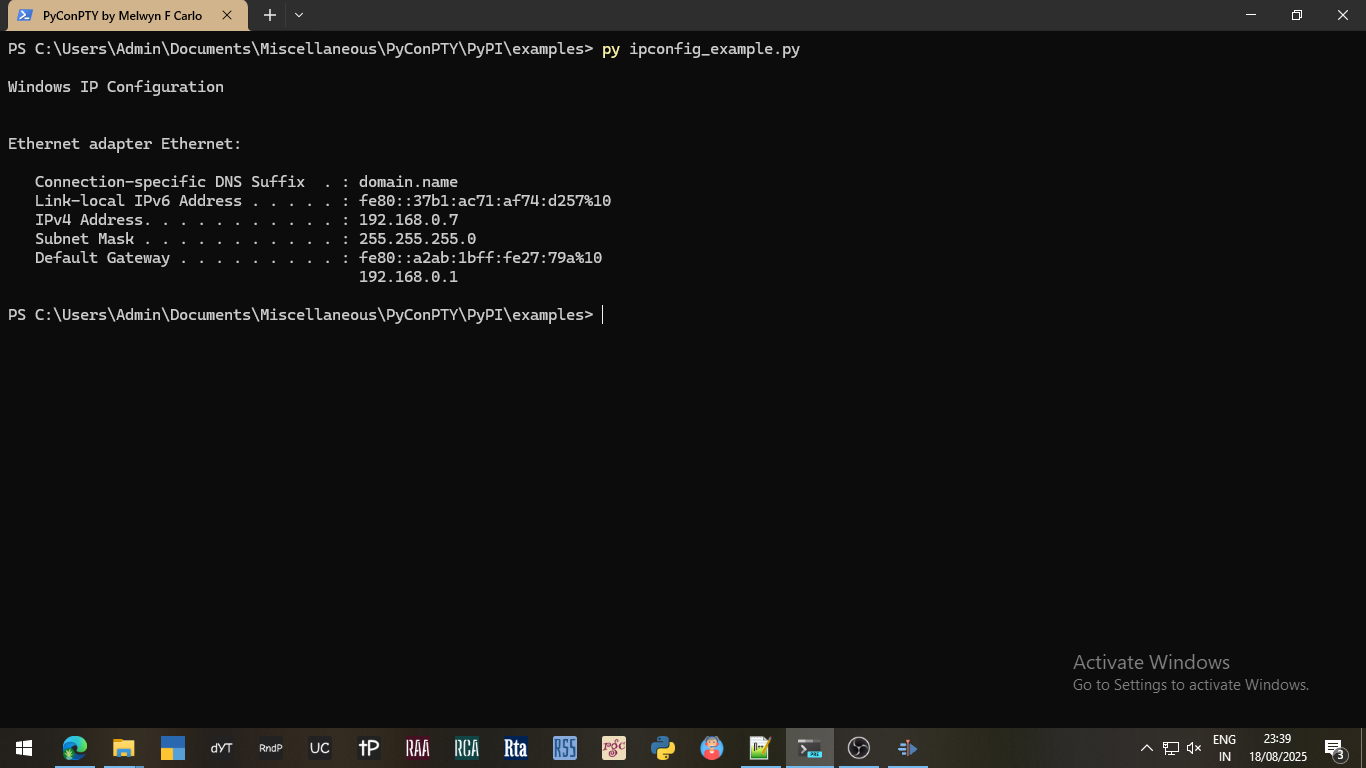
# Filename: ipconfig_example.py

from pyconpty import ConPTY

console = ConPTY()
console.run("ipconfig")
print(console.getoutput())
- Example #2
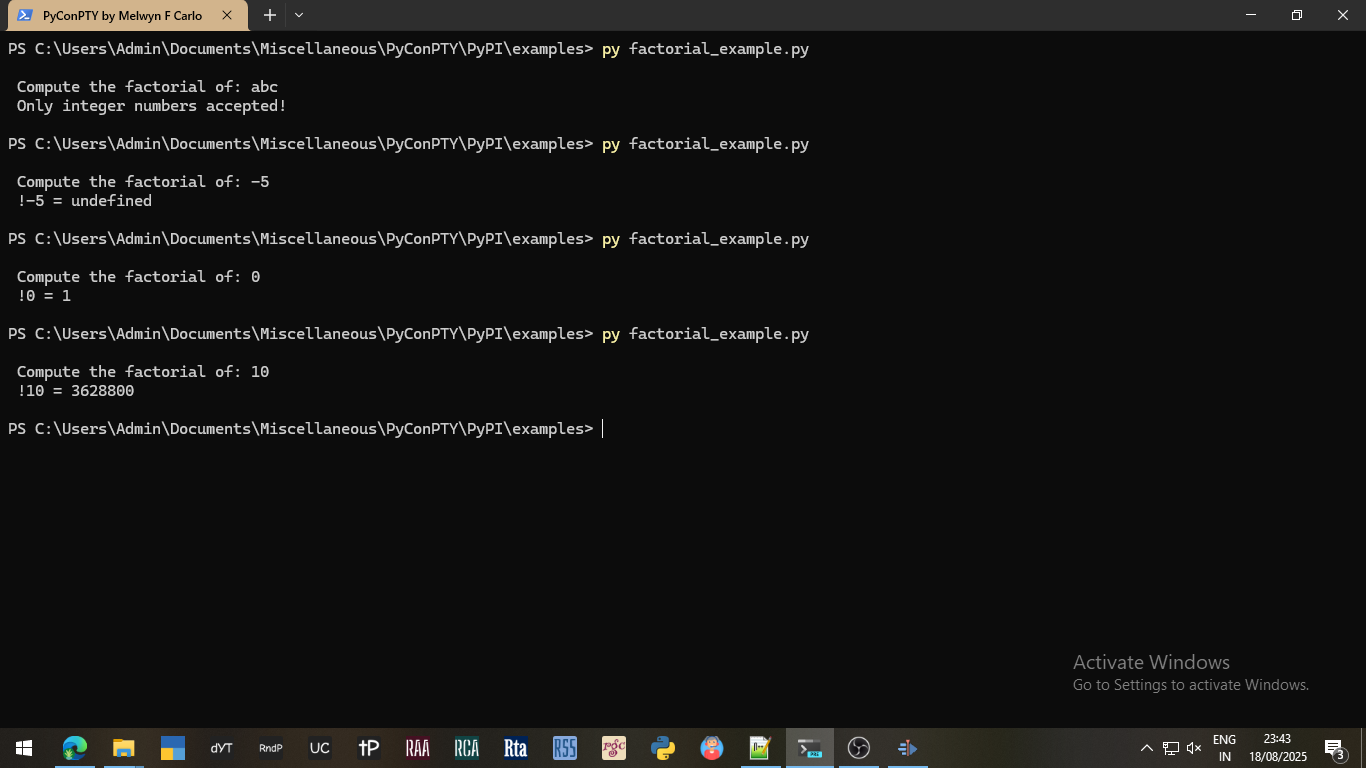
# Filename: factorial_example.py

from pyconpty import ConPTY

console = ConPTY()
console.run("factorial.exe", stripinput=True)
number = input(console.getoutput())

if number[0] == "-":
    number_without_minus = number[1:]
else:
    number_without_minus = number

if number_without_minus.isdigit():
    console.sendinput(str(number))
    print(console.getoutput())
else:
    print(" Only integer numbers accepted!\n")

if console.isrunning:
    console.kill()
/* Filename: factorial_example.c                           */
/* Build: gcc factorial_example.c -o factorial_example.exe */

#include <stdio.h>

int get_factorial(int number) {
    if (number < 0) {
        return -1;
    } else if ((number == 0) || (number == 1)) {
        return 1;
    } else {
        int factorial = 1;
        for (int i = 1; i <= number; i++) {
            factorial *= i;
        }
        return factorial;
    }
}

int main() {
    int number;
    printf("\n Compute the factorial of: ");
    scanf("%d", &number);
    const int factorial = get_factorial(number);
    if (factorial == -1) {
        printf(" !%d = %s\n", number, "undefined");
    } else {
        printf(" !%d = %d\n", number, factorial);
    }
    return 0;
}
Make (for the mavericks out there)
- Download the PyConPTY source (bundled in a ZIP file).
- Extract the ZIP file to a folder of your choice.
- Enter the extracted PyConPTY folder.
- Launch one of the following programs:
Command Prompt (cmd.exe), PowerShell, or Windows Terminal. - Clean, build and install the package locally:
py make.py
- Format the Python files appropriately using black:
py -m black --diff --color .
- Check the python code syntax using pylint:
py -m pylint .
- Perform relevant tests for the python code using pytest, pytest-repeat, pytest-rerunfailures, and pytest-timeout:
py -m pytest .
The test files are located in the tests folder.
If unnoticeable problems exist, then you may also rely on the Microsoft Console Debugger (CDB) by downloading the Windows SDK and only installing the Debugging Tools. py-spy also helps.
After installing the debugging tools, add the following (or similar) filepath to the System/User Environment Path Variables, as it contains the cdb.exe program:
C:\Program Files (x86)\Windows Kits\10\Debuggers\x64.
Testing via CDB:
cls; cdb -y "cache*C:\Symbols;srv*http://msdl.microsoft.com/download/symbols;FOLDER_PATH_TO_PDB_FILE" -srcpath "FOLDER_PATH_TO_C_FILE" -lines -c "sxd av; g" python -m pytest .
Note that:
FOLDER_PATH_TO_PDB_FILEis the folder location where the Program Database (*.pdb) file exists.- In my case, it was
C:/Users/Admin/AppData/Roaming/Python/Python313/site-packages.
- In my case, it was
FOLDER_PATH_TO_C_FILEis the folder location where the Python Extension C (*.c) file exists.- In my case, it was
C:/Users/Admin/Documents/Miscellaneous/PyConPTY/PyPI/src/pyconpty.
- In my case, it was
Upon encountering a crash, obtain the line number in the source file pertaining to the crash:
kn  (for the current thread in focus)
~*k (for all running threads)
For analyzing memory-related issues via the AddressSanitizer (ASAN) tool, you will have to copy the ASAN dynamically linked libraries (DLL's) from the Microsoft Visual Studio's Build Tools folder into the FOLDER_PATH_TO_PDB_FILE folder.
- In my case, the Microsoft Visual Studio's Build Tools folder was:
C:\Program Files (x86)\Microsoft Visual Studio\2022\BuildTools\VC\Tools\MSVC\14.42.34433\bin\Hostx64\x64 - In my case, the files copied were:
clang_rt.asan_dynamic-x86_64.dllclang_rt.asan_dbg_dynamic-x86_64.dllclang_rt.asan_dbg_dynamic-x86_64.pdbclang_rt.asan_dynamic-x86_64.pdb
- Repeat steps #5 to #8 until successfull.
Note that if the command py does not work, then replace it with python or python3 (whichever works first).
Documentation
1. ConPTY (Class)
ConPTY(width = 80, height = 24)
| return | ConPTY |
|---|---|
| width | Integer (1 to 32767) |
| height | Integer (1 to 32767) |
This class creates a ConPTY instance for communicating with ConHost.
Check the isinitialized property to confirm the initialization's success.
width and height are the pseudo-console's (terminal's) width and height, measured in 'number of characters'. They determine the I/O's internal buffer size and display. If you need the output unwrapped for N characters, then set width = N + 1.
Note that out-of-bounds values are automatically capped to their respective limits.
DO NOT share a ConPTY class instance across different threads in multi-threaded environments. Use a different instance instead.
Possible Errors:

NONE, NOT_WINDOWS_OS, INCOMPATIBLE_WINDOWS_OS,
CONSOLE_WIDTH_NOT_INT, CONSOLE_HEIGHT_NOT_INT
2. isinitialized (Property)
| return | Boolean |
|---|
True, if the class ConPTY initialized properly, else False.
If False, then check the lasterror property to determine the reason for failure.
Check this property post-initialization as a safety-check, if the initialization arguments are dynamic and not static.
Using class functions when isinitialized = False results in error set by the property lasterror = ConPTY.Error.CONPTY_UNINITIALIZED.
Possible Errors:

NONE, CONPTY_UNINITIALIZED, NOT_WINDOWS_OS,
INCOMPATIBLE_WINDOWS_OS, CONSOLE_WIDTH_NOT_INT,
CONSOLE_HEIGHT_NOT_INT
3. lasterror (Property)
| return | ConPTY.Error |
|---|
This value is one of the many Error Enumerations that is generated after each function call. The information for each function in this documentation is appended with a list of possible errors for your reference.
This value indicates whether a function call succeeded or failed.
If a function call failed, then this value indicates the reason for its failure.
This property is volatile and it must be read/copied immediately after a function returns.
Possible Errors:

NONE, CONSOLE_WIDTH_NOT_INT, CONSOLE_HEIGHT_NOT_INT,
NOT_WINDOWS_OS, INCOMPATIBLE_WINDOWS_OS,
COMMAND_LONGER_THAN_32766_CHARS, CONPTY_UNINITIALIZED,
PROCESS_ALREADY_RUNNING, NO_PROCESS_FOUND, KILL_PROCESS_ERROR,
READ_ERROR, WRITE_INTERNAL_ERROR, WRITE_TIMEOUT, RESIZE_ERROR,
RUNTIME_SUCCESS, RUNTIME_ERROR, FORCED_TERMINATION,
RUN_INTERNAL_ERROR, RUN_PROGRAM_NOT_FOUND,
RUN_PROGRAM_ACCESS_DENIED, RUN_PROGRAM_ERROR, DATA_NOT_A_STRING,
COMMAND_NOT_A_STRING, MIN_READ_BYTES_NOT_AN_INT,
MAX_READ_BYTES_NOT_AN_INT, MIN_READ_LINES_NOT_AN_INT,
MAX_READ_LINES_NOT_AN_INT, MIN_MORE_THAN_MAX_READ_BYTES,
MIN_MORE_THAN_MAX_READ_LINES, DATA_NOT_A_LIST_OF_STRINGS,
WAITTILLSENT_NOT_A_BOOLEAN, WAITFOR_NOT_A_NUMBER,
TIMEDELTA_NOT_A_NUMBER, INTERNALTIMEDELTA_NOT_A_NUMBER,
POSTENDDELAY_NOT_A_NUMBER, RAWDATA_NOT_A_BOOLEAN,
STRIPINPUT_NOT_A_BOOLEAN, TRAILINGSPACES_NOT_A_BOOLEAN,
CONSOLE_MODE_ERROR
4. width (Property)
| return | Integer |
|---|
Returns the pseudo-console's width.
Returns None if class initialization failed.
Possible Errors:

NONE, CONPTY_UNINITIALIZED
5. height (Property)
| return | Integer |
|---|
Returns the pseudo-console's height.
Returns None if class initialization failed.
Possible Errors:

NONE, CONPTY_UNINITIALIZED
6. isrunning (Property)
| return | Boolean |
|---|
Returns True, if the pseudo-console is currently running, else False.
Possible Errors:

NONE, CONPTY_UNINITIALIZED
7. processended (Property)
| return | Boolean |
|---|
Returns True, if the currently running process has truly ended, else False.
At this point, the pseudo-console might yet not have released any final pending program output, if any.
This property is particularly helpful on Windows 10, where a relevant Windows ConPTY bug exists.
Following a short delay, the pseudo-console may be terminated by calling the kill() function.
Possible Errors:

NONE, CONPTY_UNINITIALIZED
8. inputsent (Property)
| return | Boolean |
|---|
Returns True, if all input has been sent to the pseudo-console, else False.
Possible Errors:

NONE, CONPTY_UNINITIALIZED
9. exitcode (Property)
| return | Integer or None |
|---|
Returns the exitcode of the previously run process.
If no process has been run since the initialization of the ConPTY class, then None is returned.
If a process is currently running, then None is returned.
This property is volatile and it must be read/copied immediately after a function completes/terminates.
You may refer to [MS-ERREF].pdf or utilize the Microsoft Error Lookup Tool to know more about specific codes.
Possible Errors:

NONE, CONPTY_UNINITIALIZED, NO_PROCESS_FOUND, FORCED_TERMINATION,
PROCESS_ALREADY_RUNNING, RUNTIME_SUCCESS, RUNTIME_ERROR
10. run (Function)
run(command, waitfor = 0, timedelta = 0.1, stripinput = False, internaltimedelta = 100, postenddelay = -1)
| return | Boolean |
|---|---|
| command | String |
| waitfor | Integer or Float (1E-3 to SIZE_4B_MAX) |
| timedelta | Integer or Float (1E-3 to SIZE_4B_MAX) |
| stripinput | Boolean |
| internaltimedelta | Integer or Float (0 to SIZE_4B_MAX) |
| postenddelay | Integer or Float (1E-3 to SIZE_4B_MAX) |
Runs the given command or program, and then conditionally waits for its completion.
Returns True if the process started successfully, else immediately returns False.
The command string's length must not exceed 32,766 characters.
If False, check the lasterror property to determine the reason for failure.
waitfor states the minimum amount of time, in seconds, to wait for incoming data.
waitfor = 0 sets it to waitfor = 1E-3.
waitfor = 0 indicates non-blocking mode.
waitfor = N indicates blocking for N seconds.
waitfor = -1 indicates indefinite blocking mode. (until the pseudo-console closes itself)
waitfor = -2 indicates indefinite blocking mode. (until the currently running program terminates)
Set waitfor = -1 or waitfor = -2 only if program auto-termination is guaranteed.
timedelta is the time lapse (delay), in seconds, between any two consecutive process-status checks. It governs the accuracy of the waitfor time period.
stripinput determines whether or not the input data is stripped off from the output data.
internaltimedelta is the time lapse (delay), in seconds or milliseconds, for internal process loops.
0 <= internaltimedelta < 1 implies that the value is in seconds.
internaltimedelta >= 1 implies that the value is in milliseconds.
postenddelay is the minimum amount of time lapse/delay, in seconds or milliseconds, after a program ends, but just before shutting down the I/O buffer and releasing resources.
0 <= postenddelay < 1 implies that the value is in seconds, truncated to 3 decimal places.
postenddelay >= 1 implies that the value is in milliseconds.
postenddelay = -1 is equivalent to postenddelay = SIZE_4B_MAX.
Set internaltimedelta = 0 with caution.
Set postenddelay > -1 with caution.
Note that stripinput is attempted and its success not guaranteed.
Note that, 1E-3 seconds = 0.001 seconds = 1 millisecond.
Note that, SIZE_4B_MAX = 4294967295 = 4 Bytes = 32 Bits
Note that out-of-bounds values are automatically capped to their respective limits, unless stated otherwise.
Possible Errors:

NONE, CONPTY_UNINITIALIZED, COMMAND_NOT_A_STRING,
WAITFOR_NOT_A_NUMBER, TIMEDELTA_NOT_A_NUMBER,
STRIPINPUT_NOT_A_BOOLEAN, INTERNALTIMEDELTA_NOT_A_NUMBER,
POSTENDDELAY_NOT_A_NUMBER, COMMAND_LONGER_THAN_32766_CHARS,
RUN_INTERNAL_ERROR, RUN_PROGRAM_NOT_FOUND,
RUN_PROGRAM_ACCESS_DENIED, RUN_PROGRAM_NAME_TOO_LONG,
RUN_PROGRAM_ERROR
11. runandwait (Function)
runandwait(command, timedelta = 0.1, stripinput = False, internaltimedelta = 100, postenddelay = -1)
| return | Boolean |
|---|---|
| command | String |
| timedelta | Integer or Float (1E-3 to SIZE_4B_MAX) |
| stripinput | Boolean |
| internaltimedelta | Integer or Float (1E-3 to SIZE_4B_MAX) |
| postenddelay | Integer or Float (1E-3 to SIZE_4B_MAX) |
Runs the given command or program, and then waits for its completion.
Returns True if the process started successfully, else immediately returns False.
This is an alias for the run(command, waitfor=-1, ...) function.
If False, check the lasterror property to determine the reason for failure.
Refer to the run() function for more details on the command, timedelta, stripinput, internaltimedelta, and postenddelay parameters, and for possible errors.
12. waittocomplete (Function)
waittocomplete(waitfor = -2, timedelta = 0.1)
| return | Boolean |
|---|---|
| waitfor | Integer or Float (1E-3 to SIZE_4B_MAX) |
| timedelta | Integer or Float (1E-3 to SIZE_4B_MAX) |
Waits for a command or program to partially or fully complete.
Returns True if the wait conditions were satisfied, else immediately returns False.
If False, check the lasterror property to determine the reason for failure.
Refer to the run() function for more details on the waitfor and timedelta parameters.
Possible Errors:

NONE, CONPTY_UNINITIALIZED, WAITFOR_NOT_A_NUMBER,
TIMEDELTA_NOT_A_NUMBER, RESIZE_ERROR
13. resize (Function)
resize(width, height)
| return | Boolean |
|---|---|
| width | Integer (1 to 32767) |
| height | Integer (1 to 32767) |
Resizes the pseudo-console.
It is recommended to resize either at initialization (best), or after the read buffer has been cleared.
width and height are the pseudo-console's (terminal's) width and height, measured in 'number of characters'. They determine the I/O's internal buffer size and display. If you need the output unwrapped for N characters, then set width = N + 1.
Note that out-of-bounds values are automatically capped to their respective limits.
Possible Errors:

NONE, CONPTY_UNINITIALIZED, CONSOLE_WIDTH_NOT_INT,
CONSOLE_HEIGHT_NOT_INT, RESIZE_ERROR
14. read (Function)
read(max_bytes_to_read = -1, waitfor = 0, rawdata = False, timedelta = 0.1, trailingspaces = False, min_bytes_to_read = 0)
| return | String |
|---|---|
| max_bytes_to_read | Integer (-1 to SIZE_4B_MAX) |
| waitfor | Integer or Float (1E-3 to SIZE_4B_MAX) |
| rawdata | Boolean |
| timedelta | Integer or Float (1E-3 to SIZE_4B_MAX) |
| trailingspaces | Boolean |
| min_bytes_to_read | Integer (0 to SIZE_4B_MAX) |
Returns data outputted by the pseudo-console, if available, else an empty string.
The number of bytes returned could be less than max_bytes_to_read subject to the availability of data.
max_bytes_to_read = 0 returns an empty string.
max_bytes_to_read = N returns a string of N characters.
max_bytes_to_read = -1 returns the entire saved buffer.
For ASCII/ANSI encoding, 1 byte = 1 character.
waitfor states the minimum amount of time, in seconds, to wait for incoming data.
waitfor = 0 sets it to waitfor = 1E-3.
waitfor = 0 indicates non-blocking mode.
waitfor = N indicates blocking for N seconds.
waitfor = -1 indicates indefinite blocking mode.
Set waitfor = -1 only if output is guaranteed.
rawdata determines whether or not the output is in its raw format. The raw format contains Virtual Terminal Sequences (VTS) alongside normal text.
timedelta is the time lapse (delay), in seconds, between any two consecutive read-status checks. It governs the accuracy of the waitfor time period.
trailingspaces determines whether or not trailing whitespace characters, if any, should be included in the output.
For now, this is prone to incorrect number of spaces.
min_bytes_to_read number of bytes are read until the waitfor time has run out.
Note that, 1E-3 seconds = 0.001 seconds = 1 millisecond.
Note that out-of-bounds values are automatically capped to their respective limits.
Possible Errors:

NONE, CONPTY_UNINITIALIZED, NO_PROCESS_FOUND,
MAX_READ_BYTES_NOT_AN_INT, WAITFOR_NOT_A_NUMBER,
RAWDATA_NOT_A_BOOLEAN, TIMEDELTA_NOT_A_NUMBER,
TRAILINGSPACES_NOT_A_BOOLEAN, MIN_READ_BYTES_NOT_AN_INT,
MIN_MORE_THAN_MAX_READ_BYTES, READ_ERROR
15. getoutput (Function)
getoutput(waitfor = -1, rawdata = False, timedelta = 0.1, trailingspaces = True, min_bytes_to_read = 0)
| return | String |
|---|---|
| waitfor | Integer or Float (1E-3 to SIZE_4B_MAX) |
| rawdata | Boolean |
| timedelta | Integer or Float (1E-3 to SIZE_4B_MAX) |
| trailingspaces | Boolean |
| min_bytes_to_read | Integer (0 to SIZE_4B_MAX) |
Returns all the data currently outputted by the pseudo-console, if available, else an empty string.
This is an alias for the read() or read(-1) function.
Refer to the read() function for more details on the waitfor, rawdata, timedelta, trailingspaces, and min_bytes_to_read parameters, and for possible errors.
16. readline (Function)
readline(waitfor = 0, rawdata = False, timedelta = 0.1)
| return | String |
|---|---|
| waitfor | Integer or Float (1E-3 to SIZE_4B_MAX) |
| rawdata | Boolean |
| timedelta | Integer or Float (1E-3 to SIZE_4B_MAX) |
Returns a line of data outputted by the pseudo-console, if available, else, an empty string.
If the trailing data in the saved buffer does not contain a newline character:
- If a process is running, then that trailing data is considered unavailable.
- If no process is running, then that trailing data is considered available.
Refer to the read() function for more details on the waitfor, rawdata, and timedelta parameters.
Possible Errors:

NONE, CONPTY_UNINITIALIZED, NO_PROCESS_FOUND,
WAITFOR_NOT_A_NUMBER, RAWDATA_NOT_A_BOOLEAN,
TIMEDELTA_NOT_A_NUMBER, READ_ERROR
17. readlines (Function)
readlines(max_lines_to_read = -1, waitfor = 0, rawdata = False, timedelta = 0.1, min_lines_to_read = 0)
| return | List of String |
|---|---|
| max_lines_to_read | Integer (-1 to SIZE_4B_MAX) |
| waitfor | Integer or Float (1E-3 to SIZE_4B_MAX) |
| rawdata | Boolean |
| timedelta | Integer or Float (1E-3 to SIZE_4B_MAX) |
| min_lines_to_read | Integer (0 to SIZE_4B_MAX) |
Returns a list of lines of data outputted by the pseudo-console, if available, else, an empty list.
If the trailing data in the saved buffer does not contain a newline character:
- If a process is running, then that trailing data is considered unavailable.
- If no process is running, then that trailing data is considered available.
The number of lines returned could be less than max_lines_to_read subject to the availability of data.
max_lines_to_read = 0 returns an empty list.
max_lines_to_read = N returns a list of N text (string) elements.
max_lines_to_read = -1 returns a list of the entire saved buffer.
min_lines_to_read number of lines are read until the waitfor time has run out.
Refer to the read() function for more details on the waitfor, rawdata, and timedelta parameters.
Possible Errors:

NONE, CONPTY_UNINITIALIZED, NO_PROCESS_FOUND,
MAX_READ_LINES_NOT_AN_INT, WAITFOR_NOT_A_NUMBER,
RAWDATA_NOT_A_BOOLEAN, TIMEDELTA_NOT_A_NUMBER,
MIN_READ_LINES_NOT_AN_INT, MIN_MORE_THAN_MAX_READ_LINES,
READ_ERROR
18. write (Function)
write(data_to_write, waitfor = 0, timedelta = 0.1, waittillsent = False)
| return | None |
|---|---|
| data_to_write | String |
| waittillsent | Boolean |
| waitfor | Integer or Float (1E-3 to SIZE_4B_MAX) |
| timedelta | Integer or Float (1E-3 to SIZE_4B_MAX) |
Write an input to the pseudo-console.
If the input does not end with a new-line character, it implies: do not hit enter (i.e., do not send yet).
Note that an empty string sends nothing.
waittillsent determines whether or not to wait until the input has truly been sent to the requesting process.
waitfor determines the minimum amount of time, in seconds, to wait until the data has been sent.
waitfor = 0 sets it to waitfor = 1E-3.
waitfor = 0 indicates non-blocking mode.
waitfor = N indicates blocking for N seconds.
waitfor = -1 indicates indefinite blocking mode.
Set waitfor = -1 only if input (NOT output) is guaranteed.
timedelta is the time lapse (delay), in seconds, between any two consecutive write-status checks. It governs the accuracy of the waitfor time period.
Possible Errors:

NONE, CONPTY_UNINITIALIZED, NO_PROCESS_FOUND, DATA_NOT_A_STRING,
WAITTILLSENT_NOT_A_BOOLEAN, WAITFOR_NOT_A_NUMBER,
TIMEDELTA_NOT_A_NUMBER, WRITE_INTERNAL_ERROR, WRITE_TIMEOUT
19. writeline (Function)
writeline(dataline_to_write, waitfor = 0, timedelta = 0.1, waittillsent = False)
| return | None |
|---|---|
| dataline_to_write | String |
| waittillsent | Boolean |
| waitfor | Integer or Float (1E-3 to SIZE_4B_MAX) |
| timedelta | Integer or Float (1E-3 to SIZE_4B_MAX) |
Write an input to the pseudo-console, and hit enter (i.e., send).
Refer to the read() function for more details on the waittillsent, waitfor, and timedelta parameters.
Refer to the write() function for possible errors.
20. sendinput (Function)
sendinput(input_to_send, waitfor = 0, timedelta = 0.1, waittillsent = False)
| return | None |
|---|---|
| input_to_send | String |
| waittillsent | Boolean |
| waitfor | Integer or Float (1E-3 to SIZE_4B_MAX) |
| timedelta | Integer or Float (1E-3 to SIZE_4B_MAX) |
Write an input to the pseudo-console, and hit enter (i.e., send).
This is an alias for the writeline function.
Refer to the read() function for more details on the waittillsent, waitfor, and timedelta parameters.
Refer to the write() function for possible errors.
21. writelines (Function)
writelines(datalines_list_to_write, waitfor = 0, timedelta = 0.1, waittillsent = False)
| return | None |
|---|---|
| datalines_list_to_write | List of String |
| waittillsent | Boolean |
| waitfor | Integer or Float (1E-3 to SIZE_4B_MAX) |
| timedelta | Integer or Float (1E-3 to SIZE_4B_MAX) |
Write a list of inputs to the pseudo-console, hitting enter after each line of input.
Refer to the read() function for more details on the waittillsent, waitfor, and timedelta parameters.
Possible Errors:

NONE, CONPTY_UNINITIALIZED, NO_PROCESS_FOUND,
DATA_NOT_A_LIST_OF_STRINGS, WAITTILLSENT_NOT_A_BOOLEAN,
WAITFOR_NOT_A_NUMBER, TIMEDELTA_NOT_A_NUMBER,
WRITE_INTERNAL_ERROR, WRITE_TIMEOUT
22. kill (Function)
kill()
| return | Boolean |
|---|
Terminates (kills) the currently running process, and returns True if the process was terminated, else False.
If False, check the lasterror property to determine the reason for failure.
Possible Errors:

NONE, CONPTY_UNINITIALIZED, NO_PROCESS_FOUND,
RUNTIME_SUCCESS, FORCED_TERMINATION, KILL_PROCESS_ERROR
23. enablevts (Function)
enablevts()
| return | Boolean |
|---|
Enables Virtual Terminal Sequences (VTS), aka, Escape Code Sequences for the terminal display, and returns True if VTS is successfully enabled, else False.
If False, then lasterror = ConPTY.Error.CONSOLE_MODE_ERROR.
Possible Errors:

NONE, CONSOLE_MODE_ERROR
24. disablevts (Function)
disablevts()
| return | Boolean |
|---|
Disables Virtual Terminal Sequences (VTS), aka, Escape Code Sequences for the terminal display, and returns True if VTS is successfully disabled, else False.
If False, then lasterror = ConPTY.Error.CONSOLE_MODE_ERROR.
Refer to the enablevts() function for possible errors.
25. resetdisplay (Function)
resetdisplay()
| return | Boolean |
|---|
Resets the terminal display.
This is an alias for the disablevts() function.
If False, then lasterror = ConPTY.Error.CONSOLE_MODE_ERROR.
Refer to the enablevts() function for possible errors.
26. Error Enumerations (Enum Class)
Error.*
| Code | Info |
|---|---|
| 0 | NONE |
| 1 | CONSOLE_WIDTH_NOT_INT |
| 2 | CONSOLE_HEIGHT_NOT_INT |
| 3 | NOT_WINDOWS_OS |
| 4 | INCOMPATIBLE_WINDOWS_OS |
| 5 | COMMAND_LONGER_THAN_32766_CHARS |
| 6 | CONPTY_UNINITIALIZED |
| 7 | PROCESS_ALREADY_RUNNING |
| 8 | NO_PROCESS_FOUND |
| 9 | KILL_PROCESS_ERROR |
| 10 | READ_ERROR |
| 11 | WRITE_INTERNAL_ERROR |
| 12 | WRITE_TIMEOUT |
| 13 | RESIZE_ERROR |
| 14 | RUNTIME_SUCCESS |
| 15 | RUNTIME_ERROR |
| 16 | FORCED_TERMINATION |
| 17 | RUN_INTERNAL_ERROR |
| 18 | RUN_PROGRAM_NOT_FOUND |
| 19 | RUN_PROGRAM_ACCESS_DENIED |
| 20 | RUN_PROGRAM_NAME_TOO_LONG |
| 21 | RUN_PROGRAM_ERROR |
| 22 | DATA_NOT_A_STRING |
| 23 | COMMAND_NOT_A_STRING |
| 24 | MIN_READ_BYTES_NOT_AN_INT |
| 25 | MAX_READ_BYTES_NOT_AN_INT |
| 26 | MIN_READ_LINES_NOT_AN_INT |
| 27 | MAX_READ_LINES_NOT_AN_INT |
| 28 | MIN_MORE_THAN_MAX_READ_BYTES |
| 29 | MIN_MORE_THAN_MAX_READ_LINES |
| 30 | DATA_NOT_A_LIST_OF_STRINGS |
| 31 | WAITTILLSENT_NOT_A_BOOLEAN |
| 32 | WAITFOR_NOT_A_NUMBER |
| 33 | TIMEDELTA_NOT_A_NUMBER |
| 34 | INTERNALTIMEDELTA_NOT_A_NUMBER |
| 35 | POSTENDDELAY_NOT_A_NUMBER |
| 36 | RAWDATA_NOT_A_BOOLEAN |
| 37 | STRIPINPUT_NOT_A_BOOLEAN |
| 38 | TRAILINGSPACES_NOT_A_BOOLEAN |
| 39 | CONSOLE_MODE_ERROR |
More to do
- Fixing bugs, if any, relevant to the current codebase.
- Tackling edge-case race conditions, if and when found.
- For example, conducting multiple (>100) read-write tests very quickly and simulataneously causes a test or two to fail on occasion. I believe that either running outside of Python's Global Interpreter Lock (GIL) is what is causing this problem, or a pytest limitation of testing threads, or a Windows ConPTY limitation. I think this one could be referred to as a Heisenbug.
- This is especially visible if your system is working very fast and under pressure, and involves multiple ConPTY instances in a multi-threaded environment.
- Workaround is to slow down the processing by introducing slight delays (in the range of milliseconds) and tuning the
timedeltaandinternaltimedeltaoptions accordingly.
- Note that, when submitting issues, it is recommended to append a sample code that is capable of reproducing the bug.
- Tackling edge-case race conditions, if and when found.
- Fix
trailingspacesoption feature, if possible, or discard it.- Involves parsing certain VTS's, keeping track of current cursor position, and root-cause analysis of trailing spaces.
- This option ensures output fidelity, but it is not required for ordinary use-cases.
- Separation of output and error data.
- Either find a reliable method to prevent printing error data onto the pseudo-console, or devise a reliable algorithm to strip off error data from output data.
- Verifying scope for Unicode (UTF-16) environment.
- Confirming the minimum Windows version where the write handle closure related Windows ConPTY bug has been fixed.
- So that the
runandwait()function could be done away with the need for the post-kill()function. - I have attempted two fixes (both of which are unreliable solutions):
- Introduce a time delay before (force) closing the pseudo-console.
- Here, the time delay may be too long for quick, lightweight programs, and too short for some other programs, i.e., the final output may sometimes be delayed and thus inadvertently be discarded.
- I have therefore decided to cede control over to the user:
- via the
postenddelayoption. - by manually checking the
processendedproperty, and then calling thekillfunction.
- via the
- Peek into the read buffer before deciding whether to continue receiving output or to terminate.
- Here, too, under certain system load conditions, there may be an internal delay while sending data. This causes the premature peek attempt to naively assume that there is no more incoming output and that it is time to terminate.
- Introduce a time delay before (force) closing the pseudo-console.
- So that the
- Option for truly unwrapped output while reading the output.
- This involves parsing different encodings.
- This involves detecting various printable characters and character sequences.
- Current workaround is to increase the pseudo-console width.
License
GNU General Public License version 3 (GPL v3).
Refer to LICENSE to know more.
1 maintainer

Metadata
1 maintainer
Release files for pyconpty 1.0
For a detailed explanation of source distributions (sdists) and built distributions (wheels), please see the package formats documentation.
Source distribution (sdist)
| File | Size | Uploaded | |
|---|---|---|---|
| pyconpty-1.0.tar.gz | 62.9 kB | Details |
Built distribution (wheel)
| File | Interpreter | ABI | Platform | Reset |
|---|---|---|---|---|
| pyconpty-1.0-cp313-cp313-win_amd64.whl | CPython 3.13 | CPython 3.13 | Windows x86-64 | Details |
Total release size: 110.5 kB
Release files / pyconpty-1.0.tar.gz
| Download URL | pyconpty-1.0.tar.gz |
|---|---|
| Size | 62.9 kB |
| Tags | Source |
|
SHA-256 checksum How to use checksums |
013bcb0ed532afd3886280e6078b474550b7c62034df3cf6b6bf9ae0dbb36919
|
|
BLAKE2b-256 checksum How to use checksums |
a430ac121847ce78c43e7a9a90131dc77b46c9189a2b9ec679e30da324ea1554
|
| Upload date | |
|
Uploaded using Trusted Publishing? What is trusted publishing? |
No |
| Uploaded via |
twine/6.1.0 CPython/3.13.1
|
Release files / pyconpty-1.0-cp313-cp313-win_amd64.whl
| Download URL | pyconpty-1.0-cp313-cp313-win_amd64.whl |
|---|---|
| Size | 47.6 kB |
| Tags | CPython 3.13 Windows x86-64 |
|
SHA-256 checksum How to use checksums |
de647fd9a4d42dad482888140279af56d88447ffb1721963bcf4d34b158f3c91
|
|
BLAKE2b-256 checksum How to use checksums |
1a1df2b5f5b7b1053a803fb2167a2993fd2c02b41b121ade3b32a9ef9445e6e9
|
| Upload date | |
|
Uploaded using Trusted Publishing? What is trusted publishing? |
No |
| Uploaded via |
twine/6.1.0 CPython/3.13.1
|













