
pyCreate2




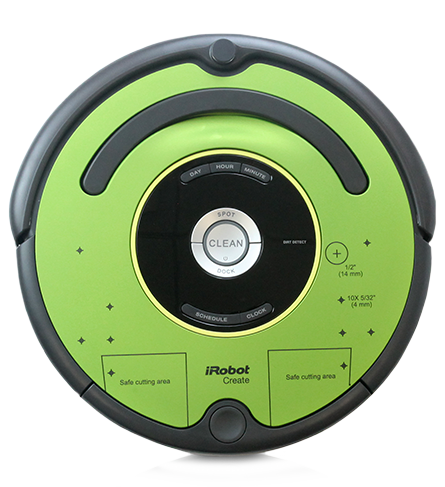
A python library for controlling the iRobot Create 2. This was used in ECE 387 Introduction to Robotics class I taught at the US Air Force Academy.
- video: robot could only follow the black tap road and couldn't run into anything. If anything got in the way, it had to naviage around it to its final destination
- video: robot pet, follow the pink ball
- video: robot pet, follow the pink ball
Install
pip
The recommended way to install this library is:
pip install pycreate2
Development
If you wish to develop and submit git-pulls, you can do:
git clone https://github.com/walchko/pycreate2
cd pycreate2
poetry install
poetry run pytest -v
Use
There are multiple ways to command the Create to move, here are some examples:
from  pycreate2 import Create2
import time

# Create a Create2.
port = "/dev/serial"  # where is your serial port?
bot = Create2(port)

# Start the Create 2
bot.start()

# Put the Create2 into 'safe' mode so we can drive it
# This will still provide some protection
bot.safe()

# You are responsible for handling issues, no protection/safety in
# this mode ... becareful
bot.full()

# directly set the motor speeds ... move forward
bot.drive_direct(100, 100)
time.sleep(2)

# turn in place
bot.drive_direct(200,-200)  # inputs for motors are +/- 500 max
time.sleep(2)

# Stop the bot
bot.drive_stop()

# query some sensors
sensors = bot.get_sensors()  # returns all data
print(sensors.light_bumper_left)

# Close the connection
# bot.close()
More examples are found in the examples folder.
Documents
Additional notes and documents are in the docs folder.
Modes
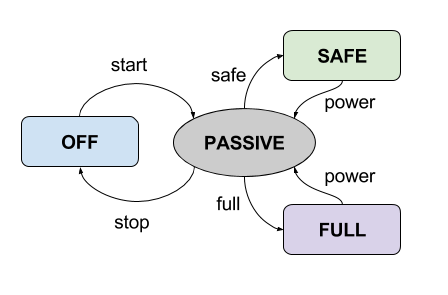
The different modes (OFF, PASSIVE, SAFE, and FULL) can be switched between by calling different commands.
- OFF: The robot is off and can charge, it will accept no commands
- PASSIVE: The robot is in standbye and can charge. It will send sensor packets, but will not move
- SAFE: The robot will not charge, but you full control over it with a few exceptions. If the cliff sensors or wheel drop sensors are triggered, the robot goes back to PASSIVE mode.
- FULL: The robot will not charge and you have full control. You are responsible to handle any response due to cliff, wheel drop or any other sensors.
Sensor Data
Sensor data is returned as a namedtuple from collections. The
information can be accessed as either:
sensors = bot.get_sensors()
sensors.wall == sensors[1]  # True
| Sensor | Range | Index |
|---|---|---|
| bumps_wheeldrops | [0-15] | 0 |
| wall | [0-1] | 1 |
| cliff_left | [0-1] | 2 |
| cliff_front_left | [0-1] | 3 |
| cliff_front_right | [0-1] | 4 |
| cliff_right | [0-1] | 5 |
| virtual_wall | [0-1] | 6 |
| overcurrents | [0-29] | 7 |
| dirt_detect | [0-255] | 8 |
| ir_opcode | [0-255] | 9 |
| buttons | [0-255] | 10 |
| distance | [-322768-32767] | 11 |
| angle | [-322768-32767] | 12 |
| charger_state | [0-6] | 13 |
| voltage | [0-65535] | 14 |
| current | [-322768-32767] | 15 |
| temperature | [-128-127] | 16 |
| battery_charge | [0-65535] | 17 |
| battery_capacity | [0-65535] | 18 |
| wall_signal | [0-1023] | 19 |
| cliff_left_signal | [0-4095] | 20 |
| cliff_front_left_signal | [0-4095] | 21 |
| cliff_front_right_signal | [0-4095] | 22 |
| cliff_right_signal | [0-4095] | 23 |
| charger_available | [0-3] | 24 |
| open_interface_mode | [0-3] | 25 |
| song_number | [0-4] | 26 |
| song_playing | [0-1] | 27 |
| oi_stream_num_packets | [0-108] | 28 |
| velocity | [-500-500] | 29 |
| radius | [-322768-32767] | 30 |
| velocity_right | [-500-500] | 31 |
| velocity_left | [-500-500] | 32 |
| encoder_counts_left | [-322768-32767] | 33 |
| encoder_counts_right | [-322768-32767] | 34 |
| light_bumper | [0-127] | 35 |
| light_bumper_left | [0-4095] | 36 |
| light_bumper_front_left | [0-4095] | 37 |
| light_bumper_center_left | [0-4095] | 38 |
| light_bumper_center_right | [0-4095] | 39 |
| light_bumper_front_right | [0-4095] | 40 |
| light_bumper_right | [0-4095] | 41 |
| ir_opcode_left | [0-255] | 42 |
| ir_opcode_right | [0-255] | 43 |
| left_motor_current | [-322768-32767] | 44 |
| right_motor_current | [-322768-32767] | 45 |
| main_brush_current | [-322768-32767] | 46 |
| side_brush_current | [-322768-32767] | 47 |
| statis | [0-3] | 48 |
Change Log
| 2020-02-16 | 0.8.0 | Simplified interface and bug fixes |
| 2020-02-16 | 0.7.7 | Fixed typo with poetry |
| 2020-02-16 | 0.7.6 | Fixed typo erro in bin |
| 2020-02-16 | 0.7.5 | Switched to toml and poetry |
| 2019-06-30 | 0.7.4 | Midi sounds working |
| 2017-08-26 | 0.7.3 | code clean up and doc updates |
| 2017-08-26 | 0.7.2 | updates and fixes |
| 2017-05-26 | 0.5.0 | init and published to pypi |
The MIT License
Copyright (c) 2007 Damon Kohler
Copyright (c) 2015 Jonathan Le Roux (Modifications for Create 2)
Copyright (c) 2015 Brandon Pomeroy
Copyright (c) 2017 Kevin Walchko
Permission is hereby granted, free of charge, to any person obtaining a copy of this software and associated documentation files (the "Software"), to deal in the Software without restriction, including without limitation the rights to use, copy, modify, merge, publish, distribute, sublicense, and/or sell copies of the Software, and to permit persons to whom the Software is furnished to do so, subject to the following conditions:
The above copyright notice and this permission notice shall be included in all copies or substantial portions of the Software.
THE SOFTWARE IS PROVIDED "AS IS", WITHOUT WARRANTY OF ANY KIND, EXPRESS OR IMPLIED, INCLUDING BUT NOT LIMITED TO THE WARRANTIES OF MERCHANTABILITY, FITNESS FOR A PARTICULAR PURPOSE AND NONINFRINGEMENT. IN NO EVENT SHALL THE AUTHORS OR COPYRIGHT HOLDERS BE LIABLE FOR ANY CLAIM, DAMAGES OR OTHER LIABILITY, WHETHER IN AN ACTION OF CONTRACT, TORT OR OTHERWISE, ARISING FROM, OUT OF OR IN CONNECTION WITH THE SOFTWARE OR THE USE OR OTHER DEALINGS IN THE SOFTWARE.
1 maintainer

Metadata
1 maintainer
Release files for pycreate2 0.8.0
For a detailed explanation of source distributions (sdists) and built distributions (wheels), please see the package formats documentation.
Source distribution (sdist)
| File | Size | Uploaded | Provenance | |
|---|---|---|---|---|
| pycreate2-0.8.0.tar.gz | 16.8 kB | Without provenance | Details |
Built distribution (wheel)
| File | Interpreter | ABI | Platform | Reset |
|---|---|---|---|---|
| pycreate2-0.8.0-py3-none-any.whl | Python 3 | none | any | Details |
Total release size: 35.2 kB
Release files / pycreate2-0.8.0.tar.gz
| Download URL | pycreate2-0.8.0.tar.gz |
|---|---|
| Size | 16.8 kB |
| Tags | Source |
|
SHA-256 checksum How to use checksums |
4846e7dca5ace4086a5115b322e4d9363bfb6dd7115a7d604ee9cd3d614c369d
|
|
BLAKE2b-256 checksum How to use checksums |
67150dfc4dcbe215eb61fdc5e88411c972b767b42d0ff812247549e461683633
|
| Upload date | |
|
Uploaded using Trusted Publishing? What is trusted publishing? |
No |
| Uploaded via |
poetry/1.0.2 CPython/3.7.7 Darwin/19.4.0
|
Release files / pycreate2-0.8.0-py3-none-any.whl
| Download URL | pycreate2-0.8.0-py3-none-any.whl |
|---|---|
| Size | 18.4 kB |
| Tags | Python 3 |
|
SHA-256 checksum How to use checksums |
de05ef13862dd445b09f323bbd79058bba129c0cc2e1011226dbf8fba957bca5
|
|
BLAKE2b-256 checksum How to use checksums |
f2dd11707a386eca4ce71873e1bd3f84f835b6cee5a378b0918883bbca810c8e
|
| Upload date | |
|
Uploaded using Trusted Publishing? What is trusted publishing? |
No |
| Uploaded via |
poetry/1.0.2 CPython/3.7.7 Darwin/19.4.0
|
Security for pycreate2 0.8.0
Provenance
Provenance describes where a file came from. On PyPI, provenance is shared via attestations, which provide a verifiable record of the build or publishing details. View details, limitations and caveats.
No provenance found
None of the files in this release were uploaded with provenance metadata.
A note on package security
PyPI is a repository for distributing packages, not a service for auditing them. While third-party security researchers and our staff do their best to detect and remove malicious packages, PyPI cannot guarantee the quality, security or suitability of any given package.














