
A PDF cropping utility for removing headers, footers, and margins from multiple pages at once.

Project description
PyCropPDF
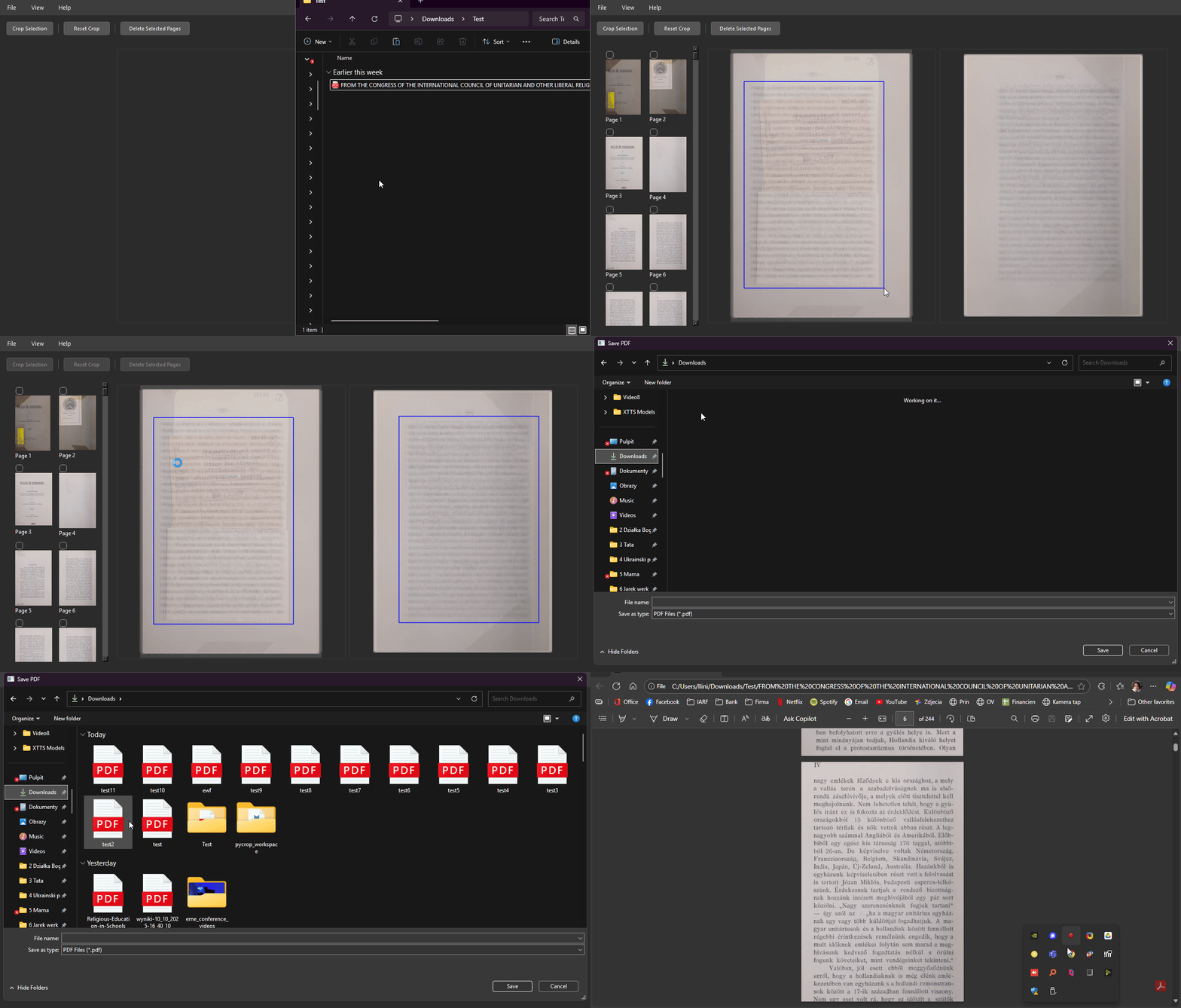
PyCropPDF is a desktop application designed to crop and mask PDF files. It is particularly suited for documents where multiple pages share a common layout structure—such as scanned books, academic papers, or reports—allowing you to remove margins, headers, footers, or watermarks across many pages simultaneously.
Key Concepts
1. Transparent Overlay Preview
Instead of showing pages one-by-one, PyCropPDF renders and overlays page previews transparently on top of each other. This enables you to visually check that a selected crop boundary or whiteout mask fits every page in the document (or group of pages) without clipping text or diagrams.
2. View Modes
- All Pages (Overlay): Overlays all document pages together. Helpful for verifying margins across the entire document.
- Odd / Even Pages: Splits the preview into two separate overlays—one for odd pages and one for even pages. This is useful for double-sided documents (like bound books) where the left and right margins alternate.
- Single Page Preview: Focuses on a single page, allowing you to fine-tune boundaries for specific layout exceptions.
3. Crop vs. Whiteout Tools
- Crop Box: Defines a bounding box. When applied, pages are cropped to this box (modifying the PDF page's physical boundaries).
- Whiteout Mask: Applies solid rectangular overlays (masks) to cover page content. You can choose a custom color to match the page background.
4. Page Selection & Deletion
A sidebar displays thumbnails of all pages.
- Multi-selection is supported using
Ctrl + Click(toggle individual pages) andShift + Click(select a range of pages). - Operations (cropping and whiteout) can be limited to the selected pages.
- Selected pages can be deleted from the document.
- Operations can be undone step-by-step.
5. Provenance Manifests
When you save a modified PDF, the application generates a JSON sidecar manifest (e.g., document_modified.pdf.pycroppdf.json). This manifest records:
- SHA-256 hashes of the source and output PDF files.
- Original page counts and mapping of output pages to original pages.
- Explicit lists of deleted page indices.
- Exact coordinates and dimensions of crops and whiteouts applied.
This manifest enables downstream automated pipelines to trace the history and modifications of the edited PDF back to its original source.
Installation
Prerequisites
- Python 3.8 or higher.
Installation from PyPI
You can install PyCropPDF directly using pip:
pip install pycroppdf
Installation from Source (Development Mode)
To clone the repository and install it in editable mode for development:
git clone https://github.com/lukaszliniewicz/PyCropPDF.git
cd PyCropPDF
pip install -e .
Usage
Start the graphical interface from the terminal:
pycroppdf
To start the interface with a PDF already loaded:
pycroppdf --input /path/to/document.pdf
Command-Line Arguments & Automation
The application accepts arguments to pre-configure paths and manifest outputs:
--input /path/to/file.pdf: Loads the specified PDF at launch.--save-to /path/to/directory/: Specifies the folder where the edited PDF will be saved.--save-as filename.pdf: Specifies the filename for the output PDF.--manifest-out /path/to/output.json: Overrides the default location for the JSON provenance manifest.
Note: If --save-to or --save-as is specified, the standard "Save File" dialog is bypassed. Clicking "Save PDF..." immediately saves the file to the pre-configured path.
Basic Edit Workflow
- Open a PDF: Drag and drop a PDF file into the window, or go to File > Open PDF....
- Select View Mode: Choose All, Odd/Even, or double-click a page thumbnail to view a single page.
- Apply a Crop: Select the Crop Box tool, click and drag a box on the canvas, and click Apply Crop. If odd/even mode is active, you can define separate boxes for odd and even pages.
- Apply a Whiteout: Select the Whiteout tool, click and drag to cover text/images.
- Manage Pages: Select thumbnails in the sidebar to delete unnecessary pages.
- Undo Changes: Use the Undo button or
Ctrl + Zto revert your actions. - Save: Click Save PDF to export the modified document and its provenance manifest.
Development & Building
Running Unit Tests
Install pytest and execute it from the project root:
pytest
Building a Standalone Executable
You can compile PyCropPDF into a standalone executable using pyinstaller. From your environment, run:
pyinstaller --onefile --noconsole --name PyCropPDF run.py
This produces a single, self-contained executable file inside the dist/ directory.
License
This project is licensed under the MIT License. See the LICENSE file for details.
Release history Release notifications | RSS feed


Download files
Download the file for your platform. If you're not sure which to choose, learn more about installing packages.
Source Distribution
Built Distribution
Filter files by name, interpreter, ABI, and platform.
If you're not sure about the file name format, learn more about wheel file names.
Copy a direct link to the current filters
File details
Details for the file pycroppdf-0.2.0.tar.gz.
File metadata
- Download URL: pycroppdf-0.2.0.tar.gz
- Upload date:
- Size: 26.7 kB
- Tags: Source
- Uploaded using Trusted Publishing? No
- Uploaded via: twine/6.2.0 CPython/3.11.15
File hashes
| Algorithm | Hash digest | |
|---|---|---|
| SHA256 |
461b628bb1705663376d10c938f3db89b5a705f9ca34699597a732ff49d15af5
|
|
| MD5 |
c6aff3743d810a31d373c03c115851eb
|
|
| BLAKE2b-256 |
38ccfc101ed64d6766be1e26e0bb58a903ff4002aae6d8b0311c161ddc3df600
|
File details
Details for the file pycroppdf-0.2.0-py3-none-any.whl.
File metadata
- Download URL: pycroppdf-0.2.0-py3-none-any.whl
- Upload date:
- Size: 23.2 kB
- Tags: Python 3
- Uploaded using Trusted Publishing? No
- Uploaded via: twine/6.2.0 CPython/3.11.15
File hashes
| Algorithm | Hash digest | |
|---|---|---|
| SHA256 |
03e2474cbdc13c60bcd68e4a682cba65c57bed9bc73a1233040a35a10ef853bd
|
|
| MD5 |
6a324910c16f37e94e716a73ad2ed28d
|
|
| BLAKE2b-256 |
11e8d3aa43f337c906bc7ae2e37d447de3667f1f9a8b950f3824a85b7f6242cb
|






