
pycsodata





pycsodata is an unofficial Python package for reading datasets published by the Central Statistics Office of Ireland, using the PxStat RESTful API. Much of its functionality is based on the CSO's existing csodata R package, while also including automatic merging of datasets with spatial data where available.
Read the full documentation here.
Installation
Installation is via pip:
pip install pycsodata
Usage
Loading a dataset
A CSO dataset with a known table code (see how to search all datasets using CSOCatalogue below) can be loaded as follows:
from pycsodata import CSODataset

# Load the CSO dataset with code "FY051A"
ds = CSODataset("FY051A")

# Print its metadata
ds.describe()
View output
Code:                FY051A
Title:               Average Age of Population

Variables:           [1] Statistic
                        (1) Average Age of Population
                            Unit: Number
                     [2] CensusYear
                     [3] Sex
                     [4] Admin Counties

Tags:                Official Statistics, Geographic Data
Time Variable:       CensusYear
Geographic Variable: Admin Counties

Last Updated:        2023-05-30
Reason for Release:  Planned release

Notes:             * The official boundaries of Cork City and Cork County have
                     changed since Census 2016. The ‘A’ version of a table (FYXXXA)
                     is based on the new Administrative Counties and contains figures
                     for Cork City and Cork County individually; therefore
                     comparisons across census years are not possible. In the ‘B’
                     version, Cork City and County have been amalgamated making
                     comparisons for county of Cork possible across census years.
                   * For more information, please go to the statistical release page
                     (https://www.cso.ie/en/statistics/population/censusofpopulation2022/)
                     on our website.

Contact Name:        Bernie Casey
Contact Email:       census@cso.ie
Contact Phone:       (+353) 1 895 1460
Copyright:           Central Statistics Office, Ireland (https://www.cso.ie/)
This may conveniently be loaded into a pandas DataFrame by calling .df():
# Load the data into a DataFrame
df = ds.df()
print(df.head())
                   Statistic CensusYear         Sex Admin Counties  value
0  Average Age of Population       2022  Both sexes        Ireland   38.8
1  Average Age of Population       2022  Both sexes         Carlow   38.8
2  Average Age of Population       2022  Both sexes          Cavan   38.5
3  Average Age of Population       2022  Both sexes          Clare   40.1
4  Average Age of Population       2022  Both sexes      Cork City   39.1
The data can also be conveniently filtered on any of its dimensions. This is done by passing filters, a dictionary mapping each dimension to a list containing a subset of values:
# Filter the data by year and sex
ds = CSODataset("FY051A", filters={"CensusYear":["2022"], "Sex":["Female"]})
df = ds.df()
print(df.head())
                   Statistic CensusYear     Sex Admin Counties  value
0  Average Age of Population       2022  Female        Ireland   39.4
1  Average Age of Population       2022  Female         Carlow   39.3
2  Average Age of Population       2022  Female          Cavan   38.9
3  Average Age of Population       2022  Female          Clare   40.5
4  Average Age of Population       2022  Female      Cork City   39.7
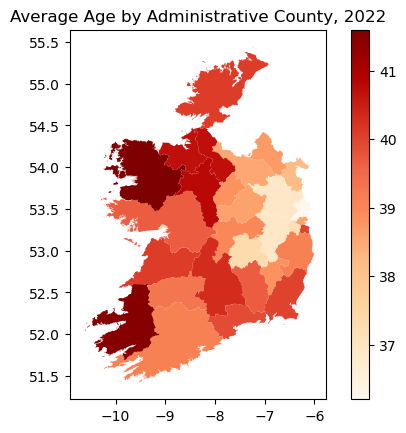
One may similarly create a geopandas GeoDataFrame by calling .gdf(), making it easy to plot the data on a map:
import matplotlib.pyplot as plt

# Filter for total population (both sexes) in 2022:
ds = CSODataset("FY051A", filters={"CensusYear":["2022"], "Sex":["Both sexes"]})
# Note this dataset actually only contains 2022,
# so the filter on that variable is technically redundant

# Create a GeoDataFrame
gdf = ds.gdf()

# Plot the data on a map
gdf.plot(column="value", cmap="OrRd", legend=True)
plt.title("Average Age by Administrative County, 2022")
plt.show()
The package also supports several pivot formats. The default is "long", in which the Statistic and Time Variable columns are both stacked, and in which there is always a value column containing the recorded data values; other options are "wide" (data pivoted on the Time Variable column), and "tidy" (data pivoted on the Statistic column). These are used by calling, for example, .df(pivot_format="wide") or .gdf(pivot_format="tidy").
Loading the catalogue
The catalogue of all CSO datasets, sorted by date updated (essentially what is shown in the GUI at data.cso.ie), may be loaded into a DataFrame as follows:
from pycsodata import CSOCatalogue

cat = CSOCatalogue()

# Load catalogue's entire table of contents
toc = cat.toc()
toc.head()
View output
| Code | Title | Variables | Time Variable | Date Range | Updated | Organisation | Exceptional |
|---|---|---|---|---|---|---|---|
| ESA04 | Environmental Subsidies and Similar Transfers (Euro Thousand) | ['Year', 'Institutional Sector', 'Type of Transfer', 'CEP'] | Year | 2000 - 2024 | 2026-01-26 | Central Statistics Office, Ireland | False |
| ESA05 | Environmental Subsidies and Similar Transfers | ['Year', 'Nace Rev 2 Group', 'Type of Transfer', 'CEP'] | Year | 2000 - 2024 | 2026-01-26 | Central Statistics Office, Ireland | False |
| MTM05 | Precipitation Amount | ['Month', 'Meteorological Weather Station'] | Month | 1960 January - 2025 December | 2026-01-23 | Met Eireann | False |
| MTM08 | Wind, Maximum Gale Gust | ['Month', 'Meteorological Weather Station'] | Month | 1960 January - 2025 December | 2026-01-23 | Met Eireann | False |
| MTM06 | Temperature | ['Month', 'Meteorological Weather Station'] | Month | 1960 January - 2025 December | 2026-01-23 | Met Eireann | False |
It is also possible to search the catalogue on any of its fields, several of which support AND, OR and NOT logic operations:
# Search the catalogue by its various fields
results = cat.search(title="population", variables="electoral division")
results.head()
View output
| Code | Title | Variables | Time Variable | Date Range | Updated | Organisation | Exceptional |
|---|---|---|---|---|---|---|---|
| HCA22 | Population, Area and Valuation | ['Census Year', 'County, Rural/Urban District, District Electoral Division and Town'] | Census Year | 1926 | 2026-01-21 | Central Statistics Office, Ireland | False |
| HCA23 | Religion and Population | ['Census Year', 'County, Rural/Urban District, District Electoral Division and Town'] | Census Year | 1926 | 2026-01-21 | Central Statistics Office, Ireland | False |
| IPEADS14 | Average Age and Population | ['Year', 'Electoral Divisions'] | Year | 2023 | 2025-06-24 | Central Statistics Office, Ireland | False |
| HCA14 | Tenements of One Room, Area, Houses Inhabited and Population in 1911 | ['Census Year', 'County, Urban/Rural District and District Electoral Division'] | Census Year | 1911 | 2025-06-06 | Central Statistics Office, Ireland | False |
| HCA17 | Tenements of One Room, Area, Houses Inhabited and Population in 1911 | ['Census Year', 'District Electoral Division'] | Census Year | 1911 | 2025-06-06 | Central Statistics Office, Ireland | False |
Managing the cache
Data is cached by default. The cache may be flushed as follows:
from pycsodata import CSOCache

cache = CSOCache()

# Flush the cache
cache.flush()
Read the full documentation here.
Notes
- By default, the PxStat API metadata links CSO datasets to generalised versions of the spatial GeoJSON files rather than to files containing the most precise ungeneralised geometries. This reduces the size of downloads, and the generalised geometries should be adequate for most purposes (such as creating visualisations). In cases where more detailed spatial analysis is required, the ungeneralised spatial data can be downloaded from Tailte Éireann using
.gdf(ungeneralised=True). - There are a few CSO datasets which clearly have a spatial dimension (such as county, area of residence, or similar), but whose metadata does not include a link to a spatial data file. In these cases pycsodata will not be able to produce a GeoDataFrame and will raise an error when
.gdf()is called. In most such cases the (generalised or ungeneralised) spatial data can be downloaded from GeoHive and manually merged with the DataFrame produced by pycsodata. - The default coordinate reference system (CRS) of the spatial data is the World Geodetic System (EPSG:4326). This should be reprojected to a geographic CRS such as Irish Transverse Mercator (EPSG:2157) before doing any distance or area calculations. For a geopandas GeoDataFrame, this is achieved by calling
gdf.to_crs(epsg=2157).
Code Provenance and AI Disclosure
The initial implementation of this package was written by the author (as was 100% of this README). AI assistance was used for refactoring, adding additional functions for caching, searching, and sanitising, creating unit tests, and writing comprehensive docstrings. All code was manually reviewed and tested by the author.
Much of the functionality of pycsodata is based on the CSO's official csodata R package. It acts as a Python wrapper for accessing the CSO's PxStat RESTful API, and makes use of the pyjstat library.
1 maintainer

Metadata
1 maintainer
Release files for pycsodata 0.2.0
For a detailed explanation of source distributions (sdists) and built distributions (wheels), please see the package formats documentation.
Source distribution (sdist)
| File | Size | Uploaded | |
|---|---|---|---|
| pycsodata-0.2.0.tar.gz | 113.1 kB | Details |
Built distribution (wheel)
| File | Interpreter | ABI | Platform | Reset |
|---|---|---|---|---|
| pycsodata-0.2.0-py3-none-any.whl | Python 3 | none | any | Details |
Total release size: 175.5 kB
Release files / pycsodata-0.2.0.tar.gz
| Download URL | pycsodata-0.2.0.tar.gz |
|---|---|
| Size | 113.1 kB |
| Tags | Source |
|
SHA-256 checksum How to use checksums |
2191262ed0ec39cd7c74999dcfc5b5046d3007ac7bd08d8c71ac265682bbe5bb
|
|
BLAKE2b-256 checksum How to use checksums |
077ee8b1518cd1d13185396f13878bafc672ed89dd4b3e92f5cc3379efdf0a4e
|
| Upload date | |
|
Uploaded using Trusted Publishing? What is trusted publishing? |
Yes |
| Uploaded via |
uv/0.11.4 {"installer":{"name":"uv","version":"0.11.4","subcommand":["publish"]},"python":null,"implementation":{"name":null,"version":null},"distro":{"name":"Ubuntu","version":"24.04","id":"noble","libc":null},"system":{"name":null,"release":null},"cpu":null,"openssl_version":null,"setuptools_version":null,"rustc_version":null,"ci":true}
|
Release files / pycsodata-0.2.0-py3-none-any.whl
| Download URL | pycsodata-0.2.0-py3-none-any.whl |
|---|---|
| Size | 62.4 kB |
| Tags | Python 3 |
|
SHA-256 checksum How to use checksums |
d16fb692740bf4c6bc0d551eb302a5011928ed43655bd600c12ddbf12fd9826c
|
|
BLAKE2b-256 checksum How to use checksums |
15023ee52aeb6969abd186af3551fcc8e9963905cf3b569fddd2715a12976cd5
|
| Upload date | |
|
Uploaded using Trusted Publishing? What is trusted publishing? |
Yes |
| Uploaded via |
uv/0.11.4 {"installer":{"name":"uv","version":"0.11.4","subcommand":["publish"]},"python":null,"implementation":{"name":null,"version":null},"distro":{"name":"Ubuntu","version":"24.04","id":"noble","libc":null},"system":{"name":null,"release":null},"cpu":null,"openssl_version":null,"setuptools_version":null,"rustc_version":null,"ci":true}
|














