
PyCUP


This is an open-source package designed for (environmental) model calibration and uncertainty analysis. The current version is the very first version, we welcome all comments, suggestions, and improvements.
v 0.1.7 Update
- A new superior algorithm MOMFO (multi-objective moth-flame optimizer) based on archive and crowding distance non-domination sort, and its elite-opposition improved version (EO-MOMFO) have been designed and provided in the new version. The elite opposition mechanism was modified based on the concept of non-domination and was embedded for updating the flame population of MOMFO. The implemented MOMFO has a similar principle as the current literature, although with some differences in details, while the elite-opposition version is original in this package.
- A "Mode" variable for MFO and MOMFO for switching the flame updating mechanism has been provided. A "Mode" value of 0 is for Mirjalili's original version, while a "Mode" value of 1 (default) is my modification. Details about the differences will be given in the upcoming algorithm introduction documentations.
What does it have
(1) For model calibration/optimization
- Single-objective heuristic algorithms including PSO, GWO, MFO, SOA, SCA, SSA, TSA, and WOA.
- Multi-objective heuristic algorithms including MOPSO, MODE, and NSGA-II.
- Elite opposition strategy modified heuristic algorithms -- with better optimum search abilities.
- Statistic based-method LHS-GLUE.
- Three kinds of algorithm border check mechanisms including Absorb, Random, and Rebound, designed for different problems.
(2) For sensitivity & uncertainty analysis
- Likelihood uncertainty estimation used in the GLUE framework for the parameter uncertainty analysis/prediction uncertainty estimation.
- The frequency based-uncertainty estimation method for the prediction uncertainty estimation.
- The multi-linear regression method for the all-at-a-time parameter sensitivity based on statmodels.
(3) Other convenient features
- Multi-processing calibration.
- Recording and resuming during the calibration task.
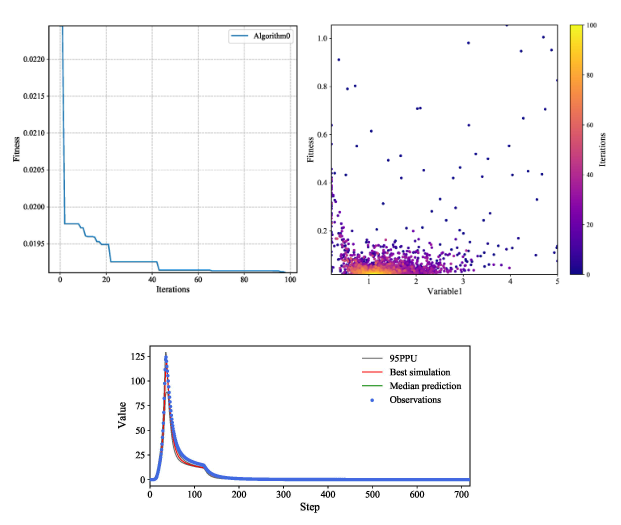
- Several result plotting functions.
- A special simulation result object for multi-station & multi-event results (of environmental models) in pycup.ResLib.
(4) Package/Tools integration
- PyCUP can be linked to spotpy database for post-processing, a pycup objective function can also be generated from the spotpy objective function using the module named pycup.integrate.
- A basic integration with PEST++ IO operations for model-agnostic calibrations. Details and limitations are provided in the specific documentation. The required objective function for pycup calibration can be easily generated using a PEST++ optimization project with/without a tsproc.exe. The PESTconvertor object in pycup.integrate provides several APIs for reading PEST++ files such as .pst, .ins, and .tpl.
How to install
The project has been uploaded onto the PyPI https://pypi.org/project/pycup/ . Or install the .whl file in the dist folder.
pip install pycup
How to use
Here is a simple example. For more details, please see the documentation.
import pycup as cp
import numpy as np

def uni_fun1(X):
	# X for example np.array([1,2,3,...,30])
    fitness = np.sum(np.power(X,2)) + 1 # example: 1.2
    result = fitness.reshape(1,-1) # example ([1.2,])

    return fitness,result

lb = -100 * np.ones(30)
ub = 100 * np.ones(30)
cp.SSA.run(pop = 1000, dim = 30, lb = lb, ub = ub, MaxIter = 30, fun = uni_fun1)
Example SWMM (Storm Water Management Model) calibration projects
IMPORTANT: PLEASE OPEN YOUR IDE (e.g. PYCHARM) OR COMMAND LINE WITH THE ADMINISTRATOR RIGHTS BEFORE EXECUTING THE EXAMPLE PROJECT
Location: https://github.com/QianyangWang/PyCUP
- The example in folder 'Example01-GLUE' contains an SWMM calibration project using single-processing GLUE. Install the dependencies (for example: pip install swmm-api==0.2.0.18.3, pip install pyswmm). Execute the 'Calibrate.py' to calibrate the model. Then, execute the 'PostProcessing.py' for uncertainty analysis.
- The example in folder 'Example02-multiprocessing' contains an SWMM calibration project using multi-processing EOGWO.
- The example in folder 'Example03-multiobjective' contains an SWMM multi-objective calibration project using EOMOPSO.
- The example in folder 'Example04-validation&prediction' shows how to use our (Ensemble)Validator/(Ensemble)Predictor objects for the validation and prediction of the model using the calibrated parameter (set).
- The example in folder 'Example05-multi-station&event' shows how to use the pycup.Reslib.SimulationResult object for the storage of multi-station & multi-event simulation results, as well as the further analysis using them.
Example PEST++ conversion project (with a Xinanjiang hydrologic model)
- The example in folder 'Example06-PESTintegration' contains a PEST++ Xinanjiang model calibration project and the python script to run a PyCUP calibration based on it.
1 maintainer

Metadata
1 maintainer
Release files for pycup 0.1.7.2
For a detailed explanation of source distributions (sdists) and built distributions (wheels), please see the package formats documentation.
Source distribution (sdist)
| File | Size | Uploaded | |
|---|---|---|---|
| pycup-0.1.7.2.tar.gz | 866.1 kB | Details |
Built distribution (wheel)
| File | Interpreter | ABI | Platform | Reset |
|---|---|---|---|---|
| pycup-0.1.7.2-py3-none-any.whl | Python 3 | none | any | Details |
Total release size: 1.8 MB
Release files / pycup-0.1.7.2.tar.gz
| Download URL | pycup-0.1.7.2.tar.gz |
|---|---|
| Size | 866.1 kB |
| Tags | Source |
|
SHA-256 checksum How to use checksums |
5fa88b87e93c3987496dc1b3a8b9320e18d4d62c2f5e9d0cef9765bd64140f92
|
|
BLAKE2b-256 checksum How to use checksums |
b6bf02ae31c4285ac8357d06a670d56549882ee134306e8bdae3239ee345aa19
|
| Upload date | |
|
Uploaded using Trusted Publishing? What is trusted publishing? |
No |
| Uploaded via |
twine/4.0.1 CPython/3.8.3
|
Release files / pycup-0.1.7.2-py3-none-any.whl
| Download URL | pycup-0.1.7.2-py3-none-any.whl |
|---|---|
| Size | 891.0 kB |
| Tags | Python 3 |
|
SHA-256 checksum How to use checksums |
f8edc12d0ac3afabb92fca2590e3f0ff0f0bc498e6bcf089d949bb4322721e51
|
|
BLAKE2b-256 checksum How to use checksums |
5e544d23077693c62dce1485d5bd93a443e1831109b56a91fb4fe9196a6420d2
|
| Upload date | |
|
Uploaded using Trusted Publishing? What is trusted publishing? |
No |
| Uploaded via |
twine/4.0.1 CPython/3.8.3
|














