
Python Computer Vision Cameras Operations and Models

Project description
pycvcam
Description
Python Computer Vision Cameras transformations and models.
A computer vision camera is modeled by three main components:
- Extrinsic: The transformation from the world coordinate system to the normalized camera coordinate system (
world_pointstonormalized_points) - Distortion: The transformation from the normalized camera coordinate system to the distorted camera coordinate system (
normalized_pointstodistorted_points) - Intrinsic: The transformation from the distorted camera coordinate system to the image coordinate system (
distorted_pointstoimage_points)
As described in the figure below, the package pycvcam uses the following notation:
world_points: The 3-D points X_w ((..., 3)) expressed in the world coordinate system (Ex, Ey, Ez).normalized_points: The 2-D points x_n ((..., 2)) expressed in the normalized camera coordinate system (I, J) with a unit distance along the optical axis (K).distorted_points: The distorted 2-D points x_d ((..., 2)) expressed in the normalized camera coordinate system (I, J) with a unit distance along the optical axis (K).image_points: The 2-D points x_i ((..., 2)) expressed in the image coordinate system (ex, ey) in the sensor plane.pixel_points: The 2-D points x_p ((..., 2)) expressed in the pixel coordinate system (u, v) in the matrix of pixels.
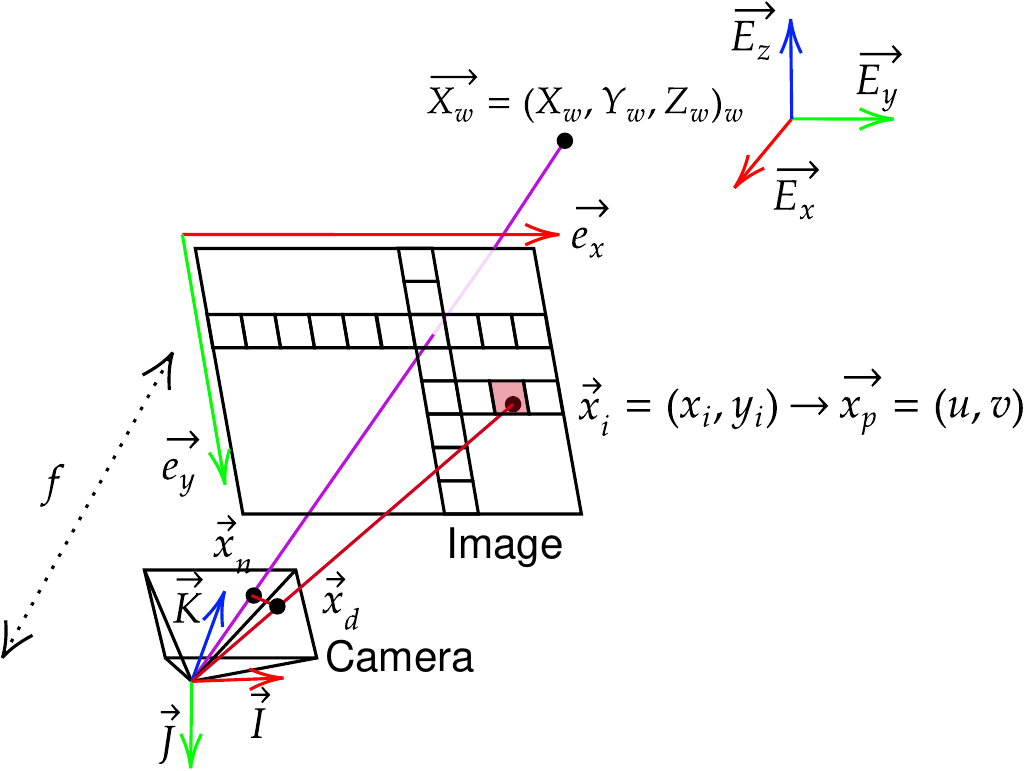
To convert the image_points to the pixel_points, a simple switch of coordinate system can be performed.
The package provides several models and extrinsic, distortion, and intrinsic transformations.
The functions project_points, compute_rays, ... can be used to easily process transformations from the 3D world frame of reference to the image plane.
Examples
Create a simple example to project 3D points to 2D image points using the intrinsic and extrinsic parameters of the camera.
import numpy
from pycvcam import project_points, Cv2Distortion, Cv2Extrinsic, Cv2Intrinsic

# Define the 3D points in the world coordinate system
world_points = numpy.array([[0.0, 0.0, 5.0],
                            [0.1, -0.1, 5.0],
                            [-0.1, 0.2, 5.0],
                            [0.2, 0.1, 5.0],
                            [-0.2, -0.2, 5.0]])  # shape (5, 3)

# Define the rotation vector and translation vector
rvec = numpy.array([0.01, 0.02, 0.03])  # small rotation
tvec = numpy.array([0.1, -0.1, 0.2])    # small translation
extrinsic = Cv2Extrinsic.from_rt(rvec, tvec)

# Define the intrinsic camera matrix
K = numpy.array([[1000.0, 0.0, 320.0],
                 [0.0, 1000.0, 240.0],
                 [0.0, 0.0, 1.0]])

intrinsic = Cv2Intrinsic.from_matrix(K)

# Define the distortion model (optional)
distortion = Cv2Distortion(parameters=[0.1, 0.2, 0.3, 0.4, 0.5])

# Project the 3D points to 2D image points
result = project_points(world_points, intrinsic=intrinsic, distortion=distortion, extrinsic=extrinsic)
print("Projected image points:")
print(result.image_points)  # shape (5, 2)
You can also compute the Jacobians of the image points with respect to the input 3D world points and the projection parameters by setting the dx and dp parameters to True.
# Project the 3D points to 2D image points with Jacobians
result = project_points(world_points, intrinsic=intrinsic, distortion=distortion, extrinsic=extrinsic, dx=True, dp=True)

print("Jacobian with respect to 3D points:")
print(result.jacobian_dx)  # shape (5, 2, 3)

print("Jacobian with respect to projection parameters:")
print(result.jacobian_dp)  # shape (5, 2, Nparams)

print("Jacobian with respect to extrinsic parameters:")
print(result.jacobian_dextrinsic)  # shape (5, 2, Nextrinsic)

print("Jacobian with respect to distortion parameters:")
print(result.jacobian_ddistortion)  # shape (5, 2, Ndistortion)

print("Jacobian with respect to intrinsic parameters:")
print(result.jacobian_dintrinsic)  # shape (5, 2, Nintrinsic)
Authors
-
Artezaru artezaru.github@proton.me
-
Git Plateform: https://github.com/Artezaru/pycvcam.git
-
Online Documentation: https://Artezaru.github.io/pycvcam
Installation
Install with pip
pip install pycvcam
pip install git+https://github.com/Artezaru/pycvcam.git
Clone with git
git clone https://github.com/Artezaru/pycvcam.git
License
Copyright 2025 Artezaru
Licensed under the Apache License, Version 2.0 (the "License"); you may not use this file except in compliance with the License. You may obtain a copy of the License at
http://www.apache.org/licenses/LICENSE-2.0
Unless required by applicable law or agreed to in writing, software distributed under the License is distributed on an "AS IS" BASIS, WITHOUT WARRANTIES OR CONDITIONS OF ANY KIND, either express or implied. See the License for the specific language governing permissions and limitations under the License.
Release history Release notifications | RSS feed


Download files
Download the file for your platform. If you're not sure which to choose, learn more about installing packages.
Source Distribution
Built Distribution
Filter files by name, interpreter, ABI, and platform.
If you're not sure about the file name format, learn more about wheel file names.
Copy a direct link to the current filters
File details
Details for the file pycvcam-2.1.7.tar.gz.
File metadata
- Download URL: pycvcam-2.1.7.tar.gz
- Upload date:
- Size: 5.0 MB
- Tags: Source
- Uploaded using Trusted Publishing? No
- Uploaded via: twine/6.2.0 CPython/3.10.19
File hashes
| Algorithm | Hash digest | |
|---|---|---|
| SHA256 |
406ed6eb6357c6957a872ee5694454890f3d031c7fabafe6c18224ccb9f848f6
|
|
| MD5 |
8ccfe2d274429b6c2c014512eb69cd59
|
|
| BLAKE2b-256 |
6479a06c889ebb83e1b7aa05bb0486bbe9941be5ea74499ab1dd3887281466db
|
File details
Details for the file pycvcam-2.1.7-py3-none-any.whl.
File metadata
- Download URL: pycvcam-2.1.7-py3-none-any.whl
- Upload date:
- Size: 421.1 kB
- Tags: Python 3
- Uploaded using Trusted Publishing? No
- Uploaded via: twine/6.2.0 CPython/3.10.19
File hashes
| Algorithm | Hash digest | |
|---|---|---|
| SHA256 |
e0aace8e12677d31b096483255a15453ad6ea76a65194e3d3a55ea4d004b9c98
|
|
| MD5 |
ff6f711f0ddba3b504fd1e9bd2bbf029
|
|
| BLAKE2b-256 |
570529ae6943f8528bb6a9642c6710452c3565d558ea77ffa6929fe905c69e41
|






