
Fast local web viewer for pydantic-ai traces (list[ModelMessage] JSON dumps)
Verified details
These details have been verified by PyPIProject links
GitHub Statistics
Maintainers

Project description
pydantic-ai-trace
Use pydantic-ai-trace when you need to inspect an agent run from a JSON dump. Give it a pydantic-ai list[ModelMessage] dump and it opens the run in a browser view.
It is a lightweight local tool. Point it at a trace or a directory of traces and it reads the files from disk, reloads them when they change, and exports individual traces as self-contained HTML files. Your traces stay on disk, with no hosted service or account.
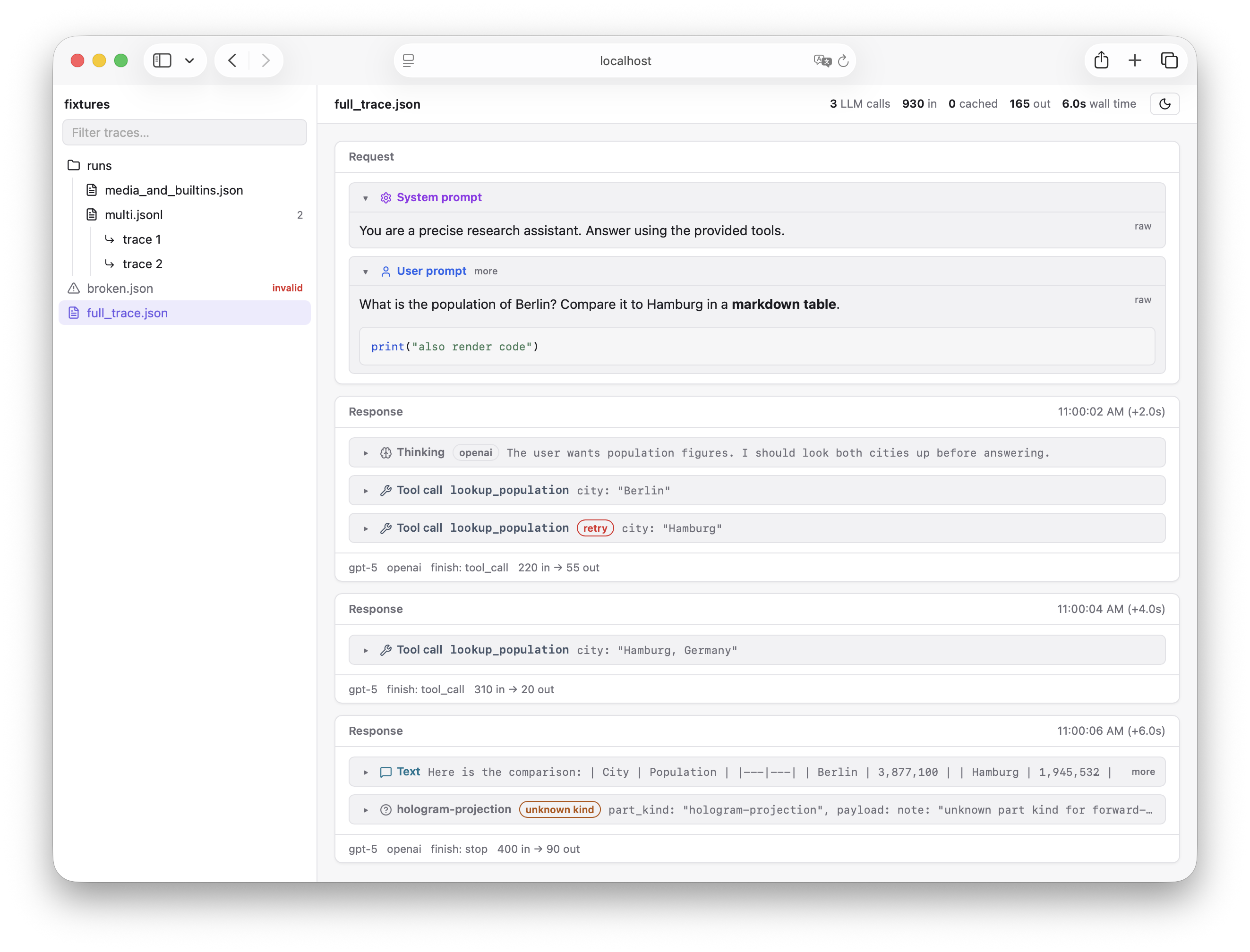
What you can inspect
- The full request and response sequence, including prompts, text, thinking, tool calls, tool results, and unknown parts
- Tool calls paired with their results, including results in later messages
- Model, provider, timing, and token usage
- A searchable directory tree for
.jsonand.jsonltraces - Collapsible large values, rendered Markdown, and keyboard navigation
- One-click copying as a compact text transcript that preserves request and response order
- CLI rendering of the same compact transcript for use by people, scripts, and AI agents
Run from a checkout
This project uses pixi. Build the bundled frontend once, then run paitrace with a trace file or directory.
pixi run build-frontend
pixi run paitrace trace.json
Usage
# View one trace
pixi run paitrace trace.json

# Browse a directory tree of traces
pixi run paitrace ./my-traces/

# Write one trace to a standalone HTML file
pixi run paitrace export trace.json -o trace.html

# Choose a trace line when exporting a multi-trace JSONL file
pixi run paitrace export runs.jsonl --line 2

# Print the browser's compact text representation to stdout
pixi run paitrace text trace.json

# Select a trace from JSONL, or write the text to a file
pixi run paitrace text runs.jsonl --line 2
pixi run paitrace text trace.json -o trace.txt
paitrace text writes only the transcript to stdout by default, so it can be piped directly into
another command. Multi-trace JSONL files require --line, just as HTML export does.
The viewer binds to 127.0.0.1:1205 and opens your browser. Pass --port, --host, or --no-open to change that behavior.
Trace files
The viewer reads the JSON emitted by ModelMessagesTypeAdapter.dump_json(messages):
.json: one bare JSON array ofModelMessageobjects.jsonl: one such array per line
When you open a directory, each line in a multi-trace .jsonl file is available as a separate trace.
Development
Run the API and frontend in separate terminals while working on the viewer.
pixi run dev-api ./trace.json  # API with reload on port 1205
pixi run dev-web               # Vite with HMR, proxying /api
pixi run test        # pytest and vitest
pixi run lint        # ruff, prettier, and eslint
pixi run typecheck   # pyright and TypeScript
pixi run build       # bundled frontend plus sdist and wheel
Releasing
Create and publish a GitHub release with a vX.Y.Z tag. The package version is derived from that
tag, so no source file needs a version bump. Publishing the release triggers GitHub Actions to run
the full check suite, build the frontend into the wheel and source distribution, publish both to
PyPI using trusted publishing, and attach them to the GitHub release. Configure a pypi
environment in GitHub and add this repository as a trusted publisher for the pydantic-ai-trace
project on PyPI before the first release.
Project details
Verified details
These details have been verified by PyPIProject links
GitHub Statistics
Maintainers


Download files
Download the file for your platform. If you're not sure which to choose, learn more about installing packages.
Source Distribution
Built Distribution
Filter files by name, interpreter, ABI, and platform.
If you're not sure about the file name format, learn more about wheel file names.
Copy a direct link to the current filters
File details
Details for the file pydantic_ai_trace-0.1.5.tar.gz.
File metadata
- Download URL: pydantic_ai_trace-0.1.5.tar.gz
- Upload date:
- Size: 185.6 kB
- Tags: Source
- Uploaded using Trusted Publishing? Yes
- Uploaded via: twine/6.1.0 CPython/3.12.9
File hashes
| Algorithm | Hash digest | |
|---|---|---|
| SHA256 |
220caf2b9749d8b41281347bf2904d0116796aaac6a3395f71f43aa773c41310
|
|
| MD5 |
2fb50735d790d4f894f228e4913a51de
|
|
| BLAKE2b-256 |
51e563aaa10ad576379731998609e4a1f121c715370e0b7b56aeae1c4e089e1d
|
Provenance
The following attestation bundles were made for pydantic_ai_trace-0.1.5.tar.gz:
Publisher:
release.yml on moritzwilksch/pydantic-ai-trace
-
Statement:
-
Statement type:
https://in-toto.io/Statement/v1 -
Predicate type:
https://docs.pypi.org/attestations/publish/v1 -
Subject name:
pydantic_ai_trace-0.1.5.tar.gz -
Subject digest:
220caf2b9749d8b41281347bf2904d0116796aaac6a3395f71f43aa773c41310 - Sigstore transparency entry: 2233005636
- Sigstore integration time:
-
Permalink:
moritzwilksch/pydantic-ai-trace@ef737d9cc1ae85b2800a174f8a73b33f6a22e715 -
Branch / Tag:
refs/tags/v0.1.5 - Owner: https://github.com/moritzwilksch
-
Access:
public
-
Token Issuer:
https://token.actions.githubusercontent.com -
Runner Environment:
github-hosted -
Publication workflow:
release.yml@ef737d9cc1ae85b2800a174f8a73b33f6a22e715 -
Trigger Event:
release
-
Statement type:
File details
Details for the file pydantic_ai_trace-0.1.5-py3-none-any.whl.
File metadata
- Download URL: pydantic_ai_trace-0.1.5-py3-none-any.whl
- Upload date:
- Size: 78.1 kB
- Tags: Python 3
- Uploaded using Trusted Publishing? Yes
- Uploaded via: twine/6.1.0 CPython/3.12.9
File hashes
| Algorithm | Hash digest | |
|---|---|---|
| SHA256 |
ed9fa50b5934463ebcea03ccbcf31ae630fdc25b458c0d864105eace47c200d8
|
|
| MD5 |
07953c28a52d2c7aa07fadd731a4312d
|
|
| BLAKE2b-256 |
b01dffe55b185e3cce610e33fb688679abf47dcd68955f100bd5e4580e42cc0b
|
Provenance
The following attestation bundles were made for pydantic_ai_trace-0.1.5-py3-none-any.whl:
Publisher:
release.yml on moritzwilksch/pydantic-ai-trace
-
Statement:
-
Statement type:
https://in-toto.io/Statement/v1 -
Predicate type:
https://docs.pypi.org/attestations/publish/v1 -
Subject name:
pydantic_ai_trace-0.1.5-py3-none-any.whl -
Subject digest:
ed9fa50b5934463ebcea03ccbcf31ae630fdc25b458c0d864105eace47c200d8 - Sigstore transparency entry: 2233006234
- Sigstore integration time:
-
Permalink:
moritzwilksch/pydantic-ai-trace@ef737d9cc1ae85b2800a174f8a73b33f6a22e715 -
Branch / Tag:
refs/tags/v0.1.5 - Owner: https://github.com/moritzwilksch
-
Access:
public
-
Token Issuer:
https://token.actions.githubusercontent.com -
Runner Environment:
github-hosted -
Publication workflow:
release.yml@ef737d9cc1ae85b2800a174f8a73b33f6a22e715 -
Trigger Event:
release
-
Statement type:






