
pydantic-ai-viz
See what your Pydantic AI agents are (the blueprint) and what they do (the run) on one canvas, live or replayed. Draw any project's agents straight from its source code, without running a line of it. No API key, no account, nothing leaves your machine.




Unofficial. pydantic-ai-viz is a community project. It is not affiliated with or endorsed by Pydantic.
Try it in 10 seconds
See a demo.
uvx pydantic-ai-viz demo
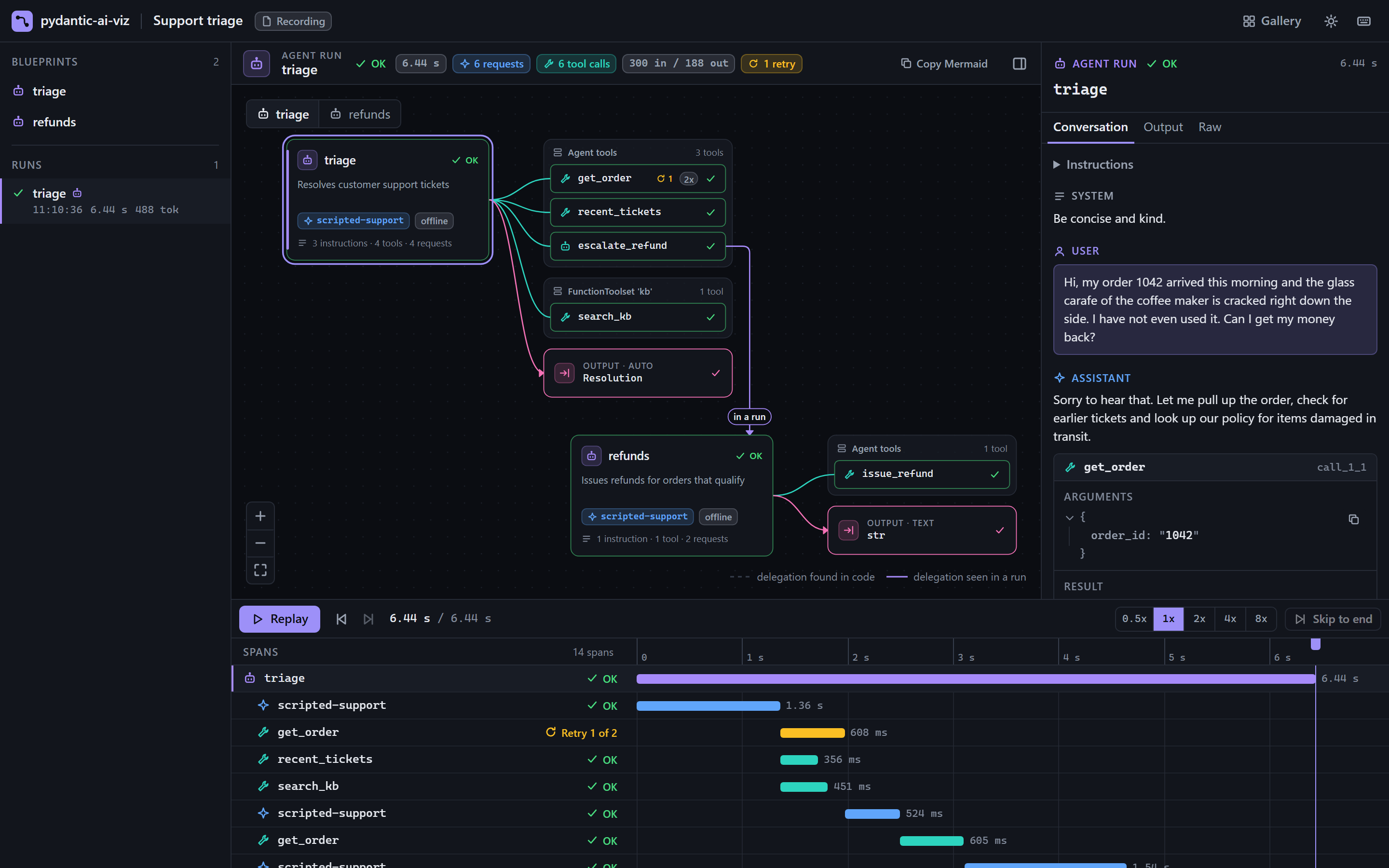
This opens a browser tab and plays a scripted support-triage agent: streamed tokens, three parallel tool calls, a retry, a delegation to a second agent and a structured result. The demo model is scripted, so it needs no API key and makes no network calls. pydantic-ai-viz demo --list shows the other demos.
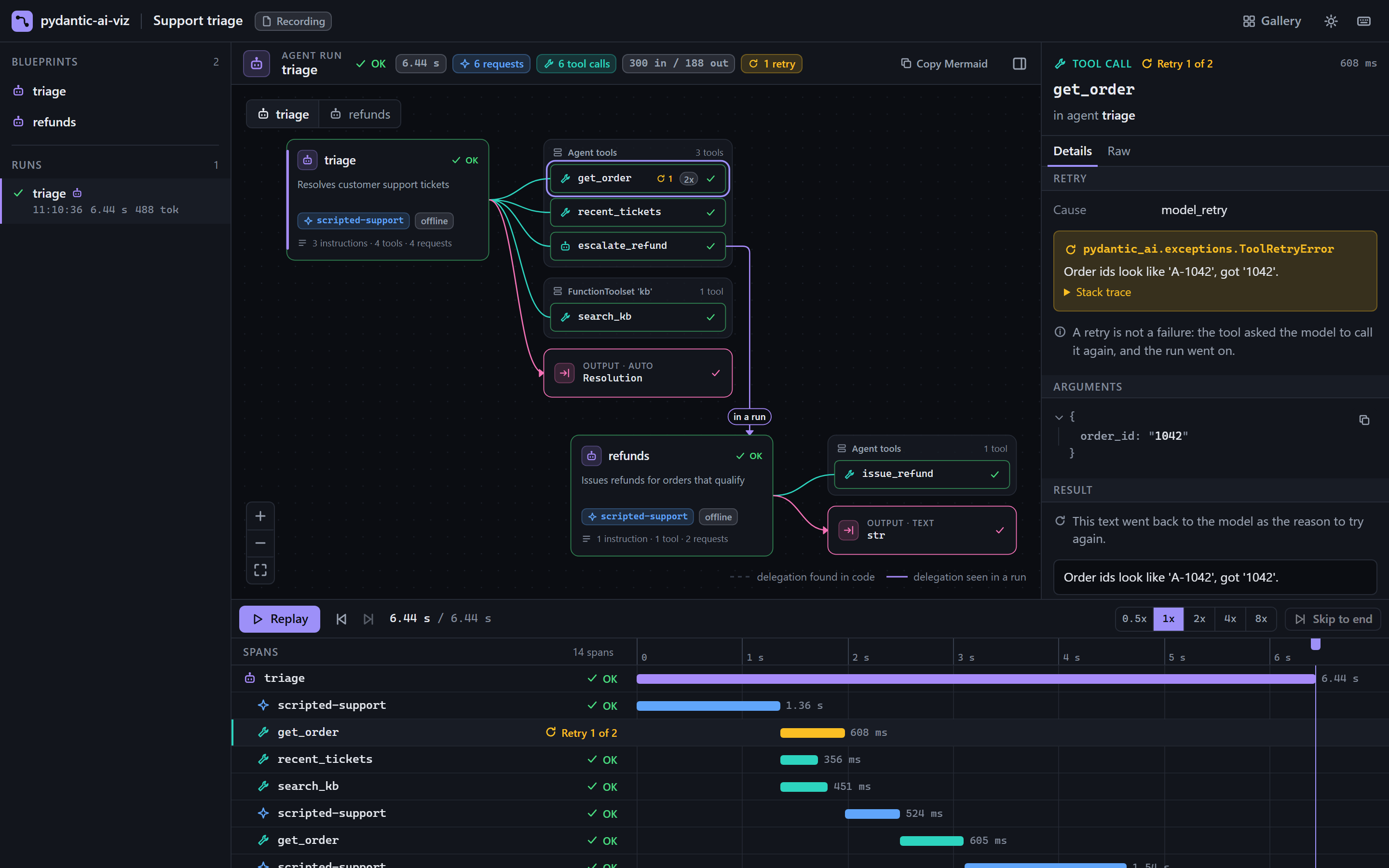
The screenshot links to the hosted demo, which replays real recordings in your browser.
See your own agents, with nothing executed.
cd path/to/your/project
uvx pydantic-ai-viz view .
This reads every .py file below the current directory and draws each agent and graph in it: model, instructions, tools with their parameter schemas, output type, and which agent hands work to which, each with the file and line it is defined at. The code is parsed, never imported or run, so its dependencies do not have to be installed and it is safe on code you have not reviewed. A file, a module name or a GitHub repository works too: uvx pydantic-ai-viz view gh:pydantic/pydantic-ai@v2.70.0/examples.
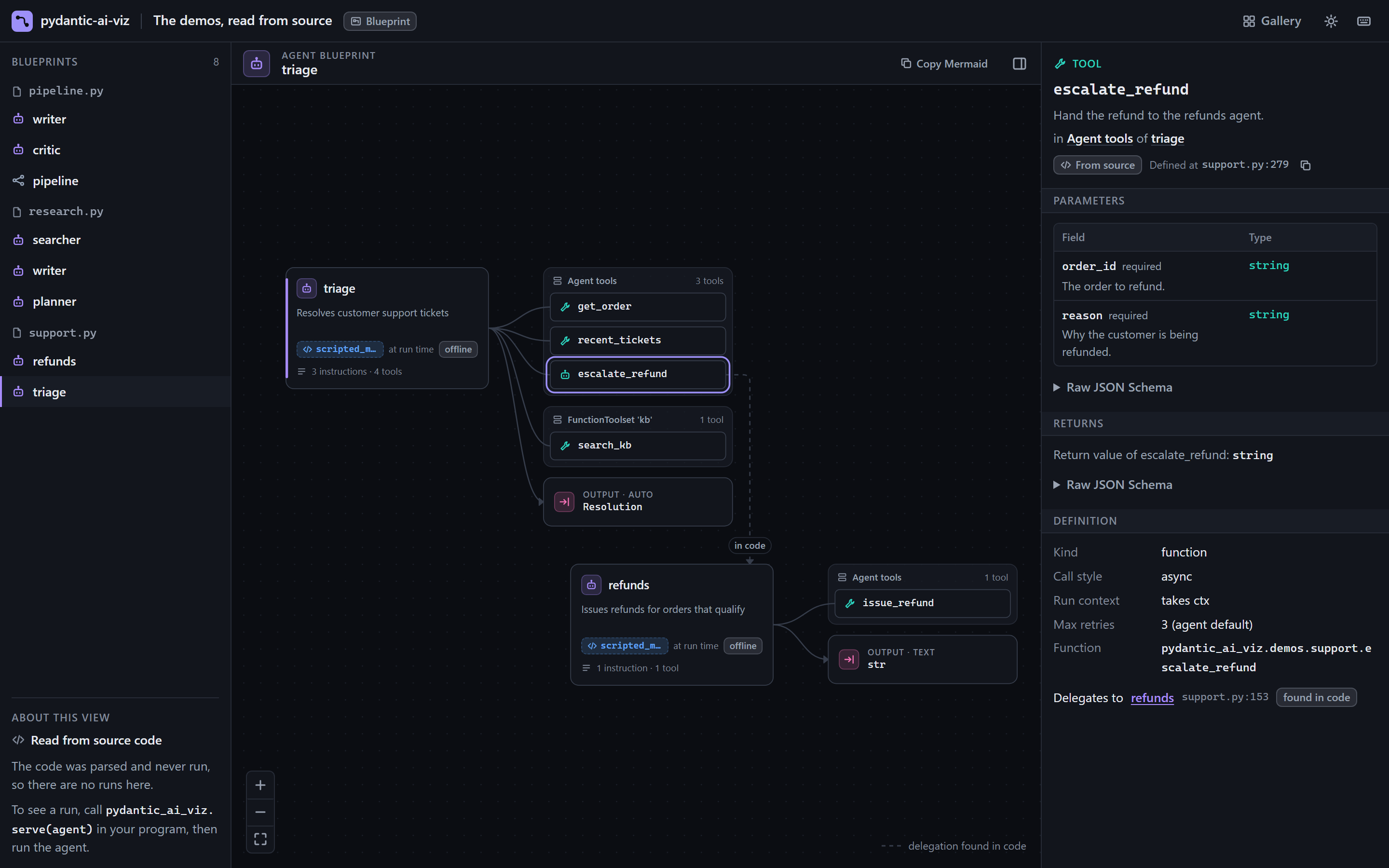
What can and cannot be read from source is in How view works, and Real-world examples shows it on twelve public projects.
Watch your agent run
pip install pydantic-ai-viz # or: uv add --dev pydantic-ai-viz
import pydantic_ai_viz as pviz
from my_app import agent

with pviz.serve(agent, open_browser=True) as session:
    agent.run_sync("Where is my order?")
    session.wait()  # keep the viewer up until Ctrl+C
serve captures every agent run in the process from then on. You do not change how you call the agent.
Or leave your code alone and run a script under the viewer:
pydantic-ai-viz run my_script.py
What you get
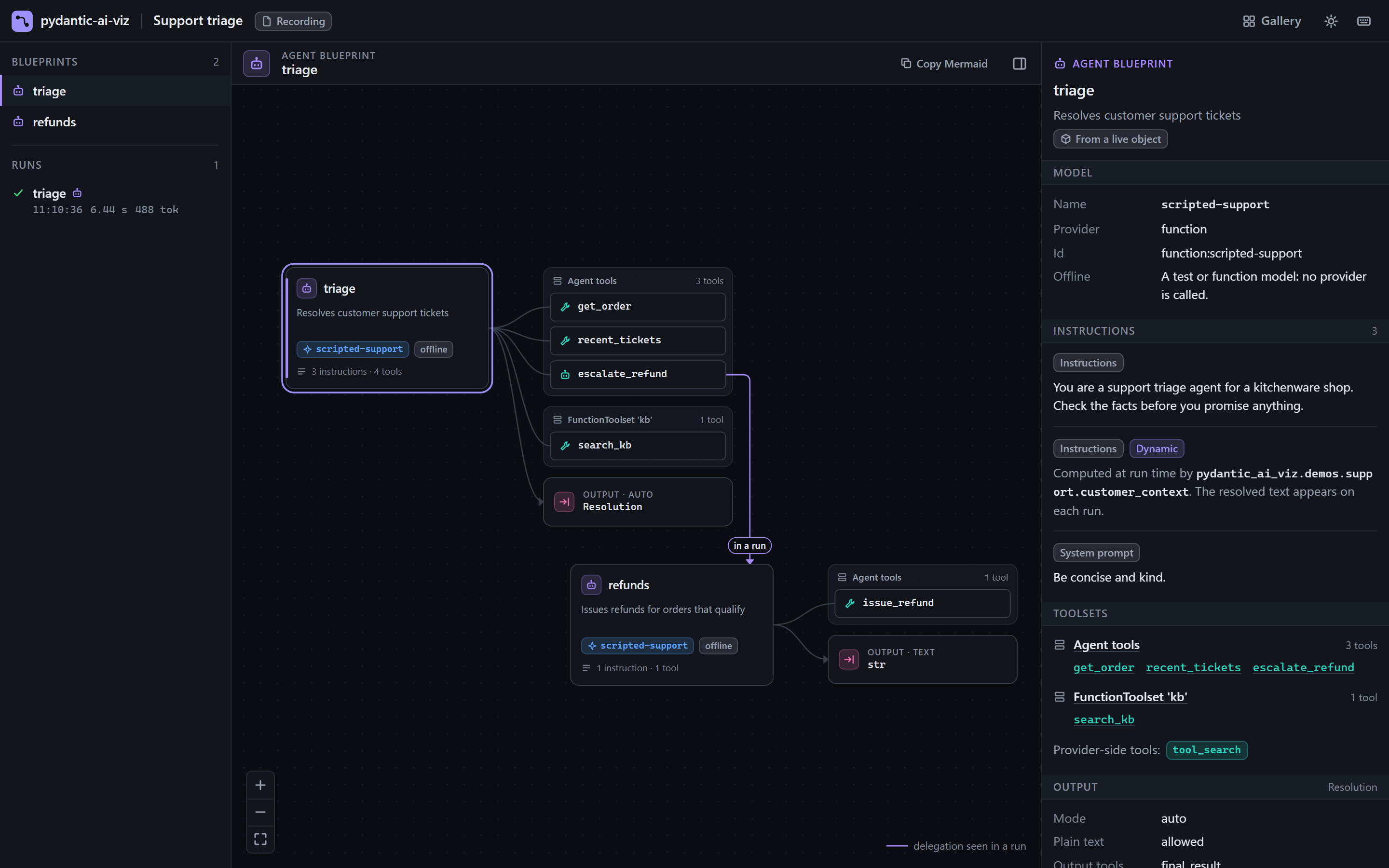
- Blueprint from source. The agent as a diagram: model, instructions, toolsets, tools with their JSON schemas, output type and delegation to other agents, across all the files of a project.
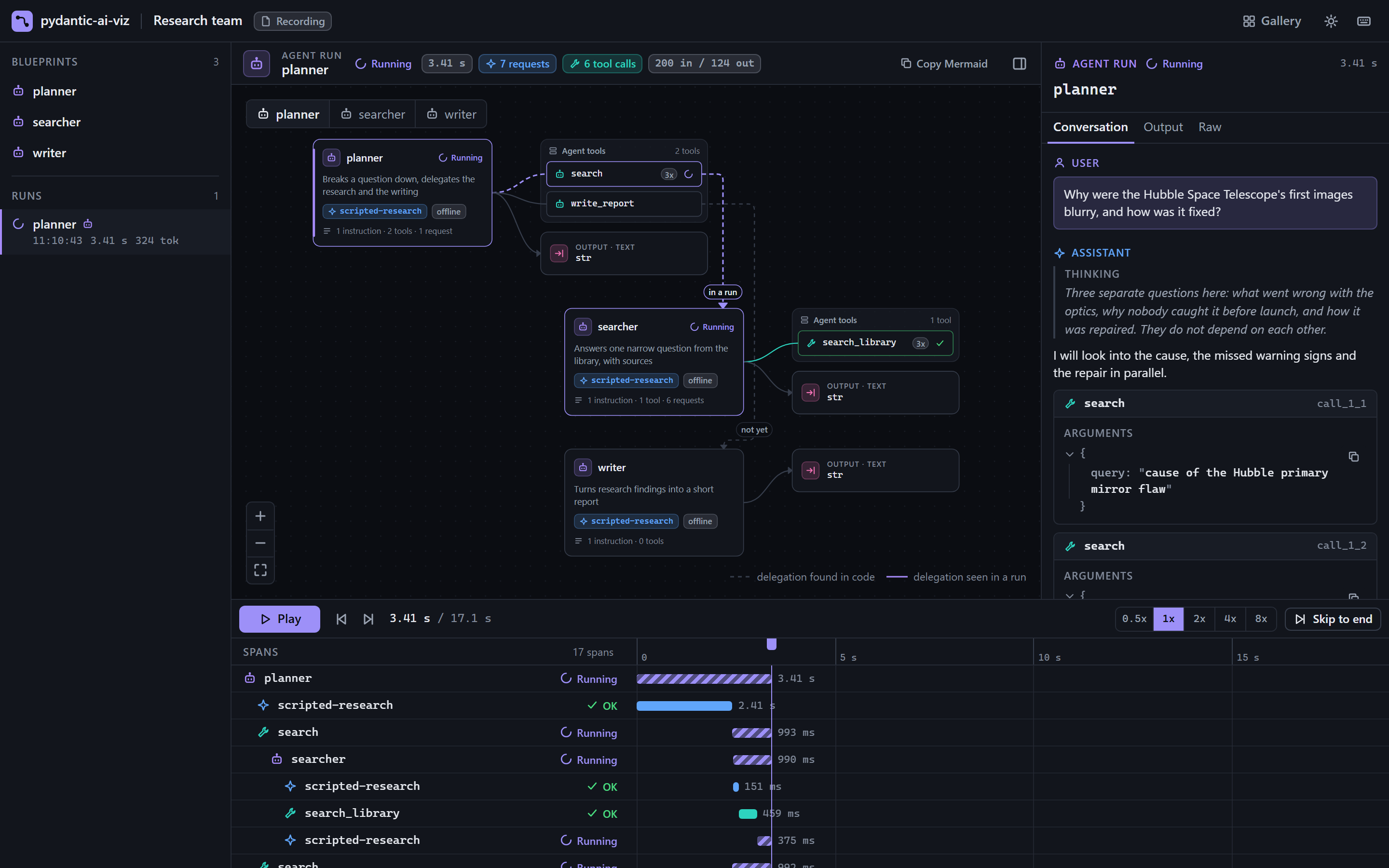
viewreads it from your source code, which is never executed; what only running the code could tell, such as a model read from an environment variable, is shown as the code that computes it. From Python, a blueprint can also be read from the agent object. - Live runs. Model requests, tool calls, retries and sub-agent runs light up on the blueprint and stack up in a span timeline as they happen.
- Inspector. Click any span to read the conversation, tool arguments and results, token usage and the raw span attributes.
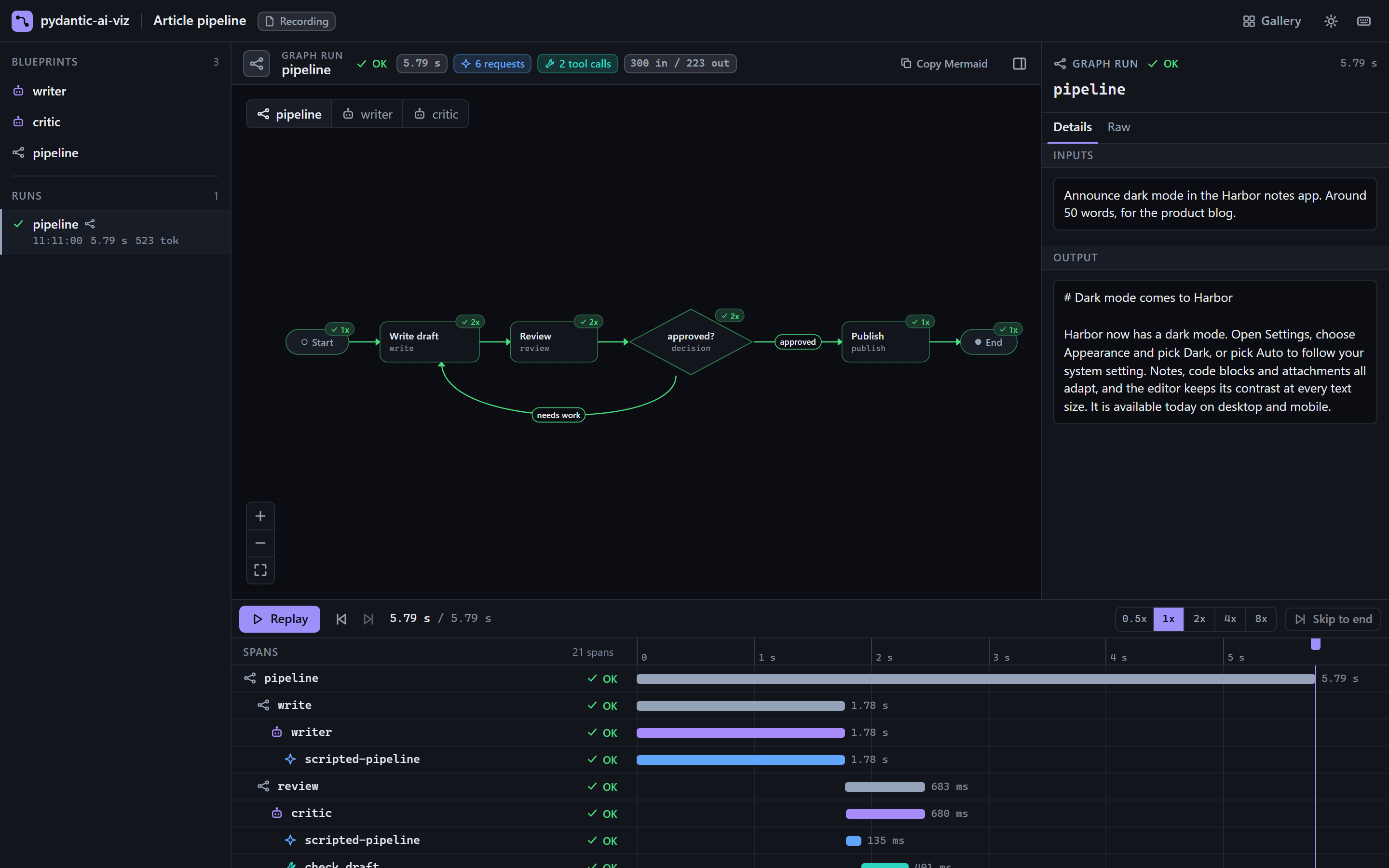
- Graphs.
pydantic-graphgraphs get the same treatment: nodes, decisions and edges, with the active node highlighted during a run. - Recordings and exports. Scrub back through any run. Save it as a
.pviz.jsonlrecording, or export one self-contained HTML file that opens offline.
 |
 |
 |
 |
How it works
view parses your files with Python's own ast module and follows names, imports and your own functions to the values they stand for; it never imports or executes the code. Values that only running the code could produce stay as source text. See How view works.
serve turns on Pydantic AI's own OpenTelemetry instrumentation and points it at a private tracer provider, so nothing is sent anywhere and no global OpenTelemetry state is set. A span processor in your process turns each span into an event in an append-only log. A small local server (standard library only, bound to 127.0.0.1) streams that log to a one-file viewer, and the same log is what a recording or an export contains.
Read more in the documentation: quickstart · guides · Python API · CLI
Limits and non-goals
viewshows only what the source spells out. A model or prompt that is computed when the code runs is shown as the expression that computes it, and an agent built by a library function is not found.view --importreads the live objects instead, which runs the code; use it only on code you trust.- Local development only. It captures runs in the process that calls
serveorrecord, and keeps them in memory. For production tracing, use Pydantic Logfire. The two work together; see the Logfire guide. - Not a chat playground. Pydantic AI already has
agent.to_web()for that. - Recordings and exports contain your prompts, tool arguments and tool results. Read Privacy before you share one.
- Token streaming is opt-in (
stream=True). It switches model requests to streaming, which fails on a model that cannot stream. - MCP toolsets are shown as one opaque node. Their tools appear once a run has used them.
- No cost estimates, run diffing or search in this version.
Compatibility
| Supported | |
|---|---|
| Python | 3.11, 3.12, 3.13, 3.14 |
| Pydantic AI | pydantic-ai-slim>=2.60,<3 |
| OpenTelemetry SDK | opentelemetry-sdk>=1.30 |
| OS | Linux, macOS and Windows (all tested in CI) |
A few blueprint fields are read from private Pydantic AI attributes. If a Pydantic AI release changes them, those fields degrade to a warning in the viewer and the rest keeps working. The compatibility page lists them and says exactly which versions were tested.
Contributing
Bug reports and pull requests are welcome. CONTRIBUTING.md covers the development setup and the checks to run. Report security issues privately as described in SECURITY.md.
Acknowledgements
The canvas is drawn with React Flow and laid out with dagre. The viewer is also built on React, Radix UI, Zustand and Tailwind CSS. The licence of every library bundled into the viewer is at the top of the viewer's HTML file, and of every export made from it.
License
MIT.
pydantic-ai-viz is an unofficial community project. It is not affiliated with, sponsored by or endorsed by Pydantic. "Pydantic", "Pydantic AI" and "Logfire" are names of their respective owners.
1 maintainer

Metadata
1 maintainer
Release files for pydantic-ai-viz 0.1.0
For a detailed explanation of source distributions (sdists) and built distributions (wheels), please see the package formats documentation.
Source distribution (sdist)
| File | Size | Uploaded | Provenance | Actions |
|---|---|---|---|---|
| pydantic_ai_viz-0.1.0.tar.gz | 601.1 kB | With provenance | Details for pydantic_ai_viz-0.1.0.tar.gz |
Built distribution (wheel)
| File | Interpreter | ABI | Platform | Actions Reset |
|---|---|---|---|---|
| pydantic_ai_viz-0.1.0-py3-none-any.whl | Python 3 | none | any | Details for pydantic_ai_viz-0.1.0-py3-none-any.whl |
Total release size: 1.0 MB
Release files / pydantic_ai_viz-0.1.0.tar.gz
| Download URL | pydantic_ai_viz-0.1.0.tar.gz |
|---|---|
| Size | 601.1 kB |
| Tags | Source |
|
SHA-256 checksum How to use checksums |
8cce0bd569fc46bd4f45d5f45b0489cbe4cd31fb7393e7ef0a13b7a77e7ab90f
|
|
BLAKE2b-256 checksum How to use checksums |
5336bcbad8322289f2b49dba3bc3ade265d1dc13c52851ac3ee0c14f109cd2cf
|
| Upload date | |
|
Uploaded using Trusted Publishing? What is trusted publishing? |
Yes |
| Uploaded via |
twine/7.0.0 CPython/3.13.16
|
Provenance
Provenance describes where a file came from. On PyPI, provenance is shared via attestations, which provide a verifiable record of the build or publishing details. View details, limitations and caveats.


PyPI Publish Attestation
PyPI verified that this artifact, at this checksum, originated from the publisher listed below.
Signed by GitHub Actions, verified by PyPI on Nov 19, 2026.
Transparency logRelease files / pydantic_ai_viz-0.1.0-py3-none-any.whl
| Download URL | pydantic_ai_viz-0.1.0-py3-none-any.whl |
|---|---|
| Size | 409.8 kB |
| Tags | Python 3 |
|
SHA-256 checksum How to use checksums |
a101f43745faa25cbf624c77bcd41cb45ca8128f517370e4bcc2aa66e1eafc85
|
|
BLAKE2b-256 checksum How to use checksums |
2ae54fa58b9a8ea393f5edab6e6b041c1a595ba053063e9bad296647cfddc089
|
| Upload date | |
|
Uploaded using Trusted Publishing? What is trusted publishing? |
Yes |
| Uploaded via |
twine/7.0.0 CPython/3.13.16
|
Provenance
Provenance describes where a file came from. On PyPI, provenance is shared via attestations, which provide a verifiable record of the build or publishing details. View details, limitations and caveats.
PyPI Publish Attestation
PyPI verified that this artifact, at this checksum, originated from the publisher listed below.
Signed by GitHub Actions, verified by PyPI on Nov 19, 2026.
Transparency logSecurity for pydantic-ai-viz 0.1.0
Provenance
Provenance describes where a file came from. On PyPI, provenance is shared via attestations, which provide a verifiable record of the build or publishing details. View details, limitations and caveats.
Full provenance
Both files in this release have been uploaded with provenance metadata.
Attestation for pydantic_ai_viz-0.1.0.tar.gz
PyPI Publish Attestation
PyPI verified that this artifact, at this checksum, originated from the publisher listed below.
Signed by GitHub Actions, verified by PyPI on Nov 19, 2026.
Transparency logA note on package security
PyPI is a repository for distributing packages, not a service for auditing them. While third-party security researchers and our staff do their best to detect and remove malicious packages, PyPI cannot guarantee the quality, security or suitability of any given package.
To learn more about protecting yourself from malicious actors, visit our package security documentation.













