
Convert Pydantic models to Mermaid class diagrams for easy visualization

Project description
Pydantic Visualizer



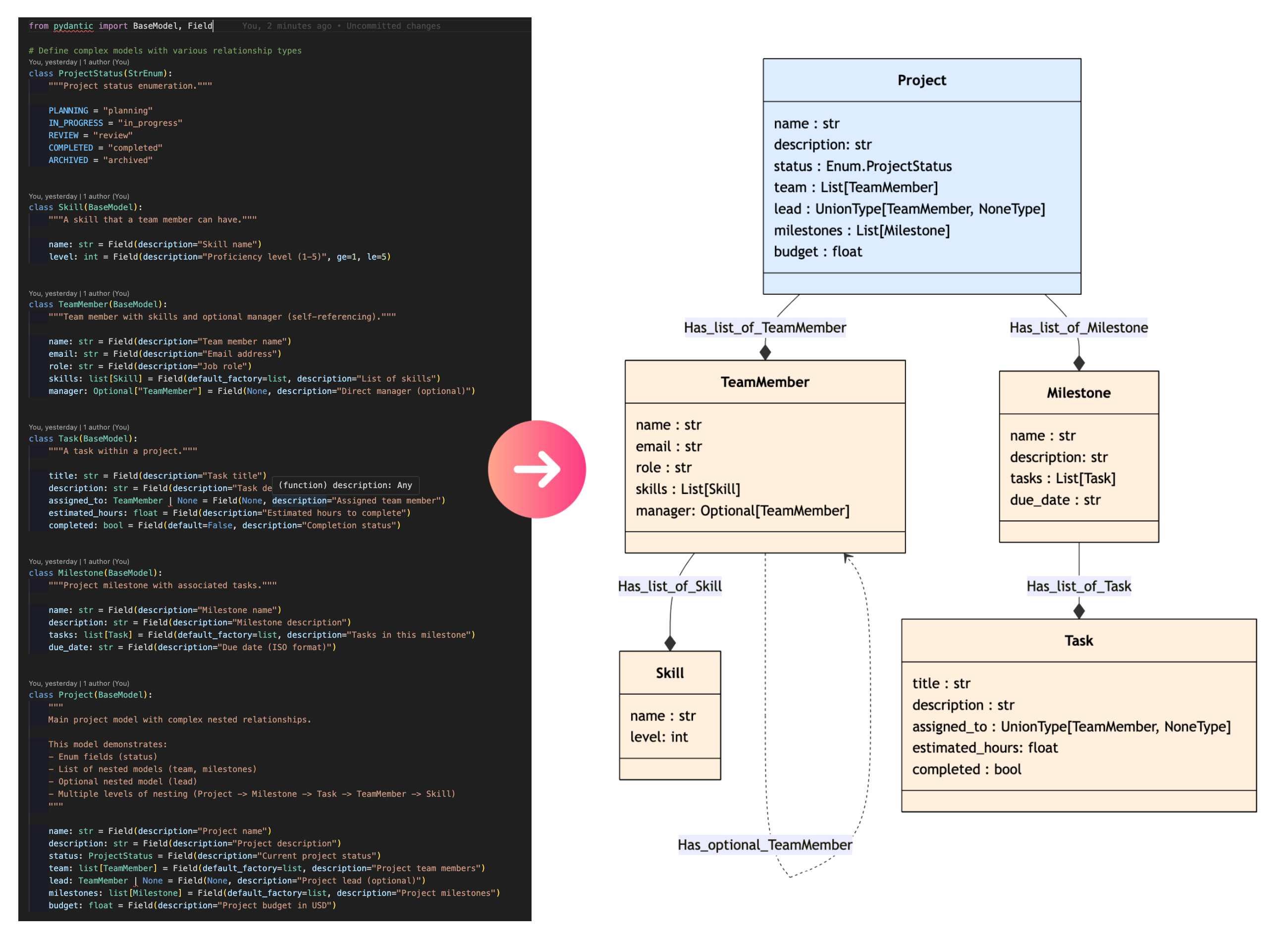
Convert your Pydantic models into beautiful Mermaid class diagrams with ease! 🎨
Pydantic Visualizer automatically generates visual representations of your Pydantic data models, making it easier to understand complex data structures, document your APIs, and communicate your data architecture.
🚀 Turn your pydantic model in mermaid diagram
✨ Features
- 🔄 Automatic Conversion: Transform Pydantic models to Mermaid diagrams instantly
- 🎯 Relationship Detection: Automatically identifies and visualizes model relationships
- 📊 Enum Support: Special handling and visualization for Enum types
- 🎨 Customizable Colors: Configure colors for different element types
- 📝 Multiple Export Formats: Save as Markdown or HTML
- 🌐 Browser Preview: Open diagrams directly in your browser
- 🔗 Nested Models: Handles complex nested model structures
- ⚡ Type-Safe: Fully typed with comprehensive type hints
📦 Installation
Using pip
pip install pydantic-visualizer
Using uv (recommended)
uv pip install pydantic-visualizer
uv add pydantic-visualizer
Exemple :
from pydantic_visualizer import PydanticVisualizer

# Define models
class Priority(str, Enum):
    """Task priority levels."""
    LOW = "low"
    MEDIUM = "medium"
    HIGH = "high"
    URGENT = "urgent"


class Comment(BaseModel):
    """Comment on a task."""
    author: str = Field(description="Comment author")
    text: str = Field(description="Comment text")
    timestamp: str = Field(description="When the comment was made")


class Task(BaseModel):
    """Task model with priority and comments."""
    title: str = Field(description="Task title")
    description: str = Field(description="Detailed task description")
    priority: Priority = Field(description="Task priority level")
    completed: bool = Field(default=False, description="Whether task is completed")
    comments: List[Comment] = Field(default_factory=list, description="Task comments")


# Create a visualizer instance
visualizer = PydanticVisualizer()

# Set the data model to visualize
visualizer.set_datamodel(Task)

# Add the second model (Nothing change here as Task is already set)
visualizer.add_model(Task)

# Print the Mermaid diagram code
print(visualizer.mermaid)

# Print the markdown enum table
print(visualizer.enum_markdown_tables)

# Returns a markdown description with tables for each class and subclass.
print(visualizer.description)

# Open the diagram in your browser
visualizer.show()

# Saving complete markdown (diagram + enums + descriptions)
visualizer.save_markdown(
    output_folder="./examples/output",
    include_diagram=True,
    include_enums=True,
    include_description=True,
)

# Saving complete HTML (diagram + enums + descriptions)
visualizer.save_html(
    output_folder="./examples/output",
    include_diagram=True,
    include_enums=True,
    include_description=True,
)
📚 More Examples: Visit the examples folder for 8+ complete, runnable examples covering:
- Basic usage and nested models
- Enum handling and custom colors
- Complex relationships and self-referencing models
- Saving to Markdown/HTML and browser preview
- Adding multiple models to one diagram
See the Examples README for detailed descriptions and usage instructions.
🎨 Diagram Features
Relationship Types
- Solid arrows (
-->) for required relationships - Dashed arrows (
..>) for optional relationships - Star notation (
*) for list/collection relationships
Visual Indicators
- Different colors for objects, lists, and enums
- Dashed borders for optional nested models
- Aligned field names for better readability
Development Setup
# Clone the repository
git clone https://github.com/Maxlo24/pydantic-visualizer.git
cd pydantic-visualizer

# Install dependencies with uv
uv pip install -e ".[dev]"

# Run tests
pytest

# Run linting
ruff check .

# Run type checking
mypy pydantic_visualizer
📝 License
This project is licensed under the MIT License - see the LICENSE file for details.
🙏 Acknowledgments
- Built with Pydantic - Data validation using Python type hints
- Diagrams rendered with Mermaid - Generation of diagrams from text
📮 Contact & Support
- Repo: GitHub Repo
- Issues: GitHub Issues
- Discussions: GitHub Discussions
🗺️ Roadmap
- Support for Pydantic v1 models
- CLI tool for quick visualization
- Integration with FastAPI for automatic API documentation
- Export to additional formats (PNG, SVG, PDF)
Made with ❤️ by Maxime Gillot


Download files
Download the file for your platform. If you're not sure which to choose, learn more about installing packages.
Source Distribution
Built Distribution
Filter files by name, interpreter, ABI, and platform.
If you're not sure about the file name format, learn more about wheel file names.
Copy a direct link to the current filters
File details
Details for the file pydantic_visualizer-0.5.0.tar.gz.
File metadata
- Download URL: pydantic_visualizer-0.5.0.tar.gz
- Upload date:
- Size: 230.8 kB
- Tags: Source
- Uploaded using Trusted Publishing? No
- Uploaded via: uv/0.8.22
File hashes
| Algorithm | Hash digest | |
|---|---|---|
| SHA256 |
6e26565be702b4c98ac5e15917026709e19d448b80b8c866093cfc91d6ff0770
|
|
| MD5 |
5ccc935c150e09305a6be247ec69a2a1
|
|
| BLAKE2b-256 |
a3d08d8cb4edd6b128d6e196eb01755c6ee4f3741e3f5845624374c16fe21875
|
File details
Details for the file pydantic_visualizer-0.5.0-py3-none-any.whl.
File metadata
- Download URL: pydantic_visualizer-0.5.0-py3-none-any.whl
- Upload date:
- Size: 11.5 kB
- Tags: Python 3
- Uploaded using Trusted Publishing? No
- Uploaded via: uv/0.8.22
File hashes
| Algorithm | Hash digest | |
|---|---|---|
| SHA256 |
ca4db869c28d98fef56ab39621342f9f0e6ea55048c9fba0469213c36802c017
|
|
| MD5 |
cf3eb5edf20dabbcffc55ef4b3e21404
|
|
| BLAKE2b-256 |
c5a9020a2248df20cf8257bc69820fa77390775808194c5eab583443987f02b3
|






