

pyDARTLAB
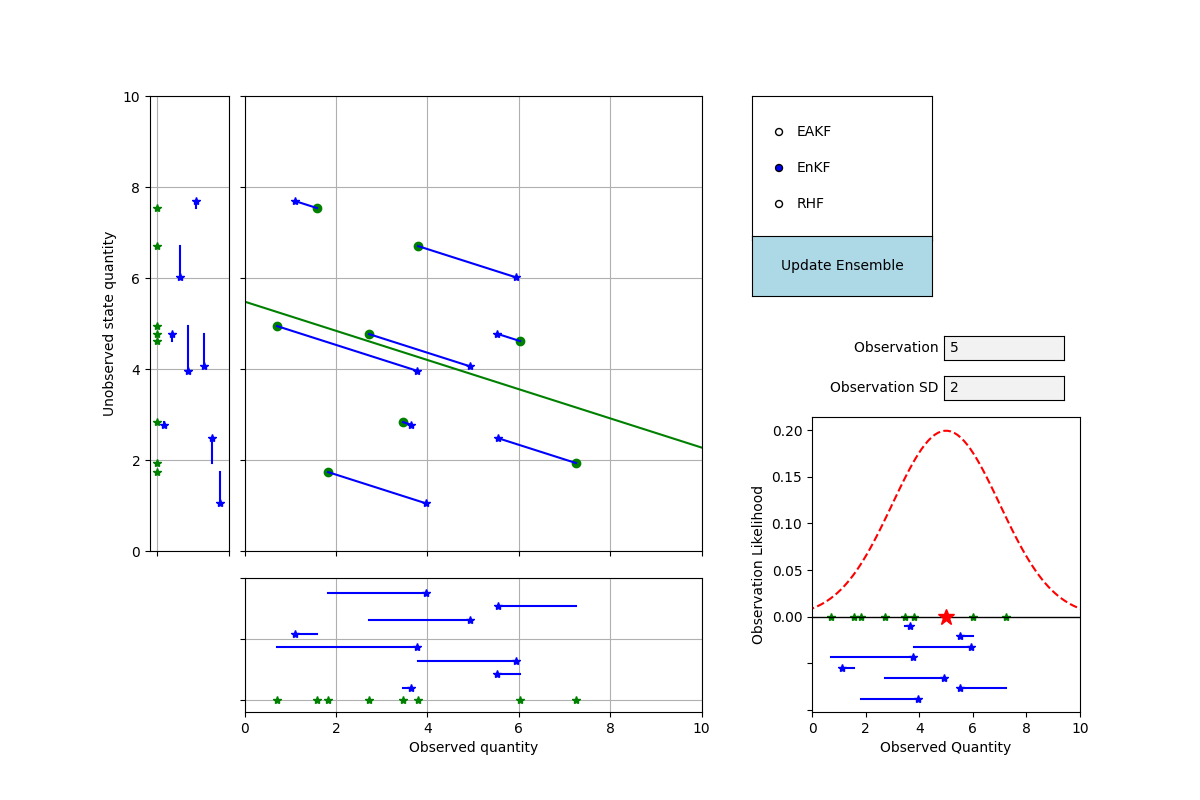
pyDARTLAB is a Python version of DART_LAB, the interactive ensemble data assimilation tutorial distributed with NCAR's DART (Data Assimilation Research Testbed). The DART_LAB MATLAB tools and slide decks become a Python package plus a set of Jupyter notebooks, so the whole tutorial can be done in a notebook.
Documentation is online at https://ncar.github.io/pyDARTLAB
You can try the notebooks online with Binder: pyDARTLABbinder
Disclaimer: This is a project to explore using Claude - the AI tool.
Installation
pip install -e ".[tutorial]"
The tutorial
jupyter lab notebooks/
Start with 00_getting_started.ipynb. The six numbered notebooks replace the
six DART_LAB slide sections:
- Ensemble data assimilation concepts in 1D
- Multivariate assimilation
- Inflation and localization
- Non-Gaussian and bounded filters (QCEFF)
- Adaptive inflation
- Using the real DART system
The package
Three layers, mirroring the design of the MATLAB DART_LAB:
pydartlab— GUI-free algorithms ported fromDART/guide/DART_LAB/matlab/private: EAKF/EnKF/RHF observation increments, gamma and bounded-RHF filters, the QCEFF/probit (PPI) transforms, fixed and adaptive inflation (Gaussian and inverse-gamma), Gaspari-Cohn localization, increment regression, and the Lorenz 63/96 models.pydartlab.experiments— scriptable cycling DA experiments (OneDExperiment,KalmanCycle,Lorenz63Experiment,Lorenz96Experiment).pydartlab.apps— the interactive tools, one per MATLAB app (gaussian_product,oned_ensemble,oned_cycle,oned_model,oned_model_inf,twod_ensemble,twod_ppi_ensemble,bounded_oned_ensemble,run_lorenz_63,run_lorenz_96,run_lorenz_96_inf). Use%matplotlib widgetin the notebook; every click-driven app also has aset_ensemble()method for environments without mouse support.
Colors follow the DART_LAB convention (green = prior, red = observation,
blue = posterior) and are settable — pydartlab.style.use_colorblind_palette()
switches to an Okabe-Ito palette.
Development
pip install -e ".[dev]"
python -m pytest
ruff check src tests
Notebook outputs are kept out of version control with nbstripout. After cloning, enable the filter once:
pip install nbstripout
nbstripout --install --attributes .gitattributes
git config filter.nbstripout.extrakeys metadata.language_info
Running the tutorial notebooks then never shows up as a change in git.
The test suite includes golden-file comparisons against the MATLAB
DART_LAB private functions. To (re)generate the reference data, run
tests/matlab_reference/generate_reference.m in MATLAB once; the resulting
CSVs are read by tests/test_matlab_golden.py (tests skip when the CSVs
are absent).
Contributing
Contributions are welcome! If you have a feature request, bug report, or a suggestion, please open an issue on our GitHub repository.
License
pyDARTLAB is released under the Apache License 2.0. For more details, see the LICENSE file in the root directory of this source tree or visit Apache License 2.0.
1 maintainer

Metadata
1 maintainer
Release files for pydartlab 0.1.0
For a detailed explanation of source distributions (sdists) and built distributions (wheels), please see the package formats documentation.
Source distribution (sdist)
| File | Size | Uploaded | Provenance | Actions |
|---|---|---|---|---|
| pydartlab-0.1.0.tar.gz | 415.3 kB | Without provenance | Details for pydartlab-0.1.0.tar.gz |
Built distribution (wheel)
| File | Interpreter | ABI | Platform | Actions Reset |
|---|---|---|---|---|
| pydartlab-0.1.0-py3-none-any.whl | Python 3 | none | any | Details for pydartlab-0.1.0-py3-none-any.whl |
Total release size: 480.5 kB
Release files / pydartlab-0.1.0.tar.gz
| Download URL | pydartlab-0.1.0.tar.gz |
|---|---|
| Size | 415.3 kB |
| Tags | Source |
|
SHA-256 checksum How to use checksums |
5e5326002e33b418a92d2612fc7d7ad599846a6426f6ec039a5afc36c30ce0ba
|
|
BLAKE2b-256 checksum How to use checksums |
ffc11da27838cc2b67718860ce68d4807c221d65f4b429a393cbd4b04b48ebb6
|
| Upload date | |
|
Uploaded using Trusted Publishing? What is trusted publishing? |
No |
| Uploaded via |
twine/6.2.0 CPython/3.14.2
|
Release files / pydartlab-0.1.0-py3-none-any.whl
| Download URL | pydartlab-0.1.0-py3-none-any.whl |
|---|---|
| Size | 65.2 kB |
| Tags | Python 3 |
|
SHA-256 checksum How to use checksums |
4e9c6a870bd824f6587b3242b19c8d02f80c92e8a5f90d1d461defd878ca9c58
|
|
BLAKE2b-256 checksum How to use checksums |
fd38323487970b2bdc8041a7a357b602a41e52ef16cf17b5b569680abd74432b
|
| Upload date | |
|
Uploaded using Trusted Publishing? What is trusted publishing? |
No |
| Uploaded via |
twine/6.2.0 CPython/3.14.2
|
Security for pydartlab 0.1.0
Provenance
Provenance describes where a file came from. On PyPI, provenance is shared via attestations, which provide a verifiable record of the build or publishing details. View details, limitations and caveats.
No provenance found
None of the files in this release were uploaded with provenance metadata.
A note on package security
PyPI is a repository for distributing packages, not a service for auditing them. While third-party security researchers and our staff do their best to detect and remove malicious packages, PyPI cannot guarantee the quality, security or suitability of any given package.
To learn more about protecting yourself from malicious actors, visit our package security documentation.














