
Overview



Datasets come in all shapes and sizes, and are often messy:
Observations come in different formats
There are missing values
Labels are missing and/or aren’t consistent
Datasets need to be wrangled 🐄 🐑 🚜
The main goal of data-wrangler is to turn messy data into clean(er) data, defined as either a DataFrame or a list of DataFrame objects. The package provides code for easily wrangling data from a variety of formats into DataFrame objects, manipulating DataFrame objects in useful ways (that can be tricky to implement, but that apply to many analysis scenarios), and decorating Python functions to make them more flexible and/or easier to write.
🚀 New: data-wrangler now supports high-performance Polars DataFrames alongside pandas, delivering 2-100x speedups for large datasets with zero code changes. Simply add backend='polars' to any operation!
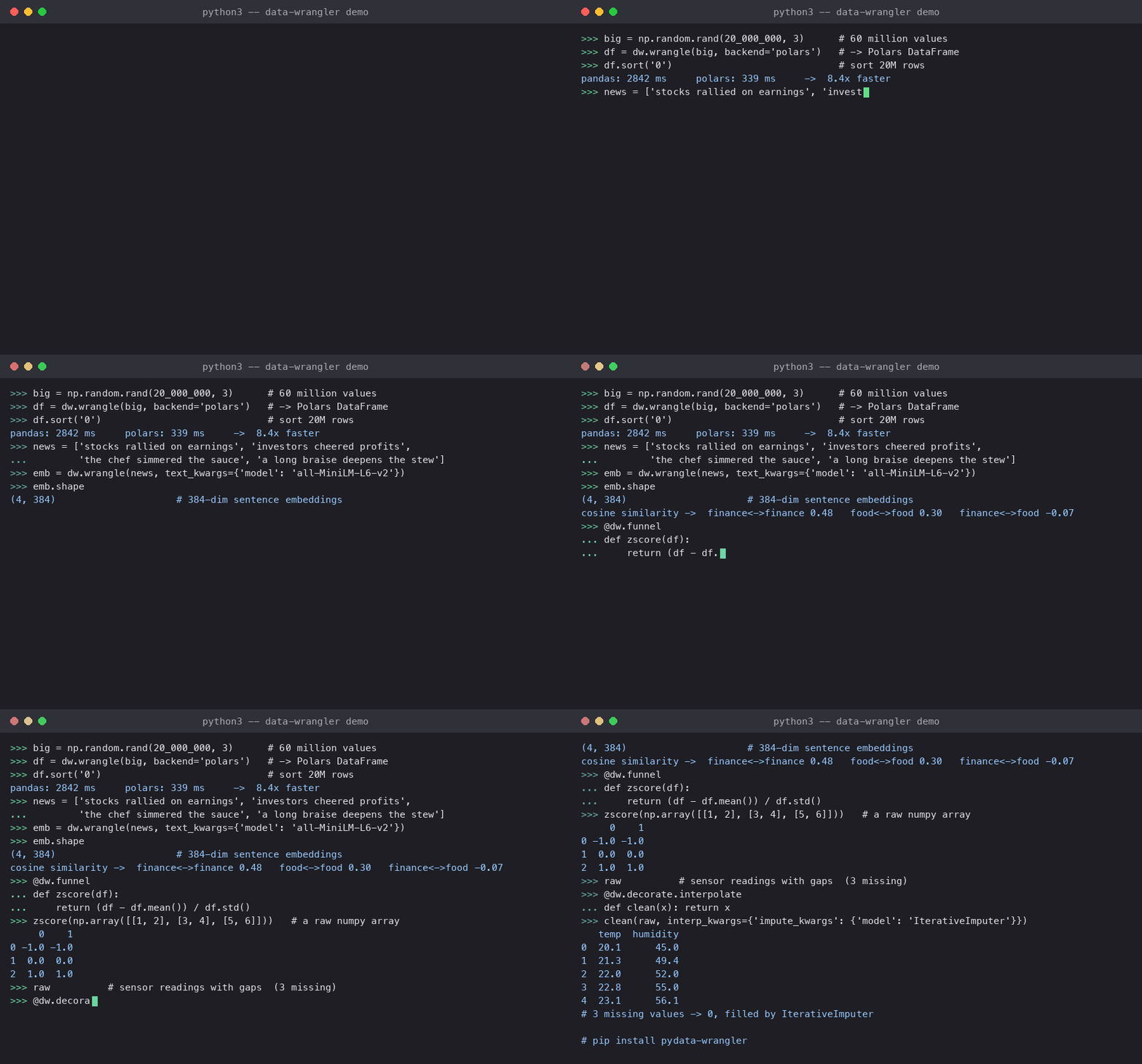
The data-wrangler package supports a variety of datatypes. There is a special emphasis on text data, whereby data-wrangler provides a simple API for interacting with natural language processing tools and datasets provided by scikit-learn and hugging-face (via sentence-transformers). The package is designed to provide sensible defaults, but also implements convenient ways of deeply customizing how different datatypes are wrangled.
For more information, including a formal API and tutorials, check out https://data-wrangler.readthedocs.io
Quick start
Install datawrangler using:
$ pip install pydata-wranglerSome quick natural language processing examples:
import datawrangler as dw

# load in sample text
text_url = 'https://raw.githubusercontent.com/ContextLab/data-wrangler/main/tests/resources/home_on_the_range.txt'
text = dw.io.load(text_url)

# embed text using scikit-learn's implementation of Latent Dirichlet Allocation, trained on a curated subset of
# Wikipedia, called the 'minipedia' corpus.  Return the fitted model so that it can be applied to new text.
# NEW: Simplified API - just pass model names as strings or lists!
lda_embeddings, lda_fit = dw.wrangle(text, text_kwargs={'model': ['CountVectorizer', 'LatentDirichletAllocation'], 'corpus': 'minipedia'}, return_model=True)

# apply the minipedia-trained LDA model to new text
new_text = 'how much wood could a wood chuck chuck if a wood chuck could check wood?'
new_embeddings = dw.wrangle(new_text, text_kwargs={'model': lda_fit})

# embed text using sentence-transformers pre-trained model
# NEW: Simplified API - just pass the model name as a string!
sentence_embeddings = dw.wrangle(text, text_kwargs={'model': 'all-mpnet-base-v2'})
High-performance Polars backend examples:
import numpy as np

# Array processing with dramatic speedups
large_array = np.random.rand(50000, 20)

# Traditional pandas backend
pandas_df = dw.wrangle(large_array, backend='pandas')

# High-performance Polars backend (2-100x faster!)
polars_df = dw.wrangle(large_array, backend='polars')

# Set global backend preference
from datawrangler.core.configurator import set_dataframe_backend
set_dataframe_backend('polars')  # All operations now use Polars

# Text processing also benefits from Polars
fast_text_embeddings = dw.wrangle(text, backend='polars')
The data-wrangler package also provides powerful decorators that can modify existing functions to support new datatypes. Just write your function as though its inputs are guaranteed to be Pandas DataFrames, and decorate it with datawrangler.decorate.funnel to enable support for other datatypes without any new code:
image_url = 'https://raw.githubusercontent.com/ContextLab/data-wrangler/main/tests/resources/wrangler.jpg'
image = dw.io.load(image_url)

# define your function and decorate it with "funnel"
@dw.decorate.funnel
def binarize(x):
  return x > np.mean(x.values)

binarized_image = binarize(image)  # rgb channels will be horizontally concatenated to create a 2D DataFrame
Supported data formats
One package can’t accommodate every foreseeable format or input source, but data-wrangler provides a framework for adding support for new datatypes in a straightforward way. Essentially, adding support for a new data type entails writing two functions:
An is_<datatype> function, which should return True if an object is compatible with the given datatype (or format), and False otherwise
A wrangle_<datatype> function, which should take in an object of the given type or format and return a pandas or Polars DataFrame with numerical entries
Currently supported datatypes are limited to:
array-like objects (including images)
DataFrame-like or Series-like objects (pandas and Polars)
text data (text is embedded using natural language processing models)
or lists of mixtures of the above.
Backend Support: All operations support both pandas (default) and Polars (high-performance) backends. Choose the backend that best fits your performance requirements and workflow preferences.
Missing observations (e.g., nans, empty strings, etc.) may be filled in using imputation and/or interpolation.
1 maintainer

Metadata
1 maintainer
Release files for pydata-wrangler 0.5.1
For a detailed explanation of source distributions (sdists) and built distributions (wheels), please see the package formats documentation.
Source distribution (sdist)
| File | Size | Uploaded | |
|---|---|---|---|
| pydata_wrangler-0.5.1.tar.gz | 2.6 MB | Details |
Built distribution (wheel)
| File | Interpreter | ABI | Platform | Reset |
|---|---|---|---|---|
| pydata_wrangler-0.5.1-py2.py3-none-any.whl | Python 2, Python 3 | none | any | Details |
Total release size: 2.7 MB
Release files / pydata_wrangler-0.5.1.tar.gz
| Download URL | pydata_wrangler-0.5.1.tar.gz |
|---|---|
| Size | 2.6 MB |
| Tags | Source |
|
SHA-256 checksum How to use checksums |
e716b4f2f8d794d082741e77287a0dc242f9ad87305ede1b40e4f4a001495147
|
|
BLAKE2b-256 checksum How to use checksums |
915190f13a9a5b073c738c81b23c43bc5dfa90eb8cb7f9dfc7a0a47af3cf38ef
|
| Upload date | |
|
Uploaded using Trusted Publishing? What is trusted publishing? |
No |
| Uploaded via |
twine/6.2.0 CPython/3.10.12
|
Release files / pydata_wrangler-0.5.1-py2.py3-none-any.whl
| Download URL | pydata_wrangler-0.5.1-py2.py3-none-any.whl |
|---|---|
| Size | 41.2 kB |
| Tags | Python 2 Python 3 |
|
SHA-256 checksum How to use checksums |
ba037b9763d659ce423842f40b2584ee68b3d858df2b2b78b5522d24124e3e6a
|
|
BLAKE2b-256 checksum How to use checksums |
8b3ebf082489cf4f5b46c08f45d8f4c90a4c005176b01c265bb504811bb31853
|
| Upload date | |
|
Uploaded using Trusted Publishing? What is trusted publishing? |
No |
| Uploaded via |
twine/6.2.0 CPython/3.10.12
|














