
A comprehensive data quality analysis library for pandas DataFrames

Project description
PyDataQuality
The Enterprise-Grade Data Quality Engine for Python.
PyDataQuality automates the tedious 80% of data science: validating, profiling, and cleaning new datasets. It transforms raw pandas DataFrames into publication-ready quality reports with a single line of code. Designed for high-velocity data teams, it features batch processing for big data, custom rule validation, and AI-powered remediation suggestions.
Features
Core Capabilities
- Data Quality Analysis: Detect missing values, outliers, inconsistencies, and data type issues
- Data Extraction: Pinpoint and extract problematic rows (e.g., specific outliers) for remediation via
get_problematic_rows() - Multi-Format Support: Native support for CSV, Excel (.xlsx, .xls), JSON, and Parquet files
- CLI Interface: Auto-detects file formats from the terminal - no coding required
- Interactive Notebook Display: Direct rendering in Jupyter/Colab with
show_report() - Batch Sampling: Process large datasets (GBs) efficiently with chunk-based sampling
- Custom YAML Rules: Enterprise-grade validation with configuration files
- AI Remediation Prompts: Auto-generated Python scripts for fixing detected issues
- Comprehensive Visualizations: Publication-quality plots for data quality assessment
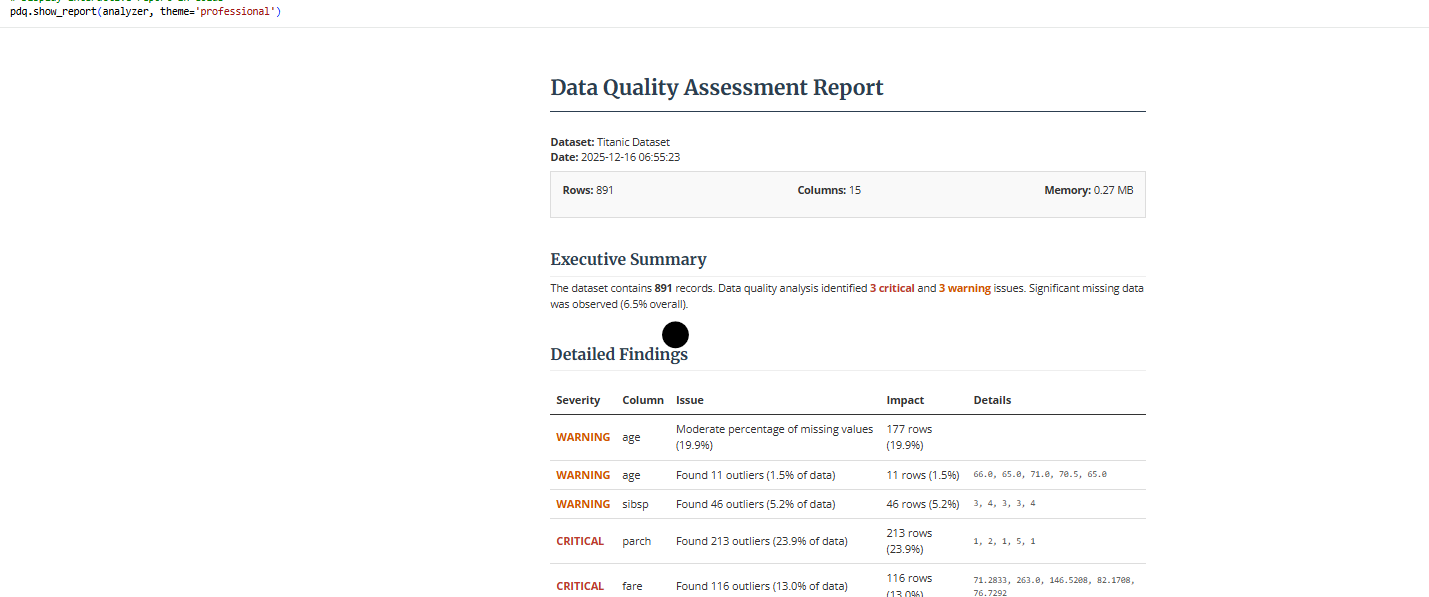
- Professional Reports: HTML, text, and JSON reports with actionable insights
- Easy Integration: Works seamlessly with pandas DataFrames from any source
Supported Input Formats
CLI: Auto-detects CSV, Excel (.xlsx, .xls), JSON, Parquet (python -m pydataquality data.csv)
Python API: Accepts any pandas DataFrame from:
- CSV files (
pd.read_csv()) - Excel files (
pd.read_excel()) - JSON files (
pd.read_json()) - Parquet files (
pd.read_parquet()) - SQL databases (
pd.read_sql()) - APIs (any source that produces a DataFrame)
- Cloud platforms (Snowflake, BigQuery, etc.)
Summary: PyDataQuality works with CSV, Excel, JSON, Parquet files, and any pandas DataFrame from SQL databases, APIs, or cloud platforms. The library is format-agnostic - it only requires a pandas DataFrame as input.
Why PyDataQuality?
The Problem
You just received a new dataset. You need to know what's wrong with it and how to fix it - fast. Existing tools either:
- Take too long (pandas-profiling: 10+ minutes, 200MB reports)
- Require too much setup (Great Expectations: YAML configs, checkpoints, data contexts)
- Don't give actionable insights (pandas
.describe(): just basic stats)
The Solution
PyDataQuality fills the gap between "too simple" and "too complex":
"I just got a new dataset. What's wrong with it, and how do I fix it? I need answers in 30 seconds, not 30 minutes."
Comparison with Alternatives
| Feature | pandas-profiling | Great Expectations | PyDataQuality |
|---|---|---|---|
| One-liner usage | ❌ | ❌ | ✅ |
| Extract bad rows | ❌ | ❌ | ✅ |
| CLI support | ❌ | ❌ | ✅ |
| Fast on large data | ❌ | ✅ | ✅ |
| No config needed | ✅ | ❌ | ✅ |
| AI integration | ❌ | ❌ | ✅ |
| Beginner-friendly | ⚠️ | ❌ | ✅ |
Real-World Example
Scenario: Data scientist gets a CSV with 1M rows
With pandas-profiling:
# Takes 10+ minutes, generates 200MB HTML
profile = ProfileReport(df)
profile.to_file("report.html")
# Now what? How do I fix the issues?
With PyDataQuality:
# Takes 30 seconds
analyzer = pdq.analyze_dataframe(df)
bad_ages = analyzer.get_problematic_rows('age', 'outliers')
bad_ages.to_csv('fix_these.csv')  # Send to data team
Bottom line: PyDataQuality is simple by design. It just works, without making you read 50 pages of documentation.
Installation
# Clone the repository
git clone https://github.com/DominionAkinrotimi/pydataquality.git
cd pydataquality

# Install in development mode
pip install -e .

# Install requirements directly
pip install -r requirements.txt

# For interactive notebook support (Jupyter/Colab)
pip install ".[notebook]"
Quick Start
import pandas as pd
import pydataquality as pdq

# Load your data
df = pd.read_csv('your_data.csv')

# Quick quality check
summary = pdq.quick_quality_check(df, name="My Dataset")

# Comprehensive analysis
analyzer = pdq.analyze_dataframe(df, name="My Dataset")

# Analysis with custom thresholds (e.g., stricter missing data check)
# Analysis with custom thresholds and excluded values
config = {
    'missing_critical': 0.1,
    'outlier_threshold': 2.0,
    'exclude_values': {
        'age': [150, -5],  # specific values to ignore
        'sales': [-100]
    }
}
analyzer = pdq.analyze_dataframe(df, name="My Dataset", config=config)

# Generate visualizations
visualizer = pdq.create_visual_report(analyzer)

# Generate HTML report
pdq.generate_report(analyzer, output_path="quality_report.html", format='html')

# Get AI assistance for fixes (includes EDA context by default)
prompt = pdq.generate_ai_prompt(analyzer)
print(prompt)

# Output example:
# "I have a dataset with 1000 rows. Issues: age (outliers: outside [18, 65]).
#  Statistical Context: age (int64): Mean=42, Max=150...
#  Please write a script..."
CLI Usage
Run the analysis directly from your terminal:
# Basic usage
python -m pydataquality data.csv

# Generate professional HTML report
python -m pydataquality data.csv --report html --theme professional

# Create visualizations
python -m pydataquality data.csv --visualize
Documentation
Examples
Check the examples directory for comprehensive usage examples:
- Basic Usage: Simple analysis and reporting
- Advanced Features: Custom configurations and visualizations
- Real-world Scenarios: Handling various data quality issues
Project Structure
PyDataQuality/
├── pydataquality/       # Main package directory
│   ├── __init__.py      # Exports
│   ├── __main__.py      # Package entry point
│   ├── analyzer.py      # Core analysis engine
│   ├── cli.py           # Package CLI logic
│   ├── comparator.py    # Data drift detection
│   ├── config.py        # Settings management
│   ├── reporter.py      # Report generation
│   ├── utils.py         # Helper functions
│   └── visualizer.py    # Visualization engine
├── docs/                # Documentation
├── examples/            # Usage examples
├── tests/               # Unit tests
├── cli.py               # Root CLI script (local usage)
├── setup.py             # Installation script
└── requirements.txt     # Dependencies
Key Components
1. DataQualityAnalyzer
Core analysis engine that examines data structure, detects issues, and computes statistics.
2. DataQualityVisualizer
Creates comprehensive visualizations including:
- Missing value heatmaps
- Outlier detection plots
- Distribution analysis
- Correlation heatmaps
- Categorical value distributions
3. QualityReportGenerator
Generates professional reports in multiple formats with actionable recommendations.
Contributing
Contributions are welcome! Please feel free to submit a Pull Request.
- Fork the repository
- Create your feature branch (
git checkout -b feature/AmazingFeature) - Commit your changes (
git commit -m 'Add some AmazingFeature') - Push to the branch (
git push origin feature/AmazingFeature) - Open a Pull Request
License
This project is licensed under the MIT License - see the LICENSE file for details.
Acknowledgments
-
Built with pandas, matplotlib, and seaborn
-
Inspired by real-world data quality challenges
-
Designed for data scientists and analysts
Release history Release notifications | RSS feed

Download files
Download the file for your platform. If you're not sure which to choose, learn more about installing packages.
Source Distribution
Built Distribution
Filter files by name, interpreter, ABI, and platform.
If you're not sure about the file name format, learn more about wheel file names.
Copy a direct link to the current filters
File details
Details for the file pydataquality-0.1.0.tar.gz.
File metadata
- Download URL: pydataquality-0.1.0.tar.gz
- Upload date:
- Size: 48.7 kB
- Tags: Source
- Uploaded using Trusted Publishing? No
- Uploaded via: twine/6.1.0 CPython/3.13.7
File hashes
| Algorithm | Hash digest | |
|---|---|---|
| SHA256 |
9b456486983a505678988d868595847b85cca932bb2bbb7be12477695edc21dc
|
|
| MD5 |
e9722e343fc10e630d27c53ea7789eba
|
|
| BLAKE2b-256 |
3bb32ceaa36a7f7dc4c320e06bf778b5b72778af4dd3ad32ae1e842aff68ff55
|
File details
Details for the file pydataquality-0.1.0-py3-none-any.whl.
File metadata
- Download URL: pydataquality-0.1.0-py3-none-any.whl
- Upload date:
- Size: 56.6 kB
- Tags: Python 3
- Uploaded using Trusted Publishing? No
- Uploaded via: twine/6.1.0 CPython/3.13.7
File hashes
| Algorithm | Hash digest | |
|---|---|---|
| SHA256 |
e6a2d8cce139636d15aed813dcb5248b61ea4d59e0d311b99eb52f057bae55e0
|
|
| MD5 |
a2f89dc3d516390bc8ab789b1950b594
|
|
| BLAKE2b-256 |
ef83f57bd4a6865eb87c66ca1ff133955df17034f91a40adf29842338bf4a04c
|






