
pydavinci
A lightly opinionated DaVinci Resolve Python API wrapper
Provides auto completion, type hints and great API reference documentation.
I really just wanted auto completion in the IDE and to program transcoding RAW formats
Install pydavinci
Install via pip using a Python 3.6 environment
pip install pydavinci
Now, with Davinci Resolve open, we just need to import it!
from pydavinci import davinci

resolve = davinci.Resolve()
Examples and documentation
- Check out the usage examples
- Or go deep in the documentation
Installation requirements and guidelines
pydavinci only works with Python 3.6.*, as that's a requirement on DaVinci Resolve's part.
For launching scripts externally, you also need the Studio version.
If you're working with the built-in Davinci Resolve Python console, you need to install pydavinci for the Python interpreter that's used by Davinci's console.
For avoiding conflicts when using inside the embedded console, don't use resolve as the entry point variable, as that's reserved by the console. Example of suggested usage:
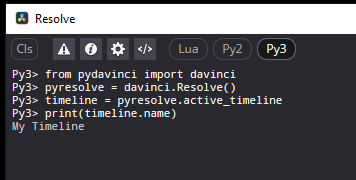
Davinci Resolve v18 beta
For the newer DaVinci Resolve v18, currently in beta, newer Python installations are supported.
If you want to try out pydavinci with new Python versions for Resolve v18, use pip with the --ignore-requires-python flag.
Note that while I did some quick tests, I can't guarantee everything works on Resolve v18 beta. Full testing will become available as further betas come through, and will be supported fully on the official release.
Launching scripts externally (Studio version)
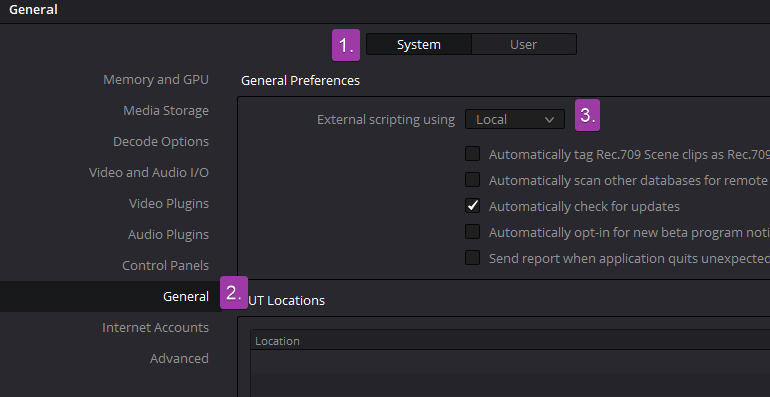
For pydavinci to work by launching scripts outside the embedded console, make sure external scripting is set to Local in Settings -> System -> General
To-do and contributing
Contributors are always welcome! I currently have a few things I want to change, some of them are:
-
Document all possible values ofNew in 0.2.0!get_settingandset_setting -
Add a better way of interfacing with the wholeNew in 0.2.0!get_settingandset_settingmethods using a proxy class or something to that effect -
Deal with markers in a better wayNew in 0.2.0! - Auto launch Resolve when it's not open - I've ran into some issues while trying to connect to the C extension right after launching it, a dirty way to do it is to just implement a
time.sleepbefore trying to import the fusionscript module, otherwise we'll need to create another entrypoint to the api for launching the process and then signaling when it's ready - Do the same wrapper made for settings to Metadata and Properties
If you want to contribute feel free to open a pull request!
1 maintainer

Metadata
1 maintainer
Release files for pydavinci 0.2.3
For a detailed explanation of source distributions (sdists) and built distributions (wheels), please see the package formats documentation.
Source distribution (sdist)
| File | Size | Uploaded | |
|---|---|---|---|
| pydavinci-0.2.3.tar.gz | 37.0 kB | Details |
Built distribution (wheel)
| File | Interpreter | ABI | Platform | Reset |
|---|---|---|---|---|
| pydavinci-0.2.3-py3-none-any.whl | Python 3 | none | any | Details |
Total release size: 82.4 kB
Release files / pydavinci-0.2.3.tar.gz
| Download URL | pydavinci-0.2.3.tar.gz |
|---|---|
| Size | 37.0 kB |
| Tags | Source |
|
SHA-256 checksum How to use checksums |
0ce99325c6f4ee22586901b5bc2b6736efbfe4c638bfaf477963b6eecee7bb96
|
|
BLAKE2b-256 checksum How to use checksums |
bfdae23fcabc1992aed5026989069940f4bcd1280d26b94fbee3e418b3613f68
|
| Upload date | |
|
Uploaded using Trusted Publishing? What is trusted publishing? |
No |
| Uploaded via |
twine/3.8.0 pkginfo/1.8.2 readme-renderer/34.0 requests/2.27.1 requests-toolbelt/0.9.1 urllib3/1.26.9 tqdm/4.64.0 importlib-metadata/4.2.0 keyring/23.4.1 rfc3986/1.5.0 colorama/0.4.4 CPython/3.6.8
|
Release files / pydavinci-0.2.3-py3-none-any.whl
| Download URL | pydavinci-0.2.3-py3-none-any.whl |
|---|---|
| Size | 45.4 kB |
| Tags | Python 3 |
|
SHA-256 checksum How to use checksums |
cf0f7b733d44bc81132e303a308ae3f0f07689df22547cd7db4f8ebfa5331c14
|
|
BLAKE2b-256 checksum How to use checksums |
ce54da888b32f871db355e888d44474a54a1cc4e095d001762946a470536bb09
|
| Upload date | |
|
Uploaded using Trusted Publishing? What is trusted publishing? |
No |
| Uploaded via |
twine/3.8.0 pkginfo/1.8.2 readme-renderer/34.0 requests/2.27.1 requests-toolbelt/0.9.1 urllib3/1.26.9 tqdm/4.64.0 importlib-metadata/4.2.0 keyring/23.4.1 rfc3986/1.5.0 colorama/0.4.4 CPython/3.6.8
|














