
Widget for deck.gl maps


Project description


pydeck: Large-scale interactive data visualization in Python
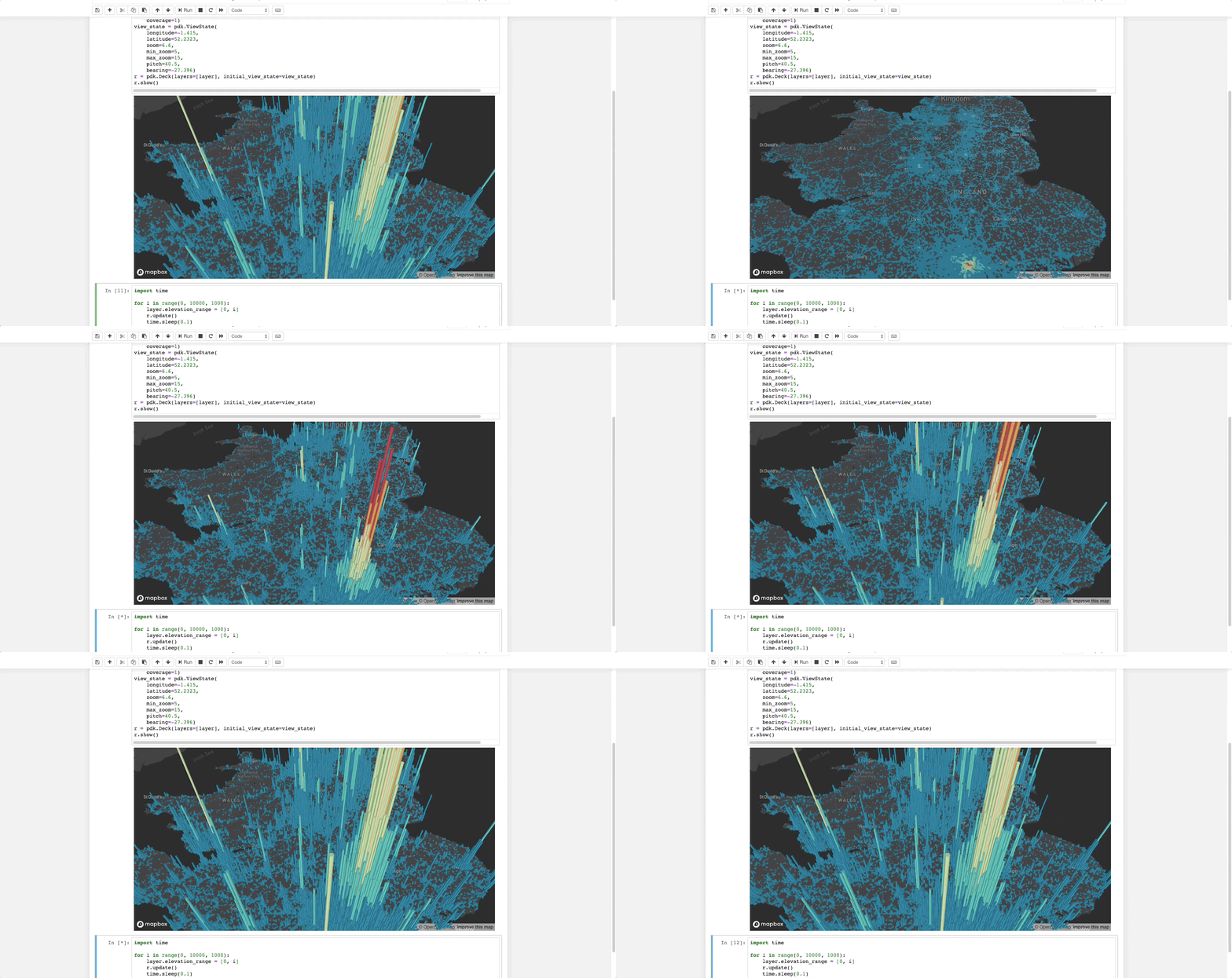
The pydeck library is a set of Python bindings for making spatial visualizations with deck.gl, optimized for a Jupyter Notebook environment.
For interactive demos, click the binder logo below:

See further documentation here.
Installation
pip install pydeck
To install pydeck for Jupyter Notebook, run the following commands on your Jupyter server:
jupyter nbextension install --sys-prefix --symlink --overwrite --py pydeck
jupyter nbextension enable --sys-prefix --py pydeck
To install pydeck for JupyterLab, run the following:
jupyter labextension install @jupyter-widgets/jupyterlab-manager
jupyter labextension install @deck.gl/jupyter-widget
Mapbox API token
Like deck.gl, the pydeck library takes its basemap tiles from Mapbox. Register with Mapbox, and you can find your Mapbox access token here. The service is free until a certain level of traffic is exceeded.
You will need to inform pydeck about your key by setting an environment variable. In your terminal, run export MAPBOX_API_KEY=<mapbox-key-here>, which pydeck will read to use Mapbox basemaps. You can also refer to the pydeck docs to see how to pass the key as a variable.
Getting started
The following code renders a visualization similar to the one above in a Jupyter notebook:
import pydeck as pdk

# 2014 locations of car accidents in the UK
UK_ACCIDENTS_DATA = ('https://raw.githubusercontent.com/uber-common/'
                     'deck.gl-data/master/examples/3d-heatmap/heatmap-data.csv')

# Define a layer to display on a map
layer = pdk.Layer(
    'HexagonLayer',
    UK_ACCIDENTS_DATA,
    get_position=['lng', 'lat'],
    auto_highlight=True,
    elevation_scale=50,
    pickable=True,
    elevation_range=[0, 3000],
    extruded=True,
    coverage=1)

# Set the viewport location
view_state = pdk.ViewState(
    longitude=-1.415,
    latitude=52.2323,
    zoom=6,
    min_zoom=5,
    max_zoom=15,
    pitch=40.5,
    bearing=-27.36)

# Render
r = pdk.Deck(layers=[layer], initial_view_state=view_state)
r.to_html('demo.html')
If you're doing this outside a Jupyter environment, you can run:
r.to_html('demo.html', notebook_display=False)
For more, check out the docs and Binder examples above.
Debugging note
Currently, some errors in pydeck will only appear in your browser's developer console. If a visualization fails to render, open the developer console. Error handling will be expanded in future versions of pydeck.
Issues
If you encounter an issue, file it in the deck.gl issues page and include your console output, if any.
Installation from source
# Clone the deck.gl repo
git clone https://github.com/uber/deck.gl/

# Navigate to the pydeck module
cd deck.gl/bindings/pydeck

# Create a virtual environment
python3 -m venv env3
. env3/bin/activate

python3 setup.py install
Development
Build the deck.gl project at the root of this repository:
git clone https://github.com/uber/deck.gl/
cd deck.gl
# Build the entire deck.gl project
yarn bootstrap
From the directory of this README, build pydeck:
# Create a virtual environment
python3 -m venv env3
. env3/bin/activate

pip install -r requirements.txt
pip install -r requirements-dev.txt
pip install -e .
JupyterLab is the recommended environment for development testing with pydeck. To develop with JupyterLab, run from this directory:
# cd ../../modules/jupyter-widget
jupyter labextension install @jupyter-widgets/jupyterlab-manager --no-build
jupyter labextension install . --no-build
jupyter labextension link .
cd -
jupyter lab build
The jupyter lab --watch command can be used to provide hot reloading for development.
Tests
Tests are handled by pytest. In the top-level pydeck directory, you can type:
pytest
Tests expect the development build of pydeck, specified above. Click on the URLs in the test output to see visualizations generated by the tests.
Release history Release notifications | RSS feed


Download files
Download the file for your platform. If you're not sure which to choose, learn more about installing packages.
Source Distribution
Built Distribution
Filter files by name, interpreter, ABI, and platform.
If you're not sure about the file name format, learn more about wheel file names.
Copy a direct link to the current filters
File details
Details for the file pydeck-0.2.1.tar.gz.
File metadata
- Download URL: pydeck-0.2.1.tar.gz
- Upload date:
- Size: 2.0 MB
- Tags: Source
- Uploaded using Trusted Publishing? No
- Uploaded via: twine/3.1.1 pkginfo/1.5.0.1 requests/2.22.0 setuptools/44.0.0 requests-toolbelt/0.9.1 tqdm/4.41.1 CPython/3.7.4
File hashes
| Algorithm | Hash digest | |
|---|---|---|
| SHA256 |
d58bc0a08707a613ccf1aa99ccdab3b040ac6d93c70046ef165cae913b527fd8
|
|
| MD5 |
de3682fcadacec861a5c6f224ae17edc
|
|
| BLAKE2b-256 |
f9351c06b7c7b8b9f58274833e154f802921fabf237953ea07826bf84292aea2
|
File details
Details for the file pydeck-0.2.1-py2.py3-none-any.whl.
File metadata
- Download URL: pydeck-0.2.1-py2.py3-none-any.whl
- Upload date:
- Size: 4.1 MB
- Tags: Python 2, Python 3
- Uploaded using Trusted Publishing? No
- Uploaded via: twine/3.1.1 pkginfo/1.5.0.1 requests/2.22.0 setuptools/44.0.0 requests-toolbelt/0.9.1 tqdm/4.41.1 CPython/3.7.4
File hashes
| Algorithm | Hash digest | |
|---|---|---|
| SHA256 |
3921fbc21efda8c458c844c9c3c54e45c8f3c9378f97d1ad6bf70a7d96543ac6
|
|
| MD5 |
be27dd18094ecf05c98308b72309bb69
|
|
| BLAKE2b-256 |
8c4f2ad343cf68b628168264503ca9a0a162d25b40f25b59fa9abfd9482614b4
|






