
A Python dependency tree analyzer with rich terminal output

Project description
PyDepTree



A powerful Python dependency analyzer that visualizes module dependencies in your Python projects as a beautiful tree structure. Built with Rich for colorful terminal output.
🎬 See PyDepTree in Action
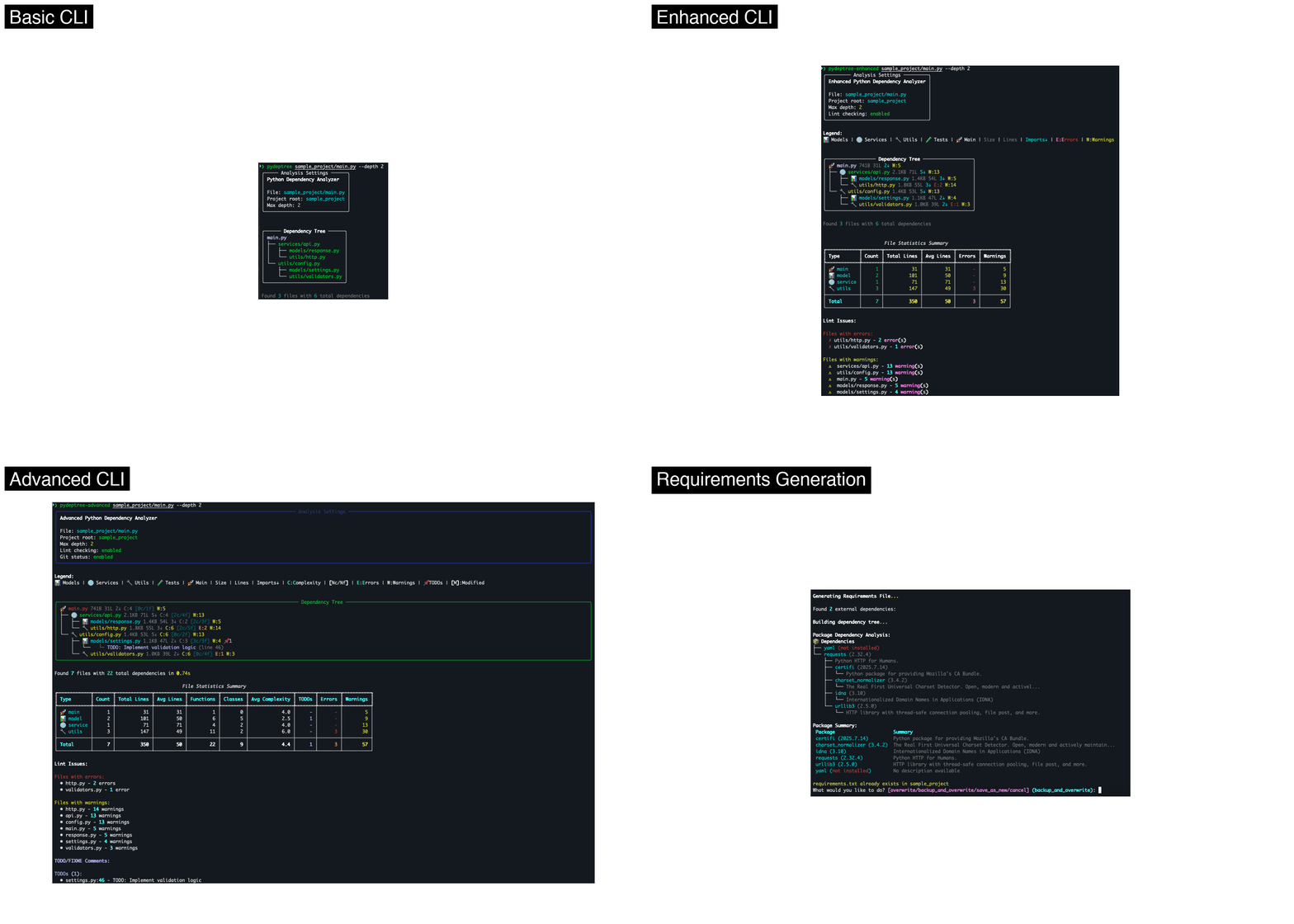
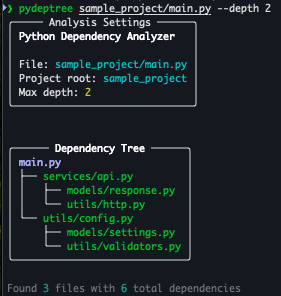
📸 View Individual Screenshots
Basic CLI
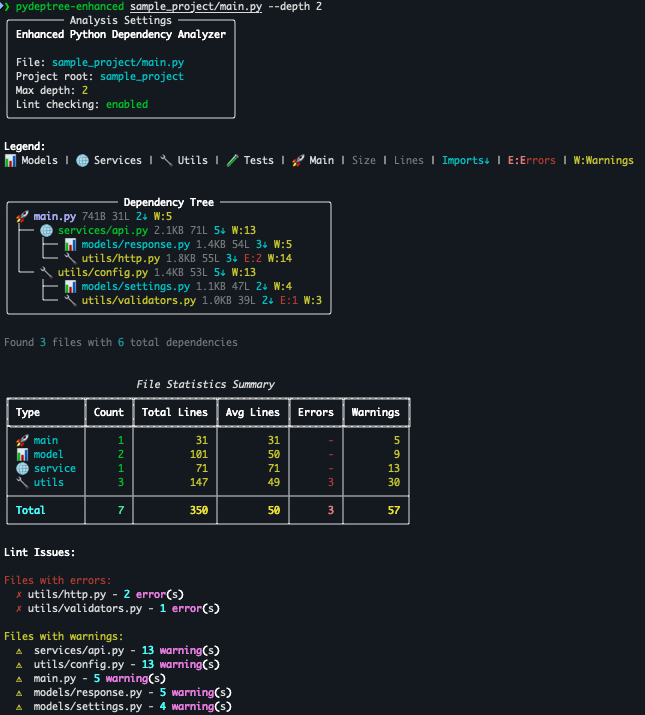
Enhanced CLI with File Metrics
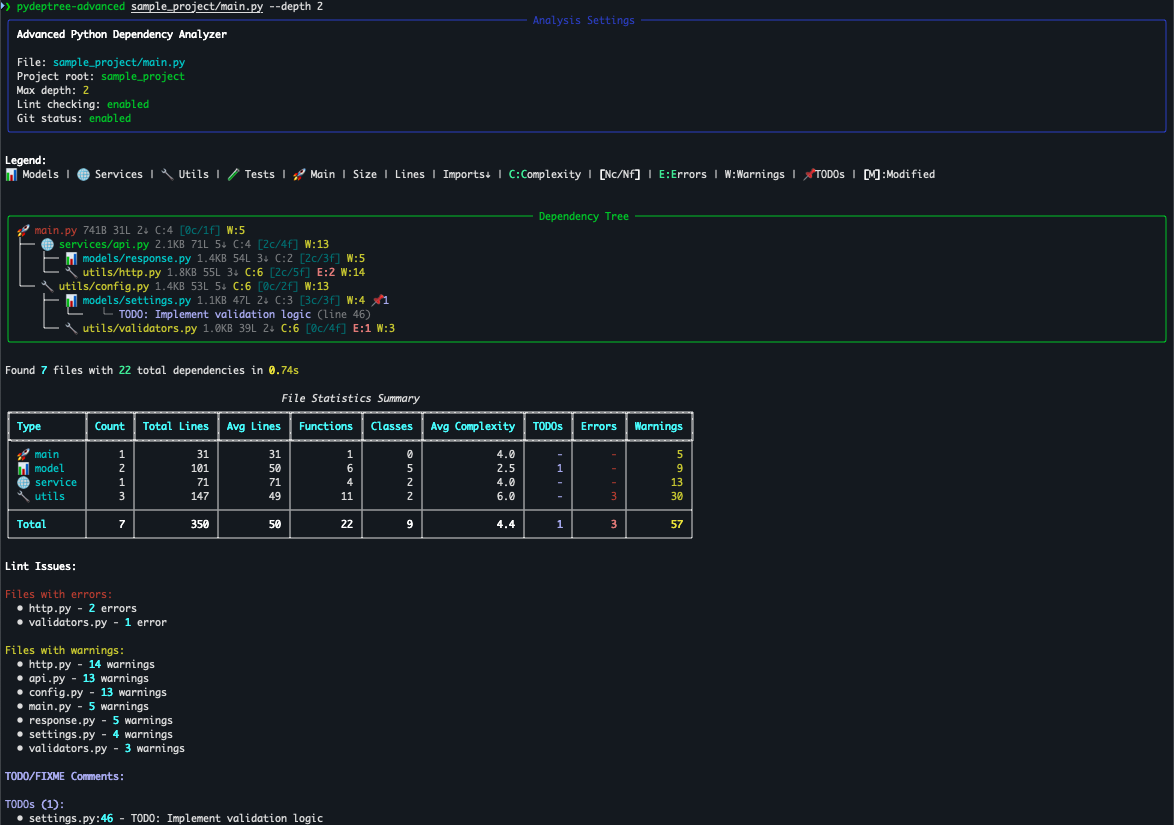
Advanced CLI with All Features
🚀 Three Powerful Versions
Compare Features Across Versions
| Feature | Basic CLI | Enhanced CLI | Advanced CLI |
|---|---|---|---|
| Dependency Tree | ✅ | ✅ | ✅ |
| Configurable Depth | ✅ | ✅ | ✅ |
| Import Preview | ✅ | ✅ | ✅ |
| Flexible Import Display | ❌ | ❌ | ✅ (inline/below/both) |
| File Type Colors | ❌ | ✅ | ✅ (+ Config) |
| File Metrics | ❌ | ✅ | ✅ |
| Lint Checking | ❌ | ✅ | ✅ |
| Summary Tables | ❌ | ✅ | ✅ |
| Search/Grep | ❌ | ❌ | ✅ |
| Complexity Analysis | ❌ | ❌ | ✅ |
| TODO Detection | ❌ | ❌ | ✅ |
| Git Integration | ❌ | ❌ | ✅ |
| Requirements.txt Gen | ❌ | ❌ | ✅ |
| Dependency Analysis | ❌ | ❌ | ✅ |
Table of Contents
- Features
- Installation
- Usage
- Quick Start Examples
- Demo and Sample Project
- Command Line Options
- Understanding the Metrics
- Requirements Generation
- How It Works
- Development
- Contributing
- License
- Acknowledgments
Features
Core Features
- 🎯 Smart Import Detection: Uses AST parsing to accurately find all imports
- 🌳 Beautiful Tree Visualization: Rich-powered colorful dependency trees
- 🔍 Configurable Depth: Control how deep to analyze dependencies
- 🚀 Fast & Efficient: Skips standard library and external packages
- 🎨 Import Preview: See actual import statements with
--show-code - 📊 Progress Tracking: Real-time progress for large codebases
- 🔄 Circular Dependency Detection: Identifies and handles circular imports
Enhanced Features ✨
- 🎨 Color-coded File Types: Models (📊), Services (🌐), Utils (🔧), Tests (🧪), Main (🚀), Config (⚙️)
- 📈 File Statistics: Size, line count, and import count badges for each file
- 🔍 Lint Integration: Automatic error/warning detection using ruff (when available)
- 📊 Summary Tables: Aggregate statistics by file type with quality metrics
- 🎯 Enhanced Visualization: Rich terminal output with progress indicators and legends
Advanced Features 🚀 (v0.3.0+)
- 🔎 Search/Grep Integration: Search for classes, functions, imports, or any text pattern
- 📐 Complexity Metrics: Cyclomatic complexity analysis with visual indicators
- 📍 Flexible Import Display: Show imports inline in tree, below tree, or both locations
- 📌 TODO/FIXME Detection: Automatically finds and displays TODO comments
- 🏗️ Code Structure Metrics: Function and class counts per file
- 🔄 Git Integration: Shows file modification status in version control
- 📄 Requirements Generation: Automatically generate requirements.txt from detected dependencies
- ⚙️ Config File Detection (v0.3.12+): Automatically detects and categorizes Python configuration files
Installation
Using pip
pip install pydeptree
Using pipx (recommended)
pipx installs CLI tools in isolated environments, preventing dependency conflicts.
If you already have pipx:
pipx install pydeptree
If you need to install pipx:
macOS:
# Option 1: Using Homebrew (recommended)
brew install pipx

# Option 2: Using pip
pip install pipx
pipx ensurepath
source ~/.zshrc  # or restart your terminal
Windows:
# Using pip
pip install pipx
pipx ensurepath
# Restart your command prompt/PowerShell
Linux:
# Ubuntu/Debian
sudo apt install pipx

# Or using pip
pip install pipx
pipx ensurepath
source ~/.bashrc  # or restart your terminal
Then install PyDepTree:
pipx install pydeptree
From source
git clone https://github.com/tfaucheux/pydeptree.git
cd pydeptree
pip install -e .
🎬 Try the Interactive Demos
PyDepTree includes self-contained demo scripts that work regardless of how you installed it:
# Run all demos (basic → enhanced → advanced)
python demo_run_all.py

# Or run individual demos
python demo_basic.py      # Core dependency analysis features
python demo_enhanced.py   # File types, statistics, lint checking
python demo_advanced.py   # Search, complexity, TODOs, and more
Perfect for:
- 🚀 New users: See all features in action with realistic examples
- 📚 Learning: Understand what each CLI version offers
- 🧪 Testing: Verify installation works correctly
- 🎯 Evaluation: Decide which features you need
Each demo creates temporary sample projects, so they work with pip, pipx, or source installations.
Usage
Basic Usage
Analyze a Python file and see its direct dependencies:
pydeptree myapp.py
Enhanced Usage
Use the enhanced CLI for additional features:
pydeptree-enhanced myapp.py --depth 2
The enhanced version provides color-coded file types, lint checking, and detailed statistics.
Advanced Usage (v0.3.0+)
Use the advanced CLI for search, complexity analysis, and more:
pydeptree-advanced myapp.py --search "APIClient" --search-type class
The advanced version includes all enhanced features plus search capabilities, complexity metrics, TODO detection, and git integration.
Advanced Options
# Analyze dependencies up to 3 levels deep
pydeptree myapp.py --depth 3

# Show import statements from each file
pydeptree myapp.py --show-code

# Specify a custom project root
pydeptree myapp.py --project-root /path/to/project
Quick Start Examples
Basic Usage
# Analyze a Python file with the original CLI
pydeptree myapp.py

# Use the enhanced version with additional features
pydeptree-enhanced myapp.py --depth 2
Enhanced Features Examples
# Disable lint checking
pydeptree-enhanced myapp.py --no-check-lint

# Disable statistics table
pydeptree-enhanced myapp.py --no-show-stats

# Show detailed import statements
pydeptree-enhanced myapp.py --show-code --depth 3
Advanced Features Examples
# Search for a specific class
pydeptree-advanced myapp.py --search "UserModel" --search-type class

# Search for functions containing 'validate'
pydeptree-advanced myapp.py --search "validate" --search-type function --depth 3

# Find all TODO comments
pydeptree-advanced myapp.py --search "TODO|FIXME|HACK" --depth 2

# Minimal output with just file structure
pydeptree-advanced myapp.py --no-show-metrics --no-check-lint --no-show-stats

# Focus on complexity issues
pydeptree-advanced myapp.py --no-show-todos --no-check-git

# Generate requirements.txt from dependencies (with safety features)
pydeptree-advanced myapp.py --generate-requirements --depth 3

# Generate requirements without versions
pydeptree-advanced myapp.py --generate-requirements --no-versions --no-interactive

# Generate requirements to specific file
pydeptree-advanced myapp.py -R -o my-requirements.txt

# Show detailed dependency analysis like johnnydep
pydeptree-advanced myapp.py --generate-requirements --analyze-deps

# Deep dependency analysis
pydeptree-advanced myapp.py --analyze-deps --dep-depth 3
Advanced CLI Output Examples
Basic Advanced Analysis with Complexity and Metrics
pydeptree-advanced sample_project/main.py --depth 2
Shows complexity metrics (C:4), function/class counts [0c/1f], lint warnings (W:5), file statistics, and comprehensive analysis with color-coded file types.
Requirements Generation with Safety Features
pydeptree-advanced sample_project/main.py --generate-requirements --no-interactive
Demonstrates the safe requirements.txt generation feature with automatic backup protection and comprehensive dependency analysis.
Import Statement Display Options
The --show-code flag offers flexible ways to display import statements:
Inline Display (--show-code=inline)
Shows import statements directly in the dependency tree:
pydeptree-advanced myapp.py --show-code=inline
Example output:
🚀 main.py
├── 🌐 services/api.py
│   ├── 📊 models/response.py
│   ├──   └─ from models.response import APIResponse, ErrorResponse
│   └── 🔧 utils/http.py
└──   └─ from utils.http import HTTPClient, HTTPError
Below Display (--show-code=below)
Traditional display showing imports after the tree (default):
pydeptree-advanced myapp.py --show-code=below
# or simply:
pydeptree-advanced myapp.py --show-code
Both Locations (--show-code=both)
Displays imports both inline and at the bottom:
pydeptree-advanced myapp.py --show-code=both
Testing the Enhanced Features
# Run the interactive demo
python demo_enhanced.py

# Try on the sample project (contains intentional lint errors for demo)
pydeptree-enhanced sample_project/main.py --depth 2

# Try the advanced features
pydeptree-advanced sample_project/main.py --search "validate" --search-type function

# Compare all three CLIs
pydeptree sample_project/main.py --depth 2          # Basic
pydeptree-enhanced sample_project/main.py --depth 2  # Enhanced
pydeptree-advanced sample_project/main.py --depth 2  # Advanced
Demo and Sample Project
PyDepTree includes a comprehensive sample project to demonstrate its enhanced features.
⚠️ Note about Sample Project: The sample_project/ directory contains intentional code quality issues (linting errors, warnings, and code smells) to demonstrate the enhanced PyDepTree's lint checking capabilities. These are not bugs but deliberate examples that showcase how the tool can help identify code quality problems in real projects.
The sample project includes realistic examples of:
- Missing imports and type hints
- Unused variables
- Long lines exceeding style guidelines
- Inefficient code patterns
- Complex conditions that could be simplified
This allows you to see how PyDepTree Enhanced detects and reports these issues with color-coded badges and summary statistics.
Command Line Options
Basic CLI (pydeptree)
FILE_PATH: Path to the Python file to analyze (required)-d, --depth INTEGER: Maximum depth to traverse (default: 1)-r, --project-root PATH: Project root directory (default: file's parent)-c, --show-code: Display import statements from each file--help: Show help message and exit
Enhanced CLI (pydeptree-enhanced)
All basic options plus:
-l, --check-lint / --no-check-lint: Enable/disable lint checking (default: enabled)-s, --show-stats / --no-show-stats: Show/hide statistics summary table (default: enabled)
Advanced CLI (pydeptree-advanced)
All enhanced options plus:
-c, --show-code [below|inline|both]: Display import statements with flexible positioningbelow: Show imports after the tree (default, backward compatible)inline: Show imports directly in the tree structureboth: Show imports in both locations
-S, --search TEXT: Search for text/pattern in files--search-type [text|class|function|import]: Type of search to perform (default: text)--show-todos / --no-show-todos: Show/hide TODO comments (default: enabled)--check-git / --no-check-git: Show/hide git status (default: enabled)--show-metrics / --no-show-metrics: Show/hide inline metrics like size, complexity (default: enabled)-R, --generate-requirements: Generate requirements.txt from detected dependencies-o, --requirements-output PATH: Output path for requirements.txt (default: auto-generated)--no-versions: Generate requirements.txt without version numbers--no-interactive: Don't prompt for confirmation when requirements.txt exists--analyze-deps: Show detailed dependency analysis like johnnydep--dep-depth INTEGER: Maximum depth for dependency analysis (default: 2)
Understanding the Metrics
Inline Metrics (Advanced CLI)
- Size: File size (B/KB/MB)
- Lines: Total line count (e.g.,
31L) - Imports: Number of import statements (e.g.,
5↓) - Complexity: Cyclomatic complexity (e.g.,
C:12)C:1-5(green/dim): Simple, easy to testC:6-10(yellow): Moderate complexityC:11+(red): High complexity, consider refactoring
- Structure: Class/function count (e.g.,
[2c/5f]= 2 classes, 5 functions) - Lint Issues:
E:n(red): Number of errorsW:n(yellow): Number of warnings
- TODOs: Number of TODO/FIXME comments (e.g.,
📌3) - Git Status:
[M]modified,[A]added,[D]deleted - Search Matches: Number of search results (e.g.,
🔍5)
Summary Table Columns
- Type: File category with icon
- Count: Number of files in category
- Total/Avg Lines: Code volume metrics
- Functions/Classes: Total count per category
- Avg Complexity: Average cyclomatic complexity
- TODOs: Total TODO comments found
- Errors/Warnings: Lint issue counts
- Matches: Search result counts (when searching)
File Type Detection
PyDepTree automatically categorizes Python files by analyzing their paths and names:
- 📊 Models: Files in
/models/directories or containing 'model' in the name - 🌐 Services: Files in
/services/directories or containing 'service', 'api', 'client' in the name - 🔧 Utils: Files in
/utils/directories or containing 'util', 'helper' in the name - 🧪 Tests: Files in
/tests/directories or starting with 'test_' - 🚀 Main: Files named 'main.py' or 'main.py'
- ⚙️ Config: Files like 'config.py', 'settings.py', 'env.py', or in
/config/directories - 📄 Other: Files that don't match the above patterns
Requirements Generation
PyDepTree can automatically generate requirements.txt files from your project's external dependencies:
# Generate requirements.txt with versions
pydeptree-advanced myapp.py --generate-requirements

# Generate without versions
pydeptree-advanced myapp.py --generate-requirements --no-versions

# Specify output file
pydeptree-advanced myapp.py -R -o my-deps.txt
Features:
- Smart Detection: Automatically identifies external packages (excludes stdlib and project modules)
- Version Detection: Attempts to detect installed package versions
- File References: Shows which files use each dependency
- Advanced Safety Features: Comprehensive protection against overwriting existing files:
- Interactive Prompts: When requirements.txt exists, choose from: overwrite, backup_and_overwrite, save_as_new, or cancel
- Automatic Backups: Creates timestamped backups (e.g., requirements.20250122_143021.backup)
- Change Preview: Shows first 5 lines of current vs new content before overwriting
- Safe Non-Interactive Mode: Auto-generates numbered filenames (requirements_1.txt, requirements_2.txt, etc.)
- Rich Display: Beautiful table showing dependencies with versions and usage
- Dependency Tree Analysis: Like johnnydep, shows transitive dependencies with descriptions
- Package Summaries: Displays what each package does
Basic Example Output:
Found 2 external dependencies:
┏━━━━━━━━━━┳━━━━━━━━━━━┳━━━━━━━━━━━━━━━━━━━━━━━┓
┃ Package  ┃ Version   ┃ Used In             ┃
┡━━━━━━━━━━╇━━━━━━━━━━━╇━━━━━━━━━━━━━━━━━━━━━━━┩
│ requests │ 2.32.4    │ http.py             │
│ yaml     │ Not found │ config.py           │
└──────────┴───────────┴─────────────────────┘

✓ Requirements file written to: requirements_1.txt
Enhanced Dependency Analysis (--analyze-deps):
Package Dependency Analysis:
📦 Dependencies
├── requests (2.32.4)
│   ├── Python HTTP for Humans.
│   ├── certifi (2025.7.14)
│   │   └── Python package for providing Mozilla's CA Bundle.
│   ├── charset_normalizer (3.4.2)
│   │   └── The Real First Universal Charset Detector.
│   ├── idna (3.10)
│   │   └── Internationalized Domain Names in Applications (IDNA)
│   └── urllib3 (2.5.0)
│       └── HTTP library with thread-safe connection pooling.
└── yaml (not installed)

Package Summary:
 Package                     Summary
 certifi (2025.7.14)        Python package for providing Mozilla's CA Bundle.
 charset_normalizer (3.4.2) The Real First Universal Charset Detector...
 idna (3.10)                Internationalized Domain Names in Applications
 requests (2.32.4)          Python HTTP for Humans.
 urllib3 (2.5.0)            HTTP library with thread-safe connection pooling.
 yaml (not installed)       No description available

✓ Requirements file written to: requirements_1.txt
How It Works
PyDepTree uses Python's built-in AST (Abstract Syntax Tree) module to parse Python files and extract import statements. It then:
- Identifies which imports are part of your project (vs external libraries)
- Recursively analyzes imported modules up to the specified depth
- Builds a dependency graph while detecting circular imports
- Renders a beautiful tree visualization using Rich
The Advanced CLI adds: 5. AST-based complexity analysis and code structure metrics 6. Pattern matching for search functionality 7. Git integration for version control awareness 8. Comment parsing for TODO detection
Development
Setup Development Environment
# Clone the repository
git clone https://github.com/tfaucheux/pydeptree.git
cd pydeptree

# Create virtual environment
python -m venv venv
source venv/bin/activate  # On Windows: venv\Scripts\activate

# Install in development mode with dev dependencies
pip install -e ".[dev]"
Running Tests
# Run all tests (33 tests total: 5 basic + 28 enhanced)
pytest

# Run with coverage report (should show ~85% coverage)
pytest --cov=pydeptree --cov-report=term-missing

# Run only enhanced CLI tests
pytest tests/test_cli_enhanced.py

# Run linting (Note: sample_project/ contains intentional errors for demo purposes)
ruff check pydeptree/  # Check only the main package code (clean)
ruff check .           # Check everything (will show demo errors)
black --check .
mypy pydeptree
Note: The sample_project/ directory contains intentional linting errors for demonstration purposes. When running linting tools on the entire project, you'll see these demo errors alongside any real issues in the main codebase.
Contributing
Contributions are welcome! Please feel free to submit a Pull Request. For major changes, please open an issue first to discuss what you would like to change.
- Fork the repository
- Create your feature branch (
git checkout -b feature/AmazingFeature) - Commit your changes (
git commit -m 'Add some AmazingFeature') - Push to the branch (
git push origin feature/AmazingFeature) - Open a Pull Request
License
This project is licensed under the MIT License - see the LICENSE file for details.
Acknowledgments
Release history Release notifications | RSS feed


Download files
Download the file for your platform. If you're not sure which to choose, learn more about installing packages.
Source Distribution
Built Distribution
Filter files by name, interpreter, ABI, and platform.
If you're not sure about the file name format, learn more about wheel file names.
Copy a direct link to the current filters
File details
Details for the file pydeptree-0.3.13.tar.gz.
File metadata
- Download URL: pydeptree-0.3.13.tar.gz
- Upload date:
- Size: 40.5 kB
- Tags: Source
- Uploaded using Trusted Publishing? No
- Uploaded via: twine/6.1.0 CPython/3.12.7
File hashes
| Algorithm | Hash digest | |
|---|---|---|
| SHA256 |
9fbd2ed8f13d513cc13a778f9da9bb00e7d6b4a8e88c55f94b33aa0a24a40028
|
|
| MD5 |
749c3b7302a518bf13657331e8714999
|
|
| BLAKE2b-256 |
245d176ca29ab4b3f5e51978c878cfc9c0a06877fc01f20f55d3fe7a32e8364c
|
File details
Details for the file pydeptree-0.3.13-py3-none-any.whl.
File metadata
- Download URL: pydeptree-0.3.13-py3-none-any.whl
- Upload date:
- Size: 32.3 kB
- Tags: Python 3
- Uploaded using Trusted Publishing? No
- Uploaded via: twine/6.1.0 CPython/3.12.7
File hashes
| Algorithm | Hash digest | |
|---|---|---|
| SHA256 |
dd5aaa4e4f49f461f6ceb0da3ff0d3764827989c98732beab9c5c5ac71dfa69c
|
|
| MD5 |
36354f57f7366aae3d682266516ad639
|
|
| BLAKE2b-256 |
94aa840dc1921814c56489e86228ec66f820ed8650c1e39dc703a6becd50e9c1
|






