
palettes
Pure-Python, zero-dependency color palette toolkit
palettes provides pre-computed, display-ready and integer-indexed color lookup tables for any Python environment. It has zero dependencies on any other PyDevices library or external package, running identically on MicroPython, CircuitPython, CPython (desktop/server), and PyScript (Web).
Universal Color Tooling
While palettes integrates seamlessly with PyDevices displays, it is a standalone utility useful for any Python project needing easy-to-access named and indexed palettes, including:
- Embedded & Hardware: RGB565 displays, addressable LEDs / NeoPixels, status indicators.
- Terminal & CLI Tools: ANSI terminal formatting, logs, status alerts.
- Data & Charts: Consistent categorical and sequential color mapping.
- Theme Engines: Swappable UI color palettes with human-readable color names.
Palette Types & Previews
1. Color Wheel ("wheel")
Generates a smooth, continuous HSV-based color spectrum. Ideal for color pickers, circular progress rings, and continuous gradient animations:
from palettes import get_palette

# 360-step full saturation color wheel (16-bit RGB565)
wheel = get_palette(name="wheel", length=360, saturation=1.0, color_depth=16)
color = wheel[180]  # get color at hue angle 180°

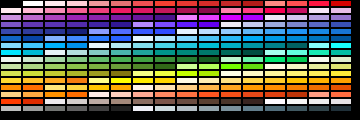
2. Material Design ("material_design")
A curated collection of modern UI colors based on Google's Material Design palette:
material = get_palette(name="material_design", color_depth=16)
primary_color = material[0]
color_name = material.color_name(0)  # e.g., "Red 500"
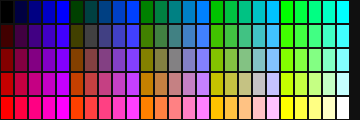
3. Color Cube ("cube")
A structured 3D RGB color cube mapped into a discrete indexed palette. Excellent for retro imaging and color-space mapping:
cube = get_palette(name="cube", size=5, color_depth=16)
4. Named Windows-16 ("default")
The classic 16 standard system colors:
win16 = get_palette(name="default", color_depth=16)
navy = win16[1]  # Black, Navy, Blue, Green, Teal, Lime, Cyan, etc.

Quick Start: Painting on a Display
import board_config
from palettes import get_palette

display_drv = board_config.display_drv
palette = get_palette(name="wheel", length=display_drv.width, color_depth=16)

# Draw a full-width color spectrum band
for x in range(display_drv.width):
    display_drv.fill_rect(x, 0, 1, 40, palette[x])

display_drv.show()
Installation
import mip
mip.install("palettes", index="https://PyDevices.github.io/mip")
pip install -i https://test.pypi.org/simple/ \
  --extra-index-url https://pypi.org/simple/ pydevices-palettes
Full options: docs/index.md.
Links & Demos
- Documentation
- Source Code
- PyScript Live Demos (
palettes_demo.py) - Related: pydevices, pdwidgets, pydevices-examples
License
MIT — see LICENSE.
1 maintainer

Metadata
1 maintainer
Release files for pydevices-palettes 0.0.12
For a detailed explanation of source distributions (sdists) and built distributions (wheels), please see the package formats documentation.
Source distribution (sdist)
| File | Size | Uploaded | Provenance | Actions |
|---|---|---|---|---|
| pydevices_palettes-0.0.12.tar.gz | 15.9 kB | Without provenance | Details for pydevices_palettes-0.0.12.tar.gz |
Built distribution (wheel)
| File | Interpreter | ABI | Platform | Actions Reset |
|---|---|---|---|---|
| pydevices_palettes-0.0.12-py3-none-any.whl | Python 3 | none | any | Details for pydevices_palettes-0.0.12-py3-none-any.whl |
Total release size: 32.9 kB
Release files / pydevices_palettes-0.0.12.tar.gz
| Download URL | pydevices_palettes-0.0.12.tar.gz |
|---|---|
| Size | 15.9 kB |
| Tags | Source |
|
SHA-256 checksum How to use checksums |
ad48627cfbfa2a507531af76becd25c54d37d3a674d82674dd37fc5a4cbee6e7
|
|
BLAKE2b-256 checksum How to use checksums |
e6854015fffbbbcac233065f9303709e38e959b494e9f5bb6b91bc06ef920fb7
|
| Upload date | |
|
Uploaded using Trusted Publishing? What is trusted publishing? |
No |
| Uploaded via |
twine/7.0.0 CPython/3.14.6
|
Release files / pydevices_palettes-0.0.12-py3-none-any.whl
| Download URL | pydevices_palettes-0.0.12-py3-none-any.whl |
|---|---|
| Size | 17.0 kB |
| Tags | Python 3 |
|
SHA-256 checksum How to use checksums |
36ad9c0639fc578273057cf26e7db78930d8afe67014fd5c71d96218a57d3fe9
|
|
BLAKE2b-256 checksum How to use checksums |
7c954c16c0269a870ab296333837cc72ec0aba9fb2d2d60c370b86298ce8eacb
|
| Upload date | |
|
Uploaded using Trusted Publishing? What is trusted publishing? |
No |
| Uploaded via |
twine/7.0.0 CPython/3.14.6
|
Security for pydevices-palettes 0.0.12
Provenance
Provenance describes where a file came from. On PyPI, provenance is shared via attestations, which provide a verifiable record of the build or publishing details. View details, limitations and caveats.
No provenance found
None of the files in this release were uploaded with provenance metadata.
A note on package security
PyPI is a repository for distributing packages, not a service for auditing them. While third-party security researchers and our staff do their best to detect and remove malicious packages, PyPI cannot guarantee the quality, security or suitability of any given package.
To learn more about protecting yourself from malicious actors, visit our package security documentation.













