
This release is a pre-release and may not be stable for production use.
A powerful and easy-to-use Python library for seamless integration with the Diagral alarm system.









pydiagral
Welcome to the documentation for pydiagral, a Python library for interacting with the Diagral API.
📍 About pydiagral
pydiagral is an asynchronous Python interface for the Diagral alarm system. This library allows users to control and monitor their Diagral alarm system through the official API.
✅ Requirement
To use this library, which leverages the Diagral APIs, you must have a Diagral box (DIAG56AAX or DIAG59AAX). This box connects your Diagral alarm system to the internet, enabling interaction with the alarm system via the API. DIAG56AAX is End of Sales but you can find more information about the DIAG59AAX available inside the DIAG99AGX.
📦 Key Features
The DiagralAPI class offers the following functionalities:
-
Authentication:
- Connect to the Diagral API with username and password
- Manage access tokens and their expiration
- Create, validate, and delete API keys
-
System Configuration:
- Retrieve alarm configuration
-
System Information:
- Obtain system details
- Retrieve the current system status
- Manage webhooks
- Manage anomalies
-
System Interraction:
- Activate or Desactivate system (partially or globally)
- Automatism actions
🚀 Quick Start
To get started with pydiagral, follow these steps:
-
Installation:
pip install pydiagral
-
Example
A modular and easy-to-use test script is available example_code.py to help you get started with the library.
Simply create a .env file with the following content:
USERNAME=your_email@example.com
PASSWORD=your_password
SERIAL_ID=your_serial_id
PIN_CODE=your_pin_code
LOG_LEVEL=DEBUG
And run the example_code.py.
📖 Documentations
Package Documentation
Library documentation is available here.
Package Structure
For detailed library documentation, please refer to the following sections:
- API Reference: Comprehensive documentation of the DiagralAPI class and its methods
- Data Models: Description of the data structures used
- Exceptions: List of package exceptions
Diagral API Official documentation
Official Diagral API is available here.
🙋 FAQ
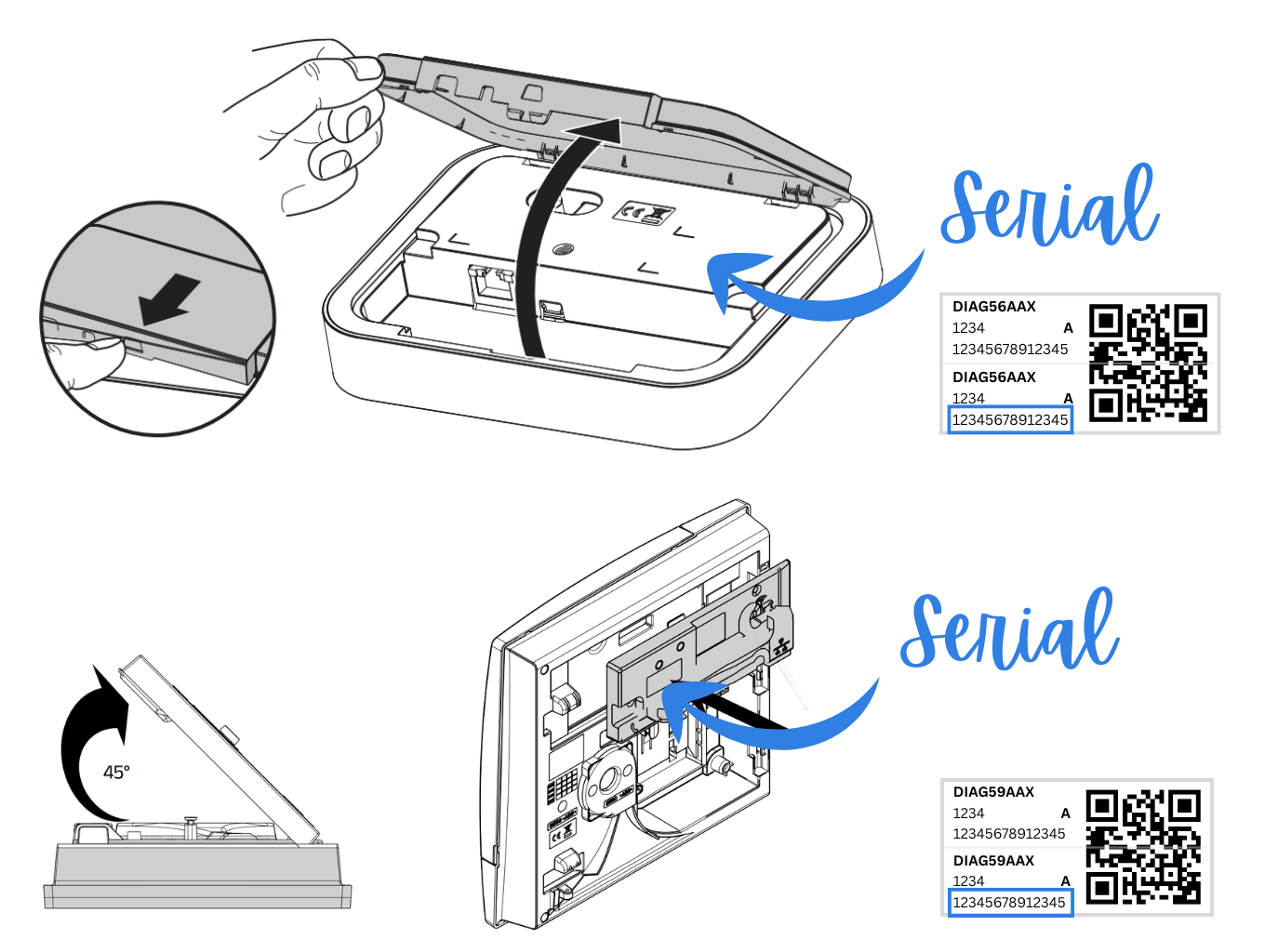
How to find Serial on DIAG56AAX
The serial number can only be found with physical access to the box. You need to open it, and you will find a label with a QR Code.
On this label, there is a 14-character code that represents the serial number of the box.
🤝 Contribution
Contributions are welcome! Here are several ways you can contribute:
- Submit Pull Requests: Review open PRs, and submit your own PRs.
- Report Issues: Submit bugs found or log feature requests.
Contributing Guidelines
- Fork the Repository: Start by forking the project repository to your GitHub account.
- Clone Locally: Clone the forked repository to your local machine using a Git client.
git clone https://github.com/mguyard/pydiagral
- Create a New Branch: Always work on a new branch, giving it a descriptive name.
git checkout -b new-feature-x
- Make Your Changes: Develop and test your changes locally.
- Commit Your Changes: Commit your changes with a clear and concise message that follows the Conventional Commits guidelines.
git commit -m 'feat: Implemented new feature x.'
- Push to GitHub: Push the changes to your forked repository.
git push origin new-feature-x
- Submit a Pull Request: Create a PR against the original project repository. Clearly describe the changes and their motivations.
Once your PR is reviewed and approved, it will be merged into the beta branch. After final testing, it will be merged into the main branch.
📄 License
pydiagral is distributed under the GPL-v3 License. See the LICENSE file for more details.
1 maintainer

Metadata
1 maintainer
Release files for pydiagral 1.6.1b3
For a detailed explanation of source distributions (sdists) and built distributions (wheels), please see the package formats documentation.
Source distribution (sdist)
| File | Size | Uploaded | Provenance | |
|---|---|---|---|---|
| pydiagral-1.6.1b3.tar.gz | 556.6 kB | Without provenance | Details |
Built distribution (wheel)
| File | Interpreter | ABI | Platform | Reset |
|---|---|---|---|---|
| pydiagral-1.6.1b3-py3-none-any.whl | Python 3 | none | any | Details |
Total release size: 607.5 kB
Release files / pydiagral-1.6.1b3.tar.gz
| Download URL | pydiagral-1.6.1b3.tar.gz |
|---|---|
| Size | 556.6 kB |
| Tags | Source |
|
SHA-256 checksum How to use checksums |
8a1514ac6fbf40ce8de74cf9d97479b7b5f8f9d4d1ac06b572659268ebd491bb
|
|
BLAKE2b-256 checksum How to use checksums |
eca18e602a56de573edcb969abd949fce9a6c27b4100d2e803985700c4b60e92
|
| Upload date | |
|
Uploaded using Trusted Publishing? What is trusted publishing? |
No |
| Uploaded via |
twine/7.0.0 CPython/3.10.22
|
Release files / pydiagral-1.6.1b3-py3-none-any.whl
| Download URL | pydiagral-1.6.1b3-py3-none-any.whl |
|---|---|
| Size | 50.8 kB |
| Tags | Python 3 |
|
SHA-256 checksum How to use checksums |
901fa0849c9d5f9df6b3317b67ad5183207f9cfd8de461292c9950465570f09a
|
|
BLAKE2b-256 checksum How to use checksums |
fb642f6b60bf19b9f5d912cec962cb38f784b4b5073b8745b196cffc4daed4f8
|
| Upload date | |
|
Uploaded using Trusted Publishing? What is trusted publishing? |
No |
| Uploaded via |
twine/7.0.0 CPython/3.10.22
|
Security for pydiagral 1.6.1b3
Provenance
Provenance describes where a file came from. On PyPI, provenance is shared via attestations, which provide a verifiable record of the build or publishing details. View details, limitations and caveats.
No provenance found
None of the files in this release were uploaded with provenance metadata.
A note on package security
PyPI is a repository for distributing packages, not a service for auditing them. While third-party security researchers and our staff do their best to detect and remove malicious packages, PyPI cannot guarantee the quality, security or suitability of any given package.
To learn more about protecting yourself from malicious actors, visit our package security documentation.














