
Python SDK for Directus

Project description
pydirectus: Python SDK for Directus
Higlights
Full ORM support for database query
Pydirectus allows you to quickly build search query in a pythonic ORM way.
The ORM supporting editors autocompletion and advanced typing.
qry = clt.query(['title', 'url'])
qry.filter("title").contains("obot")
qry.sort("title", "asc").limit(2)
res = qry.fetch()
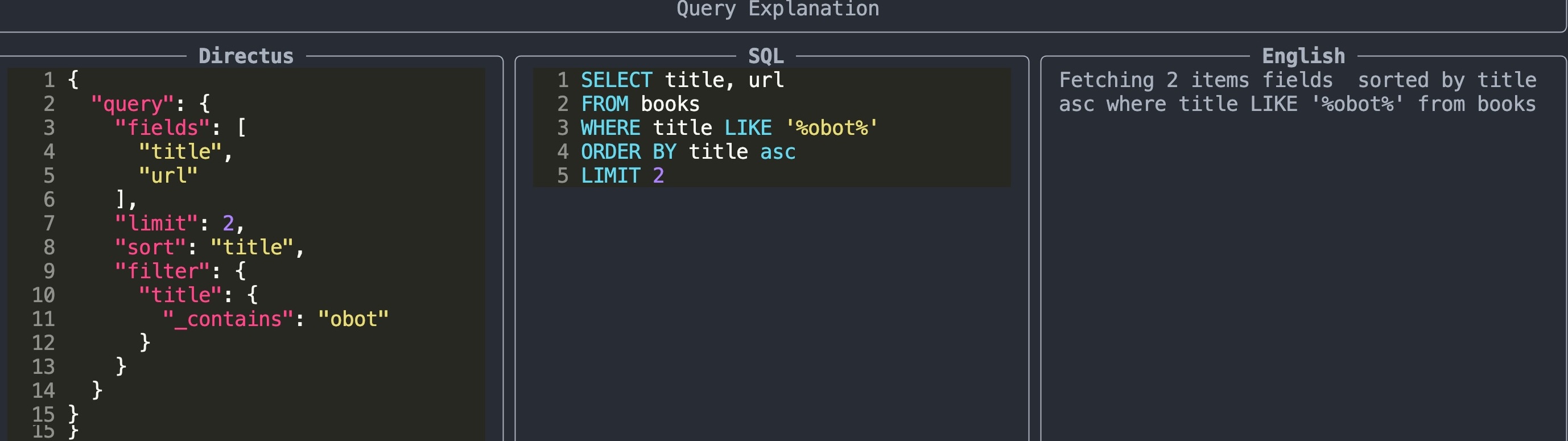
Query explainer and debuger
The Query.explain() methods allows you to visualize the query sent to directus in Directus language, SQL and English for quickly debugging and understanding your query.
qry.explain()
Typechecking
Prior to inserting or updating an item pydirectus check the fields exist and if the type of the data passed is correct to help you insert data.
Operations Supported
Here are the Directus API operations currently supported. Pull requests welcomes.
| object | list | exist | get | search | insert | update | delete |
|---|---|---|---|---|---|---|---|
| collection | ✔ | ✔ | ✔ | - | - | - | - |
| items | ✔ | ✔ | ✔ | ✔ | ✔ | ✔ | ✔ |
| folder | ✔ | ✔ | ✔ | - | ✔ | - | - |
| file | ✔ | ✔ | ✔ | - | ✔ | ✔ | ✔ |
| settings | - | - | - | - | - | - | - |
notes: create, update, delete support both single and bulk items transparently whereever possible based of if you are passing a dict (single items) or a list[dict] multiples items.
Installation
pydirectus is installed like any other packages as
pip install pydirectus-sdk
For dev setup see the bottom of the README.md
Usage
Connection
The simple way to configure the connection is to use env variables:
- URL: your base url - e.g
https://localhost:8055/ - TOKEN: your user token - we encourage you to NOT use the admin users but a least privilege user with only the permission you need.
You can put the variables in the env directly (e.g Docker) or
in .env and the code shoudl pick-it up. if you don't want
to use env variables then you can pass the url and token to the
Directus() object directly. We don't support login/pass authentication for security reasons.
Then you can test all is working as intended as:
from pydirectus import Directus
dr = Directus()  # with ENV vars or .env
# dr = Directus(url="your_base__url", token="your_token")  # if you want to explictly pass them
dr.ping()  # check we can connect to directus
dr.is_authenticated()  # check if you are properly authenticated
Colllections
To manage a collection get an instanciated Collection object:
from pydirectus import Directus
dr = Directus()  # with ENV vars or .env
clt = dr.collection('books')
fields
You can access the fields of the collection as follow
clt.display_fields()  # dislay the fields
clt.get_fields_names()  # return the list of fields names
clt.get_field() # return a Field() object
clt.field_exist()  # retrun if exist
Records
Get
single item
idx = 1
clt.get(idx)
all items
clt.get_all()
Search
pydirectus have a WIP mini ORM that allows you to construct your search query interactively with autocompletion. note: There are some case that are still buggy but basic usage works
clt = dr.collection('books')
qry = clt.query(['id', 'title', 'count'])
qry.filter("title").contains("obot")
qry.sort("id", "asc").limit(10)
# qry.explain()
items = qry.fetch()
Insert
Single item
item = {'title': 'my book'}
clt.insert(item)
Multiples items
items = [{'title': 'my book'}, {'title': 'my book2', 'rating': 3}]
clt.insert(items)
Update
Single item
item = {'title': 'my book'}
clt.update(2, item)
Multiples items
ids = [3, 4]
items = [{'title': 'my book'}, {'title': 'my book2', 'rating': 3}]
clt.update(ids, items)
Delete
Single items
idx = 1
clt.delete(idx)
Multiples items
idxs = [3, 5]
clt.delete(idxs)
Folders and Files
Get a folder
fld = dr.folder(name='folder-name')
# or by id/uuid (The one in the url)
fld = dr.folder(id='folder-uuid')
List files
fld = dr.folder(name)
files = fld.files()  # return the list[Files] that the folder hold
filenames = fld.filenames()  # return the list[str] of the file.filename_download
fld.display_files(limit=10)  # terminal pretty print of the existing files
Create folder
Root folder
Create a folder at the root of the directus instance:
fld = dr.create_folder('name')
Subfolder
Create a subfolder in the specified folder:
parent = dr.folder(name='parent-folder')
subfolder = parent.create_folder('sub-folder')
Files
get fileinfo
fld.fileinfo('test.webp')
exist
fld.exist('test.webp')
Download a file
fld.download('test.webp', 'tmp/',
              ondisk_filename='test.jpeg',
              width=200, format='jpeg')
Download support images operations and the ability to rename the file on disk via
ondisk_filename.
Note: ondisk_filename is required when doing image transformation as the
downloaded image is not the original one.
Upload
Upload is basically the same as download
fld.upload('tmp/test.jpeg', title='uploaded test')
Delete
fld.delete('filemane')
Dev
Setup
uv venv
source .venv/bin/activate  # and/or in vscode select the venv
uv pip install -e .
Refresh
when bumping version don't forget to refresh uv
uv pip install -e .
Adding test data
You can easily add more data to the test by using utils/test_data_dumper.py which interface with your directus instance to dump the raw responses. The tests should be able to pickup all the dumpped responses.
During testing we mock the Session object to respond with those dumps to ensure consistency and avoid network requests.
Release history Release notifications | RSS feed


Download files
Download the file for your platform. If you're not sure which to choose, learn more about installing packages.
Source Distribution
Built Distribution
Filter files by name, interpreter, ABI, and platform.
If you're not sure about the file name format, learn more about wheel file names.
Copy a direct link to the current filters
File details
Details for the file pydirectus_sdk-0.3.0.tar.gz.
File metadata
- Download URL: pydirectus_sdk-0.3.0.tar.gz
- Upload date:
- Size: 27.2 kB
- Tags: Source
- Uploaded using Trusted Publishing? No
- Uploaded via: twine/6.0.1 CPython/3.9.21
File hashes
| Algorithm | Hash digest | |
|---|---|---|
| SHA256 |
f5f91dd9f0703e2066084e4024d1e4ecec992de4aa35a40750331dfae97de74a
|
|
| MD5 |
8b435da04fbf952144f7c355cbc04562
|
|
| BLAKE2b-256 |
7d41b36defeaf90faeaae5fae2bc324ff3859cf695c784cafd1ebeeeca60db42
|
File details
Details for the file pydirectus_sdk-0.3.0-py3-none-any.whl.
File metadata
- Download URL: pydirectus_sdk-0.3.0-py3-none-any.whl
- Upload date:
- Size: 29.2 kB
- Tags: Python 3
- Uploaded using Trusted Publishing? No
- Uploaded via: twine/6.0.1 CPython/3.9.21
File hashes
| Algorithm | Hash digest | |
|---|---|---|
| SHA256 |
ce8a96a84fc783f6d22881b5840ee54fc534b9f3e592dac4801c3854ac10e7da
|
|
| MD5 |
d5d2046bf415b86a734383784021bb50
|
|
| BLAKE2b-256 |
9d88a7f836ae84d82632b806b7795f6a7c8d22ee08b4598db57a76402fbd4805
|






