

PyDOGE API
A modern, fully-typed Python SDK for the U.S. Department of Government Efficiency (DOGE) API — pull cancelled grants, contracts, leases, and payments, then analyze, export, and visualize them in a few lines.





PyDOGE API wraps the public DOGE API — a federal transparency initiative publishing detailed data on 💸 cancelled grants, 📑 contract terminations, 🏢 lease reductions, and 🧾 payment transactions — and turns it into a smooth workflow for data scientists, analysts, and journalists.
✨ Highlights
| Feature | What you get | |
|---|---|---|
| 🔄 | Auto-pagination | Fetch one page or every page (fetch_all=True), sync or async |
| 🧱 | Typed responses | Pydantic v2 models — or plain dicts when you prefer |
| 🐼 | DataFrames | .to_dataframe() with automatic date parsing |
| 💾 | One-line export | CSV / Excel / JSON, timestamped |
| 📊 | Instant summary | rows, nulls, dtypes, and stats via .summary() |
| 🧮 | Combined dataset | savings.all() — grants + contracts + leases in one tidy frame |
| 📈 | Built-in charts | bar, time-series, distribution, US-state choropleth ([viz] extra) |
| 🖥️ | Modern CLI | pydoge — Typer + Rich, fetch/export/summarize from the terminal |
| 🔁 | Retry-safe client | exponential backoff on 429/5xx, with a cap |
| 🔒 | Secure logging | credential scrubbing + on-demand masking via PyLogShield |
📦 Installation
pip install pydoge-api              # core
pip install "pydoge-api[viz]"      # + charts (matplotlib, plotly)
Requires Python 3.9+.
⚡ Quickstart
from pydoge_api import DogeAPI

with DogeAPI(fetch_all=True) as api:
    grants = api.savings.get_grants(sort_by="savings")

    print(grants.meta.total_results)        # e.g. 15887
    df = grants.to_dataframe()              # pandas DataFrame, dates parsed
    grants.summary()                        # rows / nulls / dtypes / stats
    grants.export("grants", format="csv")  # -> grants_YYYYMMDD_HHMMSS.csv
Prefer the combined savings dataset?
with DogeAPI(fetch_all=True) as api:
    df = api.savings.all()                  # grants + contracts + leases, with a `kind` column

print(df.groupby("kind")["savings"].sum())
🖥️ Command line
No Python required — the pydoge CLI ships with the package:
pydoge grants --sort-by savings --limit 10                       # Rich preview table
pydoge payments --filter agency_name --filter-value NASA --summary
pydoge contracts --fetch-all --export csv --out contracts        # timestamped CSV
pydoge all --export json                                          # combined dataset
📈 Visualize in one line
from pydoge_api import DogeAPI, viz        # pip install "pydoge-api[viz]"

with DogeAPI(fetch_all=True) as api:
    df = api.savings.get_grants(sort_by="savings").to_dataframe()

viz.plot_top_agencies(df, metric="savings", top_n=10)
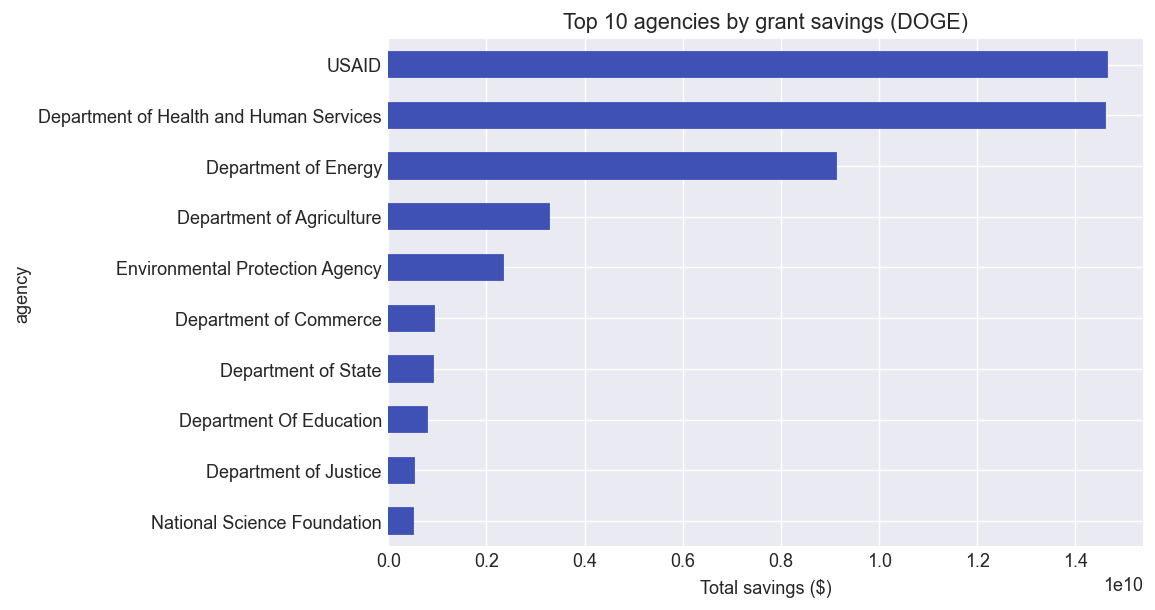
Also available: plot_over_time, plot_distribution, plot_cumulative, and an interactive
US-state plot_state_choropleth for leases.
📚 More examples
Contracts, leases & payments
from pydoge_api import DogeAPI

with DogeAPI(fetch_all=True) as api:
    contracts = api.savings.get_contracts(sort_by="value")
    leases    = api.savings.get_leases(sort_by="savings")
    payments  = api.payments.get_payments(filter="agency_name", filter_value="NASA")

    for resp, name in [(contracts, "contracts"), (leases, "leases"), (payments, "payments")]:
        resp.summary()
        resp.export(name, format="xlsx")
Sort fields: savings endpoints accept savings | value | date; payments accept amount | date.
Payment filters: agency_name | date | org_name.
Output modes & async
# Plain dicts instead of Pydantic models (still export-capable)
with DogeAPI(output_pydantic=False) as api:
    grants = api.savings.get_grants()
    grants.export("grants", format="json")

# Raw httpx.Response (no parsing)
with DogeAPI(handle_response=False) as api:
    resp = api.savings.get_grants()
    print(resp.status_code, resp.json()["meta"])

# Concurrent pagination for large pulls
with DogeAPI(fetch_all=True, run_async=True) as api:
    payments = api.payments.get_payments()
Without a context manager
api = DogeAPI(fetch_all=True)
try:
    grants = api.savings.get_grants(sort_by="savings")
    grants.export("grants", format="csv")
finally:
    api.close()
Error handling
from pydoge_api import DogeAPI, DogeAPIRequestError

with DogeAPI() as api:
    try:
        grants = api.savings.get_grants()
    except DogeAPIRequestError as err:
        print(err.status_code, err.url)   # raised after retries / on non-retriable errors
🔒 Secure logging
PyDOGE logs through PyLogShield — cloud-credential
prefixes (AWS_, AZURE_, GCP_, TOKEN, …) are scrubbed automatically, and you can mask
secrets per call. The logger is created lazily, so import pydoge_api has no side effects.
from pydoge_api._logging import get_logger

log = get_logger("pydoge_api", enable_json=True)
log.warning("api_key=SECRET123", mask=True)   # -> api_key=***
📖 Documentation
- Full docs: https://ihassan8.github.io/pydoge-api/ — quickstart, advanced usage, CLI, visualization, logging, and the complete API reference.
- Official DOGE API: https://api.doge.gov/docs
- Changelog: CHANGELOG.md
🤝 Contributing
Contributions are welcome! Open an issue with the enhancement label, or fork the repo and
send a pull request. If PyDOGE API is useful to you, please ⭐ the project — it helps.
📝 License
Released under the MIT License.
1 maintainer

Metadata
1 maintainer
Release files for pydoge-api 0.3.2
For a detailed explanation of source distributions (sdists) and built distributions (wheels), please see the package formats documentation.
Source distribution (sdist)
| File | Size | Uploaded | |
|---|---|---|---|
| pydoge_api-0.3.2.tar.gz | 584.6 kB | Details |
Built distribution (wheel)
| File | Interpreter | ABI | Platform | Reset |
|---|---|---|---|---|
| pydoge_api-0.3.2-py3-none-any.whl | Python 3 | none | any | Details |
Total release size: 615.6 kB
Release files / pydoge_api-0.3.2.tar.gz
| Download URL | pydoge_api-0.3.2.tar.gz |
|---|---|
| Size | 584.6 kB |
| Tags | Source |
|
SHA-256 checksum How to use checksums |
3e626226fc7e42d83a627c7ebdb1bf38e32300c2b348be36566738db4041b025
|
|
BLAKE2b-256 checksum How to use checksums |
d40e66972ad2b9fc31987b0dba25f422bd591f21d7840eaafc37072bcb7a4c31
|
| Upload date | |
|
Uploaded using Trusted Publishing? What is trusted publishing? |
No |
| Uploaded via |
twine/6.2.0 CPython/3.11.15
|
Release files / pydoge_api-0.3.2-py3-none-any.whl
| Download URL | pydoge_api-0.3.2-py3-none-any.whl |
|---|---|
| Size | 30.9 kB |
| Tags | Python 3 |
|
SHA-256 checksum How to use checksums |
b38de86f70afe37f9606149f6ed269b3ffcbb3d50d852c50dfa7b5b61a286e7a
|
|
BLAKE2b-256 checksum How to use checksums |
7bdff01b735750c4ae5a7857393436a5f2e4958d11aa38a29e0123840e6a4bb3
|
| Upload date | |
|
Uploaded using Trusted Publishing? What is trusted publishing? |
No |
| Uploaded via |
twine/6.2.0 CPython/3.11.15
|














