
Pydot flow


A flowing application programming interface for creating Graphviz visualizations using Pydot.
Introduction
Pydot flow makes it a little easier to assemble flowcharts using Pydot. Each line of code maps to one Node in the graph. Each call to the flow method returns the new Node that you flowed to.
You can, for example, use flow to construct a graph programmatically at each step of a data transformation pipeline - visually documenting a data transformation.
Installation
pip install pydot-flow
Example
In this hypothetical copy-and-paste example a graph is constructed using the flow API.
Implementation
# 0. Import dependencies.
import random
import pydot
from pydot_flow import Chart
from IPython.display import Image


# 1. Define a function for creating a random color code.
def random_color():
    "Generate a random color."
    return "#" + hex(random.randint(0, 0xFFFFFF))[2:].rjust(6, "0")


# 2. Create a Pydot flow Chart.
chart = Chart(
    rankdir="TB",
    splines="false",
    label="Chart",
    labelloc="t",
    fontname="Sans",
    pad=0.2,
    ratio=0.5,
    graph_type="graph",
)

# 3. Set Node defaults.
chart.get_graph().set_node_defaults(style="filled")

# 4. Create the first Node and name it Node 1.
node_1 = chart.create_node(
    src_node_attrs={
        "label": "Node 1",
        "shape": "diamond",
        "color": random_color(),
    }
)

# 5. Flow from Node 1 to Node 2a.
node_2a = node_1.flow(
    src_port="s",
    dst_node_attrs={
        "label": "Node 2a",
        "shape": "oval",
        "color": random_color(),
    },
    edge_attrs={"label": "Edge 1-2a"},
)


# 6. Flow from Node 2a to 3a.
node_3a = node_2a.flow(
    src_port="s",
    dst_node_attrs={
        "name": "Pink Elephants",  # You can optionally name your own Node.
        "label": "Node 3a",
        "shape": "square",
        "color": random_color(),
    },
    edge_attrs={"label": "Edge 2a-3a"},
)

# 7. Return to Node 1 and flow to Node 2b.
node_2b = node_1.flow(
    src_port="s",
    dst_node_attrs={
        "label": "Node 2b",
        "shape": "rectangle",
        "color": random_color(),
    },
    edge_attrs={"label": "Edge 1-2b"},
)

# 8. Flow from Node 2b to Node 2c.
node_2c = node_2b.flow(
    src_port="e",
    dst_node_attrs={
        "label": "Node 2c",
        "shape": "circle",
        "color": random_color(),
    },
    edge_attrs={"label": "Edge 2b-2c"},
    graph=pydot.Subgraph(rank="same"),
)

# 9. Return to Node 2b and flow to Node 3b.
node_3b = node_2b.flow(
    src_port="s",
    dst_node_attrs={
        "label": "Node 3b",
        "shape": "triangle",
        "color": random_color(),
    },
    edge_attrs={"label": "Edge 2b-3b"},
)

# 10. Flow from Node 3b to Node 2c - reference Node 2c by name.
node_3b.flow(
    src_port="e",
    dst_node_attrs={"name": node_2c.get_name()},
    edge_attrs={"label": "Edge 3b-2c"},
).flow( # You can use method chaining.
    src_port="s",
    dst_node_attrs={"name": "Pink Elephants"},
    edge_attrs={"label": "Edge 2c-3a"},
)

# 11. Save the graph image to a file.
chart.get_graph().write_png("output-no-splines.png")

# 12. Output an image in a Jupyter Notebook.
Image(chart.get_graph().create_png(prog="dot"))
Output
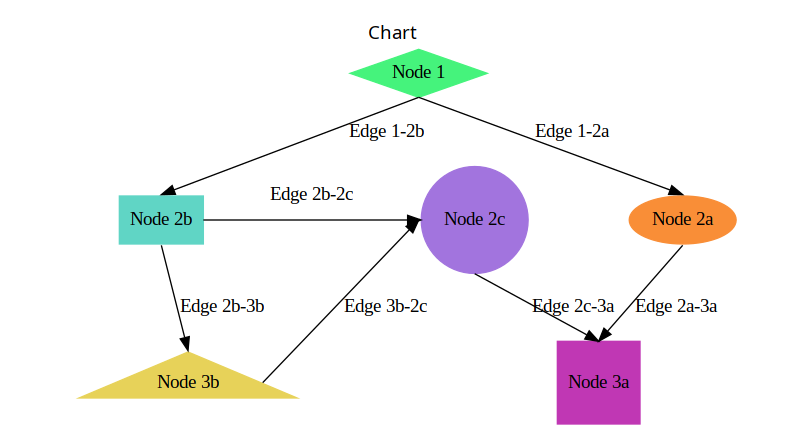
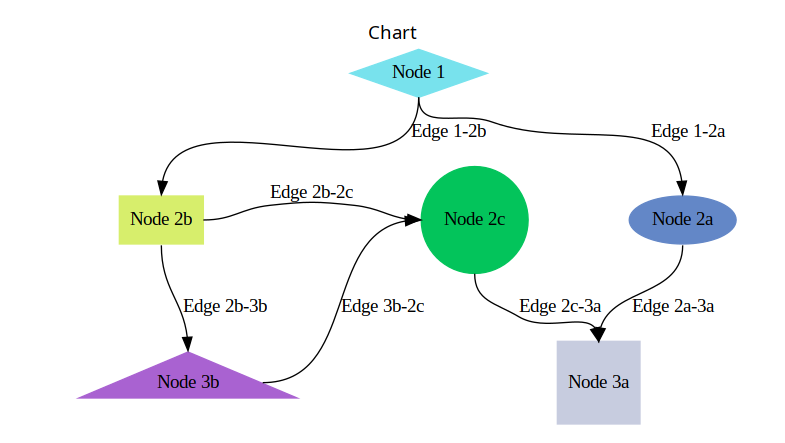
Setting the splines parameter to true in the Chart constructor will yield a chart with splines.
Support
If you have a feature request or run into any issues, feel free to submit an issue. You’re also welcome to reach out to one of the authors.
1 maintainer

Metadata
1 maintainer
Release files for pydot_flow 0.6.1
For a detailed explanation of source distributions (sdists) and built distributions (wheels), please see the package formats documentation.
Source distribution (sdist)
| File | Size | Uploaded | |
|---|---|---|---|
| pydot_flow-0.6.1.tar.gz | 126.4 kB | Details |
Built distribution (wheel)
| File | Interpreter | ABI | Platform | Reset |
|---|---|---|---|---|
| pydot_flow-0.6.1-py3-none-any.whl | Python 3 | none | any | Details |
Total release size: 131.6 kB
Release files / pydot_flow-0.6.1.tar.gz
| Download URL | pydot_flow-0.6.1.tar.gz |
|---|---|
| Size | 126.4 kB |
| Tags | Source |
|
SHA-256 checksum How to use checksums |
330e948abf78c457c220a149c77a9c2c58e24149c28f2d76805e5ab456e312d3
|
|
BLAKE2b-256 checksum How to use checksums |
c1385fb3d13385074fdcbf4922f7db20edccd4416373e7c3bc459d962984782c
|
| Upload date | |
|
Uploaded using Trusted Publishing? What is trusted publishing? |
No |
| Uploaded via |
python-httpx/0.28.1
|
Release files / pydot_flow-0.6.1-py3-none-any.whl
| Download URL | pydot_flow-0.6.1-py3-none-any.whl |
|---|---|
| Size | 5.3 kB |
| Tags | Python 3 |
|
SHA-256 checksum How to use checksums |
6978d94713876105d09c45ad0170727c96e9de0062401f44379a9d6b0c9a5b71
|
|
BLAKE2b-256 checksum How to use checksums |
741b168339cd0521a895e67d345648d76b53436685a1c67999ca8c1388737e2e
|
| Upload date | |
|
Uploaded using Trusted Publishing? What is trusted publishing? |
No |
| Uploaded via |
python-httpx/0.28.1
|














